Увод
Thank you for choosing the Divoom Onbeat 500 Portable Wireless Bluetooth Speaker. This device is designed to deliver powerful sound with convenient wireless connectivity. This manual will guide you through the setup, operation, and maintenance of your speaker to ensure optimal performance and longevity.
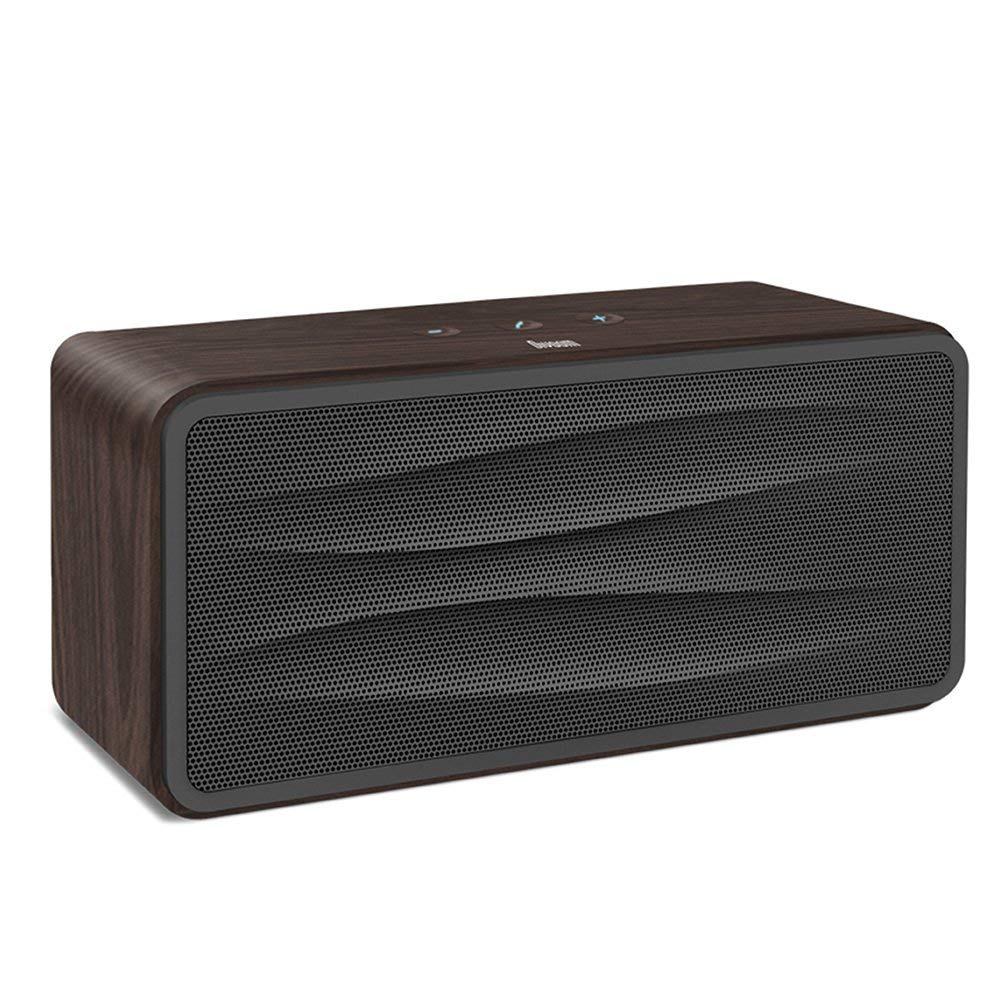
Слика 1: Фронт view of the Divoom Onbeat 500 speaker. This image displays the speaker's main grille and overall design.
Садржај пакета
Молимо вас да проверите пакет за следеће ставке:
- Divoom Onbeat 500 Speaker
- Мицро УСБ кабл за пуњење
- Аукилиари Цабле
- Кориснички приручник (овај документ)
- Гарантни лист
Карактеристике производа
The Divoom Onbeat 500 speaker offers a range of features for an enhanced audio experience:
- Снажан звук: 2.1 channel design with a proprietary passive bass radiator for rich audio.
- НФЦ технологија: Tap-to-pair functionality for quick and easy Bluetooth connection.
- Блуетоотх повезивање: Wirelessly play and control music from up to 33 feet (10 meters) away.
- Уграђени спикерфон: Allows you to make and take calls directly from the speaker.
- Дуготрајна батерија: Integrated 5000mAh battery provides extended playback time.
- Помоћни улаз: For wired connection to non-Bluetooth devices.
Сетуп
1. Пуњење звучника
Before initial use, fully charge your Divoom Onbeat 500 speaker. Use the provided Micro USB charging cable to connect the speaker to a USB power source (e.g., computer USB port, USB wall adapter). The charging indicator light will illuminate during charging and turn off or change color when fully charged. A full charge typically provides 8-10 hours of playback.
2. Укључивање/искључивање
- За укључивање: Press and hold the Power button for a few seconds until you hear an audible prompt or see the indicator light illuminate.
- За искључивање: Поново притисните и држите дугме за напајање неколико секунди док се звучник не искључи.
3. Блуетоотх упаривање
The Onbeat 500 offers two methods for wireless connection:
NFC (Near Field Communication) Pairing:
If your device supports NFC, you can pair quickly:
- Уверите се да је NFC омогућен на вашем паметном телефону или таблету.
- With the Onbeat 500 powered on, gently tap your NFC-enabled device against the NFC area on the speaker.
- Confirm the pairing request on your device. The speaker will indicate a successful connection.
Стандардно Bluetooth упаривање:
For devices without NFC or for manual pairing:
- Power on the Divoom Onbeat 500 speaker. It will automatically enter Bluetooth pairing mode if no device is connected, or you may need to press a dedicated Bluetooth button (refer to speaker controls).
- On your audio device (smartphone, tablet, computer), go to the Bluetooth settings and enable Bluetooth.
- Тражи available devices. You should see "Divoom Onbeat 500" in the list.
- Select "Divoom Onbeat 500" to connect. The speaker will confirm the connection with an audible prompt.
4. АУКС прикључак
To connect a device using the auxiliary cable:
- Connect one end of the provided auxiliary cable to the AUX-in port on the Divoom Onbeat 500.
- Повежите други крај помоћног кабла са прикључком за слушалице или аудио излазом вашег уређаја.
- The speaker will automatically switch to AUX mode, or you may need to select it manually (refer to speaker controls).

Слика 2: Сиде view of the Divoom Onbeat 500, illustrating the location of the charging port, AUX input, and control buttons.
Управљање звучником
1. Репродукција музике
Once connected via Bluetooth or AUX, you can control music playback from your connected device. The speaker may also have integrated controls for volume adjustment, play/pause, and track skipping. Refer to the speaker's physical buttons for these functions.
2. Функционалност звучника
When connected to a smartphone via Bluetooth, the Divoom Onbeat 500 can be used as a speakerphone:
- Одговарање на позив: Press the Call button (often indicated by a phone icon) on the speaker.
- Завршавање позива: Поново притисните дугме за позив.
- Одбијање позива: Press and hold the Call button.

Слика 3: Позади view of the Divoom Onbeat 500, highlighting the passive bass radiator for enhanced low-frequency sound.
Одржавање
1. Чишћење
Да бисте одржали изглед и функционалност вашег звучника:
- Обришите спољашњост меком, сувом крпом која не оставља влакна.
- Do not use abrasive cleaners, alcohol, benzene, or other chemical solvents, as these may damage the finish.
- Избегавајте улазак влаге у било какве отворе.
2. Брига о батерији
To prolong the life of the built-in lithium-ion battery:
- Избегавајте често потпуно пражњење батерије.
- Чувајте звучник на хладном и сувом месту када га не користите дуже време.
- Charge the speaker at least once every three months if stored for a long time to prevent deep discharge.
Решавање проблема
If you encounter issues with your Divoom Onbeat 500, please refer to the following common solutions:
| Проблем | Могуће решење |
|---|---|
| Звучник се не укључује | Ensure the battery is charged. Connect the speaker to a power source using the Micro USB cable and try again. |
| Нема звука из звучника | Check the volume level on both the speaker and your connected device. Ensure the speaker is correctly paired via Bluetooth or connected via AUX. Try re-pairing the Bluetooth device. |
| Блуетоотх упаривање није успело | Ensure the speaker is in pairing mode. Turn off and on Bluetooth on your device. Move your device closer to the speaker. Clear previous Bluetooth connections on your device and try again. |
| Лош квалитет звука | Ensure the speaker and connected device are within range (for Bluetooth). Check for interference from other wireless devices. Try a different audio source or cable. |
Спецификације
Detailed technical specifications for the Divoom Onbeat 500 speaker:
- Назив модела: Divoom Onbeat 500
- Тип звучника: Компјутерски звучник
- Технологија повезивања: Блуетоотх
- Технологија бежичне комуникације: Блуетоотх
- Метод контроле: Додирните
- Извор напајања: Баттери Поверед
- батерија: 1 литијум-јонска батерија (5000 mAh)
- Аудио Ватtage: 20 Ваттс
- Максимална излазна снага звучника: 100 Ваттс
- Конфигурација канала сурроунд звука: 2.1
- Компатибилни уређаји: Android, Windows, iPhone (iOS)
- Тип конектора: УСБ (за пуњење)
- Димензије производа: 22.5 к 7.49 к 10.49 цм (ДкШкВ)
- Тежина артикла: 1.55 кг
- Боја: Дрвени угаљ
- Посебне карактеристике: NFC, Built-in Speakerphone, Passive Bass Radiator
Гаранција и подршка
Your Divoom Onbeat 500 speaker comes with a limited warranty. Please refer to the included Warranty Card for detailed terms and conditions, including warranty period and coverage.
For technical support, service inquiries, or further assistance, please visit the official Divoom website or contact their customer service department using the information provided on your Warranty Card or product packaging. Please have your model number (Onbeat 500) and purchase details ready when contacting support.