
UNIC UC30 (IDSP-004)
Упутство за употребу мини пројектора UNIC UC30 LED
Model: UC30 (IDSP-004)
1. Увод
The UNIC UC30 LED Mini Projector is a compact and versatile multimedia device designed for home theater projection. It supports a wide range of input sources and file formats, making it suitable for various entertainment and presentation needs.
Кључне карактеристике укључују:
- Multiple Input Interfaces: AV, VGA, HDMI, USB, SD, and TV input.
- Екстензивно File Format Support: Compatible with various video, audio, image, and e-book formats.
- Keystone Correction: Adjusts image distortion for optimal viewинг.
- Integrated Speaker: Built-in 2.0W *2 stereo speakers for audio output.
- Flexible Projection: Supports front and rear projection models.

Слика 1: Предња страна view of the UNIC UC30 LED Mini Projector, showcasinг његов компактни дизајн и објектив.
2. Подешавање
2.1 Распакивање и постављање
Carefully remove the projector and all accessories from the packaging. Place the projector on a stable, flat surface. Ensure adequate ventilation around the unit to prevent overheating.
2.2 Прикључак за напајање
- Прикључите адаптер за напајање на улазни порт за напајање пројектора.
- Укључите адаптер за напајање у одговарајућу електричну утичницу.
2.3 Connecting Input Devices
The UC30 projector offers multiple input options. Connect your desired source device (e.g., laptop, DVD player, game console, USB drive) to the corresponding port on the projector.

Слика 2: Задња страна view of the white UNIC UC30 projector, showing various input ports including AV, VGA, HDMI, and USB.
- ДВИ: За дигитални видео и аудио високе дефиниције.
- ВГА: For connecting computers or laptops.
- АВ: For standard definition video and stereo audio (using the included 3-in-1 AV cable).
- УСБ: За репродукцију медија fileс директно са УСБ флеш диска.
- СД картица: За репродукцију медија fileдиректно са СД меморијске картице.
- ТВ: For connecting to a TV signal source (if applicable to your region/model).
2.4 Фокус и корекција трапезоидног изобличења
After powering on the projector, adjust the focus ring around the lens until the projected image is clear. Use the keystone correction feature (usually a dial or button on the projector) to correct any trapezoidal distortion in the image, ensuring a rectangular projection.
3. Упутство за употребу
3.1 Укључивање/искључивање
Press the power button on the projector or the remote control to turn the unit on or off. Allow a few seconds for the projector to warm up or cool down.
3.2 Избор улазног извора
Use the "Source" button on the projector or remote control to cycle through the available input options (HDMI, VGA, AV, USB, SD, TV) until your desired source is displayed.
3.3 Media Playback (USB/SD)
When a USB drive or SD card is inserted, the projector's media player interface will typically appear. Navigate through the menus using the directional buttons on the projector or remote to select and play your desired files.
- Подржани видео формати: AVI, MOV, VOB, DAT, MPEG, MPG, RM, RMVB (encoding: MPEG1/MPEG2/MPEG4/DivX/Xvid).
- Подржани аудио формати: МП3, ВМА, ВАВ.
- Подржани формати слика: JPEG, BMP, GIF, PNG.
- Supported E-book Format: TXT.

Figure 3: The UNIC UC30 projector displaying a video of a man in a soccer jersey, demonstrating its video playback capability.
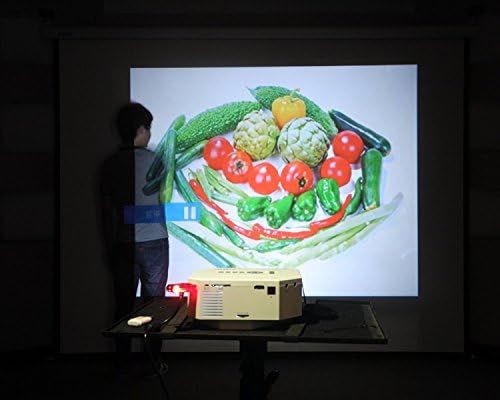
Figure 4: The UNIC UC30 projector displaying a vibrant image of vegetables, showcasing its image display quality.
3.4 Аудио излаз
The projector has built-in stereo speakers. For private listening or connecting to external audio systems, use the stereo earphone output terminal.
3.5 Projection Model
The projector supports both front and rear projection. This setting can typically be adjusted in the projector's menu to suit your setup (e.g., projecting from behind a translucent screen).
4. Одржавање
4.1 Чишћење сочива
Use a soft, lint-free cloth specifically designed for optical lenses to gently wipe the projector lens. Avoid using abrasive cleaners or excessive force, which can scratch the lens.
4.2 Чишћење кућишта пројектора
Обришите спољашњост пројектора меком, сувом крпом. За тврдокорне мрље, благо дamp Може се користити крпа, али водите рачуна да течност не уђе у вентилационе отворе.
4.3 Вентилација
Ensure the projector's ventilation ports are clear of dust and obstructions. Proper airflow is crucial for maintaining optimal operating temperature and extending the lifespan of the LED lamp.
КСНУМКС. Решавање проблема
5.1 No Image or "No Signal" Message
- Check if the projector is powered on and the power indicator light is active.
- Verify that the input cable (HDMI, VGA, AV) is securely connected to both the projector and the source device.
- Ensure the correct input source is selected on the projector (use the "Source" button).
- If using a computer, ensure its display output is enabled (e.g., press Fn + F8 or similar key combination).
5.2 Замућена слика
- Подесите прстен за фокусирање око објектива пројектора док слика не буде оштра.
- Ensure the projection distance is within the recommended range (1-3.5 meters).
- Clean the projector lens if it appears dirty.
5.3 Нема звука
- Check the volume level on both the projector and the source device.
- Ако користите HDMI, уверите се да изворни уређај шаље звук преко HDMI-ја.
- If using AV, ensure the red and white audio cables are correctly connected.
- If external speakers are connected, ensure they are powered on and functioning correctly.
5.4 Image Distortion (Trapezoid Shape)
- Adjust the keystone correction feature on the projector to square the image.
- Ensure the projector is placed on a level surface and is as perpendicular to the screen as possible.
6. Спецификације
Below are the detailed technical specifications for the UNIC UC30 LED Mini Projector:
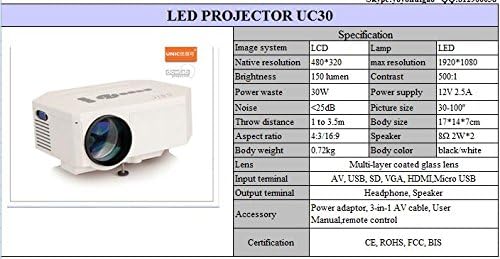
Figure 5: Official specification table for the UNIC UC30 LED Mini Projector, detailing its technical characteristics.
| Феатуре | Детаљ |
|---|---|
| Имаге Систем | ЛЦД |
| Нативе Ресолутион | 480 к 320 пиксела |
| Подршка за максималну резолуцију | 1920 к 1080 (Фулл ХД) |
| Осветљеност | 150 LUX (150 lumen) |
| Однос контраста | 500:1 |
| Потрошња енергије | 30В |
| Повер Суппли | 12В 2.5А |
| Ниво буке | <25дБ |
| Тхров Дистанце | 1 до 3.5 метара |
| Величина слике | 30-120 инча |
| Аспецт Ратио | 4:3 / 16:9 |
| Телесна тежина | 0.72 кг |
| Величина тела | 17 к 14 к 7 цм |
| Спеакер | 2.0W *2 Stereo |
| Ленс | Multi-layer coated glass lens |
| Улазни терминали | AV, USB, SD, VGA, HDMI, Micro USB |
| Излазни терминали | Stereo Earphone, Speaker |
| Укључена додатна опрема | Power adapter, 3-in-1 AV cable, User Manual, Remote control |
| Цертификати | CE, ROHS, FCC, BIS |
7. Гаранција и подршка
For information regarding warranty coverage, technical support, or service, please refer to the warranty card included with your product or contact the retailer or manufacturer directly. Keep your purchase receipt as proof of purchase.
Ask a question about this manual
Ask about setup, troubleshooting, compatibility, parts, safety, or missing instructions. Manuals+ will review the question and use this page’s manual context to help answer it.