
1. Увод
Thank you for choosing the UNIC UC18 Mini Projector. This compact and portable projector is designed to provide a versatile viewing experience for home entertainment, presentations, and more. Featuring an LED lighting system, built-in speaker, and multiple input options, the UC18 offers convenience and functionality. Please read this manual thoroughly to ensure proper setup, operation, and maintenance of your device.
2. Безбедносне информације
- Напајање: Користите само наведени адаптер за напајање. Уверите се да је јачина звукаtagе одговара захтевима пројектора.
- вентилација: Не блокирајте вентилационе отворе. Обезбедите довољно простора око пројектора за правилан проток ваздуха како бисте спречили прегревање.
- Влага: Држите пројектор даље од воде, кише и прекомерне влажности. Не користите га мокрим рукама.
- Чишћење: Disconnect power before cleaning. Use a soft, dry cloth. Avoid liquid or aerosol cleaners.
- Руковање: Пажљиво рукујте пројектором. Избегавајте испуштање или излагање јаким ударцима.
- Заштита очију: Не гледајте директно у сочиво пројектора када је укљученоamp је укључено, јер јако светло може изазвати напрезање или оштећење очију.
- Растављање: Не покушавајте сами да растављате или поправљате пројектор. Сва сервисирања препустите квалификованом особљу.
3. Садржај пакета
Молимо вас да проверите садржај пакета након распакивања. Ако неке ставке недостају или су оштећене, обратите се продавцу.
- UNIC UC18 Mini Projector
- Повер Цабле
- 3-у-1 АВ кабл
- Remote Control (requires lithium battery, not included)
- Упутство за употребу
4. Производ је готовview
Projector Layout
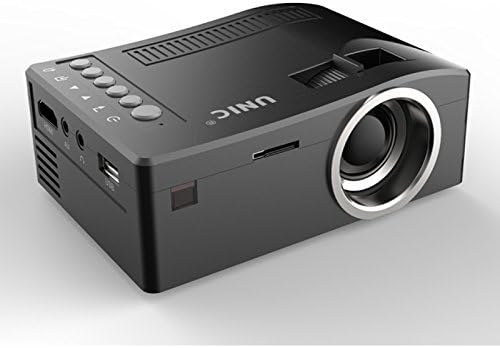
Предња и бочна view of the UNIC UC18 Mini Projector, showing the lens, ventilation, and various ports.
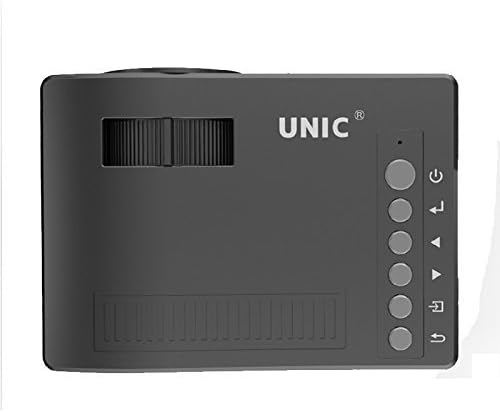
Врх view of the UNIC UC18 Mini Projector, highlighting the control buttons and focus wheel.
Портови и контроле
The UNIC UC18 Mini Projector features a range of ports and controls for easy connectivity and operation:
- Објектив: Пројектује слику на екран.
- Точак фокуса: Manual adjustment for image clarity.
- Дугме за напајање: Укључује или искључује пројектор.
- Дугме менија: Приступа менију подешавања пројектора.
- Навигациона дугмад (горе/доле/лево/десно): Користи се за навигацију кроз меније и подешавање подешавања.
- Дугме ОК: Потврђује изборе у менију.
- Дугме извора: Selects the input source (HDMI, USB, AV, TF).
- УСБ порт: Повезује УСБ уређаје за складиштење података за репродукцију медија.
- ХДМИ порт: Connects to HDMI-enabled devices like laptops, gaming consoles, or media players.
- AV порт: Connects to devices using the included 3-in-1 AV cable.
- Слот за ТФ картицу: Inserts a TF (Micro SD) card for media playback.
- 3.5 мм прикључак за слушалице: Connects external headphones or speakers.
- ИЦ пријемник: Прима сигнале са даљинског управљача.
5. Подешавање
5.1 Прикључак за напајање
- Прикључите кабл за напајање на улазни порт за напајање пројектора.
- Укључите други крај кабла за напајање у одговарајућу утичницу.
- Индикаторска лампица напајања на пројектору ће се упалити.
5.2 Connecting Input Devices
- ДВИ: Connect an HDMI cable from your source device (e.g., laptop, DVD player) to the projector's HDMI port.
- УСБ: Уметните УСБ флеш диск у УСБ порт.
- АВ: Use the provided 3-in-1 AV cable to connect to devices with AV output. Match the yellow, white, and red connectors.
- ТФ картица: Insert a TF (Micro SD) card into the TF card slot.
5.3 Позиционирање пројектора
Place the projector on a stable, flat surface. For optimal image quality, position the projector perpendicular to the projection surface (wall or screen). The throw distance can range from 0.48 to 2.43 meters, producing a picture size from 12 to 66 inches.
6. Упутство за употребу
6.1 Укључивање/искључивање
Press the Power button on the projector or the remote control to turn the device on or off.
6.2 Подешавање фокуса
After powering on, if the image appears blurry, rotate the manual focus wheel located near the lens until the image becomes clear and sharp.

Close-up of the manual focus wheel on the UNIC UC18 Mini Projector, located near the lens.
6.3 Избор улазног извора
Press the 'Source' button on the projector or remote control. Use the navigation buttons to select your desired input source (HDMI, USB, AV, TF) and press 'OK' to confirm.
6.4 Навигација кроз мени
Press the 'Menu' button to access the projector's settings. Use the navigation buttons to browse options and 'OK' to select. Press 'Menu' again to exit.
6.5 Аудио излаз
The projector has a built-in speaker. For private listening or connecting to external audio systems, plug headphones or external speakers into the 3.5mm headphone jack.
7. Одржавање
7.1 Чишћење сочива
Користите меку крпу без влакана, посебно дизајнирану за оптичка сочива. Нежно обришите сочиво да бисте уклонили прашину или мрље. Избегавајте употребу абразивних материјала или јаких хемикалија.
7.2 Чишћење кућишта пројектора
Wipe the exterior of the projector with a soft, dry cloth. Do not use liquid cleaners or solvents.
7.3 Складиштење
When not in use for extended periods, store the projector in a cool, dry place, away from direct sunlight and extreme temperatures. Cover the lens to protect it from dust.
КСНУМКС. Решавање проблема
| Проблем | Могући узрок | Решење |
|---|---|---|
| Нема приказане слике | Power not connected; Incorrect input source; Loose cable connection | Check power cable; Select correct input source; Reconnect cables securely |
| Слика је мутна | Фокус није подешен; Пројектор је преблизу/предалеко | Adjust the focus wheel; Reposition the projector within recommended throw distance |
| Нема звука | Volume too low; Muted; Audio cable not connected; Source device audio issue | Increase volume; Unmute; Check audio cable connection; Verify audio output on source device |
| Даљински управљач не ради | Batteries low/incorrectly inserted; Obstruction between remote and projector | Replace batteries (lithium battery required); Ensure clear line of sight to IR receiver |
| Пројектор се прегрева | Blocked ventilation; Prolonged use in hot environment | Ensure ventilation openings are clear; Operate in a well-ventilated area; Allow to cool down |
9. Спецификације
Техничке спецификације
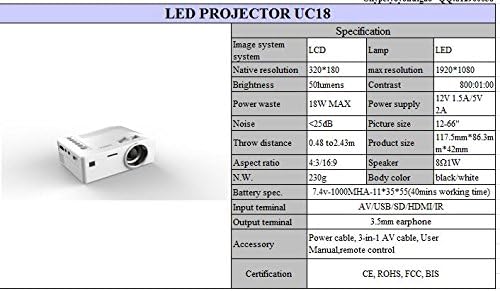
Detailed technical specifications for the UNIC UC18 Mini Projector, including resolution, contrast, and dimensions.
| Феатуре | Спецификација |
|---|---|
| Бранд | УНИЦ |
| Назив модела | УЦКСНУМКС |
| Дисплаи Тецхнологи | QVGA (LCD) |
| Нативе Ресолутион | 320 к 240 пиксела |
| Максимална подржана резолуција | 1920 x 1080 pixels (1080P) |
| Осветљеност | 50 лумена |
| Однос контраста | 500:1 |
| Аспецт Ратио | 16:9 (такође подржава 4:3) |
| Тхров Дистанце | 0.48m - 2.43m (1.57ft - 7.97ft) |
| Величина слике | 12 - 66 инча |
| Улазни терминали | AV, USB, SD (TF), HDMI, IR |
| Излазни терминал | КСНУМКСмм слушалица |
| Посебне карактеристике | Уграђени звучник, преносиви |
| Потрошња енергије | 24 В (макс. 18 В) |
| Повер Суппли | КСНУМКСВ КСНУМКСА / КСНУМКСВ КСНУМКСА |
| Ниво буке | <25дБ |
| Димензије производа (Д к Ш к В) | 117.5 мм к 86.3 мм к 42 мм |
| Нето тежина | 230г |
| Тип монтаже | Валл Моунт |
| Ремоте Цонтрол | Yes (battery not included) |
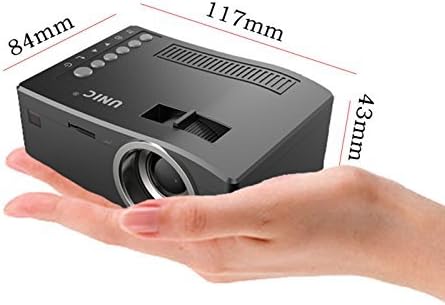
The UNIC UC18 Mini Projector held in a hand, illustrating its compact size and dimensions (117mm x 84mm x 43mm).
10. Гаранција и подршка
За информације о гаранцији или техничку подршку, погледајте документацију коју сте добили приликом куповине или контактирајте продавца. Сачувајте доказ о куповини за евентуалне рекламације у вези са гаранцијом.