
UNIC UC46 IDSP-011
Упутство за употребу мини пројектора UNIC UC46
Model: UC46 IDSP-011
1. Увод
This user manual provides detailed instructions for the operation, setup, and maintenance of your UNIC UC46 Mini Projector. Please read this manual thoroughly before using the product to ensure proper and safe operation. Keep this manual for future reference.
Безбедносне информације
- Не гледајте директно у сочиво пројектора када је укљученоamp је укључен.
- Ensure proper ventilation around the projector to prevent overheating. It is recommended to rest the projector after 4-5 hours of continuous operation.
- Keep the projector away from water or any liquids.
- Користите само адаптер за напајање који се испоручује са пројектором.
- Do not attempt to disassemble or repair the projector yourself. Contact qualified service personnel for assistance.
- This projector is designed for home entertainment and is not suitable for professional teaching, meetings, or business presentations.
2. Карактеристике производа
- Преносиви дизајн: Compact and lightweight, ideal for home use, camping, and outdoor parties.
- Висока осветљеност: 1200 lumens LED lamp for clear and vibrant images.
- Изворна резолуција: 800x480 pixels, supporting up to 1920x1080 (Full HD) via input.
- Велика величина пројекције: Projects images from 34 to 130 inches.
- Више опција повезивања: HDMI, VGA, USB, AV, SD Card, and IR.
- Бежична повезаност: Supports WiFi, Miracast, and DLNA for seamless smartphone integration (iOS, Android, Windows).
- Дуг животни век ЛЕД диода: Lamp животни век од око 20,000 сати.
3. Садржај пакета
Молимо вас да означите поље за следеће ставке:
- UNIC UC46 Mini Projector
- Повер Цабле
- 3-у-1 АВ кабл
- Ремоте Цонтрол
- Кориснички приручник (овај документ)
4. Производ је готовview
Familiarize yourself with the different parts and controls of your UNIC UC46 Mini Projector.
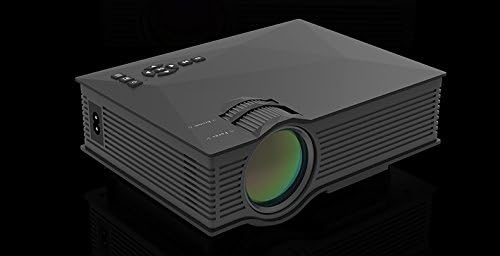
Слика 4.1: Предња и бочна страна View of the UNIC UC46 Mini Projector. Shows the main lens, focus wheel, and ventilation grilles.

Слика 4.2: Задња страна View of the Projector. Displays various input ports including HDMI, USB, AV, SD card slot, and audio output.

Слика 4.3: Врх View of the Projector. Shows the control panel buttons for navigation, power, and input selection.

Figure 4.4: Lens Focus and Keystone Adjustment Diagram. Illustrates the location of the lens focus and keystone correction wheels, along with a diagram of the remote control functions.
5. Подешавање
5.1 Постављање
Place the projector on a stable, flat surface. Ensure there is adequate space around the projector for ventilation. The projection distance will determine the screen size. Refer to the specifications for recommended distances.
5.2 Прикључак за напајање
- Connect the power cable to the projector's AC power input port.
- Plug the other end of the power cable into a standard electrical outlet (100-240V, 50/60Hz).
- Индикаторска лампица напајања на пројектору ће се упалити.
5.3 Почетно укључивање
- Притисните дугме за напајање на пројектору или даљинском управљачу да бисте укључили уређај.
- The projector will display the startup screen.
5.4 Подешавање слике
- Фокус: Rotate the focus wheel (located near the lens) until the projected image is clear and sharp.
- Кеистоне Цоррецтион: If the image appears trapezoidal, adjust the keystone correction wheel (usually next to the focus wheel) to square the image.
6. Упутство за употребу
6.1 Повезивање уређаја
The UNIC UC46 projector supports various input sources:
- ДВИ: Connect a PC, laptop, DVD player, game console (PS3, PS4), or Smart TV box using an HDMI cable. Select "HDMI" as the input source.
- ВГА: Connect a PC or laptop using a VGA cable. Select "VGA" as the input source.
- УСБ: Уметните USB флеш диск да бисте репродуковали медије files (videos, photos, music, text). Select "USB" as the input source and navigate through the files.
- АВ: Use the included 3-in-1 AV cable to connect devices with AV output (e.g., older DVD players, VCRs). Select "AV" as the input source.
- СД картица: Insert an SD card into the slot to play media files. Select "SD" as the input source.
6.2 Wireless Connectivity (WiFi)
The projector supports WiFi connectivity for screen mirroring from smartphones (iOS, Android, Windows) and DLNA.
- Go to the "WiFi" or "Wireless" menu on the projector.
- Select your WiFi network and enter the password to connect the projector to your home network.
- For screen mirroring (Miracast/AirPlay):
- Ensure your smartphone and the projector are connected to the same WiFi network.
- On your smartphone, enable screen mirroring (e.g., "Screen Mirroring," "Smart View," "AirPlay," "Wireless Display").
- Select the projector from the list of available devices.
- For DLNA:
- Ensure your smartphone and the projector are connected to the same WiFi network.
- Use a DLNA-compatible app on your smartphone to stream media to the projector.
6.3 Аудио излаз
The projector has a built-in speaker. For enhanced audio, you can connect external speakers or a sound system via the 3.5mm audio output port.
7. Одржавање
7.1 Чишћење сочива
Use a soft, lint-free cloth specifically designed for optical lenses to gently wipe the projector lens. Do not use abrasive cleaners or solvents.
7.2 Чишћење кућишта пројектора
Обришите спољашњост пројектора меком, сувом крпом. За тврдокорну прљавштину, благоamp Може се користити крпа, а затим сува крпа.
7.3 Вентилација
Regularly check that the ventilation grilles are not blocked by dust or debris. Use a soft brush or compressed air to clean them if necessary. Proper airflow is crucial for preventing overheating and extending the projector's lifespan.
7.4 Лamp Живот
ЛЕД лamp has an estimated life of 20,000 hours. To maximize lamp life, avoid frequent on/off cycles and allow the projector to cool down properly after use.
КСНУМКС. Решавање проблема
| Проблем | Могући узрок | Решење |
|---|---|---|
| Нема пројектоване слике | Power cable not connected; Projector not turned on; Incorrect input source selected; Input device not connected or powered on. | Check power connection; Press power button; Select correct input source (HDMI, VGA, USB, AV, SD); Ensure input device is connected and powered on. |
| Слика је мутна | Lens out of focus; Incorrect projection distance. | Adjust the focus wheel; Adjust the projection distance. |
| Слика је трапезоидног облика | Пројектор није нормалан у односу на платно. | Подесите точак за корекцију трапезоидног изобличења. |
| Нема звука | Volume too low; Muted; External audio device not connected or powered on; Audio format not supported. | Increase volume; Unmute; Check external audio connection; Ensure audio format is supported. |
| Даљински управљач не ради | Batteries dead or incorrectly inserted; Obstruction between remote and IR receiver. | Замените батерије; Обезбедите јасну линију вида са ИР пријемником пројектора. |
| Overheating / Shuts down automatically | Блокирана вентилација; Дуготрајна употреба. | Ensure ventilation grilles are clear; Allow projector to rest after 4-5 hours of use. |
9. Спецификације

Figure 9.1: Detailed Specifications of the UNIC UC46 Mini Projector.
| Феатуре | Детаљ |
|---|---|
| Имаге Систем | ЛЦД |
| Lamp | ЛЕД |
| Нативе Ресолутион | 800 к 480 пиксела |
| Подржана максимална резолуција | 1920 к 1080 пиксела (Фулл ХД) |
| Осветљеност | 1200 лумена |
| Однос контраста | 800:1 |
| Потрошња енергије | 50-55 вати |
| Повер Суппли | 100-240В, 50/60Хз |
| Ниво буке | <25дБ |
| Величина пројекције | 34 - 130 инча |
| Тхров Дистанце | 1.07 до 3.8 метара (3.51 до 12.47 стопе) |
| Аспецт Ратио | 4:3 / 16:9 |
| Нето тежина | 1 кг |
| Ленс | Multi-layer coated glass lens |
| Улазни терминали | USB, SD, HDMI, AV, VGA, IR |
| Излазни терминал | Слушалице, звучник |
| Бежични | ВиФи 2.4Г |
| Димензије производа | 201 мм к 153 мм к 67.5 мм |
10. Гаранција и подршка
For warranty information and technical support, please refer to the product packaging or contact your retailer. Keep your purchase receipt as proof of purchase.
Ask a question about this manual
Ask about setup, troubleshooting, compatibility, parts, safety, or missing instructions. Manuals+ will review the question and use this page’s manual context to help answer it.