
Techage 6708FN-4*BT508-20SC/P
Techage Full HD 1080p PoE CCTV Security Camera System User Manual
Model: 6708FN-4*BT508-20SC/P
1. Увод
This manual provides detailed instructions for the installation, operation, and maintenance of your Techage Full HD 1080p PoE CCTV Security Camera System. This system is designed for reliable surveillance with high-definition video capture, suitable for both indoor and outdoor environments.
2. Садржај пакета
Молимо вас да проверите да ли су све ставке наведене у наставку укључене у ваш пакет. Ако неке ставке недостају или су оштећене, обратите се корисничкој подршци.
Слика: Прекоview of the package contents, including the NVR, cameras, cables, power adapter, mouse, and user guide.
- 1 x 4-Channel 1080p NVR (Network Video Recorder) with built-in 4 PoE ports
- 4 x 2.0 Megapixel 1080p Bullet IP Cameras (Outdoor/Indoor Waterproof)
- 4 x 20-meter CAT5 Network Cables (Plug and Play for camera video)
- 1 x Напајање за НВР
- 1 x USB Mouse for NVR operation
- 1 к Упутство за употребу
- Note: Hard drive for NVR storage is not included.
3. Карактеристике производа
NVR (Network Video Recorder) Features:
- висока резолуција: Supports 1080p (1920x1080) video recording.
- ПоЕ (напајање преко етернета): Built-in 4 PoE ports for simplified camera connection and power.
- Multi-channel Recording: Simultaneous real-time recording across multiple channels.
- Режими снимања: Supports manual, alarm, dynamic detection (motion detection), and timed recording.
- Складиштење: Supports 1 SATA hard drive (up to 6TB per disk, hard drive not included).
- Излаз: VGA and HDMI full HD output.
- Кориснички интерфејс: True color 16-bit graphical menu interface with mouse operation.
- Мрежне функције: Cloud technology support, network penetration, alarm information push to mobile devices.
IP Camera Features:

Image: A close-up of a Techage IP camera, highlighting its IP66 waterproof rating and resistance to rain and snow.
- Резолуција: 2.0 Megapixel (1080p) with 2400TVL.
- Сензор: 1/6.9 inch F02 CMOS sensor.
- Ноћни вид: Clear night vision with IR-cut filter for continuous clarity in low light.
- Отпоран на временске услове: IP66 rated for outdoor and indoor use, resistant to water and snow.
- ONVIF подршка: Compatible with ONVIF standards for integration with third-party NVRs.
- Mobile Surveillance: Supports multiple mobile surveillance platforms (iOS, Android).
4. Водич за подешавање
4.1 Дијаграм повезивања система
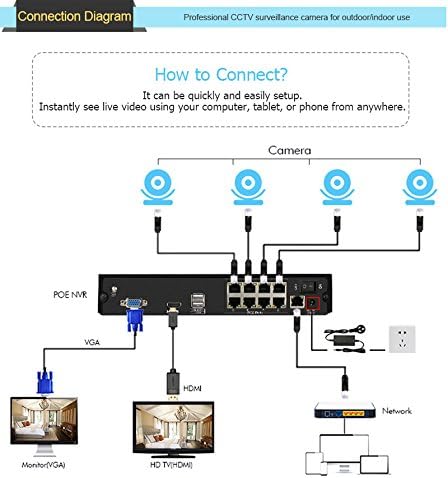
Follow the diagram below to connect your NVR and cameras. The PoE ports simplify wiring by providing both power and video transmission through a single Ethernet cable.

Image: A visual guide showing how to connect the PoE NVR to cameras, a monitor (via VGA or HDMI), and a network router.
- Connect the IP cameras to the PoE ports on the back of the NVR using the provided network cables.
- Connect the NVR to a monitor or TV using either the VGA or HDMI port.
- Connect the NVR to your network router using an Ethernet cable for remote viewинг способности.
- Connect the power adapter to the NVR and plug it into a power outlet.
- Connect the USB mouse to the NVR's USB port for navigation.
4.2 Инсталација камере
The cameras are designed for both indoor and outdoor use. Choose a location that provides optimal viewing angles and is within the range of the provided network cables. Ensure the cameras are securely mounted.
4.3 Мобилни телефон Viewинг Сетуп
То view your security feed remotely on your smartphone, follow these steps:
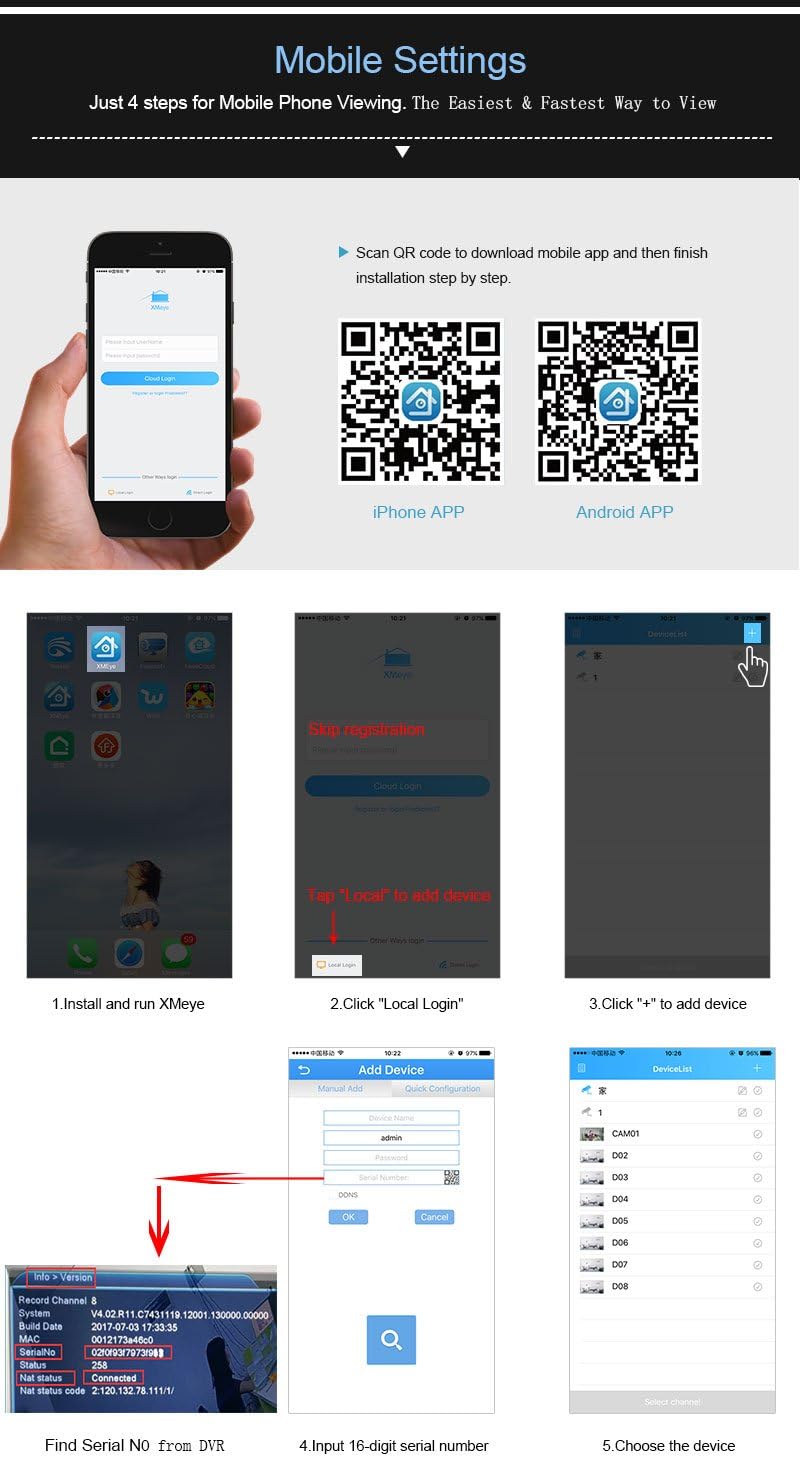
Image: A step-by-step visual guide for setting up the xmeye mobile application, including QR codes for iOS and Android app downloads, and instructions for adding devices.
- Преузмите апликацију: Scan the QR code below or visit the respective app store to download the xmeye mobile application.
iOS App Store Link
Android APK Download Link - Install and Run: Install the app on your smartphone and launch it.
- Local Login: Tap "Local" to proceed without registration.
- Додај уређај: Додирните икону „+“ да бисте додали нови уређај.
- Find Serial Number: Locate the 16-digit serial number (SN) from your NVR's system information.
- Input SN: Enter the 16-digit serial number into the app.
- Изаберите уређај: Choose the device from the list to start viewинг.
5. Упутство за употребу
5.1 Режими снимања
НВР подржава различите режиме снимања:
- Ручно снимање: Start and stop recording manually.
- Снимање аларма: Recording triggered by external alarm inputs (if connected).
- Снимање детекције покрета: Recording starts automatically when motion is detected in the camera's view.
- Временски ограничено снимање: Schedule specific times for continuous recording.
5.2 Ремоте Viewи обавештења
Once the mobile app is set up, you can view преноси уживо и снимљена хранаtage from anywhere with an internet connection. The system also supports push notifications for events like motion detection.
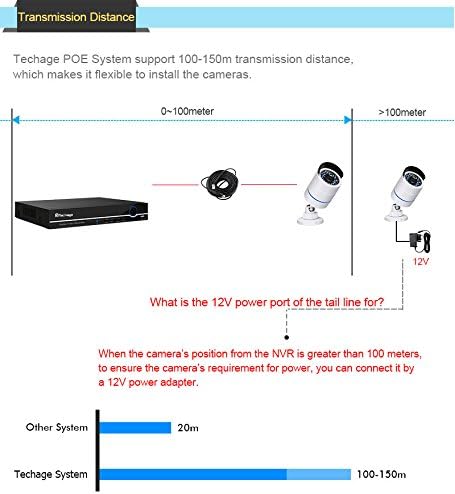
Image: Illustration of the motion detection feature, showing how the system can send email notifications with screenshots to your smartphone when motion is detected.
To enable email notifications for motion detection, navigate to the NVR's menu: Main Menu > Alarm > Motion Detect. Configure the detection area, sensitivity, and enable email alerts with screenshots.
6. Одржавање
Редовно одржавање осигурава оптималне перформансе и дуготрајност вашег безбедносног система.
- Camera Lenses: Periodically clean camera lenses with a soft, lint-free cloth to ensure clear image quality. Avoid abrasive cleaners.
- Кабловске везе: Check all cable connections (PoE, network, power) regularly to ensure they are secure and free from damage.
- Вентилација за НВР: Ensure the NVR is placed in a well-ventilated area to prevent overheating. Keep vents clear of dust and obstructions.
- Ажурирања софтвера: Проверите произвођача website periodically for firmware updates for the NVR and cameras to ensure the latest features and security patches.
- Резервна копија података: Редовно правите резервне копије важних видео записаtagна екстерни уређај за складиштење.
КСНУМКС. Решавање проблема
This section addresses common issues you might encounter with your Techage security system.
No Video Display on Monitor:
- Уверите се да је NVR укључен и да је адаптер за напајање безбедно повезан.
- Check the VGA or HDMI cable connection between the NVR and the monitor/TV.
- Verify the monitor/TV input source is correctly selected (VGA/HDMI).
Нема слике са камере:
- Check if the camera's network cable is securely connected to the NVR's PoE port.
- Ensure the camera is receiving power (check if IR LEDs illuminate in the dark).
- Verify the camera is enabled in the NVR's channel settings.
- If the camera is more than 100 meters from the NVR, ensure a 12V power adapter is used for the camera's tail line power port.
Ремоте ViewНе ради:
- Ensure the NVR is connected to your router via an Ethernet cable and has internet access.
- Verify your smartphone has a stable internet connection.
- Double-check the serial number entered in the mobile app.
- Ensure the xmeye app has necessary network permissions on your phone.
Детекција покрета се не активира:
- Check the motion detection settings in the NVR menu (sensitivity, detection area).
- Ensure the recording schedule for motion detection is correctly configured.
- Проверите да ли је сочиво камере чисто и да нема препрека.
8. Спецификације
| Феатуре | Спецификација |
|---|---|
| Број модела производа | 6708FN-4*BT508-20SC/P |
| НВР канали | 4 ЦХ |
| NVR Video Output | VGA, HDMI (Full HD) |
| NVR Hard Drive Support | 1 SATA (up to 6TB) |
| Резолуција камере | 2.0 MP (1920x1080p) |
| Сензор камере | 1/6.9 inch F02 CMOS |
| Camera Minimum Illumination | 0.1Lux @ F1.2 (Color), 0.01Lux @ F1.2 (Black/White) |
| Camera Ingress Protection | ИПКСНУМКС (водоотпоран) |
| Camera Power Input | DC12V/2A (via PoE or separate adapter) |
| Camera Main Stream Output | 1920*1080 (15fps), 1280*720 |
| Camera Sub-stream Output | 704*576 |
| Димензије система | 37.46 к 25.4 к 22.61 цм |
| Тежина система | 4.99 кг |
9. Гаранција и подршка
For warranty information and technical support, please refer to the documentation included with your purchase or visit the official Techage webсајт. Сачувајте рачун као доказ о куповини за потребе гаранције.
Ask a question about this manual
Ask about setup, troubleshooting, compatibility, parts, safety, or missing instructions. Manuals+ will review the question and use this page’s manual context to help answer it.