
1. Увод
The Centralite Pearl Thermostat is designed to provide precise temperature control with an intuitive touch interface. It integrates seamlessly with various smart home platforms using ZigBee connectivity, offering efficient management of residential HVAC systems. This manual provides essential information for installation, operation, and maintenance of your Pearl Thermostat.
2. Кључне карактеристике
- Compatible with SmartThings, Spectrum, Cox, Time Warner Cable, Vera, and ZigBee platforms.
- Supports up to 2-stagе топлоте и 2-сtage cool HVAC systems.
- Designed for quick installation, typically within 15 minutes.
- Features a built-in power amplifier for extended wireless range.
- Equipped with responsive touch controls for user interaction.
3. Садржај пакета
Проверите да ли су све ставке присутне у вашем пакету:
- Pearl Thermostat
- Вијци за монтажу (4)
- АА батерије (4)
- Водич за брзи почетак
- Налепнице за ожичење
4. Инсталација
Before beginning installation, ensure the power to your HVAC system is turned off at the circuit breaker to prevent electrical shock.
4.1 Mounting the Backplate
- Carefully remove your old thermostat from the wall. Note the wiring connections before disconnecting.
- Mount the Pearl Thermostat backplate to the wall using the provided mounting screws. Ensure it is level.
4.2 Ожичење
The Pearl Thermostat features quick-connect terminals for tool-free wiring. Match the wires from your HVAC system to the corresponding terminals on the thermostat backplate. Use the included wiring labels for identification.

Слика 1: Задња страна view of the Pearl Thermostat backplate, illustrating battery compartments and quick-connect wiring terminals for HVAC system connection.
Common wiring configurations include:
- R/Rc/Rh: 24V AC power (usually red wire)
- C: Common wire (for continuous 24V power, often blue or black)
- С/С1: Heat (usually white wire)
- Г/Г1: Cool (usually yellow wire)
- G: Fan (usually green wire)
- О / Б: Reversing valve for heat pumps
Insert each stripped wire end into its corresponding terminal until it is securely held.
4.3 Инсталација батерије
Insert the four AA batteries into the designated compartments on the back of the thermostat unit. Ensure correct polarity.
4.4 Attaching the Thermostat
Align the thermostat unit with the mounted backplate and gently push until it clicks into place. Restore power to your HVAC system at the circuit breaker.
5. Упутство за употребу
The Pearl Thermostat features a clear LCD display and intuitive touch controls for easy operation.

Слика 2: Предња страна view of the Pearl Thermostat, highlighting the digital display and touch-sensitive buttons for Mode, Hold, and Fan functions.
5.1 Подешавање температуре
Користите + и - touch areas on the right side of the thermostat to increase or decrease the desired temperature set point.
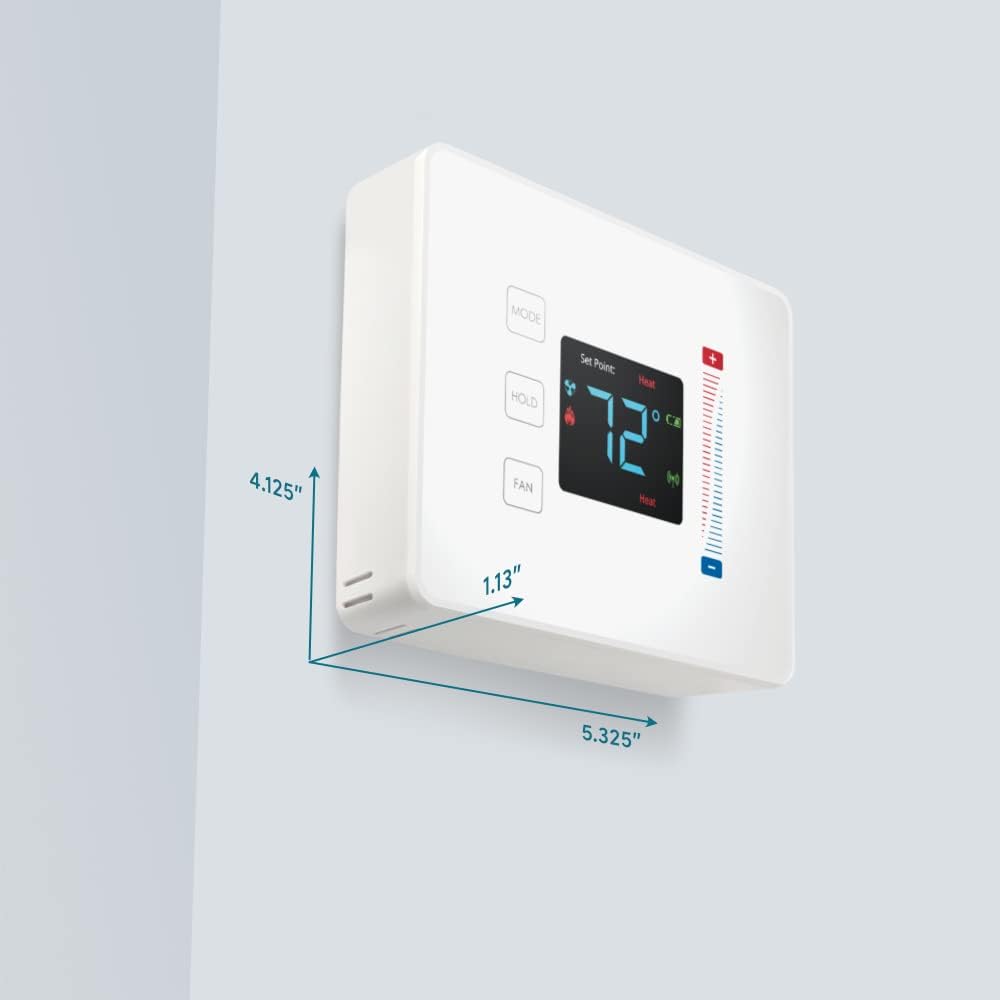
Figure 3: User interaction with the Pearl Thermostat's touch screen to modify temperature settings.
5.2 Избор режима
Притисните тастер МОДЕ button to cycle through available operating modes: Heat, Cool, Auto, Off.
5.3 Функција чекања
Притисните тастер ХОЛД button to maintain the current temperature setting indefinitely, overriding any programmed schedules. Press again to release the hold and resume the schedule.
5.4 Контрола вентилатора
Притисните тастер Фан button to cycle through fan settings: Auto (fan runs only when heating or cooling) or On (fan runs continuously).
6. Одржавање
6.1 Замена батерије
The Pearl Thermostat is powered by four AA batteries. When the battery level is low, a low battery indicator will appear on the display. To replace batteries:
- Gently pull the thermostat unit off its backplate.
- Remove the old AA batteries and dispose of them properly.
- Уметните четири нове алкалне батерије типа АА, водећи рачуна о исправном поларитету.
- Reattach the thermostat unit to the backplate.
Regular battery replacement ensures uninterrupted operation and maintains ZigBee connectivity.
6.2 Чишћење
Wipe the thermostat's surface with a soft, damp cloth. Avoid using abrasive cleaners or solvents, as these can damage the display and finish.
КСНУМКС. Решавање проблема
If you encounter issues with your Pearl Thermostat, refer to the following common troubleshooting steps:
- Без дисплеја/напајања: Check if the AA batteries are correctly installed and fully charged. Ensure power to the HVAC system is on at the circuit breaker.
- HVAC System Not Responding: Verify that the wiring connections to the backplate are secure. Confirm the thermostat is in the correct operating mode (Heat/Cool/Auto).
- Connectivity Issues (ZigBee): Ensure your smart home hub is powered on and within range. Refer to your smart home hub's instructions for device pairing. You may need to initiate a re-pairing process.
- Нетачна очитавања температуре: Уверите се да термостат није изложен директној сунчевој светлости, промаји или изворима топлоте који би могли утицати на његов унутрашњи сензор.
- Thermostat Not Responding to Touch: Gently clean the screen surface. If the issue persists, try removing the thermostat from its backplate, waiting 30 seconds, and reattaching it to perform a soft reset.
8. Спецификације

Figure 4: Dimensions of the Centralite Pearl Thermostat.
| Спецификација | Детаљ |
|---|---|
| Бранд | Централите |
| Назив модела | Centralite Pearl Thermostat |
| Број модела | 3000-wC |
| Тип контролера | SmartThings, Vera |
| Боја | Бела |
| Тип контроле температуре | Програмабилно, дигитално |
| Технологија повезивања | ЗигБее |
| Извор напајања | Напајање батеријама (4 АА батерије, укључене) |
| Тежина артикла | 0.97 фунти (приближно 15.5 унци) |
| Волtage | 230 Volts (HVAC system) |
| Материјал | Пеарл |
| Дисплаи Типе | ЛЦД |
| Финисх Типе | Сатен |
| Тип контроле | Контрола додирне табле |
| Контролни метод | Апп |
| Тип монтаже | Валл Моунт |
| Позадинско осветљење | Да |
| Димензије производа (Д к Ш к В) | 5.33 к 1.13 к 4.13 инча |
| УПЦ | 812489022264 |
9. Гаранција и подршка
For warranty information and technical support, please refer to the documentation included with your product or visit the official Centralite webсајт. Сачувајте рачун као доказ о куповини.