
HoldPeak 90EPD
HOLDPEAK 90EPD дигитални мултиметар са аутоматским подешавањем опсега, мобилна апликација, упутство за употребу
Модел: 90EPD | Марка: ХолдПеак
1. Увод
The HOLDPEAK 90EPD is a versatile digital auto-ranging multimeter designed for a wide range of electrical testing applications, including commercial, home repair, and automotive use. It offers precise measurements of AC/DC current and voltage, resistance, capacitance, frequency, temperature, and duty cycles. Key features include non-contact voltage detection, a large backlit LCD display, Data Hold, Auto Back-Light, Relative Measurement, and Mobile APP connectivity for enhanced functionality.
Кључне карактеристике:
- Мере АЦ/ДЦ волtage and AC/DC current, resistance, capacitance, frequency, duty cycle, and temperature.
- Performs diode and continuity tests.
- Features Data Hold, Auto Back-Light, Relative Measurement, and Mobile APP DMM function.
- Auto-ranging scales simplify electronic measurements.
- Equipped with a super large Backlit LCD display for visibility in low light conditions.
- Automatically enters sleep mode after 15 minutes of inactivity to conserve power.

Figure 1.1: HoldPeak 90EPD Digital Multimeter shown with its mobile application interface on a smartphone.
2. Безбедносне информације
Always adhere to safety precautions when using the multimeter to prevent electric shock or personal injury. Read all safety information before operating the device.
- IEC61010 CAT.III 1000V, CAT.IV 600V: This meter is rated for CAT.III 1000V and CAT.IV 600V overvoltage protection. Always ensure the measurement category is appropriate for the circuit being tested.
- Двострука изолација: The meter features double insulation for enhanced safety.
- Прегледајте пре употребе: Before each use, inspect the meter, test leads, and accessories for any damage. Do not use if damaged.
- Proper Terminal Connection: Always connect the test leads to the correct terminals for the desired measurement function.
- Волtagе Мерење: Никад не примењивати волtage to the meter when it is set to a current, resistance, or continuity range.
- тренутно мерење: Ensure the circuit is de-energized before connecting the meter in series for current measurements.
- Радно окружење: Use the meter in a dry environment and avoid extreme temperatures.
- Замена батерије: Replace the battery promptly when the low battery indicator appears to ensure accurate readings.
3. Садржај пакета
Проверите да ли су све ставке наведене у наставку укључене у ваш пакет:
- 1 x HOLDPEAK 90EPD Digital Mobile APP DMM Multimeter
- 1 x мерне каблове (црвени и црни)
- 1 x Temperature Test Probe
- 1 x PC Link Software CD
- 1 к УСБ кабл
- 1 к торбица за ношење
- 1 к упутство за употребу
- 1 x 9V 6F22 battery

Figure 3.1: Contents included in the HoldPeak 90EPD Multimeter package.
4. Компоненте и карактеристике производа
Familiarize yourself with the various components and functions of the HOLDPEAK 90EPD Multimeter.

Figure 4.1: Labeled components of the HoldPeak 90EPD Multimeter.
Key Function Icons:

Figure 4.2: Visual representation of the multimeter's measurement capabilities and features.
5. Подешавање
5.1 Инсталација батерије
The HOLDPEAK 90EPD Multimeter requires one 9V 6F22 battery for operation. To install or replace the battery:
- Уверите се да је мултиметар искључен.
- Пронађите одељак за батерију на задњој страни уређаја.
- Користите шрафцигер да отворите поклопац батерије.
- Уметните батерију од 9V, водећи рачуна о исправном поларитету (+/-).
- Вратите поклопац батерије и причврстите га завртњем.
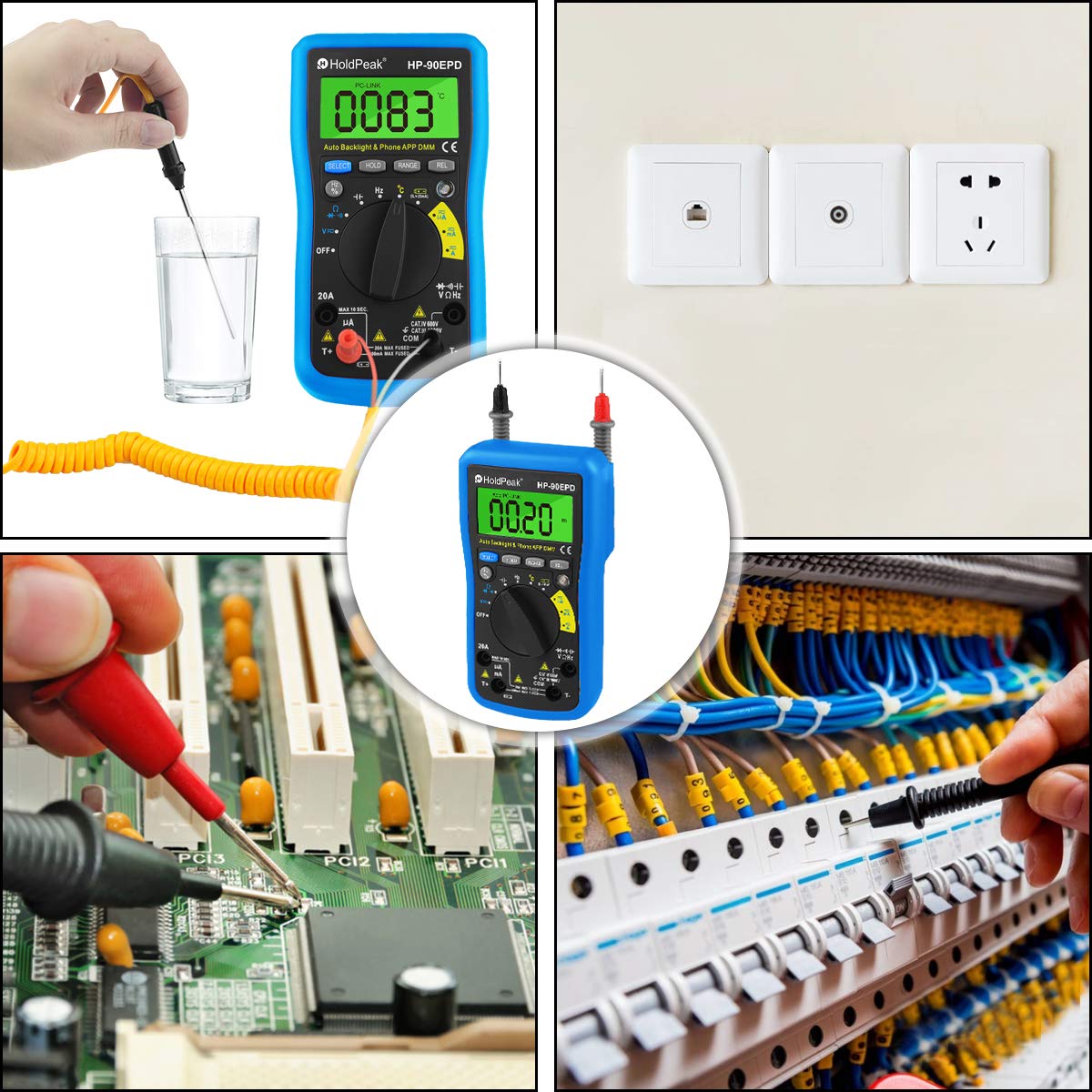
Figure 5.1: Location of the removable 9V battery compartment.
5.2 Mobile APP Connection
The HOLDPEAK 90EPD can connect to a mobile application for enhanced data logging and display features.
- 1. корак: Scan the QR code provided in the manual (or on the product packaging) or search for "intelligent multimeter" in your phone's app store to download the application.
- 2. корак: Open your phone's Bluetooth settings and ensure Bluetooth is enabled. Then, launch the downloaded application.
- 3. корак: Turn on the multimeter. Your phone should automatically detect and connect to the multimeter via Bluetooth.
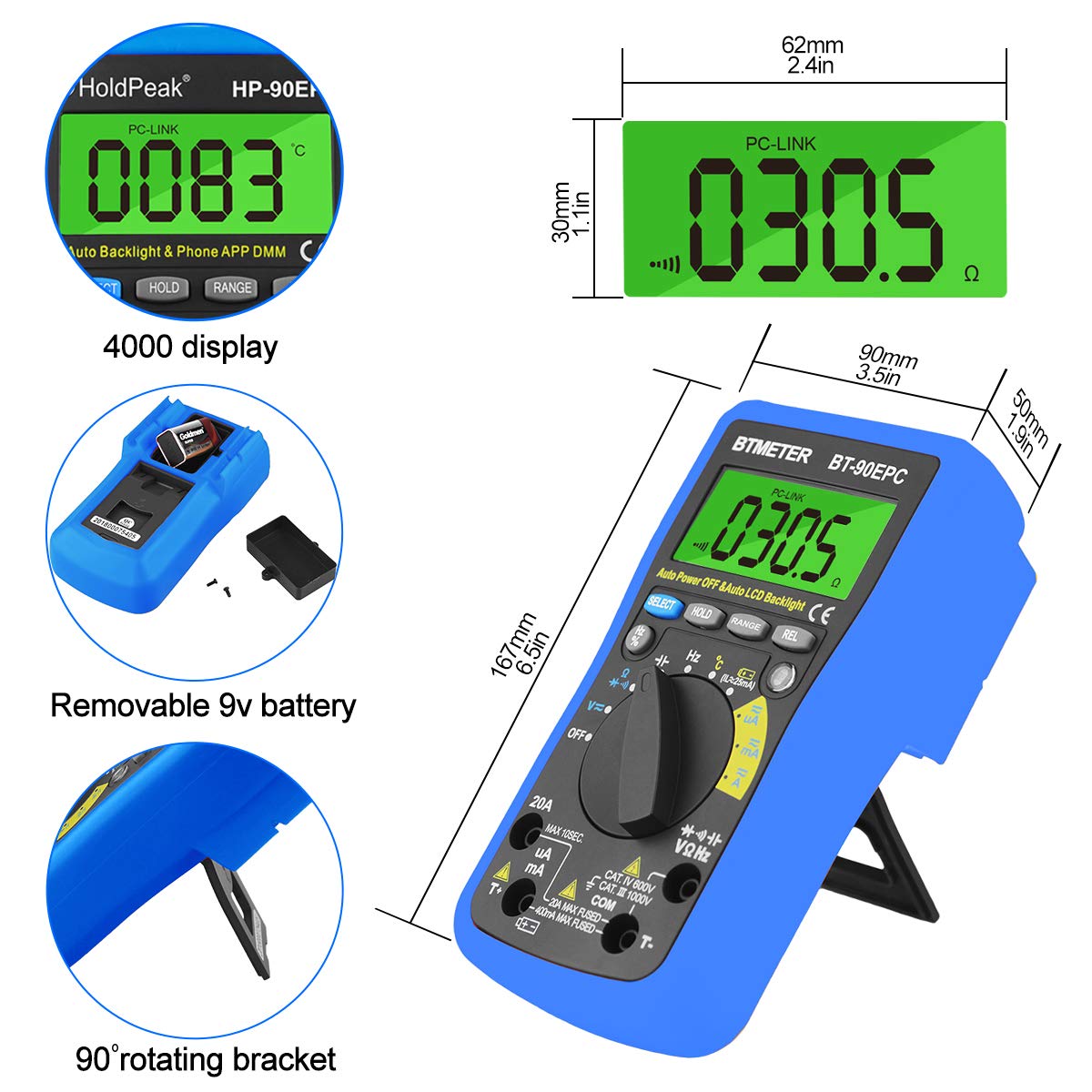
Figure 5.2: Steps for connecting the multimeter to a mobile phone application.
6. Упутство за употребу
This section provides general guidance for using the HOLDPEAK 90EPD Multimeter for various measurements. Always refer to the specific function details in the full operating manual for precise instructions.
Општа операција:
- Укључивање/искључивање: Rotate the central rotary switch to the desired measurement function to turn the meter on. Turn it to 'OFF' to power off.
- Аутоматско рангирање: The meter automatically selects the appropriate range for most measurements, simplifying operation.
- Задржавање података: Притисните дугме „HOLD“ да бисте замрзнули тренутно очитавање на екрану. Притисните поново да бисте га отпустили.
- Auto Back-Light: The display features an auto backlight for improved visibility in low-light conditions.
- Релативно мерење (REL): Press the 'REL' button to store the current reading as a reference value. Subsequent readings will be displayed as a deviation from this reference.
- Function Selection (SELECT): For ranges with multiple functions (e.g., AC/DC voltage, diode/continuity), press the 'SELECT' button to toggle between them.
Функције мерења:
- АЦ/ДЦ Волtagе (V~ / V-): Connect test leads in parallel to the circuit. Select the appropriate voltagе ранге.
- Наизменична/једносмерна струја (A~ / A-): Connect the meter in series with the circuit. Ensure the circuit is de-energized before connecting. Select the appropriate current range (µA, mA, A).
- Отпор (Ω): Уверите се да је коло без напона. Спојите мерне каблове преко компоненте.
- Капацитет (Ф): Ensure the capacitor is discharged before testing. Connect test leads across the capacitor.
- Фреквенција (Hz) / Радни циклус (%): Повежите мерне каблове са извором сигнала.
- Diode Test (→|): Use to check the forward voltagпад диоде.
- Continuity Test (•))): Use to check for open or closed circuits. An audible buzzer indicates continuity.
- Температура (°C/°F): Connect the temperature test probe to the appropriate input jacks.
- Нон-Цонтацт Волtagе (НЦВ): Use the NCV sensor to detect the presence of AC voltagе без директног контакта.
Слика 6.1: Прamples of the HoldPeak 90EPD Multimeter in various measurement scenarios.
7. Одржавање
7.1 Чишћење
За чишћење мултиметра користите меку крпуampened with mild detergent. Do not use abrasives or solvents. Ensure the meter is powered off and disconnected from any circuits before cleaning.
7.2 Складиштење
When not in use for extended periods, remove the battery to prevent leakage. Store the multimeter in its carrying case in a cool, dry place, away from direct sunlight and extreme temperatures.
КСНУМКС. Решавање проблема
If you encounter issues with your HOLDPEAK 90EPD Multimeter, refer to the common problems and solutions below:
- Без дисплеја/напајања:
- Check if the battery is installed correctly and has sufficient charge. Replace the 9V battery if necessary.
- Ensure the rotary switch is turned to an ON position.
- Нетачна очитавања:
- Проверите да ли су мерни каблови правилно повезани са одговарајућим улазним прикључцима за изабрану функцију.
- Ensure the correct measurement function is selected on the rotary switch.
- Check the battery level; low battery can affect accuracy.
- Ensure the circuit being tested is within the meter's specified range.
- Mobile APP Connection Issues:
- Уверите се да је Блуетоотх омогућен на вашем паметном телефону.
- Make sure the multimeter is powered on and within Bluetooth range.
- Restart both the multimeter and the mobile application.
- Проверите да ли је апликација ажурирана на најновију верзију.
- "OL" Displayed (Overload):
- The measured value exceeds the selected range. The auto-ranging feature should typically handle this, but if manually ranged, switch to a higher range.
- Ensure the meter is not connected to a voltage or current exceeding its maximum input ratings.
9. Спецификације
| Спецификација | Валуе |
|---|---|
| Безбедност/усаглашеност | IEC61010 CAT.III 1000V, CAT.IV 600V overvoltagе и стандард двоструке изолације |
| Дисплаи | Maximum reading 4000, analogue bar graph 41 segments |
| Избор опсега | Ауто |
| Приказ преоптерећења | Дисплаи ОЛ |
| ДЦ волtage | 400mV/4V/40V/400V (±0.5%), 1000V (±0.8%) |
| АЦ волtage | 400mV (±1.2%), 4/40/400V (±0.8%), 750V (±1.2%) |
| ДЦ струја | 400uA/4000uA/40mA/400mA (±1.2%), 4/20A (±2.0%) |
| АЦ струја | 400uA/4000uA/40mA/400mA (±1.5%), 4/20A (±2.5%) |
| Капацитет | 51.2nF (±3.0%), 512nF/5.12uF/51.2uF (±2.5%), 100uF (±5.0%) |
| Отпор | 400ohm/4k/40k/400k/4Mohm (±1.0%), 40Mohm (±1.5%) |
| Фреквенцијски опсег | 5.12Hz ~ 5.12MHz (±0.1%) |
| Тест диоде | Да |
| Тест континуитета | Да |
| Нон-цонтацт волtagе детекција | Да |
| Релативна вредност | Да |
| Мобиле АПП | Да |
| Димензије | 16.7 x 9 x 5 цм (6.6" x 3.48" x 2.36") |
| Повер | 9В 6Ф22 батерија |
| Тежина | 0.71 фунте (приближно 322 г) |
| Произвођач | Zhuhai Jida Huapu Instrument Co.,Ltd |
| Број модела артикла | 90EPD |
| Датум првог доступног | 1. септембар 2016. |
10. Гаранција и подршка
For detailed warranty information, technical support, or service inquiries, please refer to the official HoldPeak webсајт или гарантни лист који је приложен уз ваш производ. Сачувајте рачун као доказ о куповини за потребе гаранције.
Ask a question about this manual
Ask about setup, troubleshooting, compatibility, parts, safety, or missing instructions. Manuals+ will review the question and use this page’s manual context to help answer it.