
1. Увод
Thank you for choosing the Baseus Encok S16 Neck Hung Bluetooth Wireless In-Ear Earphone. This manual provides detailed instructions for setup, operation, and maintenance to ensure optimal performance and longevity of your device. Please read this manual thoroughly before use.
2. Садржај пакета
Проверите да ли су све ставке присутне у пакету:
- 1 x Baseus Encok S16 Wireless Earphone
- 1 к кабл за пуњење
- 1 к Упутство за употребу
- 1 к Гарантни лист

Image: Contents of the Baseus Encok S16 earphone package, showing the earphones, charging cable, user manual, and warranty card.
3. Производ је готовview
The Baseus Encok S16 earphones feature a neck-hung design for comfortable and secure wear. Key features include:
- Магнетна фиксација: Earbuds can be magnetically joined when not in use, preventing tangling and loss.
- Adjustable Coils: The earphone line length can be adjusted by sliding for a customized fit.
- High Fidelity Sound: Equipped with a dynamic speaker unit, composite diaphragm, and independent tune trope structure for clear audio.
- Ефикасна снага: Utilizes a British CSR chip and 120mAh battery for low power consumption and extended battery life.
- Универзална компатибилност: Smartly matches with smartphones and tablet PCs, compatible with all Bluetooth 4.0 enabled devices.

Image: Close-up of the Baseus Encok S16 earbuds demonstrating their magnetic connection capability.
4. Подешавање
4.1 Пуњење слушалица
- Connect the provided charging cable to the charging port on the earphone's control unit.
- Повежите други крај кабла за пуњење са УСБ извором напајања (нпр. УСБ портом рачунара, УСБ адаптером за зид).
- The indicator light will illuminate during charging and turn off or change color when fully charged.
- Потпуно пуњење обично траје отприлике 1.5 до 2 сата.
4.2 Блуетоотх упаривање
- Уверите се да су слушалице потпуно напуњене.
- Press and hold the Power button on the control unit until the indicator light flashes red and blue alternately, indicating pairing mode.
- На паметном телефону или уређају који подржава Bluetooth, идите на подешавања Bluetooth-а.
- Тражи available devices and select "Baseus Encok S16" from the list.
- Once connected, the indicator light will flash blue slowly or turn solid blue.
- Ако се затражи лозинка, унесите „0000“.
5. Упутство за употребу
5.1 Основне контроле
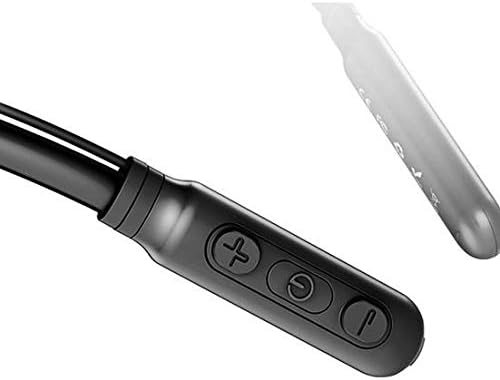
Image: Close-up of the Baseus Encok S16 earphone's inline control unit, showing the power/multi-function button, volume up, and volume down buttons.
| Дугме | Функција |
|---|---|
| Дугме за напајање (средње) |
|
| Јачина звука (+) |
|
| Смањивање јачине звука (-) |
|
5.2 Ношење слушалица
Place the neckband around your neck, ensuring the control unit is easily accessible. Insert the earbuds comfortably into your ears. Adjust the earphone line length using the sliding coils for a secure and comfortable fit.
6. Одржавање
- Clean the earbuds and control unit regularly with a soft, dry cloth.
- Avoid exposing the earphones to extreme temperatures, humidity, or corrosive liquids.
- Store the earphones in a cool, dry place when not in use. The magnetic earbuds can help prevent tangling during storage.
- Do not attempt to disassemble or repair the earphones yourself, as this will void the warranty.
КСНУМКС. Решавање проблема
| Проблем | Решење |
|---|---|
| Није могуће укључити | Ensure the earphones are fully charged. Press and hold the Power button for 3 seconds. |
| Упаривање са уређајем није могуће |
|
| Нема звука или је тиха |
|
| Интермитентна веза |
|
8. Спецификације
| Феатуре | Детаљ |
|---|---|
| Бранд | Басеус |
| Број модела | FWP-E-S16 |
| Технологија повезивања | Блуетоотх |
| Блуетоотх верзија | 4.0 (compatible with devices enabling Bluetooth 4.0) |
| Форм Фацтор | In Ear, Neck Hung |
| Тип контроле | Voice Control, Touch (via buttons) |
| Капацитет батерије | 120мАх |
| Тежина | 30 грама |
| Укључене компоненте | Wireless Earphone, Charging Cable, User Manual, Warranty Card |
9. Гаранција и подршка
This product comes with a Limited Warranty. Please refer to the included Warranty Card for detailed terms and conditions regarding coverage and duration.
For technical support or warranty claims, please contact your retailer or visit the official Baseus webсајт за информације о корисничкој служби.
Глобални трговачки идентификациони број (ГТИН): 06953156264489