
Увод
Хвала вам на куповиниasing the QUMOX L165U 2.4GHz Wireless Gamepad. This high-quality game controller is designed for use with PC and Android devices, offering a reliable 2.4GHz wireless connection for an enhanced gaming experience. Please read this manual carefully to ensure proper setup and operation of your new gamepad.

Figure 1: QUMOX L165U Gamepad with included USB adapter and OTG connection kit.
Садржај пакета
Уверите се да су све ставке присутне у вашем пакету:
- 1x QUMOX L165U Gamepad
- 1x 2.4GHz USB Wireless Adapter
- 1x OTG Connection Kit (Micro USB to USB-A adapter)
Сетуп
1. Инсталација батерије
The QUMOX L165U Gamepad is powered by 2 AAA batteries (not included). To install the batteries:
- Пронађите одељак за батерију на задњој страни гејмпада.
- Отворите поклопац батерије.
- Уметните 2 ААА батерије, водећи рачуна о исправном поларитету (+/-).
- Добро затворите поклопац батерије.

Figure 2: Open battery compartment for AAA battery installation.
2. Повезивање са рачунаром
- Plug the 2.4GHz USB Wireless Adapter into an available USB port on your PC.
- Turn on the gamepad by pressing the 'START' button. The gamepad will automatically attempt to connect.
- The PC should recognize the gamepad and install necessary drivers automatically.
- If the gamepad does not connect, press the 'MODE' button on the gamepad to cycle through connection modes until it is recognized by your PC.
3. Connecting to an Android Device (with OTG support)
- Connect the OTG Connection Kit to your Android device's Micro USB port.
- Plug the 2.4GHz USB Wireless Adapter into the USB-A end of the OTG Connection Kit.
- Turn on the gamepad by pressing the 'START' button. The gamepad will automatically attempt to connect.
- Your Android device should recognize the gamepad.
- If the gamepad does not connect, press the 'MODE' button on the gamepad to cycle through connection modes until it is recognized by your Android device.
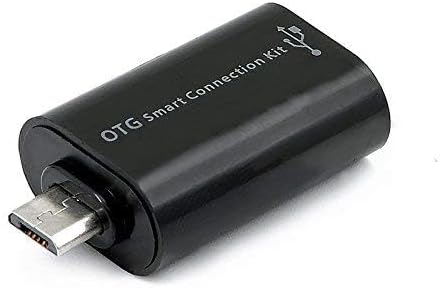
Figure 3: OTG Connection Kit for Android device connectivity.
Упутство за употребу
Once connected, your QUMOX L165U Gamepad is ready for use. The layout is standard for most game controllers.
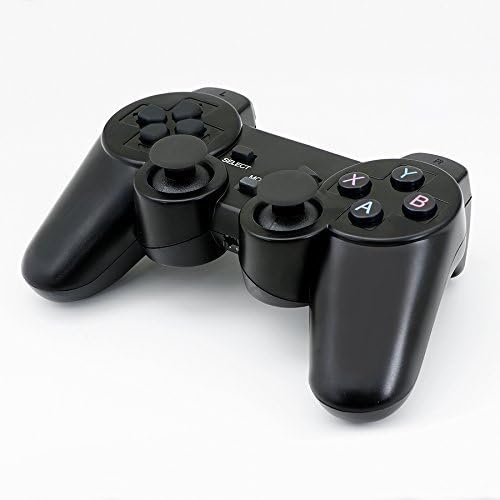
Слика 4: Врх view of the QUMOX L165U Gamepad, highlighting button layout.
- Смерни тастер (D-Pad): За прецизан усмерни унос.
- Аналогни џојстици: Два аналогна џепа за кретање од 360 степени и контролу камере.
- Дугмад за акције (A, B, X, Y): Стандардна дугмад за акције за команде у игри.
- Дугмад на рамену (L1, R1) и окидачи (L2, R2): Located on the top of the gamepad for additional actions.
- Дугме ИЗАБЕРИ/НАЗАД: Typically used for menu navigation or specific in-game functions.
- Старт дугме: Used to pause games or confirm selections.
- Дугме МОДЕ: Cycles through different operating modes (e.g., Android, PC) if automatic detection fails.
Видео Демонстрација
Video 1: A seller-provided overview of a 2-pack wireless controller, demonstrating its features and compatibility. While showing a similar product, it illustrates general wireless controller usage and setup.
Одржавање
- Чишћење: Користите меку, суву крпу за чишћење геймпада. Избегавајте употребу јаких хемикалија или абразивних материјала.
- Складиштење: Чувајте гејмпад на хладном и сувом месту, даље од директне сунчеве светлости и екстремних температура.
- Одржавање батерије: Remove batteries if the gamepad will not be used for an extended period to prevent leakage.
Решавање проблема
| Проблем | Могући узрок | Решење |
|---|---|---|
| Gamepad does not connect. | Low batteries, incorrect mode, adapter not properly inserted. | Replace batteries. Press the 'MODE' button to cycle through modes. Ensure USB adapter is fully inserted into PC or OTG adapter. |
| Дугмад или џојстици не реагују. | Connection issue, game incompatibility, physical damage. | Reconnect the gamepad. Check game settings for controller support. If issue persists, contact support. |
| Android device does not recognize gamepad. | Android device lacks OTG support, OTG adapter issue. | Verify your Android device supports OTG. Ensure OTG adapter is functioning correctly. |
Спецификације
| Феатуре | Детаљ |
|---|---|
| Број модела | Л165У |
| Технологија повезивања | 2.4GHz Wireless (via USB Adapter) |
| Компатибилни уређаји | PC, Android (with OTG support) |
| Извор напајања | 2к ААА батерије |
| Тежина артикла | 5.3 унци |
| Димензије пакета | 8.07 к 5.63 к 2.95 инча |
| Боја | Црно |
Гаранција и подршка
For warranty information or technical support, please refer to the contact details provided with your purchase or visit the official QUMOX webсајт. Сачувајте доказ о куповини за евентуалне рекламације по гаранцији.