
1. Важна безбедносна упутства
Please read all safety instructions carefully before using the Vivitek Qumi Q3 Plus-RD projector. Failure to follow these instructions may result in electric shock, fire, or damage to the device.
- Извор напајања: Use only the supplied AC power adapter. Ensure the voltagе одговара захтевима пројектора.
- вентилација: Do not block ventilation openings. Maintain adequate space around the projector for proper airflow to prevent overheating.
- Влага: Do not expose the projector to rain, moisture, or operate it near water.
- топлота: Avoid placing the projector near heat sources such as radiators, heat registers, stoves, or other apparatus that produce heat.
- Чишћење: Unplug the projector from the power outlet before cleaning. Use a dry cloth for cleaning. Do not use liquid cleaners or aerosol cleaners.
- Сервисирање: Не покушавајте сами да сервисирате овај производ. Све сервисирање препустите квалификованом сервисном особљу.
- Безбедност ока: Не гледајте директно у сочиво пројектора када је укљученоamp је укључено. Јако светло може изазвати оштећење ока.
2. Садржај пакета
Verify that all items listed below are included in your Vivitek Qumi Q3 Plus-RD package:
- Vivitek Qumi Q3 Plus-RD Projector
- AC Power Adapter with Cable
- ХДМИ кабл
- Documentation Kit (Quick Start Guide, Warranty Card)

Image: The AC power adapter and cable for the Vivitek Qumi Q3 Plus-RD projector.
3. Производ је готовview
Familiarize yourself with the components and ports of your Vivitek Qumi Q3 Plus-RD projector.
3.1 Фронт View

Слика: Фронт view of the Vivitek Qumi Q3 Plus-RD projector, showing the projection lens and speaker grille.
3.2 Реар View (Ports and Connections)

Слика: Позади view of the Vivitek Qumi Q3 Plus-RD projector, displaying various input/output ports including AV IN, USB 1, USB 2, HDMI, DC IN power input, microSD card slot, and the power button.
3.3 Сиде View

Слика: Са стране view of the Vivitek Qumi Q3 Plus-RD projector, showing the ventilation grilles and the integrated kickstand for angle adjustment.
3.4 Даљински управљач
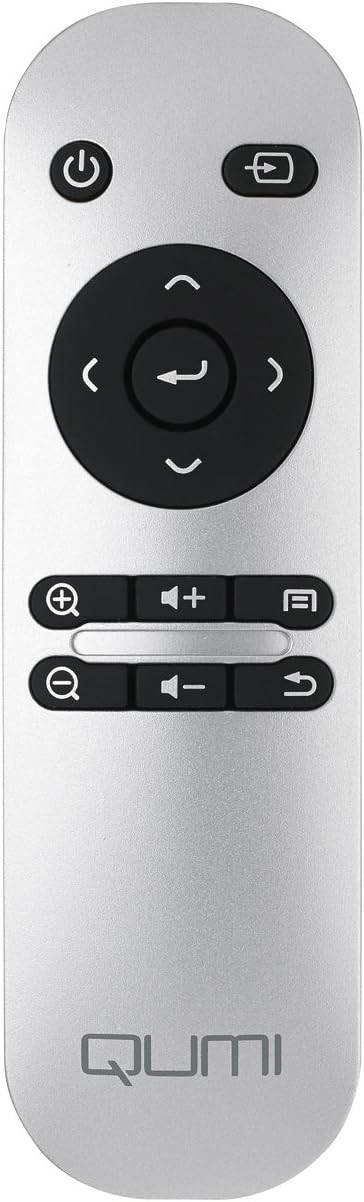
Image: The remote control for the Vivitek Qumi Q3 Plus-RD projector, featuring power, navigation, volume, and focus adjustment buttons.
4. Подешавање
Follow these steps to set up your Vivitek Qumi Q3 Plus-RD projector for first use.
- Прикључак за напајање: Connect the supplied AC power adapter to the 'DC IN' port on the projector and then plug it into a power outlet. The projector can also operate on its internal battery.
- Пласман: Place the projector on a stable, flat surface. Use the integrated kickstand to adjust the projection angle if needed. Ensure there are no obstructions to the lens or ventilation openings.
- Укључено: Press and hold the power button on the projector or the remote control to turn on the device.
- Подешавање фокуса: Once powered on, use the focus buttons on the remote control to adjust the image sharpness. The Qumi Q3 Plus-RD features motorized focus for precise adjustment.
- Кеистоне Цоррецтион: The projector features digital auto keystone correction. If the image appears trapezoidal, the projector will automatically adjust it. Manual adjustment options may be available in the settings menu.
5. Упутство за употребу
This section details how to operate your Vivitek Qumi Q3 Plus-RD projector.
5.1 Укључивање/искључивање
- За укључивање: Press and hold the power button on the projector or the remote control until the device starts.
- За искључивање: Press the power button on the projector or the remote control. A shutdown prompt will appear. Select 'Power Off' to shut down the system safely.
5.2 Навигација кроз Андроид ОС
The Qumi Q3 Plus-RD runs on an Android operating system. Use the remote control's navigation buttons (up, down, left, right, OK) to move through menus and select options. A Bluetooth keyboard/mouse can also be paired for easier navigation.
5.3 Репродукција медија
- УСБ диск: Insert a USB flash drive into one of the USB ports. The system will typically detect it and prompt you to open the file претраживач или медијски плејер.
- МицроСД картица: Insert a microSD card into the microSD slot. Similar to USB, the system will allow you to access its contents.
- Интерна меморија: The projector has 5.1 GB of available on-board memory for storing fileс и апликације.
5.4 Connecting External Devices (HDMI)
To connect an external device such as a laptop, Blu-ray player, or gaming console:
- Connect one end of an HDMI cable to the HDMI port on the projector.
- Connect the other end of the HDMI cable to the HDMI output port on your external device.
- On the projector's home screen, navigate to the input selection and choose 'HDMI'.
6. Повезивање
The Vivitek Qumi Q3 Plus-RD offers various connectivity options for seamless integration with your devices.
6.1 Ви-Фи подешавање
- Са почетног екрана идите на „Подешавања“.
- Select 'Wi-Fi' and turn it on.
- Изаберите жељену Wi-Fi мрежу са листе доступних мрежа.
- Enter the network password if prompted and connect.
6.2 Блуетоотх упаривање
You can pair Bluetooth devices such as external speakers, headphones, or a keyboard/mouse with your projector.
- Са почетног екрана идите на „Подешавања“.
- Select 'Bluetooth' and turn it on.
- Ставите свој Блуетоотх уређај у режим упаривања.
- Select your device from the list of available devices on the projector and confirm pairing.
6.3 Wireless Content Sharing
The projector supports wireless content sharing from Android and iOS devices. Refer to the projector's specific application (e.g., HappyCast or similar pre-installed app) for detailed instructions on mirroring your device's screen.
7. Одржавање
Правилно одржавање осигурава дуготрајност и оптималне перформансе вашег пројектора.
- Чишћење сочива: Gently wipe the projector lens with a soft, lint-free cloth specifically designed for optical surfaces. Do not use abrasive materials or harsh chemicals.
- вентилација: Regularly check that the ventilation openings are clear of dust and debris. Use a soft brush or compressed air to clean them.
- Одржавање батерије: For models with an internal battery, avoid fully discharging the battery frequently. If storing the projector for an extended period, charge the battery to approximately 50% to prolong its lifespan.
- Складиштење: Store the projector in a cool, dry place away from direct sunlight and extreme temperatures.
КСНУМКС. Решавање проблема
If you encounter issues with your Vivitek Qumi Q3 Plus-RD, refer to the following common problems and solutions.
- Нема пројектоване слике:
- Ensure the projector is powered on and the lens cap is removed.
- Check the input source selection to ensure it matches the connected device (e.g., HDMI, USB).
- Verify that the external device is powered on and outputting a signal.
- Нема звука:
- Adjust the volume on the projector and the connected source device.
- Check if external speakers are connected via Bluetooth or AV IN, and ensure they are powered on and functioning.
- Ensure the audio output settings on the source device are correctly configured.
- Даљински управљач не реагује:
- Ensure there are no obstructions between the remote and the projector's IR receiver (located at the rear).
- Replace the remote control battery (typically a coin cell battery).
- Проблеми са повезивањем путем Wi-Fi/Bluetooth-а:
- Ensure Wi-Fi/Bluetooth is enabled in the projector's settings.
- Restart the projector and the device you are trying to connect.
- Проверите да ли има сметњи од других бежичних уређаја.
- Слика је мутна:
- Use the remote control's focus buttons to adjust the image sharpness.
- Уверите се да је површина за пројекцију равна и да је пројектор стабилан.
9. Спецификације
Key technical specifications for the Vivitek Qumi Q3 Plus-RD projector:
| Феатуре | Спецификација |
|---|---|
| Број модела | Q3 PLUS-RD |
| Дисплаи Типе | ДЛП |
| Изворна резолуција екрана | 1280 к 720 (ХД 720п) |
| Осветљеност | До КСНУМКС Лумена |
| Однос контраста | 5,000:1 |
| Технологија повезивања | Блутут, ХДМИ, Ви-Фи |
| Посебне карактеристике | Bluetooth, Portable, Android OS |
| Оперативни систем | Android V.4.42 |
| ЦПУ | Quad-core CPU at 1.5GHz |
| Интерна меморија | 5.1 GB available |
| Батерија | 1 литијум-полимерска батерија (укључена) |
| Димензије производа | 6.9 к 4 к 1.1 инча |
| Тежина артикла | 1 фунта |
10. Гаранција и подршка
The Vivitek Qumi Q3 Plus-RD projector comes with a standard manufacturer's warranty. For detailed warranty information, please refer to the documentation kit included with your product or visit the official Vivitek webсајту.
For technical support, troubleshooting assistance, or service inquiries, please contact Vivitek customer support through their official channels. Keep your product's model number (Q3 PLUS-RD) and serial number handy when contacting support.