
Увод
This manual provides detailed instructions for the setup, operation, maintenance, and troubleshooting of your Brightsign XT243 True 4K Dual Video Decode HTML5 Player. Please read this manual thoroughly before using the device to ensure proper functionality and to prevent damage.
Безбедносне информације
Увек се придржавајте основних мера предострожности приликом коришћења овог производа како бисте смањили ризик од пожара, струјног удара и повреда. Сачувајте ово упутство за будуће потребе.
- Не излажите уређај влази или екстремним температурама.
- Use only the power adapter supplied or recommended by Brightsign.
- Не покушавајте сами да отворите или поправите уређај. Све сервисирање препустите квалификованом особљу.
- Осигурајте одговарајућу вентилацију око уређаја како бисте спречили прегревање.
Садржај пакета
Проверите да ли су све ставке присутне у вашем пакету:
- Brightsign XT243 Player
- Повер Адаптер
- Водич за брзи почетак (ако је применљиво)
- Other accessories (e.g., mounting brackets, cables)
Девице Оверview
Familiarize yourself with the ports and indicators on your Brightsign XT243 player.
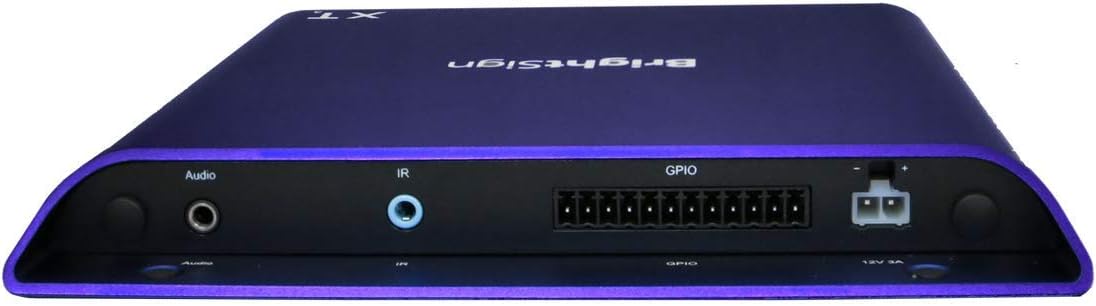
Слика: Предња и бочна страна view of the Brightsign XT243 player, highlighting the HDMI, Ethernet, and USB ports for connectivity.
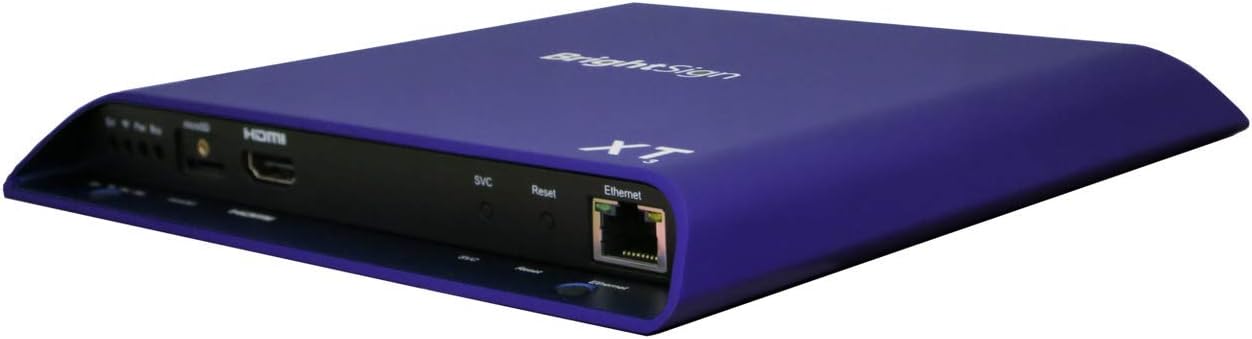
Слика: Позади view of the Brightsign XT243 player, displaying the Audio output, IR input, GPIO port, and 12V 3A power input.
Front/Side Panel Connections:
- ХДМИ излаз: Connects to a display device (TV, monitor).
- Етхернет (РЈ45): Connects to a network for content updates and control. Supports Power over Ethernet (PoE+).
- УСБ: For connecting peripherals like touchscreens, keyboards, or storage devices.
- SVC/Reset Button: Service port and reset functionality.
Прикључци задње плоче:
- Аудио излаз: 3.5 мм прикључак за аналогни аудио излаз.
- ИЦ улаз: 3.5mm jack for infrared remote control input.
- ГПИО: General Purpose Input/Output port for interactive controls.
- 12V 3A Power Input: За повезивање екстерног адаптера за напајање.
Сетуп
Follow these steps to set up your Brightsign XT243 player:
- Повежи се са екраном: Connect an HDMI cable from the XT243's HDMI Out port to an HDMI input on your display device.
- Повежите се на мрежу:
- For wired network: Connect an Ethernet cable from the XT243's Ethernet port to your network router or switch. If your network supports PoE+, the device may power on automatically.
- For Wi-Fi (if supported by an optional module, not included with standard I/O package): Refer to the Wi-Fi module's instructions for setup.
- Прикључите напајање: If not using PoE+, connect the provided power adapter to the 12V 3A Power Input port on the XT243, then plug the adapter into a power outlet. The device will power on automatically.
- Insert SD Card (Optional): If using an SD card for content storage, insert it into the designated slot. Ensure the card is properly formatted.
- Почетно покретање: The player will boot up. Follow any on-screen prompts for initial configuration, such as network settings or content loading.
Operating the Brightsign XT243
The Brightsign XT243 is designed for digital signage applications. Content is typically managed and deployed using Brightsign's BrightAuthor software or BrightSign Network.
Content Deployment:
- BrightAuthor: Create presentations using BrightAuthor software on a Windows PC. Publish the presentation to an SD card or directly to the player via a local network.
- BrightSign Network: For remote management and content updates, subscribe to BrightSign Network. This allows for cloud-based content deployment and player monitoring.
Основна операција:
- Once content is loaded, the player will automatically begin playback according to the presentation schedule.
- The player operates continuously. To power off, disconnect the power adapter or disable PoE+.
- For interactive presentations, ensure all connected peripherals (e.g., touchscreens, buttons via GPIO) are properly configured in your BrightAuthor project.
Одржавање
Regular maintenance ensures optimal performance and longevity of your Brightsign XT243 player.
- Чишћење: Користите меку, суву крпу за чишћење спољашњости уређаја. Не користите течна средства за чишћење или аеросоле.
- вентилација: Ensure that the ventilation openings are not blocked. Maintain adequate airflow around the device.
- Ажурирања фирмвера: Periodically check the Brightsign website for firmware updates. Keeping the firmware updated can improve performance and add new features. Follow the instructions provided by Brightsign for firmware update procedures.
- Управљање садржајем: Редовно реview and update your digital signage content to keep it fresh and engaging.
Решавање проблема
If you encounter issues with your Brightsign XT243, refer to the following common problems and solutions:
| Проблем | Могући узрок | Решење |
|---|---|---|
| Нема видео излаза |
|
|
| Player not powering on |
|
|
| Content not updating |
|
|
Спецификације
Key technical specifications for the Brightsign XT243 player:
- Модел: КСТ243
- Видео декодирање: True 4K, Dual Video Decode
- Повезивање: Етхернет, ХДМИ, УСБ
- Снага: PoE+ (Power over Ethernet Plus) or 12V 3A external power adapter
- Димензије: 7.08 к 8.03 к 0.86 инча (180 к 204 к 22 мм)
- Тежина: 1.24 фунте (0.56 кг)
- Боја: Љубичаста
- Подржане Интернет услуге: Нетфликс, Хулу, Амазон Прајм Видео (Note: Player primarily for digital signage; these services may require specific configurations or apps not typically used in standard signage deployments.)
- Тип контролера: Контрола дугмета (Refers to physical buttons on the device and external controls via GPIO/IR.)
- гаранција: 12 месеци
Гаранција и подршка
Информације о гаранцији:
The Brightsign XT243 comes with a 12-месечна гаранција from the date of purchase. This warranty covers defects in materials and workmanship under normal use. It does not cover damage caused by misuse, accidents, unauthorized modifications, or external causes such as power surges.
For warranty claims, please retain your proof of purchase and contact Brightsign customer support.
Корисничка подршка:
For technical assistance, troubleshooting, or further information, please visit the official Brightsign support webсајту или се обратите њиховом одељењу за корисничку подршку.
Brightsign Official Webсајт: ввв.бригхтсигн.биз
Ресурси подршке: www.brightsign.biz/support