
1. Производ је готовview
The Tenergy 11W Dimmable LED Desk Lamp (Model FY-0001) is designed to provide versatile lighting for various tasks, featuring adjustable brightness, multiple color temperatures, and a convenient USB charging port. Its sleek design and flexible arm make it suitable for home and office environments.

Image: The Tenergy 11W LED Desk Lamp, емисијаasing its modern design and adjustable features.
2. Шта је у кутији
- Tenergy 11W Dimmable LED Desk Lamp
- УСБ кабл за пуњење
- Повер Адаптер
- Кориснички приручник (овај документ)

Image: The Tenergy 11W LED Desk Lamp and its included accessories laid out on a surface.
3. Подешавање
- Пажљиво уклоните све компоненте из паковања.
- Ставите лamp поставити на стабилну, равну површину.
- Повежите адаптер за напајање на лampулазни порт за напајање, који се обично налази на задњој страни базе.
- Укључите адаптер за напајање у стандардну електричну утичницу.amp's indicator light should illuminate, indicating it is ready for use.
4. Упутство за употребу
4.1 Укључивање/искључивање
За окретање лamp on or off, gently touch the Он/Офф button located on the touch control panel on the lamp'с басе.
4.2 Подешавање осветљености
Тхе лamp offers 5 levels of brightness. Use the + и - buttons on the touch control panel to increase or decrease the light intensity.
4.3 Changing Light Modes (Color Temperature)
Тхе лamp features 4 distinct light modes, each with a different color temperature, optimized for various activities:
- Режим читања: Provides a bright, neutral white light ideal for reading.
- Study Mode: Offers a cooler, more focused light to enhance concentration.
- Режим опуштања: Emits a warm, soft light for a comfortable and calming atmosphere.
- Режим спавања: Delivers a very warm, dim light suitable for winding down before sleep.
To switch between these modes, repeatedly touch the corresponding icon on the control panel.

Image: Visual representation of the four adjustable light color temperatures available on the lamp.
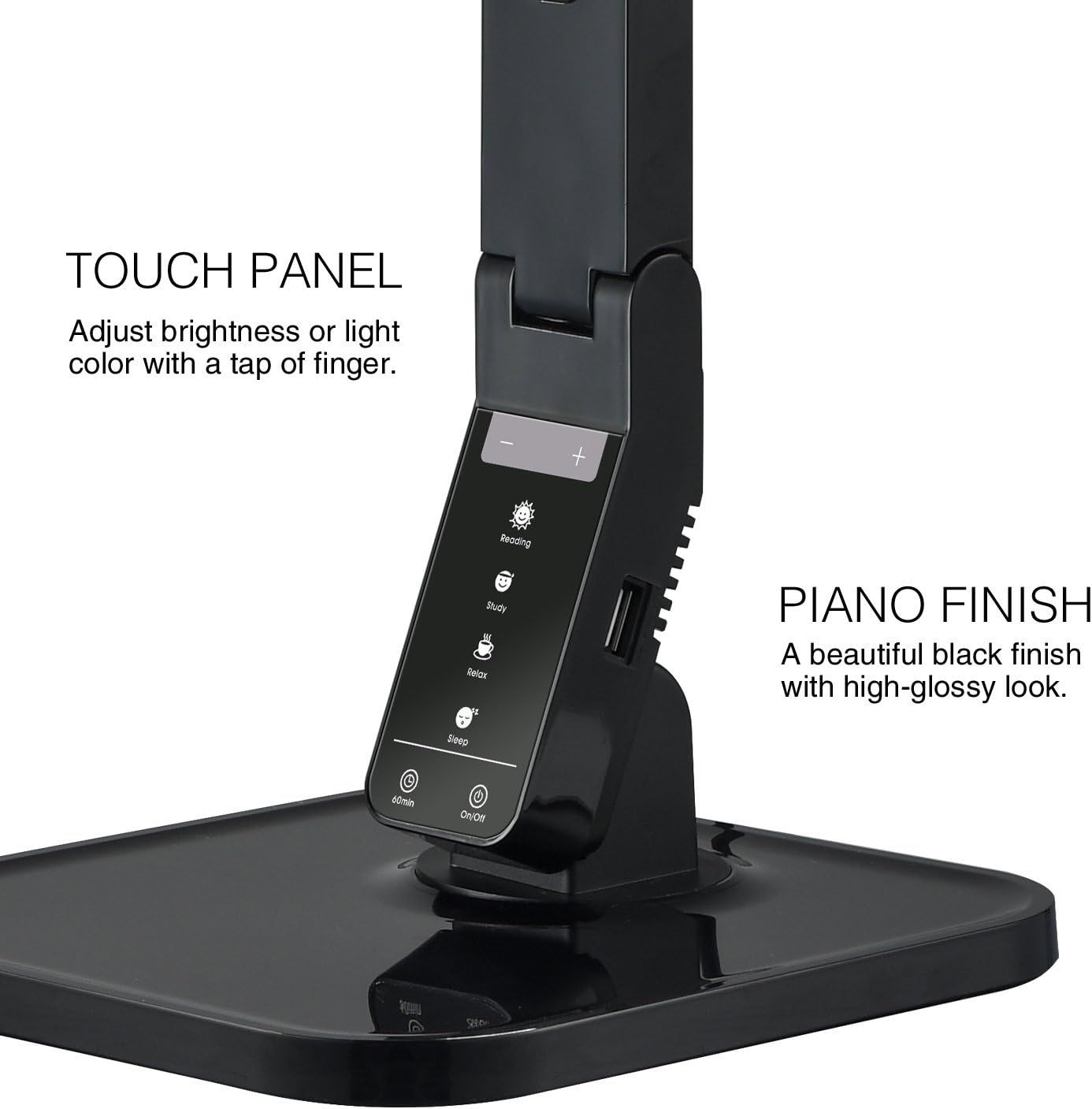
Image: The touch control panel with various light mode and brightness adjustment icons.
4.4 Коришћење USB порта за пуњење
A USB charging port is integrated into the lamp's base, allowing you to charge compatible devices such as smartphones or tablets. Simply connect your device's USB charging cable to the port.

Image: A smartphone being charged via the integrated USB port on the lamp'с басе.
4.5 Подешавање Лamp Арм
Тхе лamp features an adjustable arm that allows you to direct the light precisely where needed. The arm can be folded, extended, and swiveled to achieve optimal positioning.

Image: Illustrations demonstrating the flexibility and adjustability of the lamp's arm.
4.6 Функција тајмера
Тхе лamp includes a 60-minute timer function. To activate, press the 60мин button on the control panel. The lamp аутоматски ће се искључити након 60 минута.
4.7 Званични видео производа
Video: An official product video from Tenergy Corporation demonstrating the features and benefits of the 11W LED Desk Lamp, including its adjustable lighting, USB charging, and sleek design.
5. Одржавање
- Чишћење: За чишћење лamp, especially its glossy finish, use a soft, dry microfiber cloth. Avoid abrasive cleaners or harsh chemicals that may damage the surface.
- Складиштење: Када се не користи дуже време, чувајте гаamp на хладном и сувом месту.
КСНУМКС. Решавање проблема
- Lamp не укључује се: Уверите се да је адаптер за напајање добро прикључен у оба лamp and a working electrical outlet. Check if the outlet is receiving power.
- USB port not charging: Проверите да ли је лamp is powered on and the USB cable is properly connected to both the lamp and your device. Ensure your device is compatible with USB charging.
- Треперење светлости: If the light flickers, try unplugging the lamp for a few minutes and then plugging it back in. If the issue persists, contact customer support.
7. Спецификације
| Број модела | ФИ-0001 |
| Бранд | Тенерги |
| Ватtage | 11 вати |
| Тип извора светлости | ЛЕД |
| Бригхтнесс Левелс | 5 |
| Light Colors / Modes | 4 (Reading, Study, Relax, Sleep) |
| Контролни метод | Додирните |
| Технологија повезивања | УСБ |
| Извор напајања | Цордед Елецтриц |
| Димензије производа | 7"Д к 6.75"Ш к 16.7"В |
| Врста материјала | Пластика |
| Финисх Типе | Глосси |
8. Гаранција и подршка
For warranty information or technical support, please visit the official Tenergy webсајт или контактирајте њихову службу за кориснике. Сачувајте рачун за куповину у случају евентуалних рекламација по гаранцији.
Tenergy Store: https://www.amazon.com/stores/Tenergy/page/5AE2FFA8-E197-4708-9169-C4D8CB488E9E