
Увод
Thank you for choosing the KINGONE K5 Portable Wireless Bluetooth Speaker. This manual provides essential information for the proper setup, operation, and maintenance of your device. Please read it thoroughly before use to ensure optimal performance and longevity of your speaker.
Безбедносне информације
- Не излажите звучник екстремним температурама, директној сунчевој светлости или високој влажности.
- Избегавајте испуштање или излагање звучника јаким ударима.
- Не растављајте нити покушавајте сами да поправите звучник. То ће поништити гаранцију.
- Keep the speaker away from water and liquids. While it is waterproof, prolonged submersion or exposure to high-pressure water jets should be avoided.
- Користите само наведену јачину пуњењаtagе (DC 5V).
Садржај пакета
- KINGONE K5 Portable Wireless Bluetooth Speaker
- УСБ кабл за пуњење
- Упутство за употребу
Производ је завршенview
Упознајте се са контролама и портовима звучника.
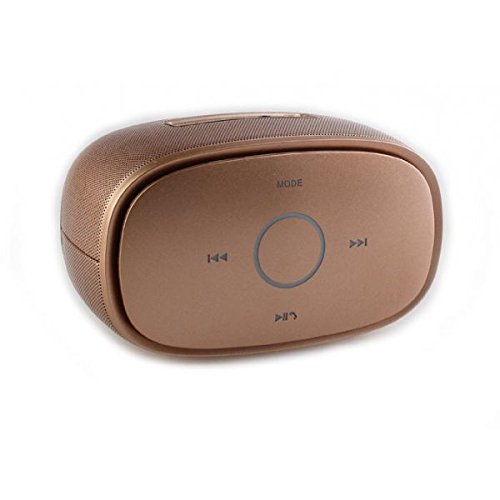
слика: Врх view of the KINGONE K5 Portable Wireless Bluetooth Speaker. The image displays the speaker's top panel, which features a central circular play/pause button, surrounded by four other buttons: 'MODE' at the top, 'previous track' (left), 'next track' (right), and 'volume down/call answer' (bottom). The speaker has a metallic brown finish with a textured grille on the sides.
Контролна дугмад:
- НАЧИН: Press to switch between Bluetooth, AUX, and other available modes.
- Previous Track (<<): Кратко притисните да бисте прешли на претходну нумеру.
- Next Track (>>): Кратко притисните да бисте прешли на следећу нумеру.
- Репродукција/Пауза (►▮▮): Press to play or pause music. Long press for power on/off.
- Volume Down/Call Answer (▼): Short press to decrease volume. During an incoming call, press to answer.
- Volume Up/Call End (▲): Short press to increase volume. During a call, press to end. (Note: Volume Up button is not explicitly visible in the provided image but is a standard function for such devices, assuming it's paired with Volume Down or integrated.)
Портови:
- Мицро УСБ порт за пуњење: За пуњење звучника.
- AUX-in порт: За жично повезивање звука.
Сетуп
1. Пуњење звучника
- Connect the small end of the USB charging cable to the Micro USB port on the speaker.
- Connect the larger end of the USB cable to a USB power adapter (DC 5V, not included) or a computer's USB port.
- Индикаторска лампица пуњења ће се упалити. Искључиће се или променити боју када се потпуно напуни.
- Потпуно пуњење обично траје отприлике 3-4 сата и омогућава до 7 сати репродукције.
2. Укључивање/искључивање
- За укључивање: Long press the Play/Pause button until you hear an audible prompt or see an indicator light.
- За искључивање: Long press the Play/Pause button again until you hear an audible prompt or the indicator light turns off.
3. Блуетоотх упаривање
- Ensure the speaker is powered on and in Bluetooth mode. If not, press the 'MODE' button to switch to Bluetooth mode. The indicator light will flash, indicating it's ready for pairing.
- Омогућите Блутут на свом паметном телефону, таблету или другом уређају који подржава Блутут.
- Тражи available Bluetooth devices. You should see "KINGONE K5" in the list.
- Select "KINGONE K5" to connect. Once paired, you will hear a confirmation sound, and the indicator light will stop flashing and remain solid.
- Звучник ће аутоматски покушати да се поново повеже са последњим упареним уређајем када се укључи.
4. Connecting via AUX (Audio Input)
- Connect one end of a 3.5mm audio cable (not included) to the AUX-in port on the speaker.
- Connect the other end of the audio cable to the headphone jack of your audio device.
- The speaker will automatically switch to AUX mode, or you may need to press the 'MODE' button to select AUX.
Оперативни
Пуштање музике
- Пусти/паузирај: Притисните дугме за репродукцију/паузу да бисте покренули или паузирали репродукцију.
- Следећа нумера: Press the Next Track (>>) button to skip to the next song.
- Претходни запис: Press the Previous Track (<<) button to go back to the beginning of the current song or to the previous song.
- Контрола јачине звука: Use the Volume Down (▼) and Volume Up (▲) buttons on the speaker to adjust the volume. You can also control the volume from your connected device.
Хандс-фрее позивање
Када је повезан путем Блутут-а, звучник се може користити за позиве без употребе руку.
- Одговори на позив: Press the Volume Down (▼) button once to answer an incoming call.
- Заврши позив: Press the Volume Up (▲) button once to end an ongoing call.
- Одбиј позив: Long press the Volume Down (▼) button to reject an incoming call.
Одржавање
Чишћење
- Обришите звучник меком, сувом или благо длакомamp тканина.
- Не користите абразивна средства за чишћење, алкохол или хемијске раствараче.
Складиштење
- Чувајте звучник на хладном и сувом месту, даље од директне сунчеве светлости и екстремних температура.
- If storing for an extended period, charge the battery periodically (e.g., every 3 months) to maintain battery health.
Баттери Царе
- Избегавајте често потпуно пражњење батерије.
- Do not leave the speaker connected to a charger for excessively long periods after it is fully charged.
Решавање проблема
| Проблем | Могући узрок | Решење |
|---|---|---|
| Звучник се не укључује. | Батерија је празна или је истрошена. | Пуните звучник најмање 30 минута. |
| Није могуће упарити са Блуетоотх уређајем. | Speaker is not in pairing mode. Bluetooth is off on your device. Speaker is already connected to another device. | Ensure speaker is in Bluetooth pairing mode (flashing indicator). Turn on Bluetooth on your device. Disconnect from other devices or restart the speaker. |
| Нема звука или је јачина звука ниска. | Volume is too low on speaker or device. Incorrect mode selected. | Increase volume on both the speaker and your connected device. Press the 'MODE' button to select the correct input (Bluetooth/AUX). |
| Изобличење звука. | Јачина звука је превисока. Уређај је превише удаљен од звучника. | Reduce volume on speaker and/or device. Move the device closer to the speaker (within 10 meters). |
Спецификације
- Назив модела: KINGONE K5
- Број модела ставке: КНГ006
- Технологија бежичне комуникације: Блуетоотх
- Блуетоотх верзија: V2.0 (as per product title)
- Тип звучника: Полица за књиге (преносива)
- Величина звучника: 2 инча
- Режим аудио излаза: Стерео (2.0 канал)
- Извор напајања: Battery Powered (Built-in Li-ion battery)
- Ратед Волtage: ДЦ 5В
- Фреквенцијски одзив: 3дБ
- Frequency Scope: 170-15КХз
- Метод контроле: Додирните
- водоотпоран: Да
- Трајање батерије: До 7 сати (приближно)
- Компатибилни уређаји: Паметни телефон, таблет
Гаранција и подршка
For warranty information or technical support, please refer to the documentation provided at the time of purchase or contact your retailer. Keep your proof of purchase for warranty claims.