
Instapark PWT-07
Instapark PWT-07 Digital Programmable Water Timer User Manual
Model: PWT-07
Увод
This manual provides detailed instructions for the setup, operation, maintenance, and troubleshooting of your Instapark PWT-07 Digital Programmable Water Timer. Please read this manual thoroughly before using the device to ensure proper function and longevity.
Безбедносне информације
- Use only 1.5V AA alkaline batteries. Do not mix old and new batteries, or different battery types.
- Ensure the battery compartment is securely closed to maintain the IP66 waterproof rating.
- Do not expose the timer to extreme temperatures or direct sunlight for prolonged periods, which may affect battery life and device performance.
- Disconnect the timer from the faucet and drain it before freezing temperatures to prevent damage.
- This device is designed for outdoor use with standard ¾” (GHS) threaded faucets.
Садржај пакета
Проверите да ли су све ставке присутне у пакету:
- Instapark PWT-07 Water Timer
- Кориснички приручник (овај документ)
- Гарантни лист
Note: 2 AA alkaline batteries are required and not included.
Карактеристике производа
- Single-station digital programmable faucet water timer.
- Impulse solenoid valve for reliable operation.
- Compatible with standard ¾” (GHS) threaded outdoor hose faucets.
- User-friendly interface with a single oversized rotary dial and 4 pushbuttons.
- Large, easy-to-read LCD display (2.1” x 1”).
- Оцена водоотпорности: ИП66.
- Built-in rain delay function (24, 48, or 72 hours).
- Manual watering option without interrupting programmed schedules.
- Detachable battery compartment for easy battery replacement.
- Low power consumption, up to 4,000 on/off cycles per battery set.
Сетуп
1. Инсталација батерије
The Instapark PWT-07 requires two (2) 1.5V AA alkaline batteries (not included).
- Пронађите одељак за батерије на задњој страни тајмера.
- Померите поклопац одељка за батерије надоле да бисте га отворили.
- Уметните две нове алкалне батерије типа АА, водећи рачуна о исправном поларитету (+/-).
- Вратите поклопац одељка за батерију на место док не кликне чврсто.
- The LCD display should illuminate, indicating successful battery installation. If the display shows a low battery indicator, remove the batteries, wait for the screen to go completely dark, then reinsert them.
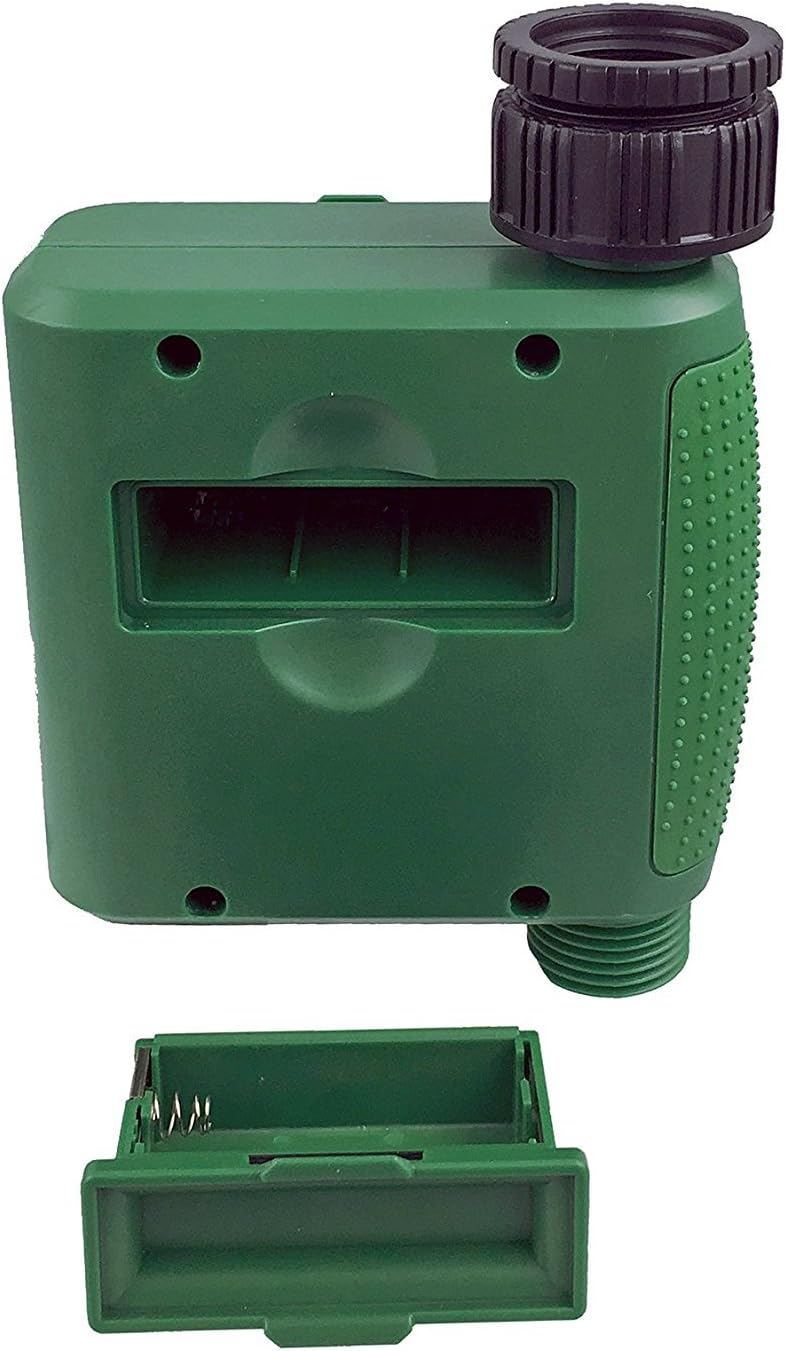
Слика 1: Одељак за батерије са уклоњеним поклопцем.
2. Mounting the Timer
Attach the timer to your outdoor faucet:
- Уверите се да је славина чиста и без прљавштине.
- Screw the timer's inlet (top connector) onto a standard ¾” (GHS) outdoor hose faucet. Hand-tighten only to prevent damage. Do not overtighten.
- Connect your garden hose or irrigation system to the timer's outlet (bottom connector). Hand-tighten securely.
- Turn on the faucet fully. The timer is designed to operate under pressure.

Figure 2: Instapark PWT-07 mounted on a faucet.
Упутство за употребу
The timer features a large rotary dial and four buttons: СЕТ, +, -, и МАНУАЛ.

Figure 3: Control panel and LCD display.
1. Подешавање тренутног времена
- Окрените окретни точкић на СЕТ ЦЛОЦК.
- Користите + и - buttons to adjust the current hour. Press СЕТ потврдити.
- Користите + и - buttons to adjust the current minute. Press СЕТ потврдити.
2. Programming Watering Schedule
The timer allows you to set a start time, duration, and frequency for watering.
Подесите време почетка:
- Окрените окретни точкић на ВРЕМЕ ПОЧЕТКА.
- Користите + и - buttons to set the desired watering start hour. Press СЕТ потврдити.
- Користите + и - buttons to set the desired watering start minute. Press СЕТ потврдити.
Set How Long (Duration):
- Окрените окретни точкић на КОЛИКО ДУГО.
- Користите + и - buttons to set the watering duration (from 5 seconds to 360 minutes). Press СЕТ потврдити.
Set How Often (Frequency):
- Окрените окретни точкић на КОЛИКО ЧЕСТО.
- Користите + и - buttons to select the watering frequency (e.g., every 10 seconds, 30 seconds, 1 minute, 3 minutes, 5 minutes, 1 hour, 2 hours, 4 hours, 12 hours, 1 day, 2 days, 3 days, 4 days, 5 days, 6 days, 7 days). Press СЕТ потврдити.
After setting all parameters, turn the rotary dial to РУН to activate the programmed schedule.
3. Ручно заливање
To water manually without affecting your programmed schedule:
- Уверите се да је бројчаник подешен на РУН or ОФФ.
- Притисните тастер МАНУАЛ button. The display will show a default manual watering duration.
- Користите + и - buttons to adjust the desired manual watering duration.
- Притисните СЕТ to start manual watering. The timer will run for the selected duration and then automatically shut off.
- To stop manual watering prematurely, press the МАНУАЛ дугме поново.
4. Функција одлагања кише
The rain delay function allows you to pause your watering schedule for a set period without losing your program settings.
- Уверите се да је бројчаник подешен на РУН.
- Притисните и држите - button for 3 seconds. The display will show "DELAY" and a default delay duration.
- Користите + и - buttons to select a delay duration of 24, 48, or 72 hours.
- Притисните СЕТ to activate the rain delay. The timer will resume its programmed schedule after the delay period ends.
- To cancel the rain delay, press and hold the - дугме поново на 3 секунди.
Одржавање
- Замена батерије: Replace batteries when the low battery indicator appears on the LCD. Always use new AA alkaline batteries.
- Чишћење: Обришите тајмер са огласомamp тканина. Немојте користити абразивна средства за чишћење или раствараче.
- Зимљење: Before the first frost, disconnect the timer from the faucet. Remove the batteries and store the timer indoors in a dry, frost-free location. Failure to do so may result in damage from freezing water.
- Екран филтера: Periodically check the filter screen inside the inlet connector for debris. Clean if necessary to ensure proper water flow.
Решавање проблема
| Проблем | Могући узрок | Решење |
|---|---|---|
| Timer does not turn on / LCD is blank. | Мртве или неправилно инсталиране батерије. | Replace with new AA alkaline batteries, ensuring correct polarity. If still blank, remove batteries, wait for screen to fully clear, then reinsert. |
| Water does not turn on at scheduled time. |
|
|
| Water does not turn off. |
|
|
| Вода цури из прикључака. |
|
|
| Low battery indicator flashes even with new batteries. | Firmware not booting correctly after battery change. | Remove batteries, wait for the LCD screen to go completely dark (may take a few minutes), then reinsert new batteries. |
Спецификације
| Модел | ПВТ-07 |
| Извор напајања | 2 x 1.5V AA Alkaline Batteries (not included) |
| Тип вентила | Импулсни соленоидни вентил |
| Радни притисак воде | 14.5 до 116 пси |
| Струја приправности | <100 µА |
| Подешавања учесталости заливања | 10s, 30s, 1m, 3m, 5m, 1h, 2h, 4h, 12h, 1d, 2d, 3d, 4d, 5d, 6d, 7d (16 settings) |
| Подешавања трајања заливања | 5s, 10s, 15s, 20s, 25s, 30s, 35s, 40s, 45s, 50s, 55s, 1-360m |
| Формат приказа времена | 24-сатни |
| Водоотпорна оцена | ИП66 |
| Материјал | АБС пластика |
| Димензије производа | 4.25"Д к 6"Ш к 2.6"В |
| Тежина артикла | 14.2 унци |
Гаранција и подршка
The Instapark PWT-07 Digital Programmable Water Timer is backed by a standard 1-year manufacturer's warranty from the date of purchase. This warranty covers defects in materials and workmanship under normal use.
For warranty claims, technical support, or any questions regarding your product, please contact Instapark customer service. Please have your purchase receipt and product model number (PWT-07) available when contacting support.
Contact information for Instapark customer service can typically be found on the manufacturer's webсајт или вашу документацију о куповини.
Ask a question about this manual
Ask about setup, troubleshooting, compatibility, parts, safety, or missing instructions. Manuals+ will review the question and use this page’s manual context to help answer it.