
1. Увод
The Amkette Trubeats S50 is a versatile smart wireless Bluetooth speaker designed to enhance your audio experience. It features multiple connectivity options including Bluetooth, USB, Micro SD card, and AUX input, along with an integrated FM radio. The speaker also includes a digital clock with alarm functions and can be controlled via a dedicated smartphone application. Additionally, it can function as a power bank to charge your mobile devices.
2. Садржај пакета
Молимо вас да означите поље за следеће ставке:
- Amkette Trubeats S50 Smart Wireless Bluetooth Speaker
- УСБ кабл за пуњење
- АУКС Цабле
- Кориснички приручник (овај документ)
3. Производ је готовview
Familiarize yourself with the various parts and controls of your Amkette Trubeats S50 speaker.
3.1 Фронт View

Слика 1: Предња страна view of the Amkette Trubeats S50 speaker, showing the speaker grille and LED display.
3.2 Горња контролна табла

Figure 2: Labeled diagram of the Amkette Trubeats S50 speaker's top control buttons: Mode, Volume Down/Previous, Play/Pause/Answer Call, Volume Up/Next, Clock, and Microphone.
- Дугме МОДЕ: Press to switch between Bluetooth, FM, AUX, USB, and Micro SD modes.
- K-/ Button: Press to decrease volume; long press for previous track/station.
- Play/Pause/Answer Call Button: Press to play/pause audio; press to answer/end calls.
- +/N Button: Press to increase volume; long press for next track/station.
- Дугме САТ: Press to set time and alarms.
- микрофон: За позивање без употребе руку.
3.3 Rear Ports and Switch

Figure 3: Labeled diagram of the Amkette Trubeats S50 speaker's rear ports: AUX, Micro SD, USB Host, USB DC, and On/Off switch.
- АУКС улаз: Повежите екстерне аудио уређаје помоћу 3.5 мм AUX кабла.
- Утор за микро СД картицу: Уметните Micro SD картицу за репродукцију звука.
- УСБ хост порт: Insert a USB drive for audio playback or use as a power bank.
- USB DC Input: Connect the USB charging cable to power the speaker.
- ОН/ОФФ прекидач: Power the speaker on or off.
4. Подешавање
4.1 Пуњење звучника
- Повежите мањи крај УСБ кабла за пуњење са USB DC Input port on the rear of the speaker.
- Повежите већи крај USB кабла за пуњење са USB адаптером за напајање (није укључен) или USB портом рачунара.
- ЛЕД индикатор ће приказивати статус пуњења. Потпуно пуњење обично траје приближно 4 сата.
Напомена: The speaker does not have a visible battery level indicator. It is recommended to charge fully before first use and when the battery is low.
4.2 Укључивање/искључивање
- To power on, slide the ОН/ОФФ прекидач on the rear of the speaker to the 'ON' position.
- Да бисте искључили напајање, померите ОН/ОФФ прекидач to the 'OFF' position.
5. Упутство за употребу
5.1 Блуетоотх упаривање

Figure 4: Speaker in Bluetooth pairing mode, indicated by 'BT' on the display.
- Power on the speaker. It will automatically enter Bluetooth pairing mode, indicated by 'BT' flashing on the LED display.
- Омогућите Блуетоотх на паметном телефону или другом уређају.
- Тражи available devices and select "Amkette S50" from the list.
- Once paired, the speaker will emit a confirmation tone, and 'BT' will stop flashing.
- Сада можете да репродукујете звук са свог уређаја преко звучника.
5.2 Коришћење AUX улаза

Figure 5: Speaker connected to a smartphone via AUX cable for wired audio playback.
- Повежите један крај 3.5 мм AUX кабла са АУКС улаз port on the rear of the speaker.
- Connect the other end of the AUX cable to the audio output jack of your external device (e.g., smartphone, MP3 player, laptop).
- Притисните тастер Дугме МОДЕ repeatedly until the speaker enters AUX mode.
- Репродукујте звук са повезаног уређаја.
5.3 Using USB/Micro SD Card
- Уметните УСБ диск у УСБ хост порт or a Micro SD card into the Утор за микро СД картицу на задњој страни звучника.
- Осигурајте свој звук files (MP3 format recommended) are stored on the drive/card.
- Притисните тастер Дугме МОДЕ repeatedly until the speaker enters USB or Micro SD mode. Playback will begin automatically.
- Користите K-/ и +/N buttons for track navigation and volume control.
Рад са 5.4 FM радиом

Figure 6: Speaker displaying FM frequency, with app control for station selection.
- Притисните тастер Дугме МОДЕ repeatedly until the speaker enters FM radio mode.
- Аутоматско скенирање: In FM mode, long press the Пусти/Паузирај button to initiate an automatic scan for available FM stations. The speaker will save detected stations.
- Ручно подешавање: Користите K-/ и +/N дугмад за навигацију кроз сачуване станице.
- For precise tuning and station management, use the Amkette Trubeats Smart Speaker App (see section 5.7).
5.5 Digital Clock and Alarm Setup

Figure 7: Speaker displaying the current time on its LED screen.
- Време подешавања: Притисните и држите Дугме ЦЛОЦК. The hour display will flash. Use the K-/ и +/N дугмад за подешавање сата. Притисните Дугме ЦЛОЦК again to set minutes, and adjust with K-/ и +/N. Притисните Дугме ЦЛОЦК још једном да потврдим.
- Подешавање аларма: Кратко притисните Дугме ЦЛОЦК to cycle through Alarm 1 and Alarm 2 settings. When an alarm time is displayed, long press the Дугме ЦЛОЦК to enter alarm setting mode. Adjust hour and minute using K-/ и +/N, confirming each with a short press of the Дугме ЦЛОЦК. You can also set the alarm source (FM/SD Card/USB) via the app.
5.6 Коришћење као преносне батерије
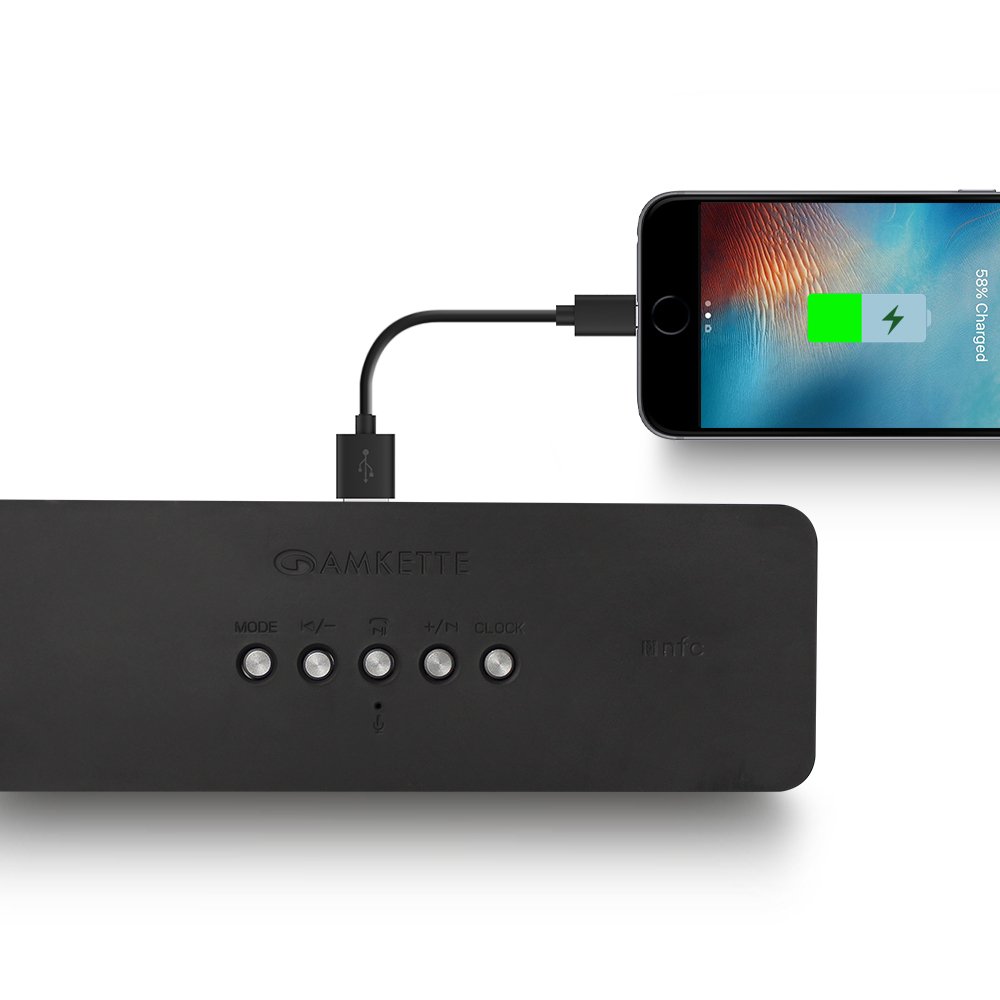
Figure 8: Speaker providing power to a smartphone through its USB Host port.
The Amkette Trubeats S50 can charge your smartphone or other USB-powered devices. Connect your device's charging cable to the УСБ хост порт on the rear of the speaker. The speaker's internal battery will then supply power to your device.
5.7 App Control (Android Only)

Figure 9: Smartphone displaying the Amkette Trubeats Smart Speaker App interface.
For enhanced control, download the Amkette Trubeats Smart Speaker App from the Google Play Store (for Android phones). The app allows you to:
- Switch between different audio modes.
- Control volume and track playback.
- Manage FM radio stations and perform precise tuning.
- Set and customize alarms, including alarm source.
Ensure your speaker is connected via Bluetooth to your smartphone for app functionality.
5.8 Управљање позивима
When connected via Bluetooth to a smartphone, the speaker can be used for hands-free calling:
- Одговори на позив: Притисните тастер Play/Pause/Answer Call Button једном.
- Заврши позив: Притисните тастер Play/Pause/Answer Call Button једном током позива.
- Одбиј позив: Дуго притисните Play/Pause/Answer Call Button.
6. Одржавање
- Keep the speaker away from extreme temperatures, direct sunlight, and moisture.
- Очистите звучник меком, сувом крпом. Не користите абразивна средства за чишћење или раствараче.
- Избегавајте испуштање звучника или његово излагање јаким ударцима.
- When not in use for extended periods, store the speaker in a cool, dry place and charge it periodically to maintain battery health.
КСНУМКС. Решавање проблема
| Проблем | Могући узрок | Решење |
|---|---|---|
| Звучник се не укључује. | Батерија је празна. | Потпуно напуните звучник. |
| Нема звука из звучника. | Јачина звука је прениска; изабран је погрешан режим; уређај није правилно повезан. | Increase speaker and source device volume. Ensure correct mode (Bluetooth, AUX, etc.) is selected. Reconnect the device. |
| Блуетоотх упаривање није успело. | Звучник није у режиму упаривања; уређај је предалеко; сметње. | Ensure speaker is in pairing mode ('BT' flashing). Move device closer to speaker. Turn off other Bluetooth devices. |
| Слаб ФМ радио пријем. | Слаб сигнал; сметње из околине. | Relocate the speaker to an area with better reception. Perform an auto-scan again. |
| App not connecting to speaker. | Bluetooth not connected; app issue. | Ensure speaker is paired via Bluetooth to your phone. Restart the app and try again. |
8. Спецификације
- Модел: С50
- Бренд: Амкетте
- Тип звучника: Portable Bluetooth Speaker (Outdoor)
- Повезивање: Bluetooth, USB, Micro SD, AUX, FM Radio
- Технологија бежичне комуникације: Блуетоотх
- Метод контроле: Buttons, App (Android)
- Режим аудио излаза: Стерео
- Аудио Ватtage: 10 Ваттс
- Извор напајања: Баттери Поверед
- Трајање батерије: До 12 сати (просечно)
- Време пуњења: Отприлике 4 сата
- Компатибилни уређаји: Laptop, Mobile, Tablet
- Димензије (ДкШкВ): 26.7 к 10.9 к 7.9 цм
- Тежина артикла: 703 грама
- водоотпоран: Да
- Тип монтаже: Таблетоп Моунт
9. Гаранција и подршка
The Amkette Trubeats S50 Smart Wireless Bluetooth Speaker comes with a 1 година гаранције од датума куповине. Ова гаранција покрива производне недостатке при нормалној употреби.
For warranty claims, technical assistance, or any other support inquiries, please contact Amkette customer support through their official webсајт или контакт информације које сте добили уз документацију о куповини.
Молимо вас да сачувате рачун као доказ о куповини у сврху гаранције.