
1. Увод
This manual provides comprehensive instructions for the installation, operation, and maintenance of your ASUS Prime Z270M-PLUS motherboard. Please read this manual thoroughly before installing or using the product to ensure correct setup and optimal performance.
2. Безбедносне информације
Observe the following safety precautions to prevent damage to the motherboard and injury to yourself:
- Увек искључите кабл за напајање из зидне утичнице пре него што додирнете било које компоненте.
- Wear an anti-static wrist strap or frequently touch a grounded object to discharge static electricity before handling components.
- Држите компоненте за ивице како бисте избегли додиривање осетљивих делова.
- Обезбедите одговарајућу вентилацију унутар кућишта рачунара како бисте спречили прегревање.
- Држите матичну плочу даље од влаге и екстремних температура.
3. Садржај пакета
Проверите да ли су све ставке присутне у вашем пакету:
- ASUS Prime Z270M-PLUS Motherboard
- SATA кабл(ови)
- Упутство за употребу
4. Производ је готовview
The ASUS Prime Z270M-PLUS is a micro-ATX motherboard designed for Intel LGA 1151 socket processors. It features robust hardware safeguards, advanced cooling controls, and high-speed connectivity options.
Кључне карактеристике:
- 5X заштита III: Hardware-level safeguards to ensure component longevity and reliability against electrical overloads.
- ЛЕД осветљење: Customizable lighting control for PCIe slots.
- Fan Xpert 4 Core: Advanced fan controls for optimized cooling and reduced noise.
- Dual Native M.2 and NVMe PCIe RAID Support: Provides high-speed storage solutions.
- УСБ типа Ц: Convenient and reversible connectivity.
- Подршка за DDR4: Supports memory speeds up to 3866 MHz.
- аудио: Realtek ALC887 8-channel high-definition audio.
- Подршка за више ГПУ: Features AMD CrossFireX Technology.

Слика 4.1: Одозго надоле view of the ASUS Prime Z270M-PLUS motherboard, highlighting the CPU socket, RAM slots, and PCIe slots.

Слика 4.2: Под углом view of the ASUS Prime Z270M-PLUS motherboard, showcasing its various components and heatsinks.
5. Подешавање
5.1. Инсталација процесора
- Пронађите ЛГА 1151 утичницу на матичној плочи.
- Отворите полугу процесорског утичнице и подигните плочу за оптерећење.
- Пажљиво поравнајте процесор са утичницом, водећи рачуна да се златни троугао на процесору поклапа са троуглом на утичници.
- Пажљиво поставите процесор у утичницу без присиљавања.
- Затворите плочу за оптерећење и притисните ручицу надоле док се не закључа на своје место.
5.2. Инсталација меморије (RAM)
The motherboard supports DDR4 memory up to 64GB with speeds up to 3866 MHz.
- Отворите копче на оба краја DIMM слота.
- Поравнајте зарез на DDR4 меморијском модулу са кључем у DIMM слоту.
- Чврсто уметните меморијски модул у слот док се клипови не уклопе на место.
5.3. Инсталација уређаја за складиштење
The motherboard supports SATA III devices and NVMe PCIe M.2 drives.
- SATA уређаји: Connect SATA data cables from your storage drives (HDDs/SSDs) to the SATA III ports on the motherboard. Connect power cables from your power supply to the drives.
- М.2 уређаји: Locate the M.2 slot. Insert the M.2 drive at an angle and secure it with the provided screw.
5.4. Инсталација картице за проширење
The motherboard features PCIe 3.0 slots for graphics cards and other expansion cards.
- Align the expansion card with the appropriate PCIe slot.
- Чврсто притисните надоле док картица не легне правилно и копча за задржавање се не закључа.
- Secure the card to the PC case with a screw.
5.5. Прикључци за напајање
Connect the 24-pin ATX power connector and the 8-pin ATX 12V power connector from your power supply to the corresponding ports on the motherboard.
5.6. Прикључци на предњој плочи
Connect the cables from your PC case's front panel (USB ports, audio jacks, power button, reset button, LED indicators) to the corresponding headers on the motherboard. Refer to the motherboard diagram in your physical manual for exact header locations.
5.7. Задња У/И плоча
Задњи И/О панел пружа разне портове за повезивање екстерних уређаја.
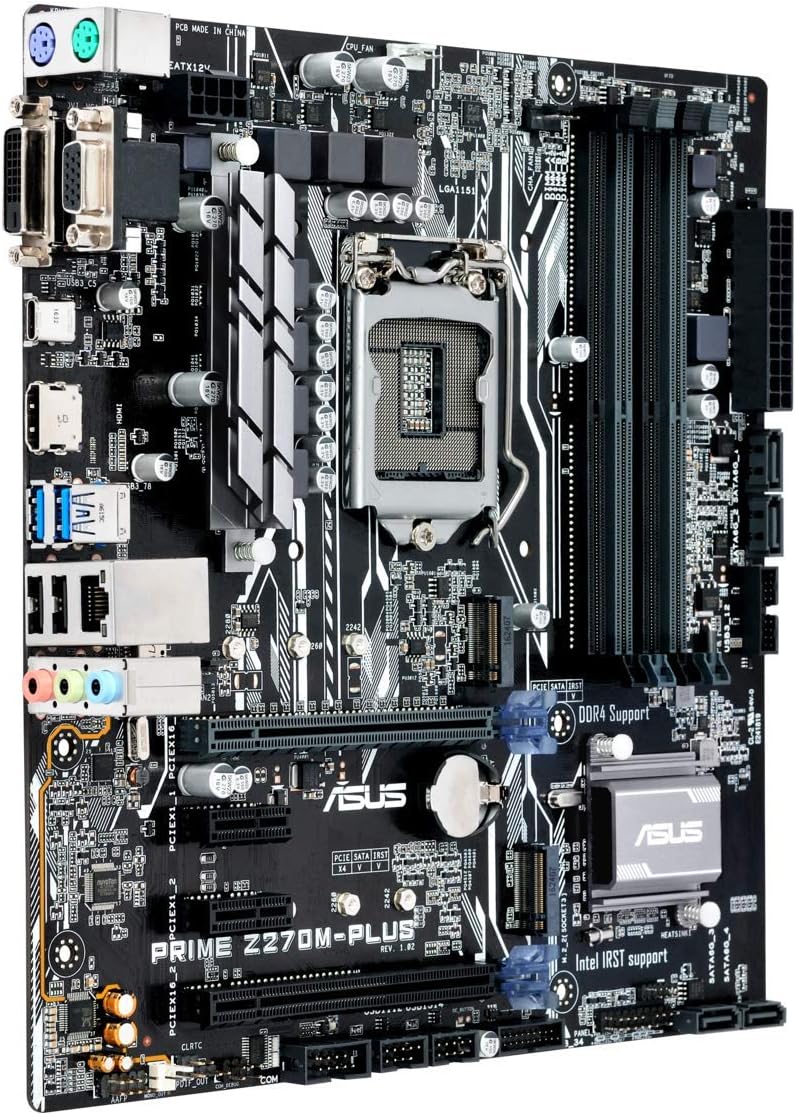
Figure 5.1: Rear I/O panel of the ASUS Prime Z270M-PLUS motherboard, showing various connectivity ports.
Common ports include:
- PS/2 Keyboard/Mouse Combo Port
- ДВИ-Д порт
- ВГА порт
- ХДМИ порт
- УСБ 3.0 портови
- УСБ 2.0 портови
- LAN (RJ-45) Port
- Audio Jacks (Line In, Line Out, Microphone)
6. Оперативни
6.1. Почетно покретање и подешавање BIOS-а/UEFI-ја
Upon the first power-on, the system will typically enter the BIOS/UEFI setup utility. Here you can configure system settings, boot order, and monitor hardware status. Press the ДЕЛ key during startup to enter the BIOS/UEFI.
6.2. Инсталација драјвера
After installing your operating system, install the necessary drivers for the motherboard components (chipset, audio, LAN, graphics, etc.). These drivers are typically provided on a support DVD or can be downloaded from the ASUS official webсајту.
6.3. System Boot
Once the operating system and drivers are installed, your system should boot normally. Ensure all peripherals are connected correctly.
7. Одржавање
7.1. Чишћење
Regularly clean your PC case and motherboard to prevent dust buildup, which can lead to overheating and component failure. Use compressed air to remove dust from fans, heatsinks, and other components. Ensure the system is powered off and unplugged before cleaning.
7.2. Ажурирања BIOS-а
Периодично проверавајте подршку за ASUS webсајт за ажурирања BIOS-а. Ажурирања BIOS-а могу побољшати стабилност система, додати подршку за нови хардвер или поправити грешке. Пажљиво пратите упутства која је дао ASUS приликом ажурирања BIOS-а како бисте избегли оштећење система.
КСНУМКС. Решавање проблема
If you encounter issues with your motherboard, consider the following general troubleshooting steps:
- Нема напајања: Ensure all power cables (24-pin ATX, 8-pin CPU) are securely connected. Check your power supply unit (PSU) for functionality.
- Без приказа: Verify that your graphics card is properly seated and connected to the monitor. If using integrated graphics, ensure your monitor is connected to the motherboard's video output. Try reseating RAM modules.
- Нестабилност/падови система: Check for overheating. Ensure all drivers are up to date. Test memory modules individually.
- Компонента није откривена: Уверите се да је компонента (нпр. чврсти диск, картица за проширење) правилно инсталирана и да су сви потребни каблови повезани. Проверите подешавања BIOS-а да бисте се уверили да је компонента омогућена.
- Ресетовање BIOS-а: If system settings become unmanageable, you can clear the CMOS by removing the CMOS battery for a few minutes or using the Clear CMOS jumper (refer to your physical manual for location).
9. Спецификације
| Феатуре | Спецификација |
|---|---|
| Назив модела | Prime Z270M-PLUS |
| ЦПУ Соцкет | ЛГА 1151 |
| Компатибилни процесори | Celeron, Core i3, Core i5, Core i7, Pentium (14nm CPUs) |
| Чипсет | Интел З270 |
| Технологија меморије | ДДР4 |
| Max. Memory Capacity | 64 ГБ |
| Брзина меморије | До 3866 МХз |
| Интерфејси за складиштење | SATA III, Dual Native M.2 (NVMe PCIe support) |
| Слотови за проширење | ПЦИе 3.0 |
| УСБ портови | USB 3.0, USB 2.0, USB Type-C |
| Видео Оутпут | HDMI, DVI-D, VGA (via integrated graphics) |
| Аудио | Реалтек АЛЦ887 8-канални звук високе дефиниције |
| ЛАН | 1к Гигабит Етхернет |
| Форм Фацтор | mATX (23 x 20 x 2 cm) |
| Тежина | 900 г |
| Број модела произвођача | Б990М80 |
10. Информације о гаранцији
The product warranty for the ASUS Prime Z270M-PLUS motherboard is not applicable as per the provided product information. Please refer to your point of purchase or local ASUS support for specific warranty terms and conditions that may apply in your region.
11. Подршка
For further assistance, technical support, or driver downloads, please visit the official ASUS support webсајт. Тамо можете пронаћи и додатне ресурсе и често постављана питања.
Званични ASUS Webсајт: ввв.асус.цом
Продавница бренда ASUS: ASUS Spain Store on Amazon