
MIDAS DM16
MIDAS DM16 User Manual
16 улазних аналогних живих и студијских миксера
1. Увод
This manual provides comprehensive instructions for the operation and maintenance of your MIDAS DM16 16 Input Analogue Live and Studio Mixer. The DM16 is designed for both live performance and studio recording environments, featuring award-winning MIDAS microphone preamplifiers and robust construction.
Please read this manual thoroughly before operating the device to ensure proper usage and to maximize its lifespan.
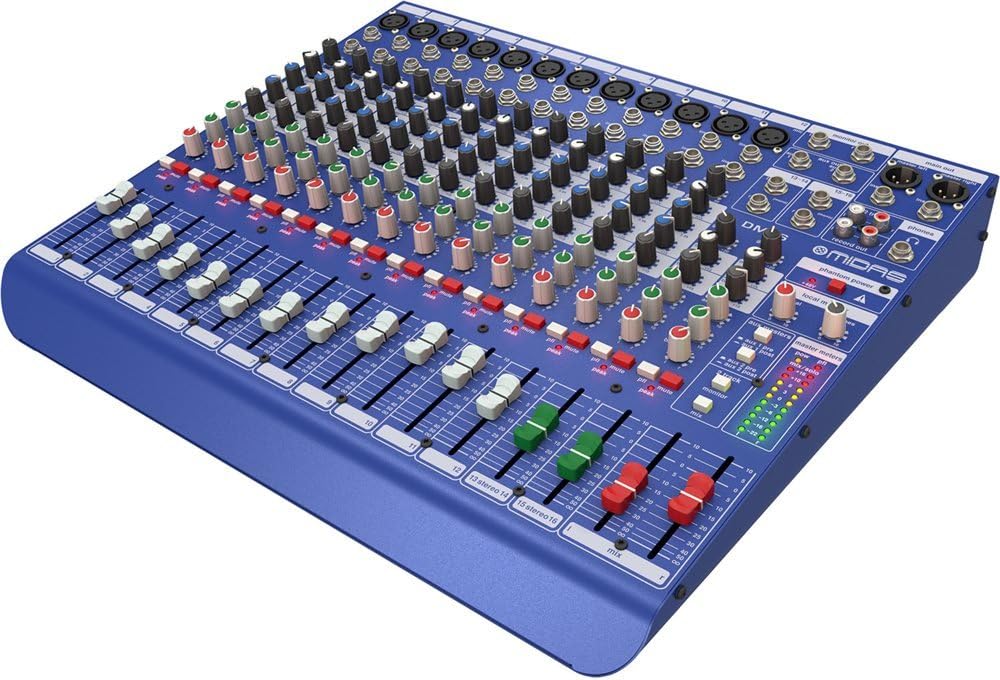
Слика 1.1: Предњи угаони положај view of the MIDAS DM16 mixer.
2. Подешавање
2.1 Распакивање и преглед
Upon receiving your MIDAS DM16, carefully unpack the unit and inspect it for any signs of damage that may have occurred during transit. Retain the original packaging materials for future transport or storage.
Укључено у кутију:
- МИДАС ДМ16 аналогни миксер уживо и студијски миксер са 16 улаза
- Повер Цорд
- Кориснички приручник (овај документ)
2.2 Прикључак за напајање
The DM16 operates on a standard AC power supply. Connect the provided power cord to the AC inlet on the rear panel of the mixer and then to a suitable power outlet. Ensure the power switch is in the 'Off' position before connecting to power.
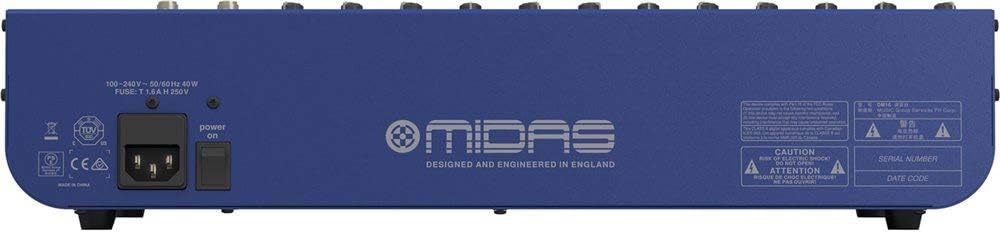
Figure 2.1: Rear panel of the MIDAS DM16 showing power input and warnings.
2.3 Улазне и излазне везе
The DM16 features a variety of input and output options for connecting microphones, instruments, and other audio devices.
- Улази за микрофон: 12 mono input channels with XLR connectors for microphones. These channels feature MIDAS microphone preampлифиерс.
- Линијски улази: 2 electronically-balanced stereo line input channels on 1/4" TRS connectors for instruments or line-level devices.
- Главни излази: Connect to your main PA system or recording interface.
- Помоћни слање: For monitor mixes or effects sends.
- Излаз за слушалице: For monitoring audio.
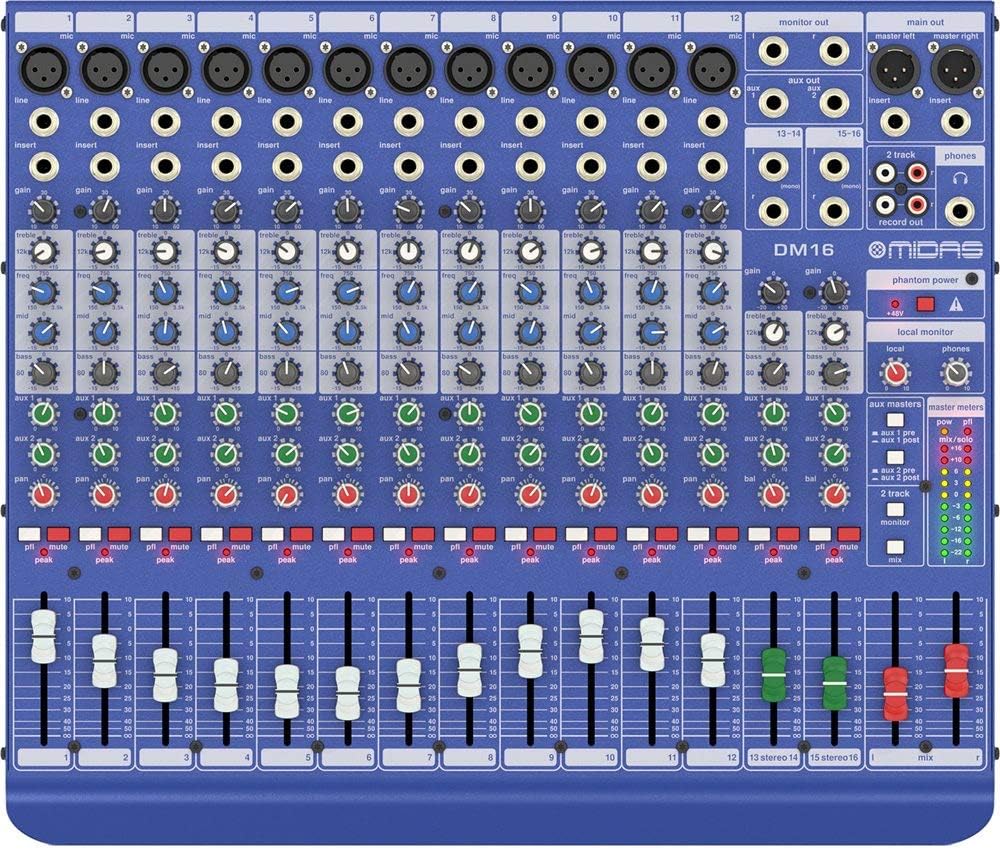
Слика 2.2: Врх view of the MIDAS DM16 showing all input/output connections and controls.
3. Упутство за употребу
3.1 Контроле канала
Each mono input channel on the DM16 features the following controls:
- ДОБИТАК: Adjusts the input sensitivity for the microphone preampлифиер.
- ЕК: A 3-band equalizer with a swept mid-band for precise tone shaping.

Слика 3.1: Детаљно view of the 3-band EQ section on a mono channel.
- AUX 1/2: Controls the level sent to the auxiliary outputs. These can be switched pre/post fader.

Figure 3.2: Aux masters section with pre/post fader switching.
- ПАН: Adjusts the stereo position of the channel.
- МУТЕ: Silences the channel.
- ПЕАК ЛЕД: Indicates when the input signal is clipping.
- ФАДЕР: Controls the output level of the channel to the main mix.

Figure 3.3: Channel faders for precise level control.
3.2 Фантомско напајање
The DM16 provides +48V phantom power for condenser microphones. This is a global switch, meaning it applies to all microphone inputs simultaneously. Ensure all connections are made before activating phantom power to prevent damage to non-phantom powered devices.

Figure 3.4: Phantom power switch.
3.3 Мониторинг
Use the headphone output and monitor controls to listen to the main mix or specific auxiliary sends. The monitor section includes controls for local monitor and phones output levels.

Figure 3.5: Monitor and headphone controls.
4. Одржавање
Proper maintenance ensures the longevity and optimal performance of your MIDAS DM16 mixer.
- Чишћење: Use a soft, dry cloth to clean the exterior of the mixer. Avoid abrasive cleaners or solvents that could damage the finish or controls.
- Заштита од прашине: Keep the mixer covered when not in use to prevent dust accumulation, especially around faders and knobs.
- вентилација: Обезбедите адекватан проток ваздуха око уређаја како бисте спречили прегревање. Не блокирајте вентилационе отворе.
- Складиштење: Store the mixer in a cool, dry environment away from direct sunlight and extreme temperatures.
КСНУМКС. Решавање проблема
This section addresses common issues you might encounter with your DM16 mixer.
- Нема напајања:
- Check if the power cord is securely connected to both the mixer and the power outlet.
- Проверите да ли је утичница функционална.
- Уверите се да је прекидач за напајање на задњој плочи у положају „Укључено“.
- Нема излаза звука:
- Проверите све кабловске везе на улазу и излазу.
- Ensure channel faders and the main mix fader are raised.
- Verify that the MUTE buttons on active channels are not engaged.
- Check the gain settings for each channel.
- Confirm that your connected speakers or monitoring system are powered on and functioning correctly.
- Изобличен звук:
- Reduce the GAIN setting on the input channel if the PEAK LED is frequently illuminating.
- Lower the output level of the connected source device.
- Проверите да ли има неисправних каблова.
- Зујање или шум:
- Уверите се да су сви каблови правилно заштићени и у добром стању.
- Check for ground loops; try connecting all audio equipment to the same power strip.
- Држите аудио каблове даље од каблова за напајање.
Ако наиђете на проблеме који нису овде обрађени, погледајте одељак за подршку.
6. Спецификације
| Феатуре | Детаљ |
|---|---|
| Врста производа | Аналогни миксер уживо и студијски миксер |
| Улазних канала | 16 (12 моно, 2 стерео) |
| Микрофон Преampослободиоци | Award-winning MIDAS preampослободиоци |
| EQ on Mono Channels | 3-band with swept mid band |
| Аук Сендс | 2 (with pre/post fader switching) |
| Извор напајања | Цордед Елецтриц |
| Тежина артикла | 11.02 фунте (5.0 кг) |
| Димензије производа (Д к Ш к В) | 17.24 к 14.57 к 3.74 инча (438 к 370 к 95 мм) |
| Земља порекла | Кина |
| Број модела | ДМ16 |
| Технологија повезивања | Аукилиари |
7. Гаранција и подршка
7.1 Информације о гаранцији
Your MIDAS DM16 mixer is covered by a limited warranty against defects in materials and workmanship. Please refer to the warranty card included with your product or visit the official MIDAS webсајт за детаљне услове гаранције.
Напомена: The warranty may not cover damage caused by improper use, unauthorized modifications, or natural disasters.
7.2 Корисничка подршка
For technical assistance, troubleshooting, or service inquiries, please contact MIDAS customer support through their official webсајт или контакт информације наведене у документацији вашег производа.
Онлине ресурси:
- Official MIDAS Webсајт: ввв.мидасцонсолес.цом
- Product Support Page: (Specific link if available, otherwise general webсајт)
When contacting support, please have your product model number (DM16) and serial number ready.
Ask a question about this manual
Ask about setup, troubleshooting, compatibility, parts, safety, or missing instructions. Manuals+ will review the question and use this page’s manual context to help answer it.