
Увод
This manual provides essential instructions for the installation, operation, and maintenance of your RISCO RPKEL0WT000A Elegant Touch Keypad. This device features an ultra-flat design with a 7-inch touchscreen, adjustable contrast and backlight, and adjustable buzzer volume. It is compatible with all versions of ProSYS systems.
Производ је завршенview
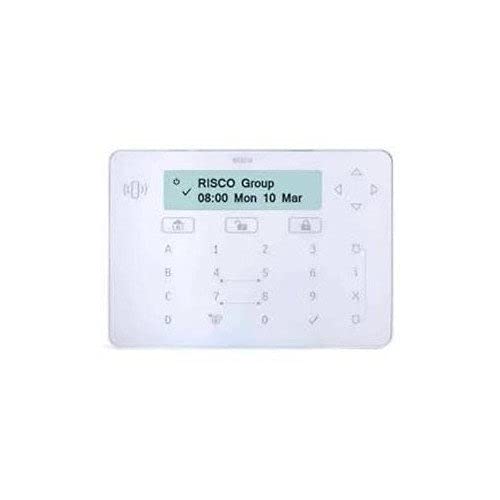
Слика 1: Предња страна view of the RISCO RPKEL0WT000A Elegant Touch Keypad, showcasing its sleek design and touchscreen interface.
Сетуп
1. Распакивање и садржај пакета
Carefully open the product packaging and ensure all components are present. The package should contain:
- RISCO RPKEL0WT000A Elegant Touch Keypad (Plastic material)
- УСБ кабл
- Ovo uputstvo za upotrebu
2. Физичка инсталација
The keypad is designed for indoor use. Choose a suitable location for installation, ensuring it is easily accessible and protected from extreme temperatures or moisture. Mount the keypad securely using appropriate hardware (not included, unless specified in packaging). Connect the USB cable to the keypad and to your ProSYS system or designated connection point.
3. Прво укључивање
Connect the power cable to the keypad and a suitable power source. The keypad will initiate its startup sequence. Follow any on-screen prompts for initial configuration or system pairing with your ProSYS system.
Упутство за употребу
1. Основне функције
- Интерфејс екрана на додир: Navigate through menus and input commands using the 7-inch touchscreen.
- Подесиво позадинско осветљење: The keypad features a backlight. Adjust its intensity via the system settings for optimal visibility in various lighting conditions.
- Adjustable Buzzer Volume: The integrated buzzer provides audible feedback. Adjust its volume through the system settings to suit your preference.
2. Компатибилност система
This keypad is compatible with all versions of RISCO ProSYS security systems. Ensure your ProSYS system is updated to the latest firmware for optimal performance and feature compatibility.
3. Keypad Layout and Input
The virtual keypad features a QWERTY layout with 104 keys, providing a familiar input experience for text and numerical entries. Use the touchscreen to select characters and functions.
Одржавање
1. Cleaning the Keypad
To clean the touchscreen and plastic casing, use a soft, lint-free cloth slightly dampened with water or a mild, non-abrasive cleaning solution. Do not spray cleaners directly onto the keypad. Avoid using harsh chemicals, solvents, or abrasive materials, as these can damage the surface.
2. Ажурирања софтвера
Information regarding guaranteed software updates for this product is not available. Please refer to the official RISCO website or your system integrator for any available firmware updates for your ProSYS system, which may include updates relevant to the keypad's functionality.
Решавање проблема
If you encounter issues with your RISCO RPKEL0WT000A keypad, please refer to the following common troubleshooting steps:
- Тастатура не реагује: Ensure the USB cable is securely connected and the keypad is receiving power. Try restarting the ProSYS system.
- Проблеми са приказом: Check the backlight settings in the system menu. If the screen remains blank, verify power connection.
- Buzzer Not Working: Check the buzzer volume settings in the system menu.
- Проблеми са повезивањем: Ensure the keypad is properly paired or connected to your ProSYS system according to the system's installation guide.
For persistent issues, consult the comprehensive ProSYS system manual or contact RISCO technical support.
Спецификације
| Феатуре | Детаљ |
|---|---|
| Број модела | РПКЕЛ0ВТ000А |
| Бранд | Risco |
| Произвођач | РИСЦО |
| ASIN | B01MTO9ECQ |
| ГТИН/УПЦ | 712073720180 |
| Дисплаи | 7-инчни екран осетљив на додир |
| Посебне карактеристике | Backlit, Adjustable Buzzer Volume |
| Технологија повезивања | УСБ |
| Компатибилни уређаји | ProSYS Systems |
| Опис тастатуре | Gaming (Note: This description might be a misclassification from the source data, as it's a security keypad.) |
| Распоред тастатуре | КВЕРТИ |
| Број кључева | 104 (virtual) |
| Материјал | Пластика |
| Извор напајања | Кабл Електрик |
| Укључене компоненте | УСБ кабл |
Информације о гаранцији
Specific warranty details for the RISCO RPKEL0WT000A Elegant Touch Keypad are not provided in this manual. For comprehensive warranty information, please refer to the official RISCO website or contact your authorized RISCO dealer or installer.
Подршка
For technical assistance, product inquiries, or further support, please visit the official RISCO website or contact your local RISCO support representative. Contact information can typically be found on the RISCO webсајту или преко вашег добављача производа.