
1. Увод
This manual provides detailed instructions for the safe and effective operation of your Profile 191000001 Digital Multimeter. This device is designed for measuring DC/AC voltage, DC current, resistance, diode forward voltage drop, and transistor hFE. Please read this manual thoroughly before use and retain it for future reference.
2. Безбедносне информације
WARNING: Failure to follow these safety instructions can result in electric shock, fire, or personal injury.
- Увек се уверите да је мултиметар у добром радном стању пре употребе. Проверите да ли су мерни каблови оштећени.
- Немојте примењивати више од оцењеног волtage (600V DC/AC) between the terminals or between any terminal and ground.
- Будите изузетно опрезни када радите са волtagизнад 30V AC RMS, 42V вршне струје или 60V DC. Ови напониtagпредстављају опасност од удара.
- Увек искључите мерне каблове из кола пре промене функција.
- Не покушавајте да мерите струју на колу са вол.tagе преко 600В.
- Ensure the correct function and range are selected for the measurement.
- Замените батерије када се појави индикатор празне батерије како бисте осигурали тачна очитавања.
- Не користите мултиметар у експлозивним атмосферама или у присуству запаљивих гасова или прашине.
3. Садржај пакета
Проверите да ли се у вашем пакету налазе све ставке наведене у наставку:
- Проfile 191000001 Дигитални мултиметар
- One pair of Test Leads (Red and Black)
- Transistor hFE Test Adapter
- 2 x 1.5V AAA Batteries (may be pre-installed)
- Упутство за употребу

Figure 1: The Profile 191000001 Digital Multimeter, including the main unit, red and black test leads, and the hFE transistor test adapter.
4. Подешавање
4.1. Инсталација батерије
The multimeter requires two 1.5V AAA batteries for operation. These are typically included and may be pre-installed. If not, or if replacement is needed:
- Уверите се да је мултиметар искључен.
- Пронађите поклопац одељка за батерије на задњој страни уређаја.
- Користите одвијач да бисте одврнули завртањ који причвршћује поклопац.
- Insert the two AAA batteries, observing the correct polarity (+ and - markings).
- Вратите поклопац одељка за батерије и причврстите га завртњем.
4.2. Повезивање мерних каблова
The test leads are essential for making measurements. Connect them as follows:
- Уметните црни мерни кабл у 'COM' (Common) прикључак.
- За већину запреминеtage, resistance, and diode measurements, insert the red test lead into the 'VΩmA' jack.
- For current measurements up to 10A, insert the red test lead into the '10A' jack.
5. Упутство за употребу
The multimeter features a rotary switch to select the desired measurement function and range. The display will show the measurement value.
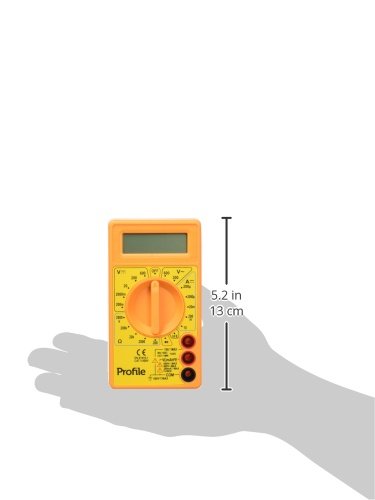
Figure 2: The Profile 191000001 Digital Multimeter with an overlay indicating its approximate dimensions (13 cm height).
5.1. Мерење једносмерне струје (DC Vol)tage (V---)
- Connect the red test lead to the 'VΩmA' jack and the black test lead to the 'COM' jack.
- Поставите ротациони прекидач на жељену јачину једносмерне струјеtage range (e.g., 20V, 200V, 600V). If the voltagАко је е непознато, почните са највишим опсегом и смањите га по потреби.
- Повежите мерне каблове паралелно преко компоненте или кола које се мери.
- Прочитајте књtagе вредност на дисплеју.
5.2. Меасуринг АЦ Волtagе (В~)
- Connect the red test lead to the 'VΩmA' jack and the black test lead to the 'COM' jack.
- Поставите ротациони прекидач на жељену јачину наизменичне струјеtagопсег (нпр. 200V, 600V).
- Connect the test leads in parallel across the AC source or component.
- Прочитајте књtagе вредност на дисплеју.
5.3. Measuring DC Current (A---)
CAUTION: To avoid damage to the multimeter or the circuit, never connect the multimeter in parallel when measuring current. Always connect it in series.
- For currents up to 200mA, connect the red test lead to the 'VΩmA' jack. For currents up to 10A, connect the red test lead to the '10A' jack. The black test lead always connects to 'COM'.
- Set the rotary switch to the desired DC Current range (e.g., 200µA, 2mA, 20mA, 200mA, 10A).
- Отворите коло у којем треба мерити струју и повежите мултиметар серијски.
- Очитајте тренутну вредност на дисплеју.
5.4. Мерење отпора (Ω)
- Connect the red test lead to the 'VΩmA' jack and the black test lead to the 'COM' jack.
- Подесите ротациони прекидач на жељени опсег отпора (нпр. 200Ω, 2kΩ, 20kΩ, 200kΩ, 2MΩ).
- Уверите се да је коло или компонента без напона пре мерења отпора.
- Повежите мерне каблове преко компоненте.
- Очитајте вредност отпора на дисплеју.
5.5. Test diode
- Connect the red test lead to the 'VΩmA' jack and the black test lead to the 'COM' jack.
- Set the rotary switch to the diode symbol (→|).
- Спојите црвени кабл на аноду, а црни кабл на катоду диоде. На дисплеју ће се приказати интензитет струје.tagе дроп.
- Reverse the leads. The display should show 'OL' (Overload) for a good diode.
5.6. Транзистор хФЕ Тест
- Set the rotary switch to the 'hFE' position.
- Insert the transistor hFE test adapter into the designated sockets on the multimeter.
- Identify if the transistor is NPN or PNP and its Emitter (E), Base (B), Collector (C) terminals.
- Insert the transistor leads into the corresponding holes on the hFE adapter.
- Read the hFE (DC current gain) value on the display.
6. Одржавање
6.1. Замена батерије
When the low battery indicator appears on the display, replace the batteries promptly to ensure accurate measurements. Refer to Section 4.1 for battery installation instructions.
6.2. Чишћење
Да бисте очистили мултиметар, обришите кућиште адamp крпом и благим детерџентом. Не користите абразивна средства или раствараче. Уверите се да је уређај потпуно сув пре употребе.
6.3. Складиштење
If the multimeter is not used for an extended period, remove the batteries to prevent leakage and store the device in a cool, dry place away from direct sunlight.
КСНУМКС. Решавање проблема
- Нема дисплеја или бледи дисплеј: Check battery charge and ensure they are correctly installed. Replace batteries if necessary.
- 'OL' (Overload) on display: The measured value exceeds the selected range. Switch to a higher range.
- Нетачна очитавања: Ensure test leads are properly connected, the correct function and range are selected, and the batteries are not low. Verify the circuit is de-energized for resistance measurements.
- No reading for current: Ensure the multimeter is connected in series with the circuit and the correct current jack (VΩmA or 10A) is used for the red lead.
8. Спецификације
| Феатуре | Спецификација |
|---|---|
| Број модела | 191000001 |
| Max DC/AC Voltage | 600В |
| Max DC Current | 10А |
| Ресистанце Меасуремент | Да |
| Диоде Меасуремент | Да |
| Транзистор хФЕ Меасуремент | Да |
| Извор напајања | 2 к 1.5 В ААА батерије |
| Димензије производа (Д к Ш к В) | КСНУМКС к КСНУМКС к КСНУМКС цм (КСНУМКС к КСНУМКС к КСНУМКС инча) |
| Тежина производа | 0.22 кг (0.48 лбс) |
| Произвођач | Eltra N.V. |
9. Гаранција и подршка
9.1. Гаранција
This Profile 191000001 Digital Multimeter comes with a 2-year warranty from the date of purchase, covering manufacturing defects. This warranty does not cover damage caused by misuse, unauthorized modification, accident, or normal wear and tear.
9.2. Корисничка подршка
For technical assistance, warranty claims, or further inquiries, please contact your retailer or the manufacturer's customer support channels. Please have your product model number and proof of purchase ready when contacting support.