
OSD Audio ACE870
OSD 8" Trimless Ceiling Speaker Instruction Manual
Model: ACE870 | Brand: OSD Audio
1. Увод
This manual provides comprehensive instructions for the installation, operation, and maintenance of your OSD Audio ACE870 8" Trimless Ceiling Speaker. Designed for LCR (Left, Center, Right) home theater surround sound applications, this speaker features a trimless grille for a seamless appearance and advanced audio components for an immersive listening experience. Please read this manual thoroughly before installation and use to ensure proper setup and optimal performance.

Figure 1.1: The OSD ACE870 Trimless Ceiling Speaker with its grille removed, showcasing the internal components and the trimless design.
2. Безбедносне информације
Always adhere to the following safety guidelines to prevent damage to the speaker, property, or personal injury:
- Ensure all power to the installation area is disconnected before beginning any wiring or installation work.
- Consult a qualified electrician if you are unsure about electrical wiring.
- Do not expose the speaker to excessive moisture or extreme temperatures. This product is not waterproof.
- Користите одговарајући алат и сигурносну опрему током инсталације.
- Ensure the mounting surface (ceiling) can adequately support the weight of the speaker.
- Do not attempt to modify or repair the speaker yourself. Refer all servicing to qualified personnel.
3. Садржај пакета
Проверите да ли су све ставке присутне у пакету:
- 1 x OSD Audio ACE870 Trimless Ceiling Speaker
If any items are missing or damaged, please contact OSD Audio customer support.
4. Подешавање и инсталација
4.1 Planning Speaker Placement
The ACE870 speaker is designed for in-ceiling installation and features a 15-degree angled woofer and pivoting tweeter, making it ideal for LCR and surround sound applications, including Dolby Atmos setups. Consider the following for optimal sound:
- For LCR channels, position speakers in the front ceiling, angled towards the primary listening area.
- For surround or height channels, place speakers strategically to create an immersive sound field, following your amplifier's recommendations for Dolby Atmos or other surround formats.
- Ensure there are no obstructions (e.g., joists, pipes, electrical wires) in the ceiling cavity where you plan to install the speaker.

Слика 4.1: Прample of a Dolby Atmos home theater speaker setup, illustrating potential placement for ceiling speakers.
4.2 Кораци инсталације
- Припремите отварање: Using the provided template (if included, otherwise measure carefully), mark the cutout area on the ceiling. Ensure the marked area is clear of any obstructions. Carefully cut the opening using a drywall saw or appropriate tool.
- Проводите жицу звучника: Route high-quality speaker wire (e.g., 12/2 gauge) from your amplifier or receiver to the speaker cutout. Leave enough slack for easy connection.
- Connect Speaker Wire: Connect the speaker wire to the binding posts on the speaker. Ensure correct polarity (+ to + and - to -) from the amplifier to the speaker. The ACE870 uses standard speaker wire connections.
- Уметни звучник: Carefully insert the speaker into the cutout. The mounting clamps will automatically swing out and secure the speaker as you tighten the screws on the front baffle.
- Причврстите решетку: The trimless grille attaches magnetically to the speaker baffle. Align the grille and gently place it onto the speaker until it snaps into place.

Слика 4.2: Прample of speaker cable used for connecting the speaker to an ampлифиер.

Figure 4.3: Diagram illustrating the process of installing a ceiling speaker into a prepared opening.
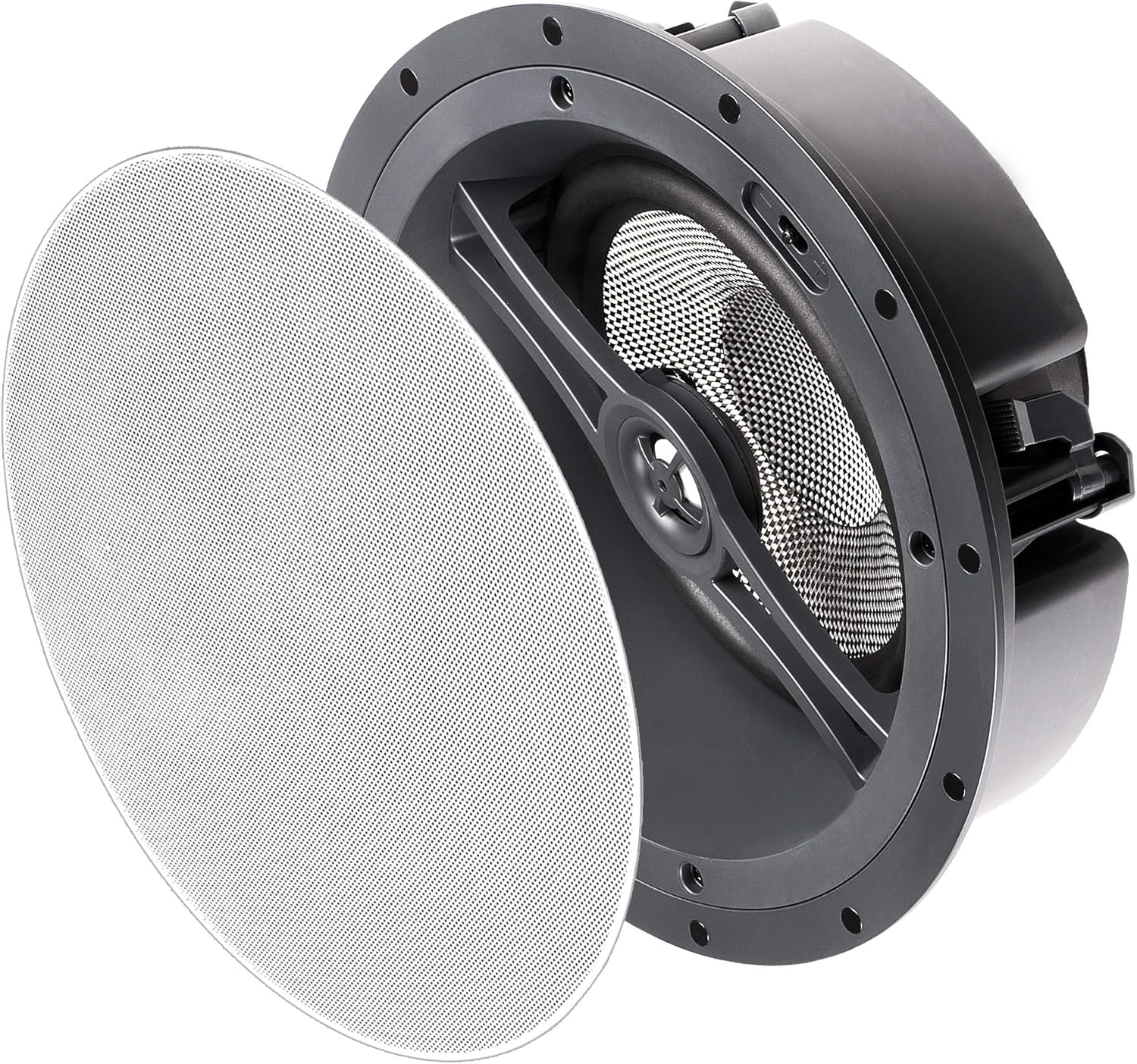
Figure 4.4: The OSD ACE870 speaker with its magnetic trimless grille detached, ready for installation or removal.
5. Управљање звучником
5.1 Подешавања звука
The ACE870 speaker features contour switches that allow you to tailor the bass and treble response to your listening preference and room acoustics. These switches are typically located near the woofer or tweeter on the speaker baffle, accessible before the grille is attached.
- Bass Contour Switch: Adjusts the low-frequency output. Use to compensate for room acoustics or personal preference.
- Treble Contour Switch: Adjusts the high-frequency output. Use to brighten or soften the sound.
Experiment with these settings to achieve the desired sound profile for your home theater system.

Слика 5.1: Крупни план view of the speaker's woofer and pivoting tweeter, where contour switches are typically located.
5.2 Системска интеграција
Connect the ACE870 speaker to a compatible home theater receiver or amplifier. Osigurajte amplifier's power output does not exceed the speaker's maximum power handling of 175 watts. The speaker is designed to work with 8 Ohm impedance systems.
While the speaker itself does not have direct voice control, it can be integrated into a voice-controlled home theater system through your compatible receiver or smart home hub.
6. Одржавање
The OSD ACE870 speaker requires minimal maintenance:
- Чишћење: Gently wipe the trimless grille with a soft, dry cloth to remove dust. Do not use abrasive cleaners or solvents.
- инспекција: Periodically check the speaker grille for any signs of damage or discoloration.
- Окружење: Ensure the speaker is not exposed to direct sunlight, excessive heat, or moisture, as these can affect its performance and lifespan.
КСНУМКС. Решавање проблема
If you encounter issues with your OSD ACE870 speaker, refer to the following common problems and solutions:
| Проблем | Могући узрок | Решење |
|---|---|---|
| Нема звука из звучника | Лабаво или неисправно ожичење; Amplifier off or input not selected; Speaker damaged. | Проверите све жице звучника и на звучнику и на amplifier, ensuring correct polarity. Verify amplifier is on and correct input is selected. Test with another speaker if possible. |
| Изобличен или нејасан звук | Овердривен amplifier; Incorrect contour switch settings; Loose speaker grille. | Смањите amplifier volume. Adjust bass/treble contour switches. Ensure grille is securely attached. Check for any physical damage to the speaker cone. |
| Speaker cuts in and out | Loose wiring; Amplifier overheating; Short circuit in wiring. | Inspect all wiring for loose connections or frayed wires. Ensure amplifier has adequate ventilation. If problem persists, consult a professional. |
If the problem persists after trying these solutions, please contact OSD Audio customer support.
8. Спецификације
| Феатуре | Детаљ |
|---|---|
| Назив модела | АЦЕ870 |
| Спеакер Типе | Atmospheric, LCR, In-Ceiling |
| Посебна карактеристика | Dolby Enabled, Hi Res Audio, Trimless Grille, Contour Switches |
| Препоручена употреба | For Surround Sound Systems, Home Theater |
| Компатибилни уређаји | Home Theater Receivers/Ampослободиоци |
| Пречник вуфера | 8 Inches (Carbon Fiber Composite Cone, 15-degree angled) |
| Твеетер | 1 Inch Aluminum Dome (Pivoting) |
| Максимална излазна снага звучника | 175 Ваттс |
| Импеданса | 8 Охм |
| Технологија повезивања | Спеакер Вире |
| Режим аудио излаза | Сурроунд |
| Тип монтаже | Плафонски носач |
| Боја | Trimless (White grille, paintable) |
| Димензије производа | 5.37"Д к 11.5"Ш к 11.5"В |
| Тежина артикла | 0.01 Ounces (Note: This weight seems incorrect, likely a data entry error. Actual weight would be higher.) |
| Укључене компоненте | 1 Спеакер |
| Је водоотпоран | НЕТАЧНО (Није водоотпорно) |
| Контролни метод | Voice (via compatible system) |
| Произвођач | ОСД Аудио |
| УПЦ | 819603012279 |
9. Гаранција и подршка
9.1 Информације о гаранцији
The OSD Audio ACE870 Trimless Ceiling Speaker comes with a ограничена гаранција. For specific details regarding the warranty period, coverage, and terms, please refer to the warranty card included with your product or visit the official OSD Audio webсајту.
9.2 Корисничка подршка
For technical assistance, troubleshooting, or warranty claims, please contact OSD Audio customer support. You can find contact information on the official OSD Audio webсајту или преко вашег продавца.
Посетите OSD Audio Store on Amazon за више информација и ресурса о производу.
Ask a question about this manual
Ask about setup, troubleshooting, compatibility, parts, safety, or missing instructions. Manuals+ will review the question and use this page’s manual context to help answer it.