
1. Увод
The TC Helicon DUPLICATOR is a compact vocal effects stompbox designed to enhance your live vocal performance with studio-quality doubling, reverb, and automatic pitch correction. This manual provides essential information for setting up, operating, and maintaining your DUPLICATOR unit.
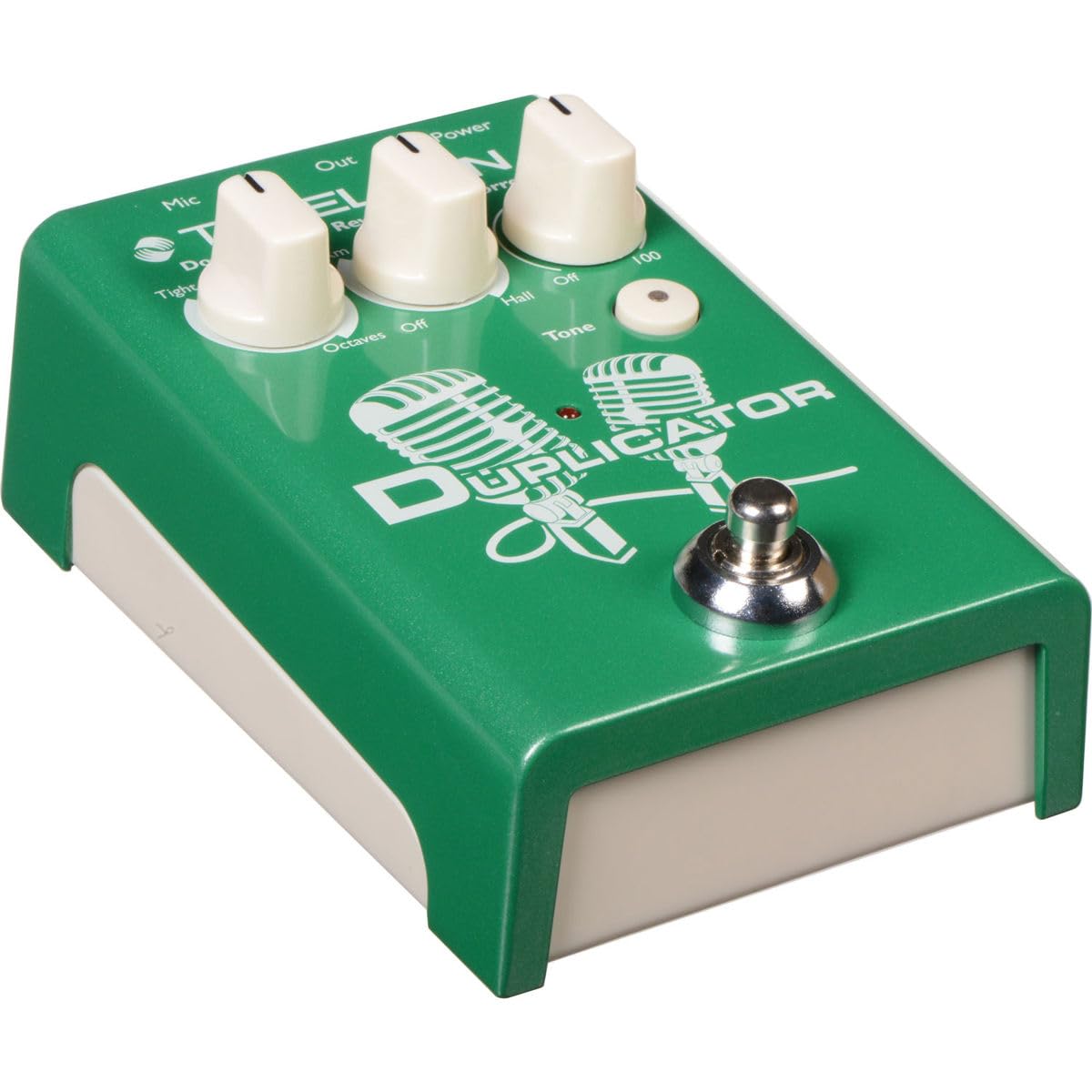
Image 1.1: The TC Helicon DUPLICATOR vocal effects stompbox, showcasinг његовим компактним дизајном и контролним дугмадима.
2. Подешавање
Follow these steps to connect and power on your DUPLICATOR unit.
2.1 Напајање
The DUPLICATOR can be powered by either AA batteries (not included) or a 9V DC power adapter (not included). Ensure the power source meets the specifications to prevent damage.
- Инсталација батерије: Open the battery compartment on the underside of the unit and insert four AA batteries, observing correct polarity.
- Адаптер за напајање: Connect a compatible 9V DC, center-negative power adapter to the 'POWER' input jack.

Слика 2.1: Примерample of a 9V DC power adapter. A compatible adapter is required for external power.
2.2 Везе
Connect your microphone and audio output as follows:
- Улаз за микрофон: Connect your microphone to the 'MIC' XLR input on the rear panel. The DUPLICATOR automatically sets the microphone gain.
- Аудио излаз: Connect the 'OUT' XLR output to your mixer, audio interface, or PA system.
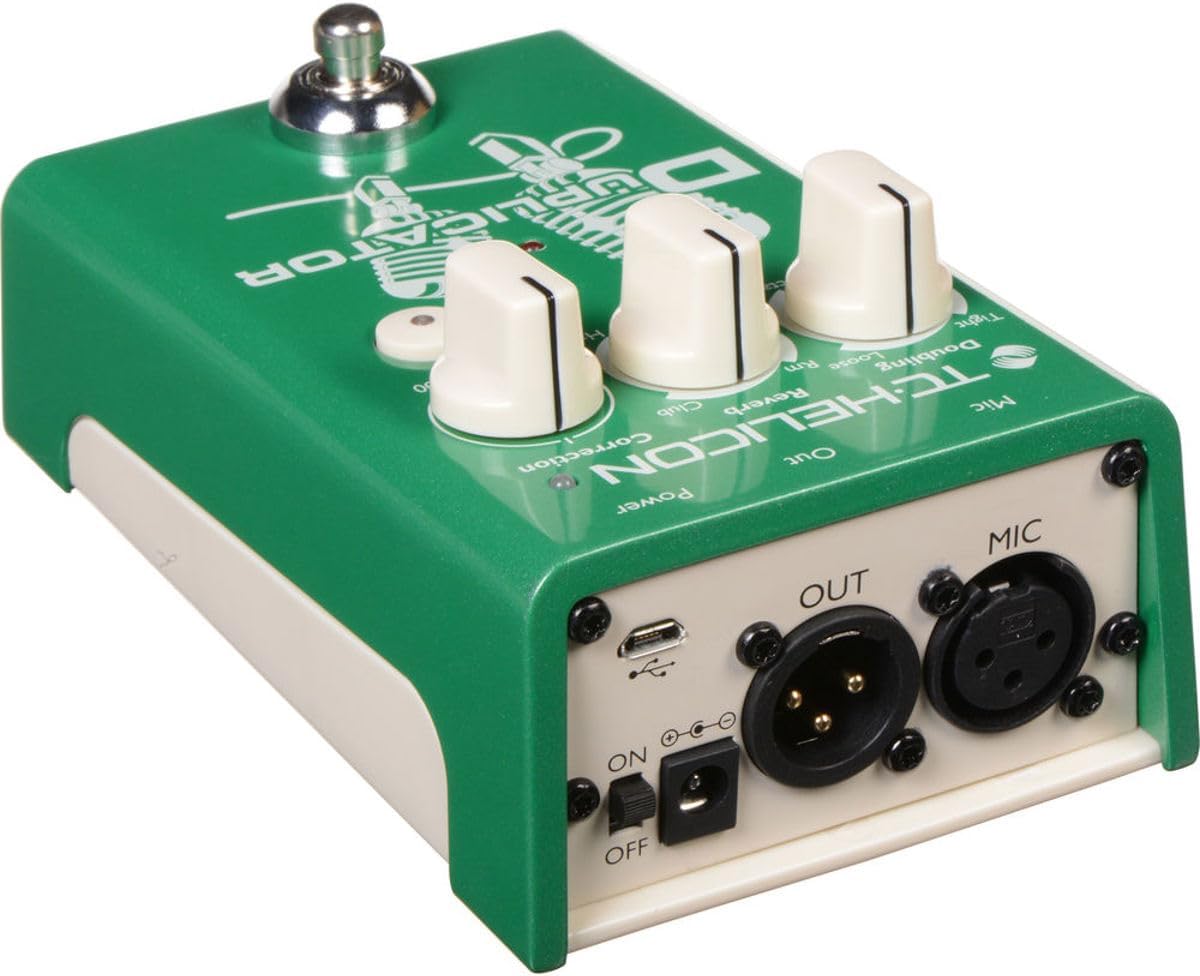
Image 2.2: Rear panel connections of the DUPLICATOR, including MIC input, OUT output, power, and USB port.
3. Упутство за употребу
The DUPLICATOR features intuitive controls for vocal effects. Familiarize yourself with the knobs and footswitch functionality.

Image 3.1: Front panel controls of the DUPLICATOR, including effect knobs and footswitch.
3.1 Контроле
- Doubling Knob: Selects the type of vocal doubling effect. Options include Чврсто, Лоосе, и Octave Up/Down. Rotate the knob to choose your desired doubling style.
- Реверб дугме: Adjusts the reverb type and intensity. Options include Соба, Цлуб, и Халл. The 'Off' position disables reverb.
- Correction Knob: Controls the amount of automatic pitch correction applied to your vocals, from 'Off' to '100' (maximum correction). Start with a lower setting and adjust to taste to avoid an unnatural sound.
- Дугме за тон: Engages the adaptive tone feature, which applies automatic EQ, compression, de-essing, and gating for a polished vocal sound. The LED illuminates when active.
3.2 Footswitch Functionality
The single footswitch on the DUPLICATOR controls multiple functions:
- Један клик: Toggles the Doubling effect on or off.
- Дуго притисните: Toggles the Reverb effect on or off.
This allows for dynamic control over your vocal effects during a performance.
4. Одржавање
Proper maintenance ensures the longevity and optimal performance of your DUPLICATOR.
4.1 Чишћење
Wipe the unit with a soft, dry cloth. Avoid using abrasive cleaners or solvents, which can damage the finish and internal components.
4.2 Замена батерије
If using batteries, replace them when the power indicator light dims or the unit behaves erratically. Always replace all four AA batteries simultaneously with new ones.
4.3 Складиштење
When not in use for extended periods, disconnect the power adapter and remove the batteries. Store the unit in a cool, dry place away from direct sunlight and extreme temperatures.
КСНУМКС. Решавање проблема
If you encounter issues with your DUPLICATOR, refer to the following common problems and solutions:
| Проблем | Могући узрок | Решење |
|---|---|---|
| Нема излаза звука | Incorrect connections, no power, output level too low. | Check all XLR cable connections. Ensure power is supplied (batteries or adapter). Verify the mixer/PA input is active and volume is up. |
| Шумни сигнал | Faulty cables, ground loop, low battery. | Try different cables. Ensure all equipment is properly grounded. Replace batteries or use a power adapter. |
| Ефекти нису занимљиви | Footswitch mode, knob set to 'Off'. | Ensure the Doubling and Reverb knobs are not set to 'Off'. Check footswitch operation (single click for doubling, long press for reverb). |
| Pitch correction sounds unnatural | Correction knob set too high. | Reduce the 'Correction' knob setting. |
If the problem persists after attempting these solutions, contact TC Helicon customer support.
6. Спецификације
- Модел: DUPLICATOR
- Тежина артикла: 14.8 унци (0.42 килограма)
- Димензије производа: 5.25 к 3.25 к 2.25 инча (13.34 к 8.26 к 5.72 цм)
- Материјал тела: Durable materials (Metal, Plastic)
- Извор напајања: 9V DC Power Adapter (not included) or 4x AA Batteries (not included)
- Тип конектора: XLR (MIC In, OUT)
- Хардверски интерфејс: 1/4-inch Audio (Note: Product description mentions 1/4-inch, but images show XLR. Prioritizing images for primary connections, but noting the specification discrepancy.)
- Формат сигнала: Аналог
7. Гаранција и подршка
The TC Helicon DUPLICATOR comes with a manufacturer's warranty. For detailed warranty information, product registration, or technical support, please visit the official TC Helicon webсајту или се обратите њиховом одељењу за корисничку подршку.
Онлине ресурси: For the most up-to-date information, FAQs, and additional resources, refer to the TC Helicon support pages.