
1. Увод
Thank you for choosing the Oreck Air Response Air Purifier. This manual provides essential information for the safe and efficient operation, maintenance, and troubleshooting of your device. Please read it thoroughly before use and retain it for future reference.
The Oreck Air Response Air Purifier is designed to improve indoor air quality by capturing airborne particles and neutralizing odors using a 2-stage filtration system. Its DustSense technology automatically monitors and responds to air quality changes, providing continuous clean air.
2. Важне информације о безбедности
- Пре употребе уређаја прочитајте сва упутства.
- Always unplug the air purifier before cleaning, performing maintenance, or when not in use.
- Do not operate any appliance with a damaged cord or plug. If the cord or plug is damaged, contact customer service.
- Не користите на отвореном или на мокрим површинама.
- Држите кабл за напајање даље од загрејаних површина.
- Не блокирајте отворе за ваздух и не стављајте на меку површину где отвори могу бити блокирани.
- Do not insert any objects into openings.
- Овај уређај је само за употребу у домаћинству.
- Do not use where flammable liquids or vapors are present.
- Пречистач ваздуха увек поставите на чврсту, равну површину.
3. Садржај пакета
- Oreck Air Response Air Purifier (Model WK16000)
- HEPA Media Filter (pre-installed)
- Филтер са активним угљем (унапред инсталиран)
- Упутство за употребу
4. Подешавање
- Распакујте јединицу: Carefully remove the air purifier from its packaging. Ensure all packing materials are removed.
- Инсталација филтера: The HEPA Media and Activated Carbon filters are typically pre-installed. Before first use, open the filter compartment (usually located on the back or side panel) and ensure the filters are unwrapped from any protective plastic bags. Reinsert them correctly if removed.
- Пласман: Place the air purifier on a firm, level surface. Ensure there is adequate space (at least 6 inches) around the air intake and outlet vents for optimal airflow. This model is designed for small rooms such as bedrooms, dens, or nurseries.
- Прикључак за напајање: Укључите кабл за напајање у стандардну електричну утичницу.

Слика 1: Предња страна view of the Oreck Air Response Air Purifier.

Слика 2: Експлодирао view illustrating the HEPA Media and Activated Carbon filters.
5. Упутство за употребу
Контролна табла се налази на врху јединице.

Figure 3: Control panel with Auto, Light, Power, Speed, and Timer buttons.
- Дугме за укључивање (U): Притисните да укључите или искључите јединицу.
- Дугме за брзину: Притисните да бисте мењали брзине вентилатора: ниска, средња, висока.
- Аутоматски режим: Press the 'Auto' button to activate DustSense technology. In this mode, the air purifier automatically adjusts fan speed based on detected air quality.
- Дугме за светло: Press to turn the indicator lights ON or OFF.
- Дугме тајмера: Press to set the operating time (e.g., 2, 4, 8 hours). The unit will automatically shut off after the selected duration.
DustSense Technology and Air Quality Indicator Bar
The Air Response Air Purifier features DustSense technology, which continuously monitors the air for particles. The Air Quality Indicator Bar provides visual feedback on the current air quality:
- плава: Low particle count (Good air quality)
- љубичаста: Medium particle count (Moderate air quality)
- црвено: High particle count (Poor air quality)
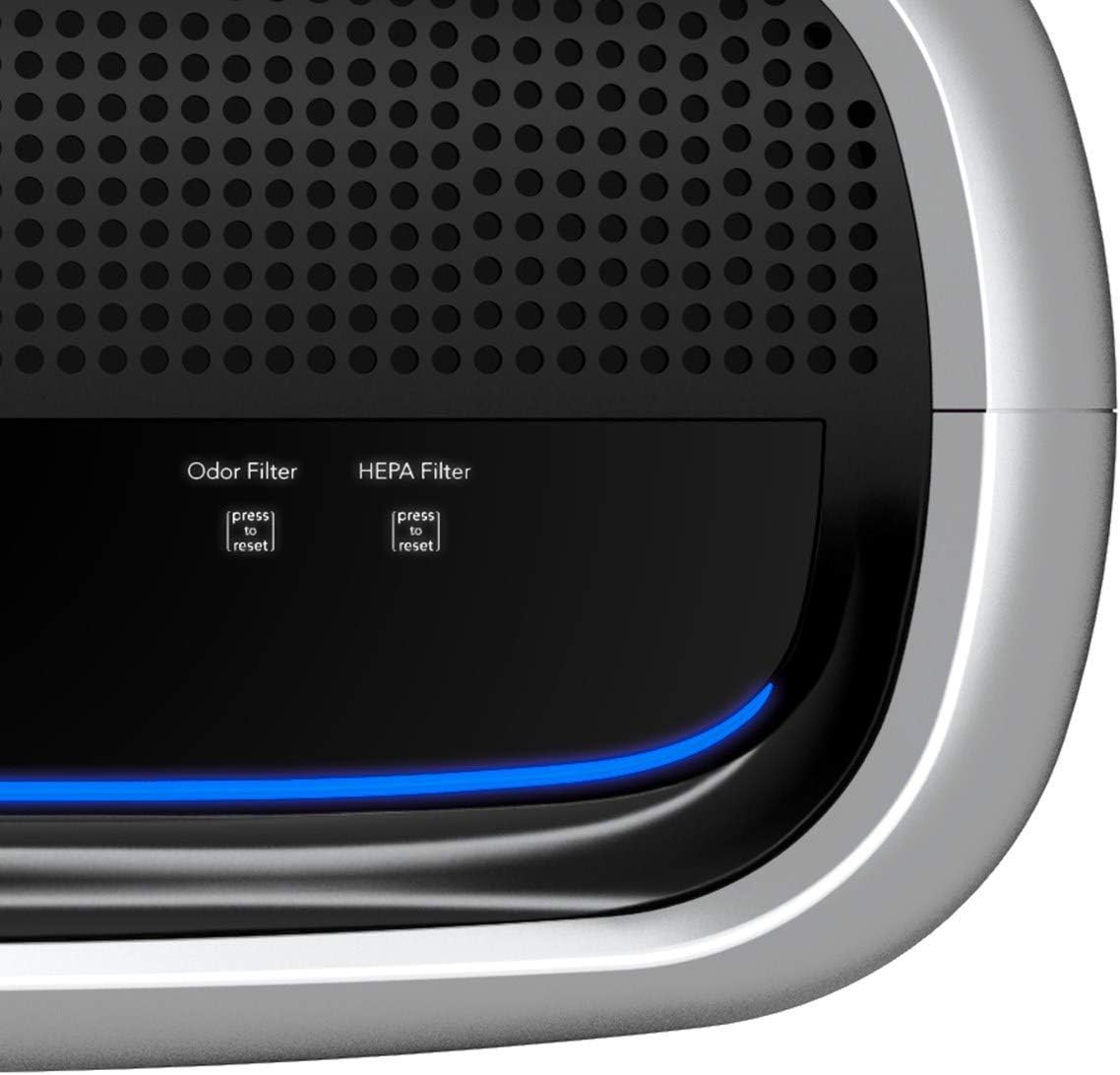
Figure 4: Air Quality Indicator Bar displaying various particle count levels.

Figure 5: Illustration of DustSense technology monitoring and responding to air particles.
6. Одржавање
Редовно одржавање обезбеђује оптималне перформансе и продужава век трајања вашег пречистача ваздуха.
Замена филтера
The Oreck Air Response Air Purifier uses a HEPA Media filter and an Activated Carbon filter. The unit features a replacement filter indicator to alert you when a filter change is needed.
- Искључите јединицу: Always unplug the air purifier before attempting any maintenance.
- Филтери приступа: Отворите поклопац одељка филтера.
- Уклоните старе филтере: Carefully remove the used HEPA Media and Activated Carbon filters. Dispose of them according to local regulations.
- Инсталирајте нове филтере: Insert new genuine Oreck replacement filters, ensuring they are correctly oriented.
- Затвори корице: Чврсто затворите поклопац одељка филтера.
- Ресетујте индикатор филтера: After replacing filters, press and hold the corresponding 'press to reset' button for the Odor Filter and HEPA Filter until the indicator light turns off.

Figure 6: Steps for replacing the air filters.
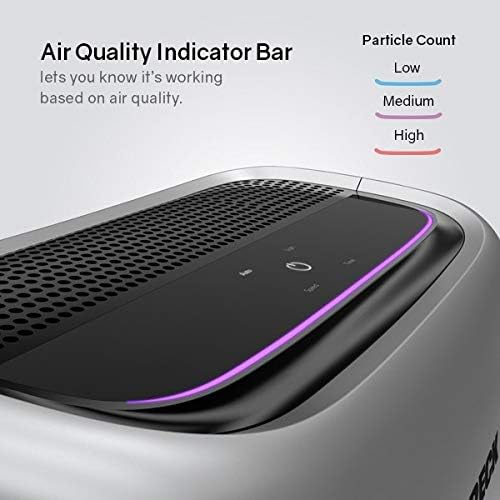
Figure 7: Filter reset buttons for Odor Filter and HEPA Filter.
Чишћење екстеријера
Обришите спољашњост пречистача ваздуха меком, дamp тканина. Немојте користити абразивна средства за чишћење или раствараче.
КСНУМКС. Решавање проблема
| Проблем | Могући узрок | Решење |
|---|---|---|
| Јединица се не укључује | No power; Power cord not securely plugged in | Проверите утичницу; Уверите се да је кабл за напајање потпуно уметнут. |
| Слаб проток ваздуха | Filters are dirty or clogged; Air intake/outlet blocked | Replace filters; Ensure vents are clear of obstructions. |
| Необична бука | Foreign object inside; Unit not on a level surface | Unplug and check for obstructions; Place on a stable, flat surface. |
| Air Quality Indicator always red/purple | High particle levels in the room; Sensor is dirty | Allow unit to run longer; Clean the sensor area (refer to full manual for sensor cleaning instructions). |
| Индикаторска лампица филтера остаје упаљена након замене | Filter reset button not pressed | Press and hold the corresponding filter reset button until the light turns off. |
8. Спецификације
- Модел: ВК16000
- Боја: Сребро
- Димензије производа: 10.5"Д к 16.5"Ш к 18.75"В
- Тежина артикла: 9.4 фунти
- Тип филтрације: HEPA Media and Activated Carbon
- Тип контролера: Контрола дугмета
- Посебна карактеристика: DustSense Technology, Air Quality Indicator Bar, Timer
- УПЦ: 743808958134

Слика 8: Димензије производа.
9. Гаранција и подршка
This Oreck Air Response Air Purifier comes with a 2-годишња гаранција. For warranty claims, technical support, or to purchase replacement parts and filters, please contact Oreck Customer Service.
Oreck Customer Service: Please refer to the contact information provided on the official Oreck webсајт или вашу картицу за регистрацију производа.
For additional information and support, visit the official Oreck webсајт: ввв.орецк.цом