
1. Увод
The Power Acoustik PD-623B is a 6.2-inch double-DIN in-dash DVD receiver equipped with Bluetooth functionality. This source unit supports DVD and USB video playback, features a 6.2-inch LCD display, and includes Bluetooth 4.0 for hands-free calling and wireless MP3 audio streaming. It also provides a 3.5 mm auxiliary input and supports ID3 MP3 tag reading for track and artist information.
Кључне карактеристике:
- 800 x 480 resolution display
- Built-in front panel Bluetooth microphone
- Bluetooth 4.0 for hands-free calling and A2DP wireless MP3 audio playback
- Playback from DVD/CD of MP3/MP4 and other video formats
- Playback from 64GB USB of MP3/MP4 and other video formats
2. Шта је у кутији
Verify that all items are present before proceeding with installation.
- Power Acoustik PD-623B Source Unit
- Ремоте Цонтрол
- Електрична инсталација
- Монтажни хардвер
- Упутство за употребу

Image 2.1: The Power Acoustik PD-623B 2-DIN Source Unit shown with its included remote control.
3. Подешавање и инсталација
3.1. Dijagram ožičenja
Refer to the detailed wiring diagram provided in the separate installation guide for proper connection of power, ground, speakers, and other accessories. Incorrect wiring can damage the unit or vehicle electrical system.
3.2. Почетно укључивање
- After completing all wiring connections, ensure the vehicle's ignition is off.
- Connect the unit's main power harness.
- Turn the vehicle's ignition to the ACC or ON position.
- Притисните дугме за напајање на уређају или даљинском управљачу да бисте га укључили.
- The unit's display should illuminate, and the initial setup screen may appear.
4. Упутство за употребу
4.1. Опште контроле
The unit features a touchscreen interface and physical buttons for common functions. The remote control provides additional access to features.

Image 4.1: Front panel of the PD-623B showing the display and control buttons.
- Дугме за укључивање/искључивање звука: Press to turn the unit on/off. Briefly press to mute/unmute audio.
- Дугме за јачину звука: Окрените да бисте подесили јачину звука.
- Дугме ХОМЕ: Враћа се на главни екран менија.
- SRC (Source) Button: Cycles through available audio/video sources (Radio, Disc, USB, SD, AUX, Bluetooth).
- EJECT Button: Ejects a disc from the DVD slot.
4.2. Функције даљинског управљача
The included remote control allows for convenient operation of the unit from a distance.
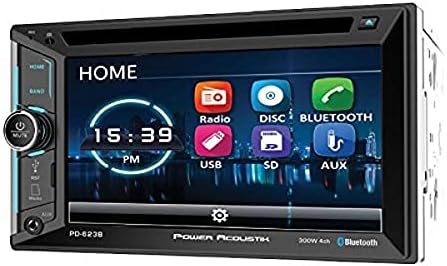
Image 4.2: The remote control for the PD-623B unit, showing all buttons.
- СНАГА: Укључује или искључује јединицу.
- ИЗБАЦИ: Избацује диск.
- СРЦ: Бира улазни извор.
- КУЋА: Приступа главном менију.
- ВОЛ +/-: Подешава јачину звука.
- МУТЕ: Искључује или укључује звук.
- ТРАКА: Changes radio bands (FM1, FM2, FM3, AM1, AM2).
- МЕНИ: Accesses disc menu during DVD playback.
- ПОДЕСИТИ: Enters system setup menu.
- Нумеричка тастатура (0-9): Direct track selection or radio station input.
4.3. Рад радио-станице
- Select 'Radio' from the main menu or press the SRC button until Radio is selected.
- Press the BAND button to cycle through FM1, FM2, FM3, AM1, and AM2.
- Use the seek buttons (◀◀ / ►►) to automatically search for the next strong station.
- Touch and hold a preset button on the screen to save the current station.
4.4. DVD/CD Playback
- Insert a DVD or CD into the disc slot. The unit will automatically switch to Disc mode.
- Use the on-screen controls or remote control for playback functions (Play, Pause, Stop, Skip, Fast Forward/Rewind).
- For DVDs, use the MENU button on the remote to access the disc's main menu.
4.5. УСБ репродукција
- Уметните УСБ уређај у УСБ порт.
- Select 'USB' from the main menu or by pressing the SRC button.
- Прегледај files and folders on the USB drive using the touchscreen.
- The unit supports MP3/MP4 and other video formats up to 64GB.
4.6. Блуетоотх повезивање
- Упаривање: On your mobile device, search for Bluetooth devices and select 'PD-623B'. Enter '0000' if a PIN is required.
- Хандс-фрее позивање: Once paired, you can make and receive calls directly through the unit. Use the touchscreen or remote to answer/end calls.
- Аудио стримовање (A2DP): Play music from your paired device wirelessly. Use the unit's controls to play, pause, and skip tracks.
4.7. Помоћни улаз
Connect an external audio device to the 3.5mm AUX input. Select 'AUX' as the source to play audio from the connected device.
5. Одржавање
5.1. Чишћење јединице
- Use a soft, dry cloth to clean the unit's display and exterior.
- За тврдокорну прљавштину, дampen the cloth lightly with water. Do not use harsh chemicals or abrasive cleaners.
- Avoid spraying liquid directly onto the unit.
5.2. Нега диска
- Држите дискове за ивице како бисте избегли отиске прстију.
- Keep discs in their cases when not in use.
- Очистите дискове меком крпом која не оставља влакна, бришући од средине ка споља.
КСНУМКС. Решавање проблема
Review the following common issues and their solutions before contacting support.
| Проблем | Могући узрок | Решење |
|---|---|---|
| Јединица се не укључује. | Неисправно ожичење; Прегорели осигурач; Паљење возила искључено. | Check power and ground connections. Inspect vehicle and unit fuses. Ensure ignition is in ACC or ON position. |
| Нема звука. | Јачина звука је прениска; активирано је искључивање звука; проблем са ожичењем звучника. | Појачајте јачину звука. Деактивирајте искључивање звука. Проверите везе звучника. |
| Упаривање Bluetooth уређаја не успева. | Bluetooth not enabled on device; Incorrect PIN; Device too far. | Ensure Bluetooth is active on your device. Re-enter PIN '0000'. Bring device closer to the unit. |
| Disc playback issues. | Scratched/dirty disc; Incorrect disc format. | Clean the disc. Try a different disc. Ensure disc format is supported (DVD, CD, MP3, MP4). |
| Проблеми са репродукцијом са УСБ-а. | Неподржано file формат; УСБ диск оштећен; капацитет УСБ диска је превелик. | Осигурати files are supported formats. Try a different USB drive. Ensure USB drive is 64GB or less. |
7. Спецификације
Technical specifications for the Power Acoustik PD-623B unit.
| Феатуре | Детаљ |
|---|---|
| Број модела | ПД-623Б |
| Дисплаи Тецхнологи | ЛЦД |
| Резолуција екрана | 800 к 480 |
| Димензије производа | 9.5 к 9.5 к 7 инча |
| Тежина артикла | 5 фунти |
| Бежична комуникација | Блуетоотх 4.0 |
| Цоннецтивити Тецхнологиес | Bluetooth, 3.5mm Jack, USB |
| Тип контролера | Екран на додир |
| Компатибилни уређаји | Паметни телефон, звучник |
| Режим аудио излаза | Сурроунд |
| Конфигурација канала сурроунд звука | 4.0 |
| Подршка за видео кодирање | MP4, H.264, H.265 |
| Произвођач | Повер Ацоустик |
| Датум првог доступног | 7. фебруара 2017. године |
8. Гаранција и подршка
8.1. Гаранција на производ
This Power Acoustik product is covered by a manufacturer's warranty. Please refer to the warranty card included with your product or visit the official Power Acoustik website for detailed warranty terms and conditions, including duration and coverage specifics. Keep your proof of purchase for warranty claims.
8.2. Корисничка подршка
For technical assistance, troubleshooting beyond this manual, or warranty service, please contact Power Acoustik customer support. Contact information can typically be found on the manufacturer's webсајту или на паковању производа.
Подршка на мрежи: Visit the official Power Acoustik webсајт за често постављана питања, регистрацију производа и ресурсе за подршку.
Телефонска подршка: Refer to the contact section of the Power Acoustik website for current phone numbers and operating hours.