
SHARP LC-40U45
SHARP AQUOS LC-40U45 40-inch 4K HDR LCD TV User Manual
Model: LC-40U45 | Brand: SHARP
1. Увод
This manual provides essential information for the safe and efficient operation of your SHARP AQUOS LC-40U45 40-inch 4K HDR LCD TV. Please read these instructions thoroughly before using the product and retain them for future reference.
The LC-40U45 features a 4K low-reflection panel to minimize glare, 120-speed backlight technology for smooth motion, and the AQUOS 4K-Master Engine PRO II for high-definition image processing. Experience enhanced audio with the bass-reflex speaker box, Sound by ONKYO collaboration, and Eilex PRISM technology. The TV also includes a swivel stand for flexible viewинг углова.
2. Безбедносне информације
Увек се придржавајте основних мера безбедности када користите овај телевизор како бисте смањили ризик од пожара, струјног удара и повреда.
- Не излажите телевизор киши или влази.
- Не блокирајте отворе за вентилацију.
- Обезбедите правилно уземљење утикача за напајање.
- Искључите телевизор из струје током олуја са грмљавином или када га не користите дуже време.
- Држите мале делове и батерије ван домашаја деце.
3. Шта је у кутији
Проверите да ли су све следеће ставке укључене у ваш телевизор:
- SHARP AQUOS LC-40U45 4K HDR LCD TV
- Даљински управљач (са 2 ААА батерије)
- Повер Цорд
- Постоље за сто (ако је применљиво)
- AV Terminal Conversion Cable
- Кориснички приручник (овај документ)
4. Подешавање
4.1 Physical Placement and Dimensions
Ensure the TV is placed on a stable surface or mounted securely. The dimensions of the TV with the stand are approximately 90.1 cm (width) x 27.1 cm (depth) x 55.8 cm (height). The weight is approximately 20.5 kg.

Figure 4.1: TV dimensions (Width: 90.1cm, Height: 55.8cm, Depth: 27.1cm) and recommended viewing distance of approximately 150cm.
4.2 Повезивање периферних уређаја
Your TV offers various connection ports on the rear panel for external devices.

Figure 4.2: Rear panel connections including HDMI inputs, USB ports, headphone jack, AV input, LAN port, and antenna inputs.
- HDMI улази (x4): Connect Blu-ray players, game consoles, or other HDMI-compatible devices. Input 1 supports HDR.
- USB портови (x2): Connect USB storage devices for media playback or external HDD for recording.
- PC Input (x1): Повежите рачунар.
- LAN Port (10BASE-T/100BASE-TX): За жичану интернет везу.
- Headphone Jack (3.5mm stereo mini-jack): За приватно слушање.
- АВ улаз: Use the provided AV terminal conversion cable for older devices.
- Антенски улази: Connect terrestrial digital and BS/CS digital antennas.
- B-CAS Card Slot: Insert the B-CAS card to decrypt digital broadcasts.
4.3 Мрежна веза
The TV supports both wired and wireless (Wi-Fi) network connections. Built-in Wi-Fi allows for easy connection to your home network.
4.4 Swivel Stand
The TV features a swivel stand that allows you to adjust the screen angle left and right by 30 degrees. This provides flexibility for optimal viewing from various positions in the room and makes accessing rear ports easier for cleaning or connecting devices.

Figure 4.3: The swivel stand allows for 30-degree left/right adjustment, simplifying cleaning and access to rear connections.
5. Управљање телевизором
5.1 Функције даљинског управљача
Use the provided remote control to navigate menus, change channels, adjust volume, and access smart TV features. The remote includes dedicated buttons for popular streaming services.
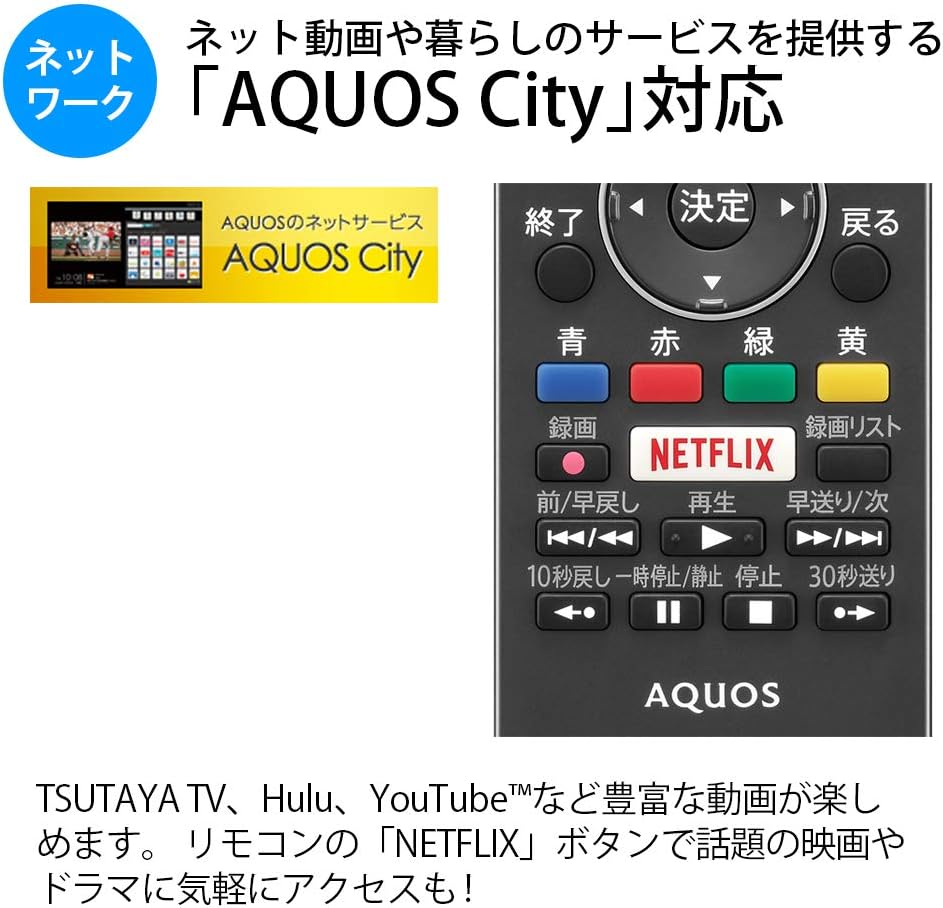
Figure 5.1: Remote control with a dedicated Netflix button and a view of the AQUOS City interface.
5.2 Smart TV Features (AQUOS City)
Your AQUOS TV supports "AQUOS City," providing access to various internet video services and lifestyle applications. Enjoy streaming content from platforms like NETFLIX, YouTube, Hulu, and TSUTAYA TV. Simply press the dedicated "NETFLIX" button on your remote for quick access.
5.3 4K Image Processing
The AQUOS 4K-Master Engine PRO II is a high-definition image processing circuit specifically designed for 4K LCD panels. It reduces noise and enhances contrast for a more immersive 4K viewинг искуство.

Figure 5.2: The AQUOS 4K-Master Engine PRO II enhances 4K images by reducing noise and improving contrast.
5.4 Аудио функције
The TV is equipped with a bass-reflex type speaker box, developed in collaboration with ONKYO, to deliver high-quality sound with enhanced high-frequency pressure and rich bass. Eilex PRISM technology expands the listening position and creates a sense of audio depth.

Figure 5.3: Illustration of the bass-reflex speaker box, designed for superior sound quality.
5.5 Low-Reflection Panel
The 4K low-reflection panel minimizes reflections from room lighting and external light sources, ensuring clear and comfortable viewing even in bright environments.

Figure 5.4: Visual comparison demonstrating how the low-reflection panel reduces glare compared to a conventional LCD panel.
5.6 Video Mirroring (Fire TV)
You can mirror your smartphone screen to the TV using Fire TV mirroring. This allows you to display photos, videos, or smartphone apps on the large TV screen. To use this feature, connect a Fire TV device to one of the TV's HDMI ports and ensure both devices are on the same Wi-Fi network. Refer to your Fire TV device's manual for specific mirroring instructions.
6. Одржавање
Да бисте осигурали дуготрајност и оптималне перформансе вашег телевизора, пратите ова упутства за одржавање:
- Чишћење екрана: Нежно обришите екран меком крпом која не оставља влакна. За тврдокорне мрље, благо обришитеampОперите крпу водом или специјализованим средством за чишћење екрана. Не прскајте течност директно на екран.
- Чишћење кабинета: Користите меку, суву крпу за брисање кућишта телевизора. Избегавајте употребу абразивних средстава за чишћење или растварача.
- вентилација: Уверите се да вентилациони отвори на телевизору нису блокирани како бисте спречили прегревање.
- Кабл за напајање: Редовно проверавајте кабл за напајање да ли је оштећен. Уколико је оштећен, обратите се квалификованом сервисеру.
КСНУМКС. Решавање проблема
Ако наиђете на проблеме са телевизором, погледајте следеће уобичајене проблеме и решења:
| Проблем | Могући узрок / решење |
|---|---|
| Нема струје | Check if the power cord is securely plugged into the TV and the wall outlet. Press the power button on the remote or TV. |
| Нема слике, али је звук присутан | Уверите се да је изабран исправан улазни извор. Проверите кабловске везе са спољним уређајима. |
| Нема звука, али је слика присутна | Check volume level and mute status. Ensure audio cables are correctly connected. |
| Даљински управљач не ради | Замените батерије. Уверите се да нема препрека између даљинског управљача и инфрацрвеног сензора телевизора. |
| Повезивање на Ви-Фи није могуће | Check your Wi-Fi router and network settings. Ensure the TV is within range of the router. |
8. Спецификације
| Феатуре | Спецификација |
|---|---|
| Величина екрана | 40 инча |
| Дисплаи Тецхнологи | ЛЦД |
| Резолуција | 3840 к 2160 (4К) |
| ХДР подршка | HDR compatible (HDMI Input 1) |
| Рефресх Рате | 120 Hz (120 Speed backlight technology) |
| Тјунери | Terrestrial Digital x3, BS/CS Digital x3 |
| Аудио излаз | 20В (10В + 10В) |
| Карактеристике звучника | Bass-reflex type, Sound by ONKYO, Eilex PRISM |
| ХДМИ портови | 4 |
| УСБ портови | 2 (USB-HDD recording compatible) |
| ПЦ Инпут | 1 |
| Мрежна повезаност | Wi-Fi built-in, LAN port |
| Вирелесс Типе | Bluetooth, Wi-Fi, Miracast |
| Потрошња енергије | Approx. 106W (Annual: 96Kwh/year) |
| Димензије (Ш к Д к В) | 90.1 x 27.1 x 55.8 цм (са постољем) |
| Тежина | 20.5 кг |
| VESA стандард за монтирање | 600 к 400 мм |
| Recommended Network Services | NETFLIX, YouTube, Hikari TV 4K, Hulu, TSUTAYA TV |
9. Гаранција и подршка
For warranty information, please refer to the warranty card included with your product or visit the official SHARP website. For technical support, troubleshooting assistance, or service requests, please contact SHARP customer service. Contact details can be found on the official SHARP webсајту или у документацији вашег производа.
Ask a question about this manual
Ask about setup, troubleshooting, compatibility, parts, safety, or missing instructions. Manuals+ will review the question and use this page’s manual context to help answer it.