
Увод
Thank you for choosing the Atlanta Digital LCD Radio Alarm Clock, Model 1882-0. This compact and easy-to-use alarm clock features a clear LCD display, temperature indication, and a radio-controlled time function for automatic synchronization. This manual provides detailed instructions for setup, operation, and maintenance to ensure optimal performance.
Безбедносне информације
- Безбедност батерије: Use only the specified battery type. Ensure correct polarity (+/-) when inserting batteries. Do not mix old and new batteries, or different types of batteries. Remove batteries if the device will not be used for an extended period. Dispose of used batteries responsibly according to local regulations.
- Пласман: Place the clock on a stable, flat surface. Avoid direct sunlight, extreme temperatures, high humidity, or dusty environments.
- Чишћење: Не користите абразивна средства за чишћење или раствараче. Обришите меком, сувом крпом.
- Изложеност води: This device is not waterproof. Avoid exposure to water or other liquids.
Садржај пакета
- Atlanta Digital LCD Radio Alarm Clock (Model 1882-0)
- Упутство за употребу (овај документ)
- (Батерије обично нису укључене и морају се купити засебно)
Производ је завршенview
Упознајте се са главним компонентама и контролама вашег будилника.

Слика 1: Предња страна View. This image displays the front of the Atlanta Digital LCD Radio Alarm Clock. The large LCD screen shows the current time (10:40), radio control signal indicator, DST indicator, alarm time (6:00), and temperature (24.6°C). Below the screen are three buttons: "TIME", "ALARM", and "+ / -". A red snooze/light button is visible on the top edge.
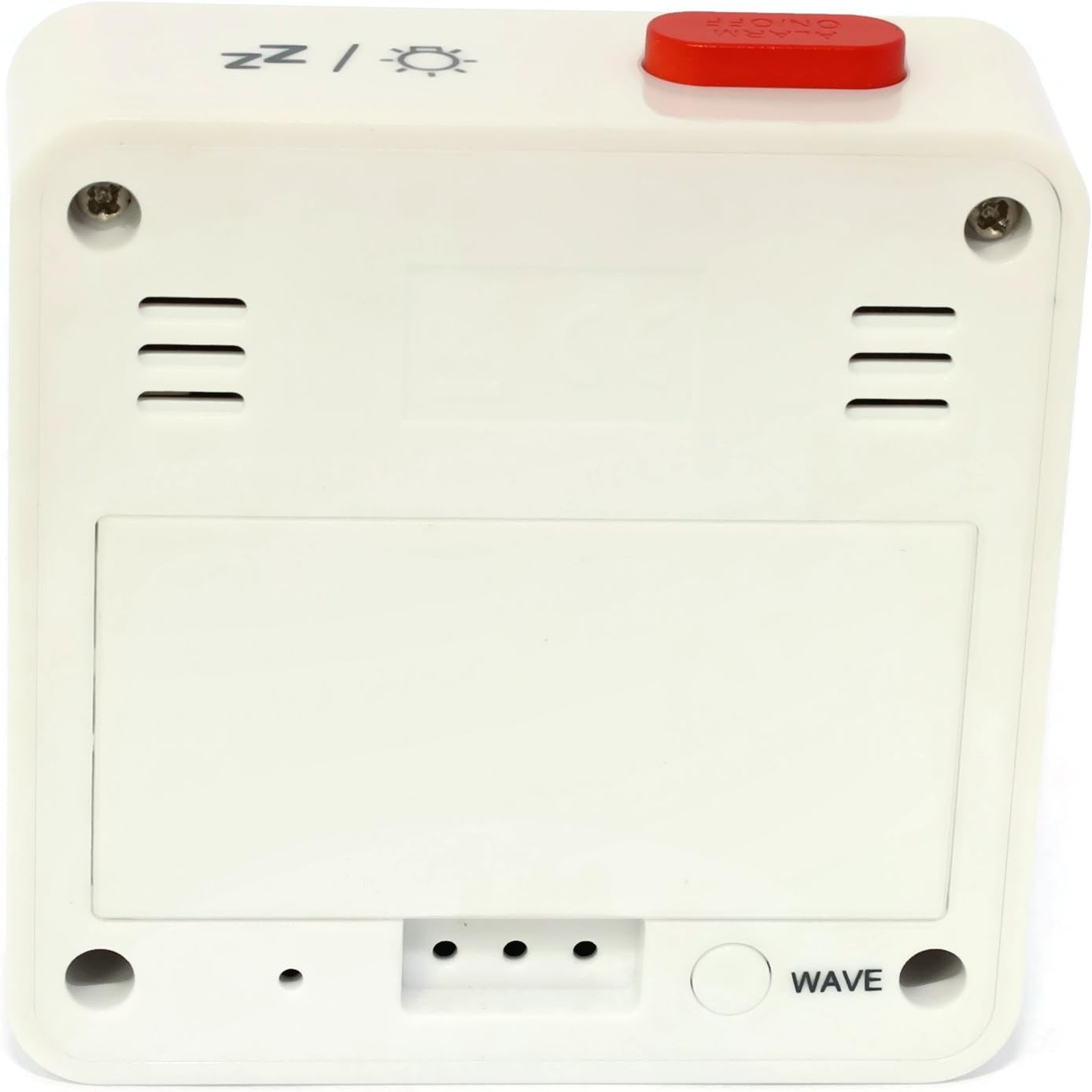
Слика 2: Позади View. This image shows the back of the Atlanta Digital LCD Radio Alarm Clock. The large rectangular cover for the battery compartment is prominent. Below it, a circular "WAVE" button is visible, used for manual radio signal reception. Ventilation slots are present on both sides of the upper back panel.
Controls and Display Elements:
- ЛЦД екран: Shows time, alarm time, temperature, and radio control status.
- ТИМЕ тастер: Used to set the current time manually.
- Дугме АЛАРМ: Used to set and activate/deactivate the alarm.
- + / - Дугмад: Used to adjust values (time, alarm) and potentially toggle settings.
- SNOOZE / LIGHT Button (Top): Activates snooze function during an alarm; illuminates the display backlight.
- WAVE Button (Back): Initiates manual radio signal reception for time synchronization.
- Battery Compartment (Back): Садржи потребне батерије.
Сетуп
1. Инсталација батерије
- Open the battery compartment cover located on the back of the clock (refer to Figure 2).
- Insert the required batteries (e.g., 2x AAA, not included) according to the polarity markings (+ and -) inside the compartment.
- Добро затворите поклопац одељка за батерије.
- The clock will power on and attempt to receive the radio-controlled time signal.
2. Initial Time Synchronization (Radio Control)
Upon battery insertion, the clock will automatically search for the radio time signal. This process may take several minutes. During this time, a signal icon (e.g., ((()))) ће трептати на дисплеју.
- For best reception, place the clock near a window and away from electronic devices that may cause interference.
- Once the signal is successfully received, the time will be set automatically, and the signal icon will appear solid.
- If the signal is not received after a few minutes, press the ТАЛАС button on the back of the clock to initiate a manual search.
3. Manual Time Setting (If Radio Control is Unavailable)
- Притисните и држите ВРЕМЕ дугме приближно 3 секунде док цифре сати не почну да трепћу.
- Користите + or - дугмад за подешавање сата.
- Притисните тастер ВРЕМЕ button again to confirm the hour and move to the minute setting.
- Користите + or - дугмад за подешавање минута.
- Притисните тастер ВРЕМЕ дугме још једном да бисте потврдили и изашли из режима подешавања времена.
Упутство за употребу
1. Подешавање аларма
- Притисните и држите АЛАРМ button for approximately 3 seconds until the alarm hour digits begin to flash.
- Користите + or - buttons to adjust the desired alarm hour.
- Притисните тастер АЛАРМ button again to confirm the hour and move to the alarm minute setting.
- Користите + or - buttons to adjust the desired alarm minutes.
- Притисните тастер АЛАРМ дугме још једном да бисте потврдили и изашли из режима подешавања аларма.
2. Активирање/деактивирање аларма
- Кратко притисните АЛАРМ дугме да бисте укључили или искључили аларм.
- When the alarm is active, an alarm icon (e.g., a bell symbol) will appear on the display.
- Када се огласи аларм, притисните СНООЗЕ / ЛИГХТ button on top to activate the snooze function. The alarm will sound again after a few minutes.
- To turn off the alarm completely, press any other button (e.g., ВРЕМЕ, АЛАРМ, +, -) or let it sound for its full duration.
3. Функција позадинског осветљења
Притисните тастер СНООЗЕ / ЛИГХТ button on the top of the clock to illuminate the display for a few seconds, allowing for easy viewинг у условима слабог осветљења.
4. Приказ температуре
The clock continuously displays the ambient temperature. The unit of temperature (Celsius or Fahrenheit) may be switchable by a dedicated button or a combination of existing buttons (refer to specific model variations if applicable, otherwise it defaults to Celsius as shown in the image).
Одржавање
Чишћење
- Wipe the clock's exterior with a soft, dry, lint-free cloth.
- Do not use liquid cleaners, aerosol sprays, or abrasive materials, as these can damage the finish or internal components.
Замена батерије
- When the display becomes dim or the clock functions erratically, it is time to replace the batteries.
- Пратите кораке за инсталацију батерије наведене у одељку „Подешавање“.
- Обезбедите правилно одлагање старих батерија.
Решавање проблема
| Проблем | Могући узрок | Решење |
|---|---|---|
| Екран је празан или замагљен. | Батерије су празне или уметнуте погрешно. | Замените батерије, водећи рачуна о исправном поларитету. |
| Време је погрешно. | Poor radio signal reception or manual time not set. | Move the clock to a location with better reception (near a window). Press the ТАЛАС button for manual synchronization. If still incorrect, set the time manually. |
| Аларм се не оглашава. | Аларм није активиран или је погрешно подешен. | Ensure the alarm icon is visible on the display. Recheck alarm time settings. |
| Функција одлагања не ради. | Alarm was turned off instead of snoozed. | Ensure you press the СНООЗЕ / ЛИГХТ button when the alarm sounds, not other buttons. |
Спецификације
- Модел: 1882-0
- Бренд: Атланта
- Боја: Бела
- Материјал: Пластика
- Тип приказа: Дигитални ЛЦД
- Димензије (Д к Ш к В): 6.5 x 2.1 x 6.5 цм (приближно 2.56 x 0.83 x 2.56 инча)
- Тежина: 65 грама (приближно 2.29 унце)
- Извор напајања: Battery powered (e.g., 2x AAA, not included)
- Посебне карактеристике: Temperature Display, Alarm, Radio-Controlled Time, Backlight, Snooze
- Наменска употреба: Индоор
Гаранција и подршка
Specific warranty information for your Atlanta product may vary by region and retailer. Please refer to the documentation provided at the time of purchase or visit the official Atlanta webсајт за детаљне услове гаранције.
For technical support or inquiries, please contact your retailer or the manufacturer's customer service department. Contact information can typically be found on the product packaging or the official brand webсајту.
Напомена: Произвођач не даје информације о доступности резервних делова.