
Увод
This manual provides detailed instructions for the setup, operation, and maintenance of your Intex Wi-Fi HD Camera, model IT-101. Please read this manual thoroughly before using the device to ensure proper functionality and safety.
Производ је завршенview
The Intex Wi-Fi HD Camera IT-101 is a compact security camera designed for monitoring. It features HD video resolution, night vision capabilities, and Wi-Fi connectivity for remote access.
Кључне карактеристике:
- ХД видео резолуција: Captures video at 1280x720 pixels (720p) with a frame rate of 25 frames per second.
- Виде Ленс View: Features a 77-degree lens view angle for broader coverage.
- Ноћни вид: Equipped with Infrared LED illumination for clear night vision up to 10 meters.
- Подршка за СД картицу: Supports up to 64GB SD card for local storage.
- Бежична повезаност: Connects via Wi-Fi for remote monitoring through mobile or computer applications.
- Компатибилност: Supports Android and iOS operating systems.
Садржај пакета:
- Intex Wi-Fi HD Camera IT-101
- Адаптер за напајање (ДЦ 5В/1А)
- Кориснички приручник (овај документ)
- Прибор за монтажу (ако је укључен)
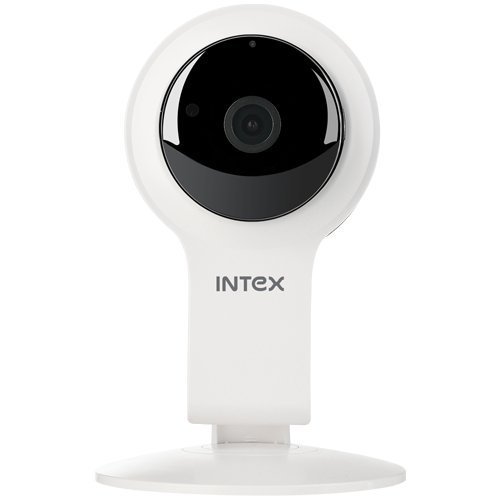
Слика 1: Предња страна view of the Intex Wi-Fi HD Camera IT-101. This image shows the camera lens and the main body of the device.
Сетуп
1. Укључивање камере:
- Connect the provided DC 5V/1A power adapter to the camera's power input port.
- Укључите адаптер за напајање у стандардну електричну утичницу.
- The camera will power on, and an indicator light will illuminate (refer to the camera's physical indicators for specific light behavior).
2. Installing an SD Card (Optional):
To enable local video recording, an SD card (up to 64GB) can be installed.
- Locate the SD card slot on the camera (consult the camera's physical design for exact location).
- Gently insert the SD card into the slot with the contacts facing the correct direction until it clicks into place.
- Да бисте је уклонили, притисните SD картицу ка унутра док не искочи.
3. Connecting to Wi-Fi and Mobile App:
The camera requires a mobile application for initial setup and remote viewing. The specific app name is not provided in the product details, please refer to the packaging or a quick start guide for the correct app to download from your device's app store (Android/iOS).
- Download and install the designated mobile application on your smartphone or tablet.
- Open the application and create an account or log in if you already have one.
- Follow the in-app instructions to add a new device. This typically involves scanning a QR code on the camera or manually entering its device ID.
- Connect the camera to your home Wi-Fi network through the app. Ensure your Wi-Fi network is 2.4GHz, as 5GHz networks may not be supported.
- Once connected, the camera's indicator light will change (e.g., solid blue), and you should see the live feed in the app.
Упутство за употребу
Уживо View:
Access the live video feed from your camera through the mobile application. This allows real-time monitoring of the camera's view.
Снимање:
- Ручно снимање: Most applications offer a manual record button to start and stop video recording directly to your phone or the installed SD card.
- Планирано снимање: Configure recording schedules within the app to automatically record at specific times.
- Снимање детекције покрета: Enable motion detection in the app settings. The camera will automatically record when motion is detected within its field of view.
Репродукција:
Снимљено фооtage stored on the SD card can be accessed and played back through the mobile application. Navigate to the "Playback" or "History" section within the app.
Ноћни вид:
The camera automatically switches to night vision mode in low-light conditions. The Infrared LED illuminates the area, allowing for clear black and white video capture up to 10 meters.
Подешавања:
The mobile application provides various settings to customize your camera's operation, including:
- Video quality adjustment
- Осетљивост детекције покрета
- Подешавања обавештења
- Синхронизација времена и датума
- SD card management (formatting, viewing storage)
Одржавање
- Чишћење: Користите меку, суву крпу за чишћење објектива и кућишта камере. Избегавајте употребу јаких хемикалија или абразивних материјала.
- Ажурирања фирмвера: Periodically check the mobile application for available firmware updates for your camera. Keeping the firmware updated ensures optimal performance and security.
- Управљање СД картицама: Regularly back up important recordings from your SD card. Consider formatting the SD card periodically through the app to maintain performance.
- Услови животне средине: Ensure the camera is operated within its specified temperature and humidity ranges. The camera is not water-resistant, so avoid exposure to moisture.
Решавање проблема
Камера се не укључује:
- Ensure the power adapter is securely connected to both the camera and a working electrical outlet.
- Verify that the power adapter is the correct DC 5V/1A model.
Није могуће повезати се на Ви-Фи:
- Confirm your Wi-Fi network is 2.4GHz. The camera may not support 5GHz networks.
- Уверите се да је камера у домету вашег Wi-Fi рутера.
- Check that the Wi-Fi password entered in the app is correct.
- Рестартујте Wi-Fi рутер и камеру, а затим покушајте поново да се повежете.
- If issues persist, try resetting the camera to factory defaults (refer to the camera's physical buttons or app for reset option).
No Video Feed in App:
- Проверите да ли је камера укључена и повезана на Wi-Fi.
- Check your internet connection on your mobile device.
- Close and reopen the mobile application.
- Ensure the camera's privacy mode (if available) is not activated.
SD Card Not Recording or Recognized:
- Уверите се да је SD картица правилно уметнута.
- Verify the SD card is not full. Format it through the app if necessary (this will erase all data).
- Check if the SD card is damaged. Try a different compatible SD card.
- Confirm that recording settings (manual, scheduled, motion detection) are properly configured in the app.
Спецификације
| Феатуре | Детаљ |
|---|---|
| Назив модела | ИТ-101 |
| Сензор слике | H42 1/4 CMOS Sensor |
| Резолуција снимања видео записа | 1280x720 Pixels (720p HD) |
| Фраме Рате | 25 фпс |
| Ленс View Угао | 77 степени |
| Ленс Типе | 3.6 mm, Zoom |
| Фоцус Типе | Ауто Фоцус |
| Удаљеност ноћног вида | 10 meters (Infrared LED Illumination) |
| Дан/Ноћни режим | Yes (Automatic switching) |
| Технологија повезивања | бежични (Ви-Фи) |
| Подршка за СД картице | До 64 ГБ |
| Video Supported Format | Х.264, МП4 |
| Подржани формат слике | ЈПЕГ |
| Компатибилност оперативног система | Андроид, иОС |
| Повер Суппли | ДЦ 5В/1А |
| Бруто тежина | 260г |
| Боја | Бела |
| Ниво отпорности на воду | Није водоотпоран |
| Стабилизација слике | бр |
Гаранција и подршка
For warranty information and technical support, please refer to the documentation included with your purchase or visit the official Intex webсајт. Сачувајте доказ о куповини за потребе гаранције.
Произвођач: Интек
Бренд: Интек