
Увод
This manual provides essential information for the installation, operation, and maintenance of your Cisco SG550X-24-K9-NA 24-Port Stackable Managed Ethernet Switch. This device is designed to support demanding network environments with advanced capabilities and superior performance.

Figure 1: Cisco SG550X-24-K9-NA 24-Port Stackable Managed Ethernet Switch.
Сетуп
Follow these steps to set up your Cisco SG550X-24-K9-NA switch.
1. Распакивање и први преглед
Carefully unpack the switch and all included components. Inspect for any signs of damage during shipping. If any components are missing or damaged, contact your vendor immediately.
Укључене компоненте:
- Cisco SG550X-24 Switch
- Кабл за напајање
- Rack-Mount kit
- Гумене ноге
- DB-9 to RJ45 Serial Cable
- Поинтер картица са Кином РоХС
- Technical support contacts
- Водич за брзи почетак
2. Физичка инсталација
The switch can be installed on a desktop or mounted in a standard equipment rack using the provided rack-mount kit. Ensure adequate ventilation around the device.
3. Мрежна веза
Connect your network devices to the 24 Gigabit Ethernet ports. The switch also features 4 x 10G SFP+ uplinks for high-speed connections.
4. Укључите напајање
Connect the power cord to the switch and a suitable power outlet. The switch will power on automatically.
5. Почетна конфигурација
For simplified setup, utilize the Cisco Business App. This application facilitates plug-and-play (PnP), auto-discovery, and zero-touch deployment, allowing for quick network integration. Alternatively, you can use the on-box WebUI or CLI for configuration.
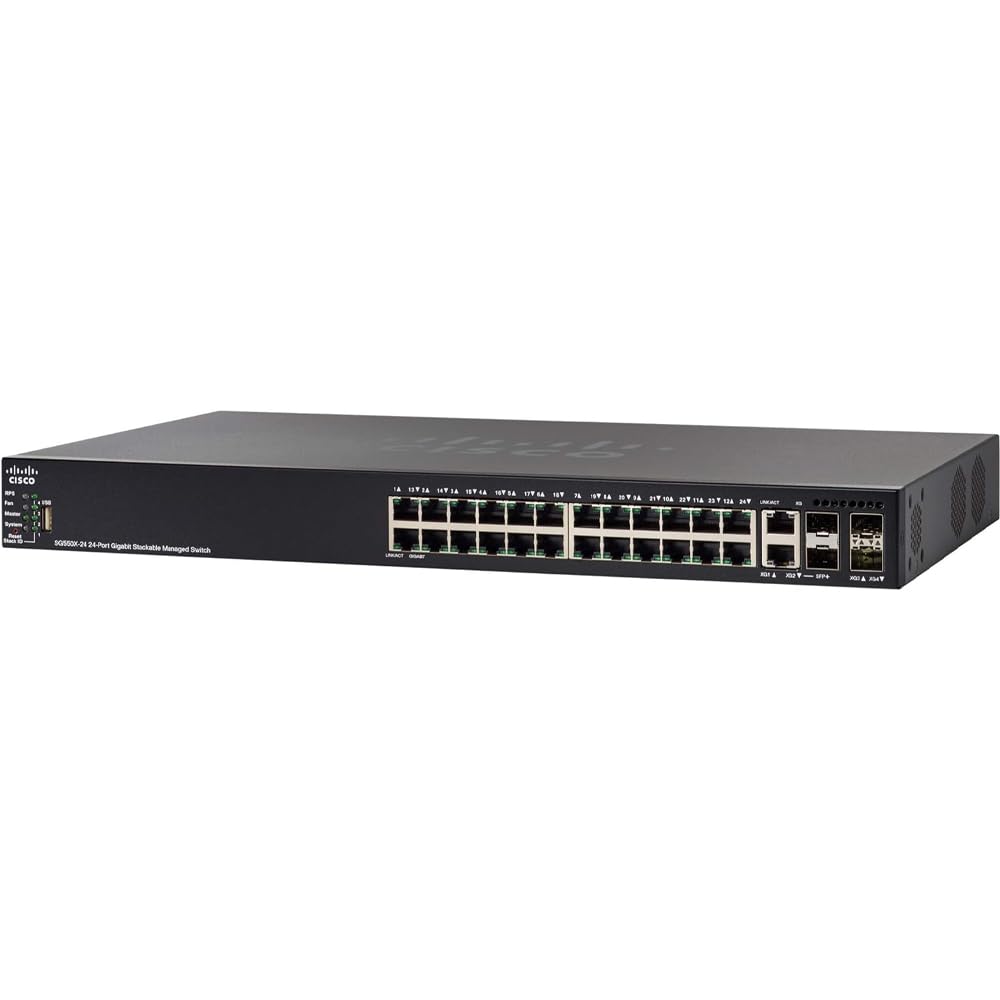
Figure 2: Front panel of the Cisco SG550X-24-K9-NA switch showing ports and indicators.
Упутство за употребу
The Cisco SG550X-24-K9-NA is a managed switch offering extensive features for network control and optimization.
Network Port Configuration
- Етхернет портови: 24 ports supporting 10/100/1000 Mbps speeds.
- Уплинк портови: 4 x 10G SFP+ uplinks for high-bandwidth connections.
Управљање и контрола
The switch can be managed through various interfaces:
- Web Кориснички интерфејс (WebУИ): Access the intuitive web-based interface for graphical configuration and monitoring.
- Интерфејс командне линије (CLI): For advanced users, the CLI provides granular control over switch settings.
- СНМП: Simple Network Management Protocol support for integration with network management systems.
- Менаџер мреже Cisco FindIT: A tool for simplified network management and troubleshooting.
- Auto Smartports: Automatically configures port settings based on the connected device type.
Advanced Layer 2+/Layer 3 Features
The SG550X-24-K9-NA supports a comprehensive set of features to enhance network performance and security:
- Статичко рутирање: Manual configuration of network routes.
- Квалитет услуге (КоС): Дајте приоритет мрежном саобраћају за критичне апликације.
- Voice/Guest VLAN: Separate voice and guest traffic for improved security and performance.
- GVRP (GARP VLAN Registration Protocol): Automates VLAN registration and propagation.
- MSTP (Multiple Spanning Tree Protocol): Prevents network loops and provides path redundancy.
- ИГМП њушкање: Optimizes multicast traffic delivery.
- Time-based Access Control Lists (ACLs): Control network access based on time schedules.
- Dynamic Routing (RIP, VRRP): Automatically adjusts routing paths for network resilience.
- Policy-based Routing: Routes traffic based on defined policies.
- ИГМП упитник: Manages multicast groups.
- 802.1x and Web-based Authentication: Robust user authentication for network access.
- IPv6 First-Hop Security: Protects against IPv6 network attacks.
- Динамичка АРП инспекција: Defends against ARP spoofing attacks.
Видео 1: Оверview of Cisco small business product solutions, demonstrating ease of setup and management for network devices like the SG550X-24-K9-NA switch.
Одржавање
Regular maintenance ensures optimal performance and longevity of your Cisco SG550X-24-K9-NA switch.
Ажурирања фирмвера
Keep the switch firmware updated to benefit from the latest features, performance enhancements, and security patches. Firmware updates are typically available through the Cisco support portal.
Физички преглед
Periodically inspect the switch for dust accumulation, especially around ventilation areas. Ensure all cable connections are secure. The switch incorporates a fan and power hardware redundancy for increased availability.
Мрежна безбедност
Leverage Cisco's cloud security platforms, such as Umbrella, to provide always up-to-date protection against cyber threats, safeguarding your network and connected devices.
Софтваре Фикес
Free software fixes are provided for the term of the product's warranty, ensuring your device remains secure and functional.
Решавање проблема
This section provides general guidance for common issues. For detailed troubleshooting, refer to the comprehensive documentation available on the Cisco support webсајту или контактирајте техничку подршку.
Но Повер
- Verify the power cord is securely connected to both the switch and a working power outlet.
- Проверите функционалност извора напајања.
Проблеми са мрежном повезивањем
- Ensure Ethernet cables are properly connected to the correct ports on both the switch and the connected device.
- Check the link/activity LEDs on the switch ports for status.
- Verify IP address configurations on connected devices.
- If using VLANs, ensure devices are assigned to the correct VLANs.
Slow Network Performance
- Check for network congestion using the switch's monitoring tools (WebUI/CLI).
- Ensure duplex settings match between the switch port and the connected device.
- Verify that QoS policies are correctly configured to prioritize critical traffic.
Accessing Management Interface
- Confirm your management station is on the same network segment or has a route to the switch's management IP address.
- Verify the switch's management IP address.
- Clear your browser's cache if experiencing issues with the WebУИ.
Спецификације
| Феатуре | Детаљ |
|---|---|
| Бранд | Цисцо |
| Број модела | SG550X-24-K9-NA |
| Број портова | 24 |
| Конфигурација Етхернет порта | 24-портовни 10/100/1000 |
| Уплинкс | 4 x 10G SFP+ |
| Тип прекидача | Управљано |
| Стацкабилити | До 8 јединица |
| Брзина преноса података | 1 гигабит у секунди (по порту) |
| Волtage | 48 волти (ДЦ) |
| Цуррент Ратинг | 4 Amps |
| Тип материјала кућишта | Метал |
| Тежина артикла | 8 фунти |
| Боја | Црно |
| GTIN / UPC | 882658808739 |
Гаранција и подршка
Информације о гаранцији
The Cisco SG550X-24-K9-NA switch comes with a Ограничена доживотна гаранција. This warranty includes next-business-day replacement for eligible hardware failures and free software fixes for the term of the warranty.
Техничка подршка
One year of technical support is included with your purchase. For assistance, refer to the technical support contacts provided in the product packaging or visit the official Cisco support website. The Cisco FindIT Network Manager can also assist with diagnostics and support.
For the most up-to-date support resources and documentation, please visit Cisco Small Business Support.