
1. Производ је готовview
The GeoVision GV-EFD4700-0F is an indoor, fixed, mini-sized network camera designed for day and night surveillance. It features an automatic IR-cut filter and integrated IR LEDs to ensure clear imaging in various lighting conditions. This model offers an entry-level surveillance solution with essential features and high image quality.
Кључне карактеристике укључују:
- 1/3" progressive scan super low lux CMOS sensor for minimal illumination at 0.02 lux.
- Dual streams supporting H.265, H.264, and MJPEG codecs.
- Video resolutions up to 20 fps at 2592 x 1520, 25 fps at 2560 x 1440, and 30 fps at 2048 x 1520.
- Intelligent IR with a distance of up to 15 meters (50 ft).
- Wide Dynamic Range Pro (WDR Pro) for clear images in high-contrast scenes.
- 3D noise reduction for improved image clarity.
- Built-in microphone for audio monitoring.
- 2-axis mechanism (pan / tilt) for flexible positioning.
- Power options: DC 12V or Power over Ethernet (PoE IEEE 802.3af).
2. Садржај пакета
Молимо вас да проверите да ли су све ставке присутне и у добром стању након отварања пакета:
- GeoVision GV-EFD4700-0F Mini Fixed IP Dome Camera
- Комплет завртња за монтажу
- Шаблон за инсталацију
- Кратки водич / Упутство за употребу (овај документ)
3. Безбедносне информације
Read these instructions carefully before installation and operation. Keep this manual for future reference.
- Извор напајања: Use only the specified power adapter (DC 12V) or a compliant PoE (IEEE 802.3af) switch. Incorrect voltagе може оштетити уређај.
- Инсталација: Ensure the camera is securely mounted to prevent it from falling. Installation should be performed by qualified personnel if necessary.
- Окружење: This camera is designed for indoor use. Do not expose it to water, moisture, or extreme temperatures.
- Чишћење: Искључите напајање пре чишћења. Користите меку, суву крпу. Не користите течна или аеросолна средства за чишћење.
- Сервисирање: Не покушавајте сами да сервисирате овај производ. Све сервисирање препустите квалификованом сервисном особљу.
4. Подешавање и инсталација
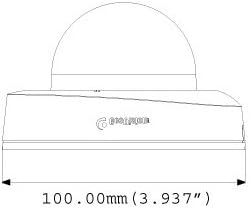
4.1 Физичке димензије
Understand the camera's dimensions for proper placement and mounting.

4.2 Опције монтаже
The GV-EFD4700-0F supports both ceiling and wall-surface mounting.


4.3 Кораци инсталације
- Изаберите локацију: Choose a suitable indoor location for optimal surveillance coverage.
- Припремите површину: Use the provided installation template to mark drilling points on the ceiling or wall.
- Избушене рупе: Drill pilot holes according to the template. Insert wall anchors if necessary.
- Сигурна камера: Attach the camera base to the mounting surface using the supplied screws.
- Повежите каблове: Connect the Ethernet cable for network and PoE, or a DC 12V power adapter and a separate Ethernet cable.
- Подесите угао: Loosen the adjustment screws to pan and tilt the camera lens to the desired viewing angle. Tighten screws once adjusted.
4.4 Почетна конфигурација
Након физичке инсталације и повезивања напајања, приступите камери web interface for initial setup:
- Мрежна конекција: Ensure the camera is connected to your network. It will typically obtain an IP address via DHCP.
- Откријте камеру: Use GeoVision's IP Device Utility software or a network scanner to find the camera's IP address.
- Приступ Web Интерфејс: Отвори а web browser and enter the camera's IP address.
- Пријава: Enter the default username and password (refer to the Quick Start Guide or GeoVision documentation for default credentials). Change these immediately for security.
- Основна подешавања: Configure network settings, date/time, video resolution, and recording preferences.
5. Руковање камером
5.1 Уживо View и Снимање
Once configured, you can access the live video feed through the web interface or compatible NVR/VMS software. The camera supports continuous recording, scheduled recording, and event-triggered recording (e.g., motion detection).
- H.265 Compression: Utilizes H.265 video codec for efficient storage and reduced network bandwidth while maintaining high image quality.
- ВДР Про: Wide Dynamic Range Pro enhances image visibility in scenes with both very bright and very dark areas.
- ИР функционалност: The built-in IR LEDs automatically activate in low-light conditions, providing clear black and white images up to 15 meters.
5.2 Детекција покрета и упозорења
Configure motion detection zones and sensitivity within the camera's web interface. The camera can be set to trigger recordings, send email alerts, or notify your VMS upon detecting motion.
5.3 Аудио мониторинг
The integrated microphone allows for audio monitoring of the surveillance area. Audio settings can be adjusted via the web интерфејс.
6. Одржавање
6.1 Чишћење
Regularly clean the camera lens and housing to ensure optimal image quality. Use a soft, lint-free cloth. For stubborn dirt, a slightly damp cloth with mild detergent can be used, followed by a dry cloth. Avoid abrasive cleaners or solvents.
6.2 Ажурирања фирмвера
Periodically check the GeoVision website for firmware updates. Firmware updates can provide new features, performance improvements, and security enhancements. Follow the instructions provided with the firmware update package carefully to avoid damaging the device.
КСНУМКС. Решавање проблема
If you encounter issues with your GV-EFD4700-0F camera, refer to the following common problems and solutions:
- Нема напајања:
- Check if the power adapter is securely connected and providing 12V DC.
- If using PoE, ensure the Ethernet cable is connected to a PoE-enabled switch or injector and that the switch port is active.
- Нема видео фида:
- Verify network connectivity. Ping the camera's IP address.
- Ensure the camera's IP address, subnet mask, and gateway settings are correct.
- Check if the video stream settings (e.g., resolution, frame rate) are compatible with your viewing software or NVR.
- Restart the camera by disconnecting and reconnecting power.
- Лош квалитет слике:
- Очистите сочиво камере.
- Проверите да ли постоје препреке у видном пољу камере view.
- Adjust WDR Pro settings in the web interface for high-contrast scenes.
- Ensure sufficient lighting for optimal color images; IR will provide black and white in low light.
- Не могу приступити Web Интерфејс:
- Confirm the camera's IP address is correct.
- Ensure your computer is on the same network segment as the camera.
- Покушајте другачије web претраживач.
- Temporarily disable any firewall software on your computer.
If problems persist, contact GeoVision technical support.
8. Спецификације
| Феатуре | Детаљ |
|---|---|
| Назив модела | GV-EFD4700-0F |
| Сензор слике | 1/3" progressive scan super low lux CMOS |
| Ефективна резолуција мировања | 4 МП |
| Минимално осветљење | 0.02 лукса |
| Видео Цомпрессион | Х.265, Х.264, МЈПЕГ |
| Макс. Број слика | 30 fps at 2048 x 1520 |
| ИР Дистанце | До 15 м (50 стопа) |
| Ленс | 2.8mm (Fixed) |
| Динамиц Ранге | ВДР Про |
| Смањење буке | 3Д смањење шума |
| Аудио | Уграђен микрофон |
| Pan/Tilt Mechanism | 2-акис |
| Повер Инпут | ДЦ 12В / ПоЕ (ИЕЕЕ 802.3аф) |
| Технологија повезивања | Wired (Ethernet), Wi-Fi (for certain functions/protocols) |
| Унутрашња/спољна употреба | Индоор |
| Димензије (ставка) | 3.9 к 3.9 к 2.4 инча (100 к 100 к 60.8 мм) |
| Тежина (артикал) | 5.28 унци |
| Боја | Бела |
| Произвођач | USA Vision Systems |
9. Информације о гаранцији
GeoVision products typically come with a limited manufacturer's warranty. Specific warranty terms, conditions, and duration may vary by region and retailer. Please refer to the warranty card included with your purchase or visit the official GeoVision webсајт за детаљне информације о гаранцији и поступке регистрације. Сачувајте доказ о куповини за потребе потраживања у оквиру гаранције.
10. Подршка
For technical assistance, product inquiries, or further support, please utilize the following resources:
- GeoVision Official Webсајт: Посетите ввв.геовисион.цом.тв for product documentation, FAQs, software downloads, and support contact information.
- техничка подршка: Contact GeoVision's technical support team through their website or the contact details provided in your product's packaging.
- Онлине ресурси: Explore online forums and communities for user-generated tips and solutions.