
Увод
The American Lifetime 8-inch Digital Day Clock is designed to provide clear and easy-to-read time, day, and date information. Its large display and customizable features make it a valuable tool for maintaining daily routines and orientation. This manual will guide you through the setup, operation, and maintenance of your new clock.
Кључне карактеристике:
- Издржљива конструкција: Built with robust materials for long-lasting use.
- Лако читљив екран: Features a large, clear, high-contrast 8-inch display for optimal visibility, even in low light.
- Једноставно подешавање: User-friendly interface with an easy-to-follow manual for quick operation.
- Прилагодљиви аларми: Set up to 5 daily alarms for reminders such as medication times or appointments.
- Аутоматско затамњење: Adjusts display brightness automatically based on ambient room light.
- Подршка за више језика: Offers various language and time format options.
- Резервна батерија: Internal battery ensures time and date are maintained during power outages, automatically resetting when power returns.
- Очисти екран: Spells out the time, period of the day, full day of the week, month, and date without confusing abbreviations.
Сетуп
Setting up your American Lifetime Digital Day Clock is straightforward. Follow these steps to get started:
- Распакујте сат: Carefully remove the clock and all accessories from the packaging.
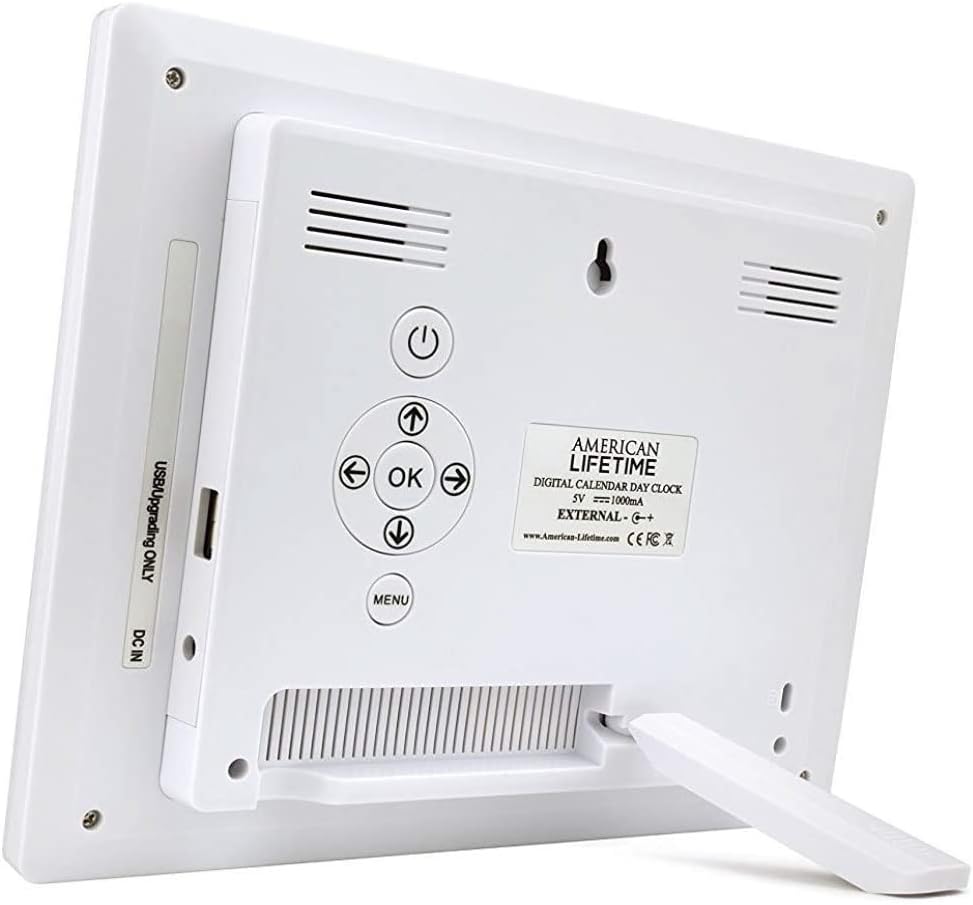
- Причврстите постоље: The clock includes a removable stand that can be inserted into the back for tabletop display. It supports both horizontal and vertical orientations.
- Прикључите напајање: Plug the provided power adapter into the DC IN port on the back of the clock and then into a standard electrical outlet. The clock will automatically power on and display the current time and date.
- Почетна подешавања: Use the control buttons on the back of the clock to navigate the menu and set the correct time, date, time mode (12/24 hour), date mode (Month-Day-Year, Day-Month-Year), and language.

Упутство за употребу
Your Digital Day Clock offers several customizable settings to enhance its utility. All adjustments are made using the buttons located on the back of the unit.
Контролна дугмад:
- Дугме за напајање: Укључује или искључује екран.
- Дугме ОК: Потврђује изборе у менију.
- Дугмад са стрелицама (горе/доле/лево/десно): Крећите се кроз опције менија и подешавајте вредности.
- Дугме менија: Приступа главном менију подешавања.
Подешавање времена и датума:
- Притисните тастер Мени дугме за улазак у подешавања.
- Користите Горе/Доле arrows to select "Set Time" or "Set Date".
- Притисните OK to enter the setting. Use Лево/Десно arrows to move between digits/fields and Горе/Доле arrows to change values.
- Притисните OK to confirm each change.
Customizing Alarms:
The clock supports up to 5 customizable alarms with messages.
- From the main menu, navigate to "Alarm Time 1" through "Alarm Time 5".
- Притисните OK да изаберете аларм.
- Set the alarm time and frequency (e.g., daily, weekdays).
- Choose a pre-set message (e.g., "Time to take medication", "Appointment Reminder") or set a custom message if available.
- Ensure the alarm is set to "On" and press OK да спасе.
Остала подешавања:
- Временски режим: Switch between 12-hour and 24-hour formats.
- Режим датума: Select your preferred date display format (e.g., Month-Day-Year).
- Језик: Choose from multiple language options.
- Show Period Of The Day: Enable or disable the display of "Morning," "Afternoon," "Evening," or "Night."
- Аутоматско затамњивање: Turn this feature on to allow the clock to automatically adjust its brightness.
Одржавање
To ensure the longevity and optimal performance of your Digital Day Clock, follow these simple maintenance guidelines:
- Чишћење: Use a soft, dry cloth to gently wipe the screen and frame. Avoid abrasive cleaners or sprays that could damage the display or finish.
- Пласман: Place the clock on a stable, flat surface or mount it securely on a wall. Avoid direct sunlight or extreme temperatures, which can affect performance and display life.
- Снага: Always use the original power adapter provided with the clock.
Решавање проблема
If you encounter any issues with your American Lifetime Digital Day Clock, refer to the following common problems and solutions:
| Проблем | Решење |
|---|---|
| Сат се не укључује. | Ensure the power adapter is securely plugged into both the clock and a working electrical outlet. Try a different outlet. |
| Екран је превише таман или превише светао. | Check the "Auto Dimming" setting in the menu. You can turn it off to manually adjust brightness if needed. |
| Време или датум су нетачни. | Access the "Set Time" and "Set Date" options in the menu to manually correct the settings. |
| Alarms are not sounding. | Verify that the alarm time is correctly set, the alarm is enabled ("On"), and the volume is not muted. |
Спецификације
- Бренд: Америцан Лифетиме
- Број модела: H1-HO1A--JB6HDWLAO4
- Боја: Браон
- Тип приказа: Дигитал
- Димензије производа: 8.5" Ш x 6.75" В
- Извор напајања: Цордед Елецтриц
- Материјал: Пластика
- Тип монтаже: Зидни носач, столна плоча
- Посебне карактеристике: Alarm, Calendar Display, Auto-Dimming, Multi-Language Support, Battery Backup
- Тежина артикла: 15.8 унци
- УПЦ: 728044490976
Гаранција и подршка
American Lifetime stands behind its products. Your Digital Day Clock comes with a Двогодишња ограничена гаранција произвођача. Additionally, you can return the product for free within the first 30 days of purchase, no questions asked.
For any questions, troubleshooting assistance, or warranty claims, please contact American Lifetime customer service. Our team is dedicated to providing support and ensuring your satisfaction.
Посетите American Lifetime Store за више информација и ресурса за подршку.