
1. Увод
Хвала вам на куповиниasing the iHome IB90 Bluetooth Headphones. These headphones are designed to provide rich, detailed sound with an enhanced bass response, offering a comfortable listening experience with wireless freedom and extended battery life. This manual will guide you through the setup, operation, and maintenance of your new headphones.
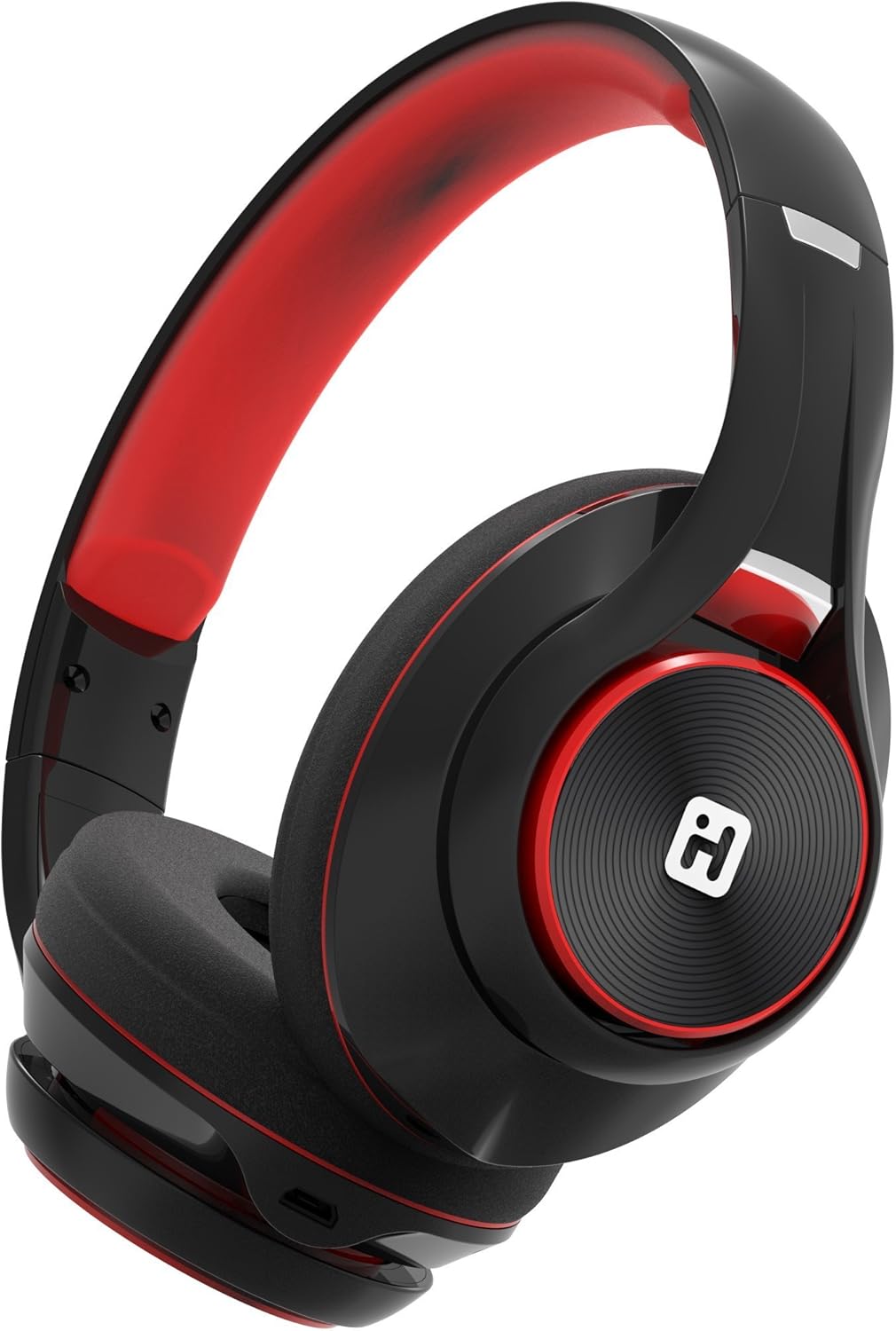
Image: iHome IB90 Bluetooth Headphones, featuring a comfortable over-ear design in black and red.
2. Садржај пакета
- iHome IB90 Bluetooth Headphones
- Audio Cable (for wired mode)
- USB Charging Cable (not explicitly listed but implied for rechargeable battery)
3. Подешавање
3.1 Пуњење слушалица
Before initial use, fully charge your headphones. The extra-long life rechargeable battery provides up to 46 hours of continuous use on a single charge. A 10-minute charge can provide 1 hour of play when the battery is low.
- Повежите приложени УСБ кабл за пуњење са портом за пуњење на слушалицама.
- Повежите други крај УСБ кабла са напајаним УСБ портом (нпр. рачунаром, зидним адаптером).
- Индикаторска лампица пуњења ће светлети током пуњења и искључити се када се потпуно напуни.
3.2 Блуетоотх упаривање
Pair your iHome IB90 headphones with your Bluetooth-enabled device to enjoy wireless audio.
- Уверите се да су слушалице напуњене и искључене.
- Press and hold the Power/Bluetooth button on the headphones until the indicator light flashes, indicating pairing mode. Voice prompts will confirm Bluetooth connection status.
- On your device (smartphone, tablet, computer), go to the Bluetooth settings and enable Bluetooth.
- Select "iHome IB90" (or similar model name) from the list of available devices.
- Once connected, a voice prompt will confirm successful pairing, and the indicator light will change.
3.3 Melody Voice Assistant Setup
The iHome IB90 headphones are compatible with the free Melody voice-powered personal music assistant app, allowing you to control music from services like Spotify and iHeartRadio using voice commands. The voice control button on the earcup also works with Siri and Google Assistant.
Image: Melody Personal Music Assistant app logo.
- Download the Melody app from your device's app store (App Store for iOS, Google Play for Android).
- Open the Melody app and follow the on-screen instructions to set up your account and link your preferred music streaming services.
- Ensure your headphones are paired with your device.
- Use the voice control button on the earcup to activate Melody or your device's native voice assistant (Siri/Google Assistant) and issue commands.
Video: This video demonstrates the features and functionality of the Melody voice-powered personal music assistant, highlighting its integration with iHome products for hands-free music control and access to various streaming platforms.
4. Управљање слушалицама
4.1 On-Ear Remote Control
The earcup features convenient controls for managing your audio and calls:
- Пусти/паузирај: Press the designated button to play or pause audio.
- Избор песме: Use the track buttons to skip forward or backward.
- Контрола јачине звука: Подесите јачину звука помоћу дугмади за јачину звука.
- Одговори/заврши позиве: The built-in echo-cancelling microphone allows for hands-free phone calls. Press the call button to answer or end a call.

Image: Close-up of the iHome IB90 headphone earcup, illustrating the location of control buttons.
4.2 Управљање гласом
Activate your personal voice assistant (Melody, Siri, or Google Assistant) by pressing the dedicated voice control button on the earcup. You can then use voice commands to:
- Play specific songs, artists, albums, or playlists.
- Check weather, set reminders, and make phone calls (via Siri/Google Assistant).
- Access music from various streaming platforms (via Melody app).
4.3 Жични режим
The headphones can also be used in wired mode with the provided audio cable, ensuring you can continue listening even if the battery is depleted. Simply connect the audio cable to the headphone's audio input and your device's audio output.
5. Одржавање
5.1 Чишћење
Да бисте одржали слушалице у добром стању:
- Обришите слушалице и траку за главу меком, сувом крпом.
- Избегавајте употребу абразивних средстава за чишћење, растварача или јаких хемикалија.
- Do not immerse the headphones in water, as they are not water-resistant.
5.2 Складиштење
When not in use, store your headphones in a cool, dry place away from direct sunlight and extreme temperatures. The foldable design allows for compact storage and portability.
КСНУМКС. Решавање проблема
If you encounter issues with your iHome IB90 headphones, refer to the following common solutions:
- Нема напајања: Ensure the headphones are fully charged. Connect them to a power source using the USB charging cable.
- Не могу да упарим преко Bluetooth-а: Make sure the headphones are in pairing mode (flashing indicator light). Turn off and on your device's Bluetooth, then try re-pairing. Ensure the headphones are not already connected to another device.
- Нема звука или слаба јачина: Check the volume levels on both the headphones and your connected device. Ensure the headphones are properly paired. If using wired mode, ensure the audio cable is securely connected.
- Микрофон не ради: Verify that the headphones are properly connected via Bluetooth. Check your device's audio input settings to ensure the headphone microphone is selected.
- Цурење звука: The iHome IB90 headphones feature passive noise isolation, not active noise cancellation (ANC). While they provide an immersive sound environment, they may not completely block out all external noise, and some sound may be audible to others at higher volumes.
7. Спецификације
| Феатуре | Детаљ |
|---|---|
| Бранд | иХоме |
| Број модела | IB90v2BRC |
| Постављање уха | Преко уха |
| Форм Фацтор | Он Еар |
| Контрола буке | None (Passive Noise Isolation) |
| Технологија повезивања | Блуетоотх |
| Бежична технологија | Блуетоотх |
| Тип контроле | Ремоте Цонтрол |
| Уграђени медији | Слушалице |
| Тежина артикла | 0.5 фунти |
| Материјал кућишта | Пластика |
| Специфичне употребе за производ | Травел |
| Ниво отпорности на воду | Није водоотпоран |
8. Гаранција и подршка
За информације о гаранцији и корисничкој подршци, погледајте документацију која је приложена уз ваш производ или посетите званичну iHome веб страницу webсајт. Овај приручник не садржи конкретне детаље о гаранцији.