
Увод
This manual provides comprehensive instructions for the safe and effective use of your Winplus AC55925-80 3-in-1 Emergency Socket Power Bank. This device combines a compact power bank, a USB car charger, and an emergency glass-breaking tool. Please read this manual thoroughly before operation and retain it for future reference.
Производ је завршенview
The Winplus 3-in-1 Emergency Socket Power Bank is designed for convenience and safety, offering multiple functionalities in a compact form factor.

Figure 1: Winplus 3-in-1 Emergency Socket Power Bank with key features highlighted.
Компоненте:
- Compact Power Bank: Provides portable power for charging devices.
- УСБ ауто пуњач: Plugs into a 12V car socket to charge devices and the power bank.
- Emergency Glass-Breaking Tool: Integrated for emergency situations.
- УСБ излазни порт: For connecting charging cables to devices.
- Микро УСБ улазни порт: For charging the internal power bank.
- ЛЕД индикатор: Приказује статус пуњења.

Слика 2: Детаљно view портова уређаја.
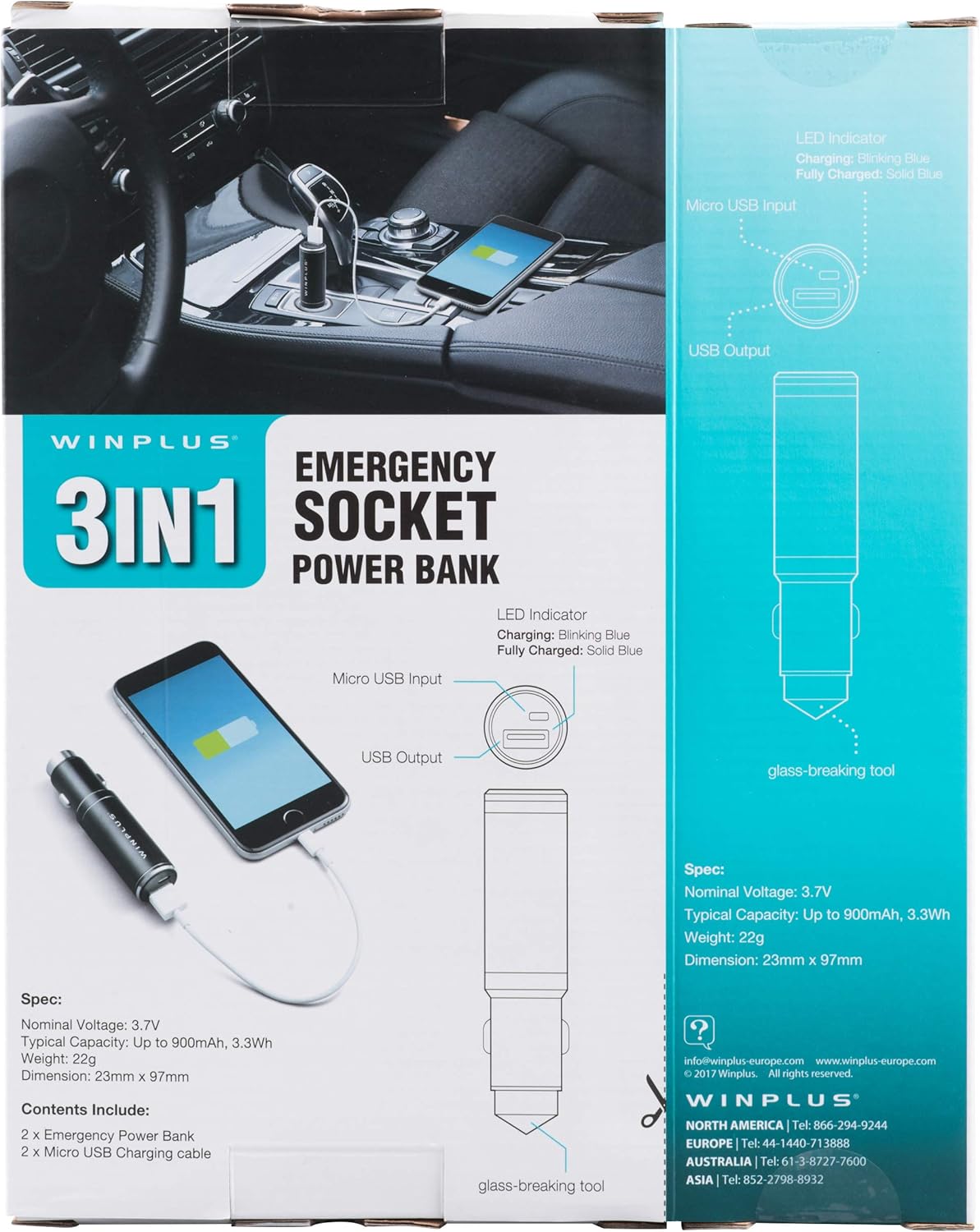
Figure 3: LED indicator status and glass-breaking tool location.
Сетуп
Почетно пуњење преносног пуњача:
- Locate the Micro USB Input port on the device.
- Connect the provided Micro USB charging cable to the Micro USB Input port.
- Connect the other end of the USB cable to a standard USB power source (e.g., a computer USB port, a wall adapter, or the car's 12V socket when used as a car charger).
- The LED indicator will blink blue during charging.
- Once fully charged, the LED indicator will turn solid blue.
Note: It is recommended to fully charge the power bank before its first use.
Упутство за употребу
Коришћење као преносиви Повер Банк:
- Ensure the power bank is charged (solid blue LED indicator).
- Connect your device's charging cable to the USB Output port on the power bank.
- Connect the other end of the cable to your mobile device (smartphone, tablet, etc.).
- Повер банк ће аутоматски почети да пуни ваш уређај.
Using as a USB Car Charger:
- Insert the Winplus 3-in-1 device into your vehicle's 12V accessory socket (cigarette lighter socket).
- Connect your device's charging cable to the USB Output port on the Winplus device.
- Други крај кабла повежите са мобилним уређајем.
- Your device will begin charging. The internal power bank will also charge simultaneously if it is not full.
Using the Emergency Glass-Breaking Tool:
The emergency glass-breaking tool is located at the tip of the device, opposite the USB ports. This tool is intended for emergency use only to break vehicle side windows in situations where occupants are trapped.
- In an emergency, firmly press the tip of the tool against a corner of a side window.
- Apply steady pressure until the spring-loaded mechanism activates and shatters the glass.
- Once the glass is broken, carefully clear any remaining shards before exiting the vehicle.
УПОЗОРЕЊЕ: Use this tool only in genuine emergencies. Misuse can cause serious injury. Keep out of reach of children.
Одржавање
- Keep the device dry. Moisture can damage internal circuits.
- Не излажите екстремним температурама (вруће или хладно).
- Очистите уређај меком, сувом крпом. Не користите јаке хемикалије или абразивна средства за чишћење.
- Чувати на хладном и сувом месту када се не користи.
- Избегавајте испуштање или излагање уређаја јаким ударима.
Решавање проблема
| Проблем | Могући узрок | Решење |
|---|---|---|
| Уређај се не пуни. | Power bank is depleted. Кабл је неисправан. USB port is dirty or damaged. | Напуните повер банк. Пробајте други кабл за пуњење. Clean the USB ports carefully or try another port. |
| ЛЕД индикатор се не пали. | Device is not connected to a power source. Device is fully charged (if solid blue). Уређај је неисправан. | Ensure proper connection to a power source. Check if it's already solid blue. Контактирајте корисничку подршку ако проблеми и даље постоје. |
| Споро пуњење. | Cable is not suitable. Power source is low current. Device being charged has high power requirements. | Use a high-quality charging cable. Connect to a higher current USB adapter. This device provides 2.1A output, which is standard for fast charging most phones. |
Спецификације
- Модел: АЦ55925-80
- Номинал Волtage: 3.6В
- Типичан капацитет: Up to 2500 mAh, 9 Wh
- Састав батерије батерије: Литхиум Полимер
- УСБ излаз: 5В / 2.1А
- Микро УСБ улаз: 5В / 0.5А
- Димензије: 23 мм x 127 мм (приближно)
- Тежина артикла: 510 g (for the 2-pack)
- Тип конектора: Micro USB (Input), USB Type-A (Output)
Безбедносне информације
- Не растављајте, не отварајте и не цепајте батеријски пакет.
- Не излажите батерију топлоти или ватри. Избегавајте складиштење на директном сунцу.
- Немојте изазивати кратки спој батеријског пакета. Не складиштите батеријске пакете насумично у кутији или фиоци где могу изазвати међусобни кратки спој или кратки спој са другим металним предметима.
- Не излажите батерије механичком удару.
- У случају цурења батерије, не дозволите да течност дође у контакт са кожом или очима. Уколико дође до контакта, исперите захваћено подручје са доста воде и потражите лекарски савет.
- Немојте користити ниједан пуњач осим оног који је посебно приложен за употребу са опремом.
- Држите батерије ван домашаја деце.
- Одмах потражите савет лекара ако се батерија прогута.
- Увек купујте одговарајућу батерију за опрему.
- Држите батеријске пакете чистим и сувим.
- Не остављајте батерију на дужем пуњењу када није у употреби.
- Правилно одложите батерије у складу са локалним прописима.
Гаранција и подршка
For warranty information or technical support, please contact Winplus North America Inc. directly.
- Произвођач: Winplus North America Inc
- Контакт информације: Refer to product packaging or the official Winplus webсајт за најновије информације о подршци.
You can also visit the Winplus webсајт за често постављана питања и додатне информације о производу: www.winplus-europe.com