
Увод
This manual provides instructions for the proper use and care of your Helios 77M-4 50mm F1.8 vintage lens. Designed for Sony E-mount cameras, this manual focus lens offers a classic photographic experience with its distinct optical characteristics. Please read this manual thoroughly before using the lens to ensure optimal performance and longevity.
Компоненте сочива
Familiarize yourself with the main components of your Helios 77M-4 lens.
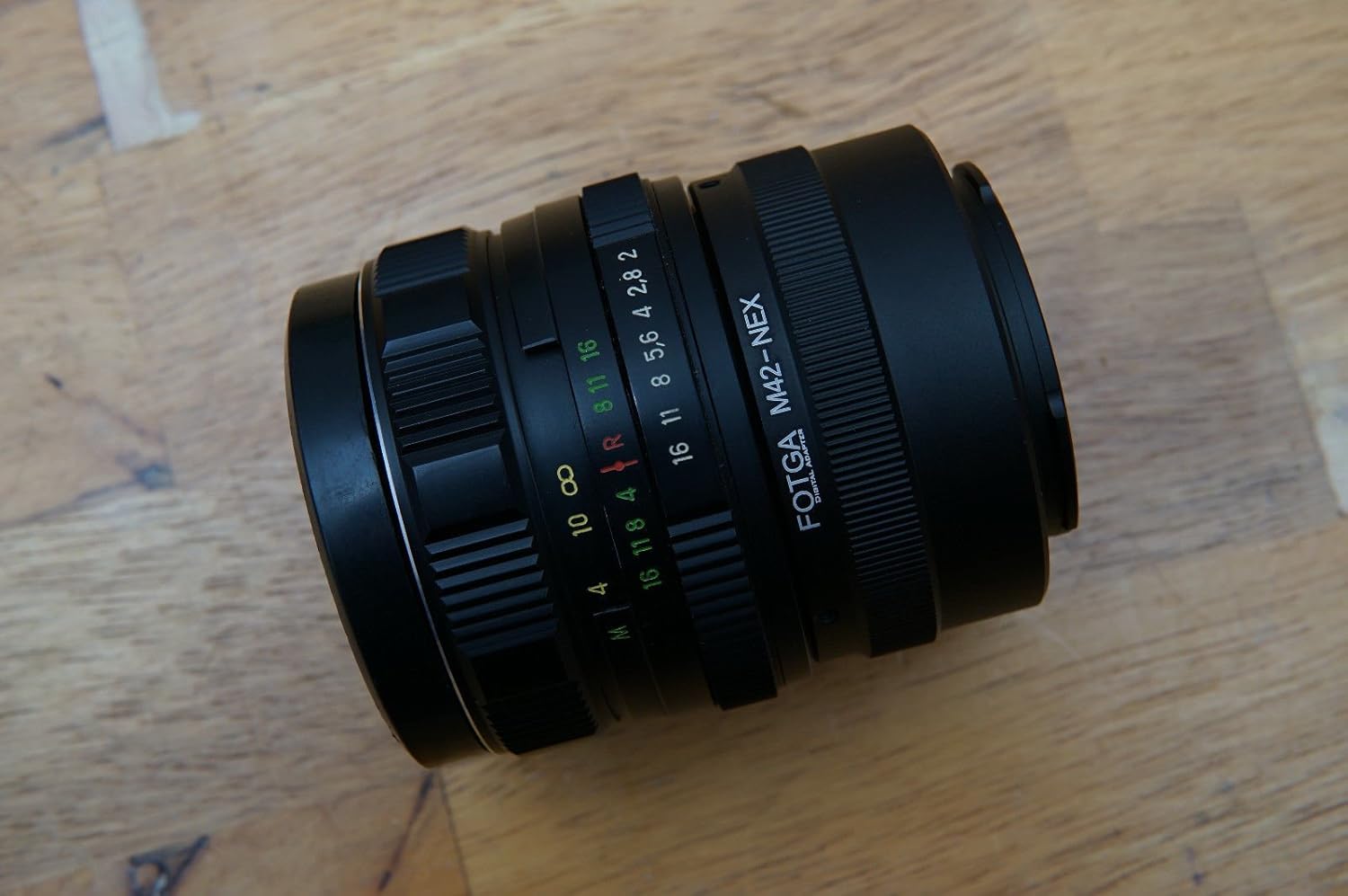
Image: The Helios 77M-4 50mm F1.8 lens, displaying its manual focus ring, aperture ring, and depth of field scale. This view highlights the robust construction and clear markings essential for manual operation.
- Прстен за фокусирање: Used to adjust the focus manually.
- Прстен бленде: Used to set the desired aperture (f-stop).
- Depth of Field Scale: Provides an indication of the depth of field at various apertures.
- Монтажни прстен: Connects the lens to the camera body.
Сетуп
Монтирање сочива
- Уверите се да је ваша камера искључена.
- Remove the rear lens cap from the Helios 77M-4 lens and the body cap from your Sony E-mount camera.
- Align the white index mark on the lens barrel with the corresponding white index mark on the camera body.
- Уметните објектив у носач камере и окрените га у смеру казаљке на сату док не кликне на своје место. Немојте силом померати објектив.
- Once mounted, remove the front lens cap.

Image: The Helios 77M-4 lens securely attached to a Sony E-mount camera body. This illustrates the correct mounting position, ready for use.
Подешавања камере
Since this is a manual lens, you will need to adjust your camera settings:
- Подесите камеру на Ручно (М) or Aperture Priority (A) режим.
- Омогући "Release without lens" or "Shoot without lens" in your camera's menu, as the camera will not detect an electronic connection to the lens.
- Consider using "Focus Peaking" и "Magnified View" features on your camera for easier manual focusing. Refer to your camera's manual for specific instructions on these features.
Руковање објективом
Подешавање отвора бленде
The aperture is controlled directly on the lens using the aperture ring. Rotate the ring to select your desired f-stop. A wider aperture (smaller f-number like F1.8) allows more light and creates a shallower depth of field, ideal for portraits. A narrower aperture (larger f-number) allows less light and creates a deeper depth of field, suitable for landscapes.
Ручно фокусирање
To focus, rotate the focus ring on the lens barrel until your subject appears sharp in the viewfinder or on the LCD screen. Utilize your camera's focus peaking and magnification features for precise focusing, especially at wider apertures.
- Пик фокуса: Highlights in-focus areas with a colored outline.
- Увећано View: Zooms in on a portion of the image for critical focus assessment.
Одржавање
Чишћење сочива
- Use a soft, lint-free microfiber cloth specifically designed for optical surfaces to clean the front and rear elements.
- For stubborn smudges, apply a small amount of lens cleaning solution to the cloth, not directly to the lens.
- Use a blower brush to remove dust particles before wiping to prevent scratching.
- Никада не користите абразивне материјале или јаке хемикалије.
Складиштење
- Увек ставите предњи и задњи поклопац објектива када се објектив не користи.
- Чувајте сочиво на хладном и сувом месту, даље од директне сунчеве светлости и екстремних температура.
- If storing for extended periods, consider using a dehumidifying agent to prevent fungus growth.
Решавање проблема
| Проблем | Могући узрок | Решење |
|---|---|---|
| Camera does not recognize lens / Cannot take photos | Manual lens, no electronic contacts. | Enable "Release without lens" or "Shoot without lens" in camera settings. |
| Слике су мутне | Неправилан фокус или подрхтавање камере. | Ensure proper manual focus using focus peaking/magnification. Use a faster shutter speed or tripod to prevent camera shake. |
| Images are too dark/bright | Incorrect exposure settings (aperture, shutter speed, ISO). | Adjust aperture on the lens. Adjust shutter speed and ISO on the camera to achieve desired exposure. |
| Dust or smudges on images | Dirty lens elements. | Clean lens elements carefully using a blower brush and microfiber cloth. |
Спецификације
| Феатуре | Детаљ |
|---|---|
| Модел | Helios 77M-4 |
| Фоцал Ленгтх | 50 мм |
| Максимални отвор бленде | Ф1.8 |
| Ленс Типе | Стандардни главни објектив |
| Компатибилни носачи | Sony E-Mount (NEX, A7 series, 6500, a6300, a6000, a5100, a5000, a3000) |
| Фоцус Типе | Мануал Фоцус |
| Произвођач | 77M-4 (as per product data) |
Гаранција и подршка
This product is a vintage lens. Specific warranty information may vary depending on the seller and purchase conditions. Please refer to your purchase documentation for details regarding any applicable warranty.
For technical support or inquiries, please contact the retailer or the original manufacturer if contact information is available. As a vintage item, direct manufacturer support may be limited.