
1. Увод
Thank you for choosing the HTC USB Type-C Hi-Res Earphones, Model 99H20317-00. These earphones are designed to provide a high-quality audio experience with their advanced features and ergonomic design. This manual provides essential information for the proper setup, operation, maintenance, and troubleshooting of your new earphones.
Кључне карактеристике укључују:
- Concert hall design for unparalleled sound.
- Larger 13mm speakers for a fuller sound profile.
- Enhanced port optimization for improved bass reproduction.
- Lighter and thinner aerospace polymer diaphragm to increase sound frequency response.
- Ergonomic design for maximum comfort during extended use.
2. Безбедносне информације
Please read and follow these safety guidelines to ensure safe and optimal use of your earphones:
- Заштита слуха: Avoid listening at high volume levels for prolonged periods to prevent hearing damage.
- Еколошка свест: Do not use earphones in situations where the inability to hear ambient sounds could be dangerous, such as while driving, cycling, or walking in traffic.
- Чишћење: Clean the earphones regularly with a soft, dry cloth. Do not use liquid cleaners or solvents.
- Изложеност води: These earphones are not waterproof. Avoid exposure to water or excessive moisture.
- деца: Држати ван домашаја мале деце због ситних делова који могу представљати опасност од гушења.
3. Садржај пакета
Проверите да ли су све ставке присутне у вашем пакету:
- HTC USB Type-C Hi-Res Earphones (Model: 99H20317-00)
- Additional ear tips (if included)
- Кориснички приручник (овај документ)
4. Подешавање
These earphones are designed for simple plug-and-play operation.
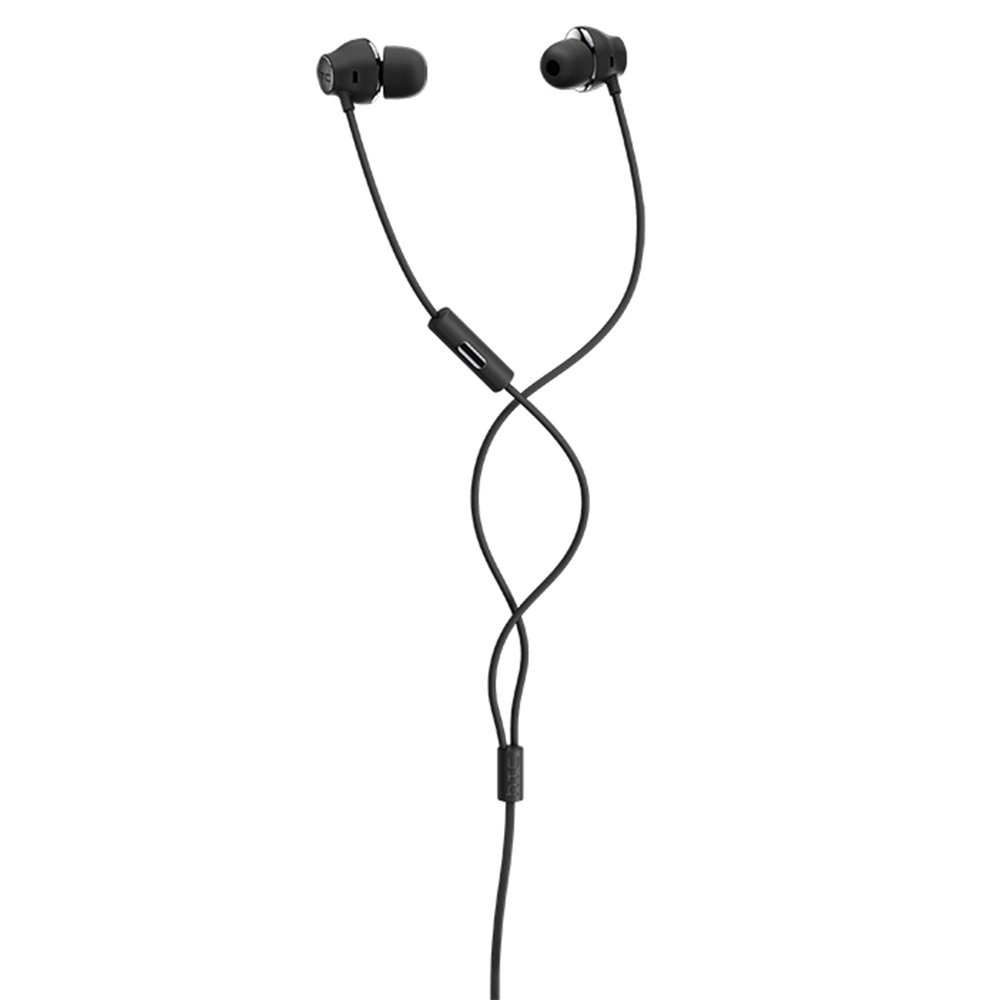
- Повежите се: Insert the USB Type-C connector of the earphones into the USB Type-C port of your compatible device (Smartphone, Laptop, Tablet).
- Препознавање уређаја: Your device should automatically recognize the earphones. If prompted, select the earphones as the audio output device.
- Подесите јачину звука: Begin playback at a low volume and gradually increase to a comfortable listening level.
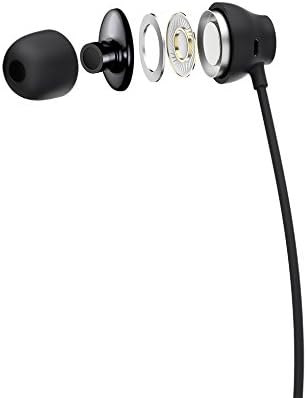
Figure 1: HTC USB Type-C Hi-Res Earphones connected to a device.
5. Упутство за употребу
Once connected, your earphones are ready for use.
- Аудио репродукција: Play audio from your connected device. The sound will be routed through the earphones.
- Управљање позивима: For devices supporting call functions, you can typically answer/end calls using the device's interface.
- Контрола апликације: This model supports control via an application. Refer to your device's app store for any official HTC audio control applications that may offer additional features or sound customization.
6. Одржавање и њега
Proper care extends the lifespan of your earphones:
- Савети за чишћење ушију: Gently remove ear tips and clean them with a mild soap solution and water. Ensure they are completely dry before reattaching.
- Cleaning Earphone Body: Wipe the earphone body and cable with a soft, dry, lint-free cloth. Do not use abrasive materials or harsh chemicals.
- Складиштење: When not in use, store the earphones in a clean, dry place, preferably in a protective pouch to prevent tangling and damage.
- Управљање кабловима: Avoid tightly winding the cable or subjecting it to sharp bends, which can damage internal wires.
Слика 2: Експлодирао view of earphone components, highlighting the 13mm speaker and aerospace polymer diaphragm.
КСНУМКС. Решавање проблема
Ако наиђете на проблеме, погледајте следеће уобичајене проблеме и решења:
| Проблем | Могући узрок | Решење |
|---|---|---|
| Нема звука | Earphones not properly connected; device volume too low; incorrect audio output selected on device. | Ensure the USB Type-C connector is fully inserted. Increase device volume. Check device audio settings to confirm earphones are selected as output. |
| Лош квалитет звука | Dirty ear tips; damaged cable; low-quality audio source. | Clean ear tips. Inspect the cable for visible damage. Try a different audio source or file. |
| Earphones uncomfortable or fall out | Incorrect ear tip size. | Try different sized ear tips (if provided) to find the best fit for your ears. |
8. Спецификације
| Феатуре | Детаљ |
|---|---|
| Бранд | ХТЦ |
| Број модела | 99Х20317-00 |
| Технологија повезивања | Жичани (УСБ тип-Ц) |
| Величина звучника | 13 мм |
| Материјал | Synthetic leather (ear tips/housing accents) |
| Тежина | 50 грама |
| Димензије производа | 0.1 x 0.1 x 0.1 cm (packaging/shipping dimensions, actual earphone size is compact) |
| Контролни метод | Апп |
| Блуетоотх подршка | бр |
| Батерије су потребне | бр |
| Компатибилни уређаји | Smartphone, Laptop, Tablet with USB Type-C audio output |
| Боја | Тамно сива |
| Постављање уха | Ин-еар |
9. Гаранција и подршка
For warranty information and technical support, please refer to the documentation provided with your purchase or visit the official HTC support webсајт. Сачувајте доказ о куповини за потребе гаранције.