
1. Увод
This user manual provides detailed instructions for the installation, operation, and maintenance of the Cooler Master Elite RC-342 Mini-Tower Computer Case. This chassis is designed to support Micro-ATX motherboards and offers efficient cooling with its front mesh design. Please read this manual thoroughly before beginning installation to ensure proper setup and optimal performance.
2. Карактеристике производа
- Mini-Tower Design: Compact form factor supporting Micro-ATX motherboards.
- Оптимизована вентилација: Front mesh panel ensures superior airflow for component cooling.
- Easy Access I/O: Conveniently located front panel with USB ports and audio jacks.
- Укључено напајање: Comes with a 400W power supply unit.
- Drive Bay Flexibility: Features internal 3.5" drive bays, including a removable bay for easier installation.
3. Подешавање и инсталација
Before starting, ensure you have a clean, static-free workspace. Refer to your motherboard and component manuals for specific installation details.
3.1. Отварање случаја
To access the interior, remove the two thumbscrews located at the rear of the case on the left side panel. Slide the side panel backward and lift it off.

Слика 3.1: Left side panel of the case. Remove thumbscrews to open.
3.2. Инсталација матичне плоче
The Elite RC-342 supports Micro-ATX motherboards. Install the necessary standoffs into the motherboard tray according to your motherboard's mounting holes. Carefully place the motherboard onto the standoffs and secure it with screws.
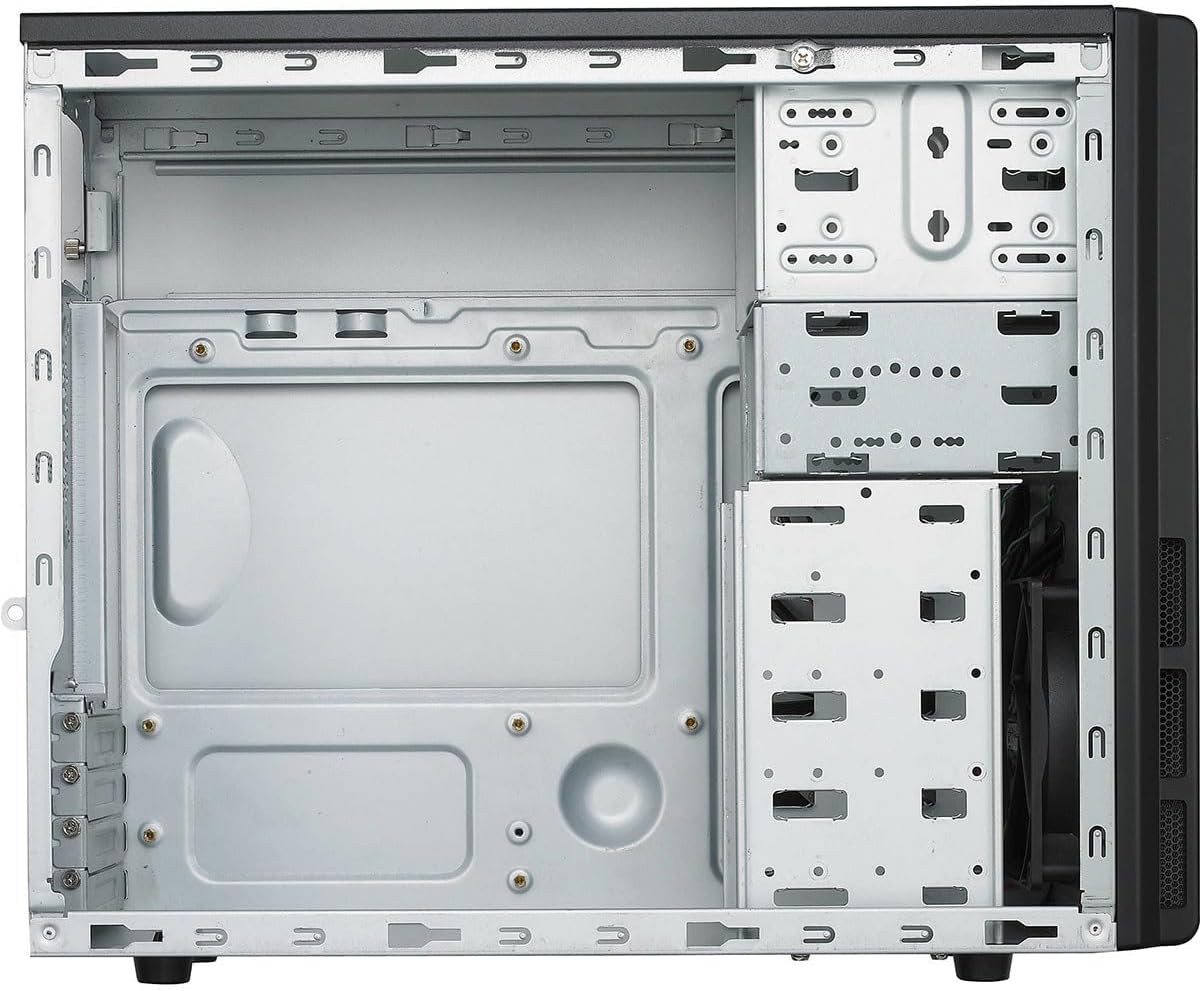
Слика 3.2: Ентеријер view of the case, illustrating the motherboard mounting area and drive bays.
3.3. Drive Installation (HDD/SSD)
The case features multiple 3.5-inch internal drive bays. One of these bays is removable to facilitate easier installation of hard drives. For 2.5-inch SSDs, use the provided 2.5-inch to 3.5-inch adapter if necessary. Secure drives with screws.

Слика 3.3: Removable drive cage for hard drive installation.
3.4. Инсталација јединице за напајање (PSU)
The Cooler Master Elite RC-342 includes a 400W power supply unit. Install the PSU into the designated bottom-mount area at the rear of the case. Secure it with screws from the exterior. Connect the necessary power cables to your motherboard and components.

Слика 3.4: The included 400W power supply unit.
3.5. Front I/O Panel Connections
Connect the front panel cables (USB 3.0, audio, power switch, reset switch, power LED, HDD LED) to the corresponding headers on your motherboard. Refer to your motherboard manual for header locations.

Слика 3.5: Front panel with USB 3.0 ports, audio jacks, and power/reset buttons.

Слика 3.6: Позади view of the case, showing the I/O shield area and expansion slots.
4. Оперативна разматрања
The Elite RC-342 is designed for optimal airflow through its front mesh panel. Ensure that the case is placed in an area with adequate ventilation to allow for proper air intake and exhaust. Avoid blocking the front, rear, or side vents.
The front I/O panel provides convenient access to two USB 3.0 ports and audio jacks for headphones and microphones.
5. Одржавање
Regular maintenance helps maintain optimal cooling performance and extends the lifespan of your components.
- Чишћење прашине: Periodically clean the front mesh panel and any fan filters to prevent dust buildup, which can restrict airflow. Use compressed air or a soft brush.
- Унутрашње чишћење: With the system powered off and unplugged, carefully clean the interior of the case to remove accumulated dust from components and surfaces.
КСНУМКС. Решавање проблема
Ако наиђете на проблеме током или након инсталације, размотрите следеће:
- Component Fit: Ensure all components, especially the motherboard and expansion cards, are properly seated and secured.
- Управљање кабловима: Verify that internal cables are routed efficiently and do not obstruct airflow or prevent side panel closure. Poor cable management can sometimes hinder component installation or cooling.
- Проблеми са напајањем: Double-check all power connections from the PSU to the motherboard and other components. Ensure the PSU switch is in the 'ON' position.
- Функционалност предњег панела: If front USB ports or audio jacks are not working, confirm that their respective cables are correctly connected to the motherboard headers.
7. Спецификације
| Феатуре | Детаљ |
|---|---|
| Бранд | Цоолер Мастер |
| Назив модела | Елите |
| Број модела | RC342KKR400U3 |
| Тип случаја | Мини-кула |
| Компатибилност матичне плоче | Мицро-АТКС |
| Боја | Црно |
| Материјал | Акрилонитрил бутадиен стирен (ABS), легирани челик |
| Димензије производа (Д x Ш x В) | 17.3" x 7.1" x 13.9" (43.9 цм x 18.0 цм x 35.3 цм) |
| Тежина артикла | 9 фунти (4.08 кг) |
| Тип монтаже напајања | Боттом Моунт |
| Укључено напајање | 400 Ваттс |
| Метод хлађења | Ваздух |
| Total USB 3.0 Ports | 2 (Front Panel) |
| Унутрашња лежишта за погон | 4 к 3.5 инча |
| УПЦ | 884102029349 |

Слика 7.1: Product dimensions (Depth x Width x Height).
8. Информације о гаранцији
The Cooler Master Elite RC-342 Computer Case comes with a 2 година гаранције од датума куповине. Ова гаранција покрива недостатке у материјалу и изради при нормалној употреби. Молимо вас да сачувате доказ о куповини за потребе подношења захтева за гаранцију.
9. Подршка
For technical assistance, troubleshooting, or warranty inquiries, please visit the official Cooler Master support webсајту или контактирајте њихову корисничку службу.
Cooler Master Official Webсајт: ввв.цоолермастер.цом