
1. Увод
The Sengled Smart Light Bulbs A19 are Zigbee-compatible LED bulbs designed for integration into smart home systems. These bulbs provide soft white (2700K) illumination, are dimmable, and offer control via voice commands or a mobile application when connected to a compatible Zigbee hub. This manual provides instructions for installation, setup, operation, and troubleshooting.

Image 1.1: Sengled Smart Light Bulbs A19 (4-Pack)
2. Безбедносне информације
- електрична безбедност: Always ensure power is turned off at the switch before installing or removing bulbs.
- Само за унутрашњу употребу: These bulbs are designed for indoor use in dry locations. Do not expose to water or excessive humidity.
- Радна температура: Do not install in enclosed fixtures that restrict airflow, as this may reduce bulb lifespan.
- Компатибилност димера: These bulbs are dimmable via the smart home system. Do not use with standard incandescent dimmers.
- одлагање: Одложите електронски отпад одговорно у складу са локалним прописима.
3. Садржај пакета
Пакет укључује:
- 4 x Sengled Smart LED Light Bulbs (A19, Soft White 2700K)
4. Спецификације
| Феатуре | Детаљ |
|---|---|
| Број модела | E21-N13A |
| Булб Типе | ЛЕД |
| Величина облика сијалице | А19 |
| Булб Басе | Е26 |
| Ватtage | 9 Ваттс |
| Ужарени еквивалент | 60 Ваттс |
| Осветљеност | 800 лумена |
| Температура боје | 2700 Келвина (мека бела) |
| Волtage | 120 Volts (100-120V, 60Hz) |
| Контролни метод | Глас, апликација |
| Повезивање | Zigbee Protocol (Hub Required) |
| Просечан живот | 25,000 сата |
| Унутрашња/спољна употреба | Индоор |
| Димензије | 2.4" Ш x 4.5" В |
5. Упутства за подешавање
These Sengled Smart Light Bulbs require a compatible Zigbee hub for full functionality. Compatible hubs include Sengled Smart Hub, Amazon Echo devices with a built-in Zigbee hub (e.g., Echo 4th Gen, Echo Plus, Echo Show 10, Echo Studio), SmartThings Hub, Wink Hub, or Hubitat Hub.
5.1. Почетни кораци подешавања
- Инсталирајте сијалицу: Screw the Sengled Smart Light Bulb into a standard E26 light socket. Ensure the power to the fixture is turned off before installation.
- Укључено: Turn on the power to the light fixture. The bulb should illuminate.
- Преузмите апликацију: Download the Sengled Home App from the Apple App Store or Google Play Store. Alternatively, use the app for your chosen compatible hub (e.g., Amazon Alexa App, SmartThings App).
- Региструј се/Пријави се: Open the app and register for an account or log in if you already have one.
- Додај уређај: Follow the in-app instructions to add a new device. This typically involves scanning a QR code on the bulb or packaging, or initiating a device search within the app.
- Повежи се са хабом: The bulb will connect to your Zigbee hub. This process usually completes within one minute.
5.2. Hub-Specific Setup Options
The following images illustrate common setup configurations:

Image 5.1: Setup with Sengled Smart Hub

Image 5.2: Setup with Samsung SmartThings Hub

Image 5.3: Setup with Amazon Echo (Built-in Hub)
6. Операција
Once successfully paired with your smart hub, the Sengled Smart Light Bulbs offer various control options.
6.1. Управљање гласом
Control your lights hands-free using voice commands with compatible assistants like Amazon Alexa or Google Home Assistant.

Image 6.1: Voice control example with Alexa
6.2. Dimming and Remote Control
Adjust the brightness from 1% to 100% and control your lights from anywhere using the Sengled Home App or your smart home platform's app.
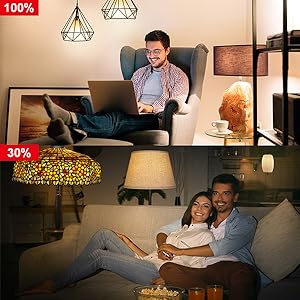
Image 6.2: Dimming functionality from 100% to 30%

Image 6.3: Remote control from any location
6.3. Scheduling and Routines
Set schedules for your lights to turn on/off or adjust brightness at specific times, such as dusk or sunrise. Create routines for automated lighting scenarios.
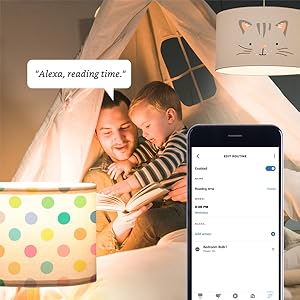
Image 6.4: Setting up a reading time routine
6.4. Групна контрола
Add multiple smart bulbs (up to 64) to your smart hub system and control them individually or as a group within the app.
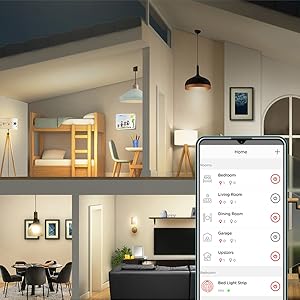
Image 6.5: Managing lights by room for group control
7. Одржавање
- Чишћење: Уверите се да је сијалица искључена и да се охлади пре чишћења. Обришите меком, сувом крпом. Не користите течна средства за чишћење.
- Складиштење: Ако складиштите сијалице, држите их на хладном и сувом месту, даље од директне сунчеве светлости и екстремних температура.
- Нема делова које може да сервисира корисник: Do not attempt to disassemble or repair the bulb. This will void the warranty.
КСНУМКС. Решавање проблема
8.1. Bulb Not Responding/Connecting
- Проверите снагу: Ensure the light fixture switch is in the ON position and the bulb is receiving power.
- Веза са чвориштем: Verify that your Zigbee hub is powered on and connected to your network.
- Близина: Ensure the bulb is within range of your Zigbee hub or another Zigbee device acting as a repeater.
- Поновно упаривање: If the bulb loses connection, try removing it from your app and re-pairing it according to the setup instructions. Power cycling the bulb (turning it off and on 5 times) can sometimes reset it for re-pairing.
- Ажурирање апликације: Ensure your Sengled Home App or smart home platform app is updated to the latest version.
8.2. Проблеми са гласовном контролом
- Assistant Link: Confirm that your Sengled account (or smart hub) is correctly linked to your voice assistant (Alexa, Google Home).
- Откривање уређаја: Ask your voice assistant to "Discover devices" to ensure all bulbs are recognized.
- Command Clarity: Speak commands clearly and ensure the device name used in the command matches the name in your app.
8.3. Unstable Connection
- Zigbee Network: A strong Zigbee mesh network is crucial. Adding more Zigbee devices (like smart plugs or other bulbs) can strengthen the network.
- сметње: Keep your Zigbee hub away from Wi-Fi routers, microwaves, or other devices that might cause wireless interference.
9. Информације о гаранцији
Sengled Smart Light Bulbs are covered by a 3-годишња ограничена гаранција from the date of purchase. This warranty covers defects in materials and workmanship under normal use. For warranty claims or detailed terms, please refer to the official Sengled webсајту или контактирајте корисничку подршку.
10. Корисничка подршка
For further assistance, technical support, or to report issues, please visit the official Sengled support website or contact their customer service department. Contact information can typically be found on the Sengled website or within the Sengled Home App.