
Увод
The Perixx PERIBOARD-313 is a wired, full-sized keyboard featuring an integrated touchpad and a 3-level LED backlight. Designed for convenience and efficiency, this keyboard combines typing and pointing functionalities into a single device, making it suitable for various computing environments. Its dimensions are approximately 456mm x 160mm x 30mm, with a touchpad measuring 57mm x 40mm.
This manual provides comprehensive instructions for the proper setup, operation, and maintenance of your PERIBOARD-313 keyboard to ensure optimal performance and longevity.
Садржај пакета
- 1 x Perixx PERIBOARD-313 Wired USB Backlit Keyboard with Touchpad
- Кориснички приручник (овај документ)

Image: The Perixx PERIBOARD-313 keyboard, its USB cable, and the user manual shown next to the product packaging.
Системски захтеви
- Оперативни систем: Виндовс 7, 8 или 10
- Connectivity: Available USB port
Сетуп
- Распакујте тастатуру: Carefully remove the PERIBOARD-313 from its packaging.
- Повежите се са рачунаром: Укључите УСБ конектор тастатуре у слободан УСБ порт на рачунару.
- Инсталација драјвера: Тастатура је „plug-and-play“. Ваш оперативни систем ће аутоматски детектовати и инсталирати потребне драјвере. Није потребна додатна инсталација софтвера.
- Проверите функционалност: Once connected, the keyboard and touchpad should be immediately functional. Test by typing and moving the cursor.
Упутство за употребу
Распоред тастатуре
The PERIBOARD-313 features a standard full-size US English QWERTY layout with 104 keys, including a dedicated numeric keypad and function keys.

Image: Detailed diagram illustrating the full QWERTY keyboard layout, including the numeric keypad and integrated touchpad.
Функције додирне табле
The integrated touchpad provides precise cursor control and includes two buttons that function as left and right mouse clicks.
- Кретање курсора: Превуците прст преко површине тачпеда да бисте померали курсор на екрану.
- Леви клик: Притисните лево дугме испод тачпеда или једном додирните површину тачпеда.
- Десни клик: Press the right button below the touchpad or tap with two fingers on the touchpad surface (if supported by OS settings).
- Померање: Use two fingers to scroll vertically on the touchpad (if supported by OS settings).
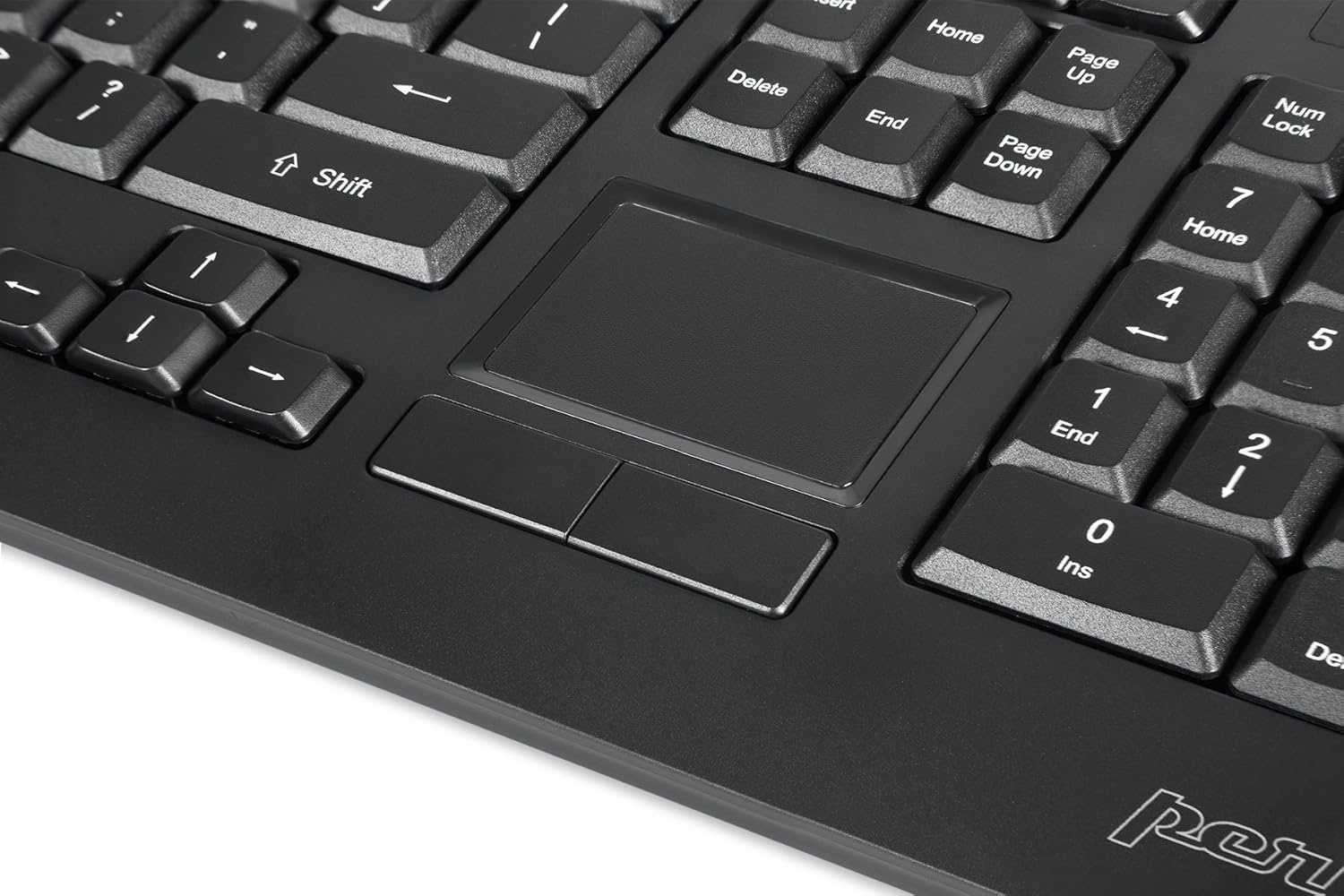
Image: A close-up of the integrated touchpad, highlighting its surface and the two dedicated click buttons.

Image: A user's hand interacting with the touchpad for cursor control.
Контрола позадинског осветљења
The keyboard features a white LED backlight with three adjustable brightness levels. Use the dedicated backlight control keys to adjust the illumination.
- Укључивање/искључивање позадинског осветљења: Притисните тастер Фн + Ф12 комбинација тастера.
- Подесите осветљеност: Притисните Фн + Ф11 за циклус кроз три нивоа осветљености.
Мултимедијални тастери
The PERIBOARD-313 includes 10 multimedia function keys for quick access to media controls and internet features. These functions are activated by holding the Fn key and pressing the corresponding function key (F1-F10).
- Фн + Ф1: Отворите Медиа Плаиер
- Фн + Ф2: Утишавање звука
- Фн + Ф3: Волуме Уп
- Фн + Ф4: Муте
- Фн + Ф5: Превиоус Трацк
- Фн + Ф6: Нект Трацк
- Фн + Ф7: Пусти/Паузирај
- Фн + Ф8: Стани
- Фн + Ф9: Отвори Web Бровсер
- Фн + Ф10: Отворите Емаил Цлиент
Интегрисана УСБ чворишта
The keyboard features two integrated USB 2.0 hubs, allowing you to connect additional USB devices directly to the keyboard for convenience.

Image: The side of the keyboard displaying the two built-in USB 2.0 ports for connecting peripherals.
Одржавање
- Чишћење: Искључите тастатуру из рачунара пре чишћења. Користите меку,amp cloth to wipe the surface. For deeper cleaning between keys, use compressed air to remove dust and debris. Avoid using harsh chemicals or abrasive cleaners.
- Складиштење: Store the keyboard in a dry environment, away from extreme temperatures and direct sunlight.
- Изложеност течности: This keyboard is not water-resistant. Avoid spilling liquids on it. If liquid exposure occurs, immediately disconnect the keyboard and allow it to dry completely before reconnecting.
Решавање проблема
| Проблем | Могући узрок | Решење |
|---|---|---|
| Тастатура не реагује | Лабава УСБ веза, неисправан УСБ порт, проблем са драјвером. |
|
| Тоуцхпад не ради | Driver issue, touchpad disabled (unlikely for wired), physical damage. |
|
| Backlight not turning on/off or adjusting | Нетачна комбинација тастера, софтверски конфликт. |
|
| Мултимедијални тастери не раде | Нетачна комбинација тастера, софтверски конфликт. |
|
Спецификације
| Бранд | Перикк |
| Назив модела | PERIBOARD-313 US |
| Број модела | 11445 |
| Технологија повезивања | USB-A (жичани) |
| Опис тастатуре | QWERTY, Full-sized, Backlit |
| Посебна карактеристика | Backlit, Integrated Touchpad, USB Hubs |
| Боја | Црно |
| Keyboard Backlighting Color | Single Color (White LED) |
| Материјал | АБС пластика |
| Број кључева | 104 |
| Тип прекидача | Мембране |
| Димензије додирне табле | 57 мм x 40 мм (2.24" x 1.57") |
| Димензије тастатуре | 456 мм к 160 мм к 30 мм (17.95" к 6.30" к 1.18") |
| Тежина артикла | 1.85 фунти |
| Total USB 2.0 Ports | 2 (Integrated Hubs) |
Image: Technical drawing with key dimensions of the PERIBOARD-313 keyboard.
Гаранција
The Perixx PERIBOARD-313 comes with a 1-годишња ограничена гаранција from the date of purchase. This warranty covers manufacturing defects and workmanship under normal use. It does not cover damage caused by misuse, accident, modification, or unauthorized repair. Please retain your proof of purchase for warranty claims.
Подршка
For further assistance, technical support, or warranty inquiries, please visit the official Perixx webсајту или контактирајте њихову корисничку службу. Више информација и контакт податке можете пронаћи на Perixx Brand Store on Amazon.