
1. Увод
The Paradox NV35MX is a dual digital detector designed for advanced perimeter protection of doors and windows. It offers reliable detection for both outdoor and indoor environments, effectively identifying intruders while minimizing false alarms. This wired detector integrates seamlessly with compatible security systems, providing robust security for residential and commercial applications.
2. Безбедносне информације
- Професионална инсталација: Installation of this device should only be performed by qualified security professionals.
- електрична безбедност: Ensure all power sources are disconnected before installation or maintenance to prevent electrical shock. This device operates with a wired electrical power source.
- Услови животне средине: Do not expose the detector to extreme temperatures, direct water spray, or corrosive substances.
- Tampеринг: Any unauthorized modification or tampering with the device may void the warranty and compromise its security performance.
3. Садржај пакета
Проверите да ли су све компоненте присутне у пакету:
- Paradox NV35MX Dual Digital Detector Unit
- Монтажни прибор (вијци, анкери)
- Упутство за инсталацију (овај документ)
4. Подешавање и инсталација
4.1 Монтажа
The NV35MX detector is designed for wall mounting. Choose a location that provides optimal coverage for the door or window you intend to protect. Ensure the mounting surface is stable and free from vibrations. The detector should be positioned to have a clear line of sight to the protected area, avoiding obstructions.
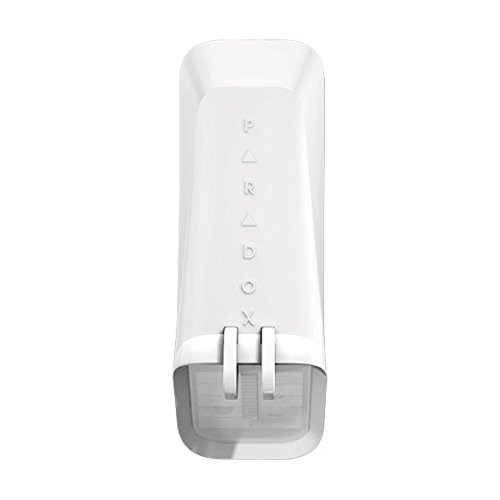
Image showing the Paradox NV35MX detector unit, typically mounted on a wall or frame. This unit is designed for perimeter protection of doors and windows.
4.2 Ожичење
The NV35MX requires a wired electrical connection for power and communication with your security system. Follow the wiring diagram provided by your security system manufacturer for proper connection. Ensure all connections are secure and insulated. Incorrect wiring can lead to malfunction or damage to the device and the security system.
- Identify the power input terminals on the NV35MX.
- Connect the appropriate power wires from your security system to the detector.
- Connect the alarm output and tamper switch wires to the corresponding inputs on your security system control panel.
- Secure all wiring connections and ensure they are properly insulated.
5. Упутство за употребу
The Paradox NV35MX operates as an integral part of your security system. Once properly installed and configured, it continuously monitors the protected area for intrusion. When an intrusion is detected, the device sends a signal to the connected security system control panel, triggering an alarm according to your system's programming.
- Активирање/деактивирање: The detector's active state is controlled by the arming and disarming of your main security system.
- Откривање: The dual digital technology is designed to differentiate between genuine threats and environmental disturbances, reducing false alarms.
- Интеграција: The NV35MX is compatible with various security systems, smart home hubs, and lighting controls, allowing for integrated security and automation solutions.
6. Одржавање
Regular maintenance ensures the optimal performance and longevity of your Paradox NV35MX detector.
- Чишћење: Periodically clean the detector's lens and housing with a soft, dry cloth. Avoid using abrasive cleaners or solvents, as these can damage the device.
- Функционална провера: Test the detector's functionality regularly as part of your overall security system maintenance. Refer to your security system's manual for testing procedures.
- Инспекција заштите животне средине: Ensure that no new obstructions have appeared in the detector's field of view and that its mounting remains secure.
КСНУМКС. Решавање проблема
If you experience issues with your NV35MX detector, consider the following troubleshooting steps:
- Нема напајања/Нема индикације:
- Check all wired electrical connections for proper seating and continuity.
- Verify that the power supply to the security system is active.
- Лажни аларми:
- Inspect the mounting location for sources of vibration or movement (e.g., loose window frames, tree branches).
- Ensure the detector's field of view is clear of moving objects or extreme temperature changes.
- Consult your installer for sensitivity adjustments if available.
- Без детекције:
- Confirm the detector is properly armed through your security system.
- Check for any obstructions blocking the detector's view.
- Verify wiring connections to the security system control panel.
For persistent issues, it is recommended to contact your professional security system installer or Paradox technical support.
8. Спецификације
| Феатуре | Спецификација |
|---|---|
| Бранд | Парадокс |
| Модел | НВ35МКС |
| Боја | Бела |
| Извор напајања | Ожичена електрична опрема |
| Тип монтаже | Валл Моунт |
| Батерија | Battery not included (Wired device) |
| Компатибилни уређаји | Security system, Smart home hub, Lighting controls |
| Препоручена употреба | Residential and Commercial Security |
9. Гаранција и подршка
The Paradox NV35MX detector is covered by a manufacturer's warranty. Please refer to the warranty documentation provided with your purchase for specific terms and conditions. For technical support, service, or warranty claims, please contact your authorized Paradox dealer or the professional installer who installed your security system. You may also visit the official Paradox website for further support resources.