
1. Увод
This manual provides essential information for the safe and effective operation of your CEM LDM-100 Digital Laser Distance Meter. Please read this manual thoroughly before using the device and keep it for future reference. The LDM-100 is designed for precise distance, area, and volume measurements using laser technology.
2. Безбедносне информације
WARNING: Laser Radiation
The LDM-100 emits Class 2 laser radiation. Do not stare into the laser beam or direct it at other people or animals. Avoid direct eye exposure. Use of controls or adjustments or performance of procedures other than those specified herein may result in hazardous radiation exposure.
- Не покушавајте да модификујете уређај.
- Држите уређај ван домашаја деце.
- Не користите уређај у експлозивним срединама.
- Заштитите уређај од влаге и директне сунчеве светлости.
- Уверите се да су батерије уметнуте са исправним поларитетом.
3. Производ је готовview
The CEM LDM-100 is a compact and robust laser distance meter. Familiarize yourself with its components:

Слика 1: Фронт view of the CEM LDM-100 Digital Laser Distance Meter, showing the display, measurement buttons, and function keys.

Слика 2: Close-up of the LDM-100 display, showing measurement readings and icons for various functions like area, volume, and Pythagorean calculations.
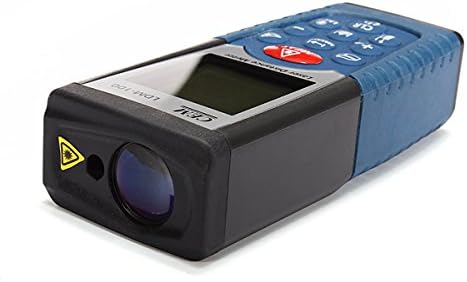
Слика 3: Сиде view of the LDM-100, highlighting the laser emission aperture and the receiving lens.
Кључне компоненте:
- Laser Emission Aperture: Where the laser beam exits.
- Receiving Lens: Детектује рефлектовани ласерски зрак.
- Екран: Shows measurements, battery status, and function indicators.
- Дугме MEAS: Activates laser and initiates measurements.
- Функционална дугмад: For area, volume, Pythagorean calculations, and continuous measurement.
- Дугме јединице: Changes measurement units (m, ft, in).
- CLR/OFF Button: Брише тренутно мерење или искључује уређај.
- +/- Дугмад: For adding/subtracting measurements or navigating menus.
4. Подешавање
4.1 Инсталација батерије
The LDM-100 requires batteries for operation. Batteries are not included with the device.
- Пронађите поклопац одељка за батерију на задњој страни уређаја.
- Померите или откопчајте поклопац да бисте отворили одељак.
- Insert the required batteries (e.g., AAA batteries, refer to the compartment for specific type) ensuring correct polarity (+/-).
- Добро затворите поклопац одељка за батерије.
Напомена: Извадите батерије ако уређај неће бити коришћен дуже време како бисте спречили цурење.
5. Упутство за употребу
5.1 Укључивање/искључивање
- Да бисте укључили: Притисните дугме МЕАС button. The laser will activate.
- Да бисте искључили напајање: Притисните и држите CLR/OFF button for a few seconds. The device will also automatically power off after a period of inactivity.
5.2 Основно мерење удаљености
- Turn on the device by pressing МЕАС.
- Усмерите ласер на циљану површину.
- Притисните МЕАС again to take a measurement. The distance will be displayed on the screen.
5.3 Промена мерних јединица
Притисните тастер Јединица button repeatedly to cycle through available units: meters (m), feet (ft), inches (in).
5.4 Мерење површине
- Притисните тастер Функција button (often indicated by a square icon) until the area icon appears on the display.
- Измерите прву страну (нпр. дужину) притиском МЕАС.
- Измерите другу страну (нпр. ширину) притиском МЕАС опет.
- The calculated area will be displayed.
5.5 Мерење запремине
- Притисните тастер Функција дугме док се не појави икона за јачину звука (коцка).
- Измерите дужину притиском МЕАС.
- Измерите ширину притиском МЕАС.
- Измерите висину притиском МЕАС.
- The calculated volume will be displayed.
5.6 Питагорина мерења (индиректно мерење)
This function allows indirect measurement of heights or distances using the Pythagorean theorem.
- Притисните тастер Функција button until the Pythagorean icon appears (e.g., a triangle).
- Follow the on-screen prompts or diagram to measure the required sides (e.g., hypotenuse, base).
- Уређај ће израчунати и приказати непознату страну.
5.7 Континуирано мерење (праћење)
- Притисните и држите МЕАС button or activate the continuous measurement function (often indicated by a MAX/MIN icon).
- Move the device slowly towards or away from the target. The display will update measurements in real-time, often showing current, maximum, and minimum distances.
- Притисните МЕАС поново да бисте зауставили континуирано мерење.
6. Одржавање
- Чишћење: Користите меку, дamp cloth to clean the device. Do not use abrasive cleaners or solvents. Clean the laser lens with a soft cloth, similar to cleaning eyeglasses.
- Складиштење: Store the device in a dry, cool place, away from direct sunlight and extreme temperatures. If storing for extended periods, remove the batteries.
- калибрација: The device is factory calibrated. If you suspect inaccuracies, contact customer support.
КСНУМКС. Решавање проблема
| Проблем | Могући узрок | Решење |
|---|---|---|
| Уређај се не укључује. | Празне или неправилно уметнуте батерије. | Замените батерије или проверите поларитет. |
| Нетачна мерења. | Dirty laser lens; unstable measuring surface; extreme temperatures. | Clean lens; ensure stable position; operate within specified temperature range. |
| Ласер није видљив. | Јако амбијентално светло; ласер није активиран. | Use in lower light conditions; press МЕАС to activate laser. |
| Порука о грешци на екрану. | Мерење ван опсега; интерна грешка. | Ensure target is within measuring range; restart device. If error persists, contact support. |
8. Спецификације
| Феатуре | Детаљ |
|---|---|
| Модел | ЛДМ-100 |
| Бранд | ЦЕМ |
| Меасуремент Ранге | Up to 50m (as per product title) |
| Оцена међународне заштите | ИП54 |
| Тежина артикла | 0.31 фунте (приближно 140.61 г) |
| Батерије | Not included (type typically AAA, refer to device) |
| Ласер Цласс | Класа 2 |
9. Гаранција и подршка
For warranty information or technical support, please refer to the documentation provided at the time of purchase or contact your retailer. Keep your purchase receipt as proof of purchase.