
1. Увод
This manual provides essential information for the safe and effective use of your Vivibright GP90 UP Portable Video Projector. Please read it thoroughly before operating the device and retain it for future reference. The Vivibright GP90 UP is a portable video projector featuring an Android 4.42 operating system, 3200 lumens brightness, and 1280x800 native resolution, designed for multimedia entertainment and presentations.
2. Безбедносна упутства
- Do not block the ventilation openings. Ensure adequate airflow around the projector to prevent overheating.
- Не излажите пројектор киши или влази да бисте избегли струјни удар или пожар.
- Избегавајте да гледате директно у сочиво пројектора када је лamp је укључено, јер јако светло може изазвати оштећење ока.
- Поставите пројектор на стабилну, равну површину како бисте спречили његов пад.
- Користите само адаптер за напајање који се испоручује са пројектором.
- Не покушавајте сами да растављате или поправљате пројектор. Сва сервисирања препустите квалификованом особљу.
- Keep the projector away from heat sources and direct sunlight.
3. Садржај пакета
Проверите да ли су све ставке присутне у пакету:
- Vivibright GP90 UP Projector
- Повер Цабле
- Remote Control (may not be included with all models)
- Кориснички приручник (овај документ)
4. Производ је готовview
Familiarize yourself with the projector's components and connection ports.
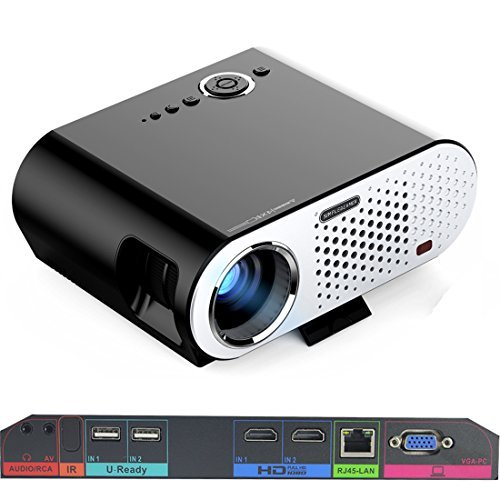
Image: The Vivibright GP90 UP projector showing its top controls, lens, and various input/output ports on the rear panel. The top features power and navigation buttons. The front has the projection lens. The rear panel includes Audio/RCA, IR receiver, two USB ports (U-Ready), two HDMI ports (HD), an RJ45-LAN port, and a VGA-PC port.
4.1 Предња плоча
- Пројекционо сочиво: Емитује слику.
4.2 Горња плоча
- Контролна дугмад: Power, navigation, and menu access.
4.3 Rear Panel (Input/Output Ports)
- AUDIO/RCA: Audio output and composite video input.
- ИР: Инфрацрвени пријемник за даљинско управљање.
- IN 1 / IN 2 (USB): Two USB ports for connecting USB storage devices.
- IN 1 / IN 2 (HDMI): Two HDMI inputs for digital video and audio sources.
- RJ45-LAN: Етернет порт за жичану мрежну везу.
- VGA-PC: VGA input for connecting to computers.
5. Подешавање
5.1 Постављање
- Place the projector on a flat, stable surface or mount it on a ceiling or tripod.
- Ensure the projector is positioned directly in front of the screen or wall. Avoid angled placement as horizontal keystone correction is not available.
- The optimal projection distance ranges from 1.2m to 8.5m, producing screen sizes from 35 to 280 inches. For a 100-inch image, a distance of approximately 3 meters is recommended.
5.2 Прикључак за напајање
- Повежите кабл за напајање са улазом за напајање пројектора.
- Plug the other end of the power cable into a suitable electrical outlet (90~240V/50~60Hz).
5.3 Connecting Input Devices
- ДВИ: Connect an HDMI cable from your source device (e.g., laptop, Blu-ray player, gaming console) to one of the projector's HDMI ports.
- УСБ: Insert a USB flash drive or external hard drive into a USB port to access media files.
- ВГА: Connect a VGA cable from your computer to the projector's VGA-PC port.
- АВ: Use an RCA cable to connect older devices to the AV input.
- ЛАН: Connect an Ethernet cable to the RJ45-LAN port for a wired internet connection.
5.4 Подешавање фокуса и трапезоидног искривљења
- Фокус: Rotate the focus ring around the lens until the projected image is sharp and clear.
- Кеистоне Цоррецтион: Use the manual vertical keystone correction feature (±15°) to adjust the image shape if the projector is not perfectly perpendicular to the screen. This corrects trapezoidal distortion.
6. Упутство за употребу
6.1 Укључивање/искључивање
- Укључено: Press the power button on the projector or the remote control. The indicator light will change, and the projector will start.
- Искључивање: Press the power button again. Confirm shutdown if prompted. Allow the projector to cool down before unplugging.
6.2 Навигација кроз Андроид ОС
- The projector runs on Android 4.42. Use the remote control or connect a wireless mouse (recommended for easier navigation) to interact with the interface.
- Access pre-installed apps or download compatible applications from the app store. Note that some newer applications may not be compatible with Android 4.42.
6.3 Бежична пројекција
- Ви-Фи: Connect to a wireless network via the settings menu. Supports dual-band Wi-Fi 2.4G.
- Блуетоотх: Supports Bluetooth 4.0 for connecting wireless devices such as speakers. Note that Bluetooth audio output may only be available when using USB or Android sources, not HDMI.
- Wireless Push (EZCast / Miracast / Airplay): Use compatible apps on your smartphone or tablet to mirror your device's screen to the projector. Ensure your device and the projector are on the same Wi-Fi network.
6.4 Аудио подешавања
- The projector features built-in 4Ω, 5W stereo speakers with SRS sound technology.
- For enhanced audio, connect external speakers via the Audio Out port or wirelessly via Bluetooth (when using Android or USB sources).
7. Одржавање
7.1 Чишћење
- Објектив: Користите меку крпу без влакана, посебно дизајнирану за оптичка сочива. Не користите абразивна средства за чишћење.
- Casing: Обришите спољашњост пројектора меком, сувом крпом. За тврдокорну прљавштину користите благоamp крпом, а затим добро осушите.
- Вентилациони отвори: Periodically clean the ventilation openings with a soft brush or compressed air to prevent dust buildup, which can affect performance and lifespan.
7.2 Складиштење
- Када се пројектор не користи дуже време, чувајте га на хладном и сувом месту, даље од директне сунчеве светлости и екстремних температура.
- Cover the lens with its cap to protect it from dust and scratches.
КСНУМКС. Решавање проблема
| Проблем | Могући узрок | Решење |
|---|---|---|
| Нема пројектоване слике | Power not connected; Input source not selected; Lens cap on | Проверите везу за напајање; Изаберите исправан улазни извор; Скините поклопац објектива |
| Слика је мутна | Фокус није подешен; Пројектор је преблизу/предалеко | Подесите прстен за фокусирање; Подесите даљину пројекције |
| Слика је трапезоидног облика | Пројектор није нормалан у односу на платно | Adjust vertical keystone correction; Reposition projector to be centered |
| Нема звука | Volume too low; Muted; External speakers not connected/selected | Increase volume; Unmute; Check external speaker connections/settings |
| Wireless projection unstable | Weak Wi-Fi signal; Device incompatibility; Outdated Android OS | Ensure strong Wi-Fi signal; Check device compatibility with Miracast/Airplay; Consider wired connection if issues persist with older Android version. |
9. Спецификације
| Феатуре | Детаљ |
|---|---|
| Бранд | Вивибрајт |
| Модел | GP90 UP |
| Оперативни систем | Андроид 4.42 |
| Осветљеност | 3200 Lumens (LED Luminous efficiency) |
| Нативе Ресолутион | 1280 x 800 (supports up to 1080P) |
| Однос контраста | 3000:1 (Dynamic up to 10,000:1) |
| Величина пројекције | 35-280 инча |
| Удаљеност пројекције | 1.2m - 8.5m |
| Тхров Ратио | 1.45:1 |
| Кеистоне Цоррецтион | Ручно Вертикално ± 15 ° |
| Живот извора светлости | До 30,000 сати |
| Повезивање | Wi-Fi (2.4G), Bluetooth 4.0, 2x HDMI, 2x USB, VGA, AV, RJ45-LAN |
| Аудио | Built-in 4Ω, 5W stereo speakers with SRS sound |
| Повер Суппли | 90~240В/50~60Хз |
| Димензије производа | 27 к 22 к 9 цм |
| Тежина артикла | 3.17 кг |
10. Гаранција и подршка
For warranty information and technical support, please refer to the documentation provided at the time of purchase or contact Vivibright customer service. Keep your purchase receipt as proof of purchase for warranty claims.