
1. Увод
The ANEWISH T16 Mini Wireless Keyboard with Touchpad is a versatile input device designed for convenient control of various smart devices. Its compact, game-handle inspired design integrates a full QWERTY keyboard, a high-sensitive touchpad, and multimedia control buttons. This manual provides essential information for setting up, operating, and maintaining your T16 keyboard.
Кључне карактеристике:
- Game Handle Design: Ergonomically shaped for comfortable use, similar to a game controller.
- Бежична веза од 2.4 GHz: Connects to devices via a mini USB receiver with an operational range of up to 25 meters.
- High-Sensitive Touchpad: Functions as a mouse with multi-finger gesture support for navigation and control.
- Тастатура са позадинским осветљењем: Keys illuminate with a blue light for visibility in low-light conditions.
- Пуњива литијум-јонска батерија: Уграђена пуњива батерија за продужену употребу.
- Карактеристике уштеде енергије: Automatically enters sleep mode after several minutes of inactivity to conserve battery life.
- Широка компатибилност: Supports Windows 2000/XP/7/10/Vista/CE, Linux, and Android operating systems. Compatible with Android TV Boxes, PCs, PS3, and PADs. Note: Not compatible with Fire TV or Fire Stick.
2. Садржај пакета
Молимо вас да означите поље за следеће ставке:
- 1 x ANEWISH T16 2.4GHz Mini Wireless Keyboard with Touchpad
- 1 к УСБ кабл за пуњење
- 1 к Упутство за употребу
- 1 x USB Receiver (located in the battery compartment of the keyboard)

Image: The ANEWISH T16 keyboard, USB charging cable, user manual, and USB receiver laid out next to the product box.
3. Производ је готовview
The ANEWISH T16 keyboard is designed for intuitive control with a combination of a QWERTY keyboard, touchpad, and dedicated media buttons.
3.1 Компоненте и контроле

Слика: Одозго надоле view и бочно view of the ANEWISH T16 keyboard, highlighting the charge port, switch button, left mouse button, right mouse button, low battery alarm, signal indicator, and charging status indicators. Dimensions are shown as 5.90 inches (length), 4.33 inches (width), and 0.70 inches (height).
- КВЕРТИ тастатура: Full keyboard layout for typing.
- Тоуцхпад: High-sensitive area for mouse control.
- Дугмад за контролу медија: Play/Pause, Volume Up/Down, Next/Previous track.
- Дугмад за навигацију: Directional pad for menu navigation.
- Порт за пуњење: Микро УСБ порт за пуњење уређаја.
- Дугме за пребацивање: Прекидач за укључивање/искључивање.
- Лево/десно дугме миша: Dedicated buttons for mouse clicks.
- Индикатори: Low Battery Alarm, Signal Indicator, Charging Status.
3.2 Гестови тачпеда

Image: ANEWISH T16 keyboard with hands demonstrating touchpad gestures: Single tap for Left mouse click, Double click for Open Files, Double fingers click for Right Mouse click, and Double fingers drag for Roll Screen or Zoom in/out.
- Једнократни додир: Кликните левим мишем.
- Дупли клик: Отвори files.
- Double Fingers Click: Десни клик миша.
- Double Fingers Drag: Roll screen or zoom in/out.
3.3 Подешавање осетљивости DPI
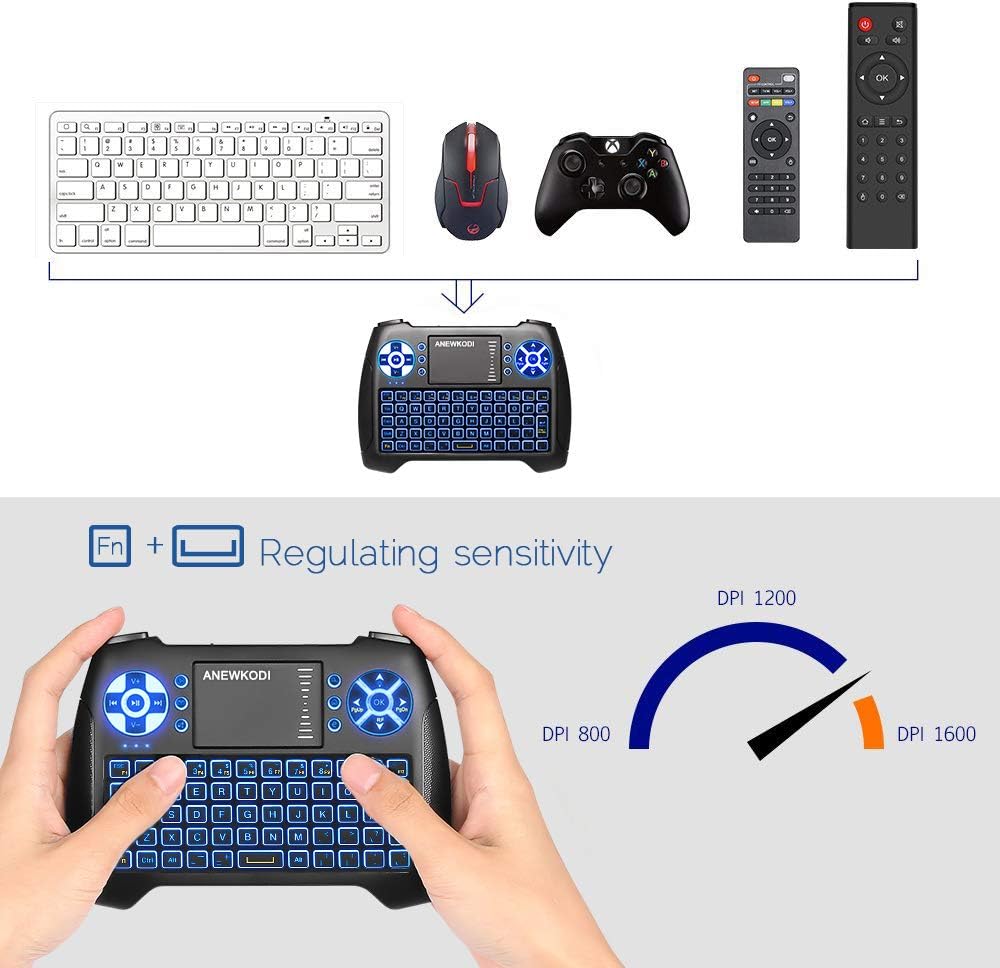
Image: ANEWISH T16 keyboard with hands demonstrating how to adjust DPI sensitivity by pressing 'Fn' and the touchpad. An arc graphic shows DPI settings of 800, 1200, and 1600.
To adjust the touchpad's DPI sensitivity, press the 'Fn' key and simultaneously move your finger across the touchpad. This allows you to cycle through different sensitivity levels (800, 1200, 1600 DPI) to suit your preference.
4. Упутства за подешавање
Follow these steps to connect your ANEWISH T16 Mini Wireless Keyboard:
- Пронађите УСБ пријемник: The USB receiver is stored in the battery compartment on the back of the keyboard. Open the battery cover to retrieve it.
- Уметните пријемник: Plug the USB receiver into a standard USB port on your target device (e.g., Smart TV, PC, Android TV Box).
- Укључивање тастатуре: Slide the power switch, located on the left top side of the keyboard, to the 'ON' position.
- Аутоматско повезивање: The keyboard should automatically connect to your device. No additional drivers are typically required.

Image: The back of the ANEWISH T16 keyboard with the battery cover removed, showing the rechargeable Li-ion battery and the slot for the USB receiver. Text indicates 'Receiver' and 'Li-ion Battery'.
Important: Ensure your device has a standard USB port for compatibility. This keyboard is not compatible with Fire TV or Fire Stick.
Video: A demonstration of unboxing the ANEWISH T16 Mini Wireless Keyboard, showing its components and initial setup steps, including inserting the USB receiver and powering on the device.
5. Упутство за употребу
5.1 Основна употреба
- куцање: Use the QWERTY keyboard for text input.
- Контрола мишем: Use the touchpad for cursor movement and gestures as described in Section 3.2.
- Контрола мултимедије: Use the dedicated media buttons for playback, volume, and track control.
- Навигација: Use the directional pad for navigating menus and interfaces.
5.2 Функција позадинског осветљења

Image: ANEWISH T16 keyboard with a finger pressing the 'Fn' key and another finger pressing the 'Up Arrow' key, demonstrating how to activate the blue backlight. The keyboard keys are illuminated.
To activate the blue backlight, press the 'Fn' key and the 'Up Arrow' key (located on the upper right directional pad) simultaneously. Repeat this action to turn off the backlight. The backlight allows for comfortable use in dark environments.
5.3 Compatibility and Range

Image: The ANEWISH T16 keyboard surrounded by various compatible devices including Android TV Box, X-Box, Smart TV, Projector, Desktop, Laptop, IPSTB, and HTPC, illustrating its broad compatibility via 2.4GHz wireless connection.
The T16 keyboard offers a reliable 2.4GHz wireless connection with an operating range of up to 25 meters, providing flexible control from a distance. It is compatible with a wide range of devices, including:
- Андроид ТВ боксови
- Паметни телевизори
- PCs (Windows 2000, XP, 7, 10, Vista, CE)
- Лаптопс
- ПС3
- Linux devices

Image: A user operating the ANEWISH T16 keyboard from a distance of 20 meters to control a smart TV displaying a movie selection interface. Text highlights '20 Meters Long Distance Control' and 'USB Receiver Plug and Play'.
6. Пуњење батерије
The ANEWISH T16 keyboard features a built-in rechargeable lithium-ion battery. To charge the device:
- Connect the supplied USB charging cable to the Micro USB port on the keyboard.
- Plug the other end of the USB cable into a standard USB power source (e.g., computer USB port, USB wall adapter).
- The charging status indicator light will show when the device is charging.
The keyboard can be used while it is charging. The device is designed with power-saving features, including automatic sleep mode after several minutes of non-use, to maximize battery life.
7. Техничке спецификације
| Феатуре | Спецификација |
|---|---|
| Бранд | АНЕВИСХ |
| Број модела | Т16 |
| Повезивање | 2.4 GHz бежични (USB пријемник) |
| Број кључева | 74 кључа |
| Извор напајања | Уграђена литијум-јонска батерија |
| Оператинг Волtage | 3.3В |
| Оператинг Цуррент | 5мА |
| Цхаргинг Цуррент | 300мА |
| Струја спавања | <1мА |
| Оперативни опсег | Up to 25 meters (MAX) |
| Димензије производа (ДкШкВ) | 5.8 к 4.2 к 0.7 инча |
| Тежина артикла | 5.1 унци |
| Материјал | Пластика |
| Посебне карактеристике | Позадинско осветљење, Пуњиво |
| Опис тастатуре | КВЕРТИ |
| Keyboard Backlighting Color | Single Color (Blue) |
8. Одржавање
To ensure the longevity and optimal performance of your ANEWISH T16 keyboard:
- Одржавајте уређај чистим тако што ћете га обрисати меком, сувом крпом.
- Избегавајте излагање тастатуре екстремним температурама, влази или директној сунчевој светлости.
- Do not disassemble the device, as this may void the warranty and cause damage.
- Чувајте УСБ пријемник у његовом предвиђеном одељку када га не користите како бисте спречили губитак.
КСНУМКС. Решавање проблема
If you encounter issues with your ANEWISH T16 keyboard, consider the following:
- Без конекције: Ensure the USB receiver is securely plugged into a standard USB port on your device and the keyboard is powered on. Try plugging the receiver into a different USB port.
- Касни или не реагује: Check the battery level. Recharge the keyboard if the battery is low. Ensure the keyboard is within the operational range (up to 25 meters) and there are no significant obstructions between the keyboard and the receiver.
- Позадинско осветљење не ради: Ensure the keyboard is powered on and the battery is charged. Activate the backlight by pressing 'Fn' + 'Up Arrow' simultaneously.
- Touchpad Issues: Adjust the DPI sensitivity as described in Section 3.2. Ensure your fingers are clean and dry when using the touchpad.
- Компатибилност: Confirm your device meets the system requirements (e.g., standard USB port, supported OS). Remember, it is not compatible with Fire TV or Fire Stick.
10. Гаранција и подршка
ANEWISH offers an unconditional one-month money-back guarantee. If you are not satisfied with your wireless keyboard, please contact us for a solution.
For any questions or concerns regarding the use of your ANEWISH T16 Mini Wireless Keyboard, please contact our customer support team via buyer message or by asking a question. We are committed to providing comfortable customer service and will address your concerns promptly.