
Radioddity Raddy RF23 AM FM Portable Pocket Radio MP3 Player User Manual
Модел: РФ23
Увод
This manual provides detailed instructions for the Radioddity Raddy RF23, a compact and versatile portable radio and MP3 player. It features AM/FM radio reception, MP3 playback from Micro TF cards and USB disks, and an integrated flashlight. Please read this manual thoroughly before using the device to ensure proper operation and longevity.
Садржај пакета
- 1 x Radioddity Raddy RF23 AM/FM Radio
- 1 к УСБ кабл за пуњење
- 1 x Rechargeable Lithium-Ion Battery (BL-5C type)
- КСНУМКС к Ремен за зглоб
Производ је завршенview
Familiarize yourself with the various parts and controls of your Raddy RF23 radio.

Слика 1: Предња страна View of Raddy RF23 - Displays the speaker grille, digital display, and numeric keypad with function buttons.

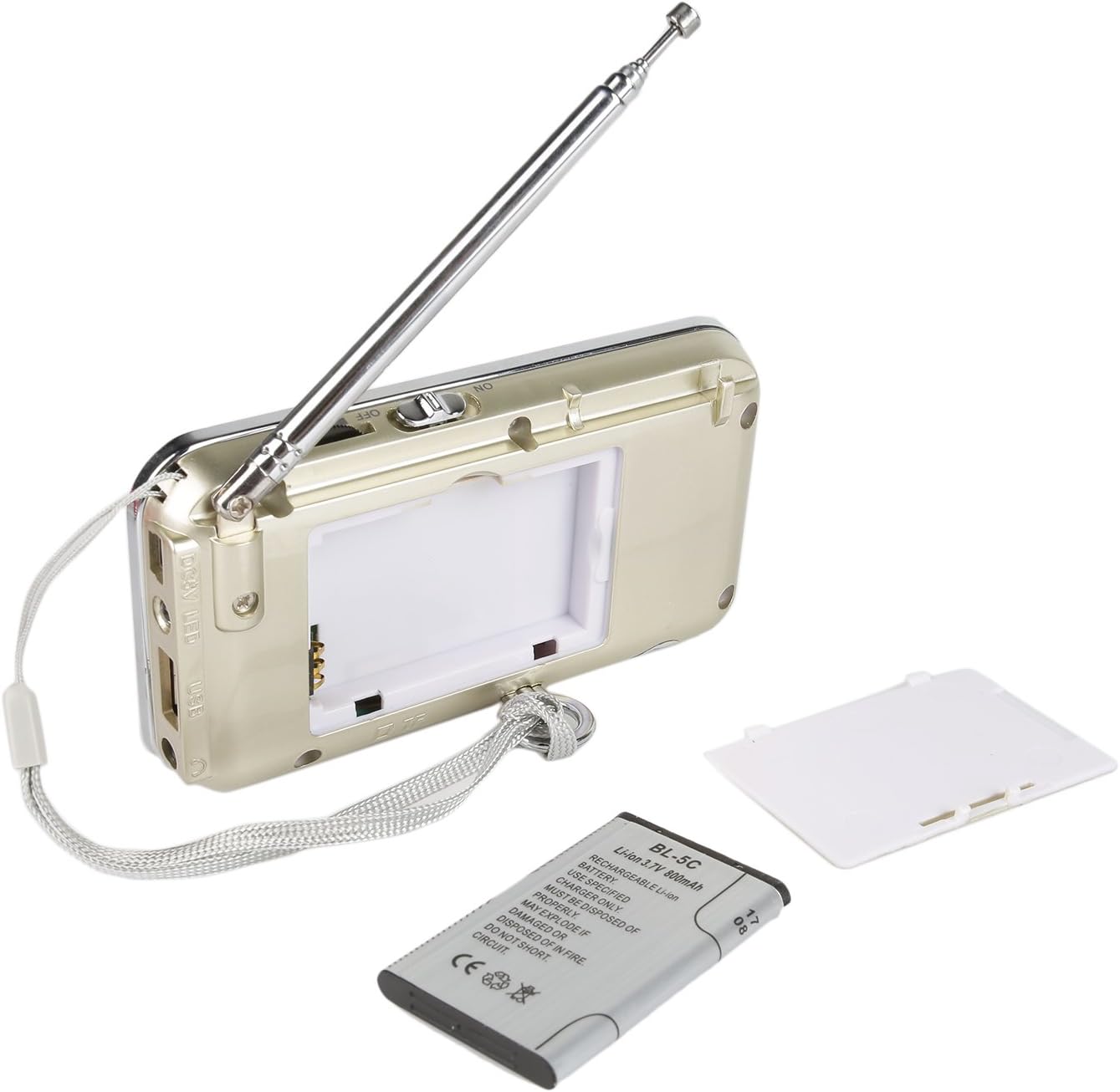
Слика 2: Позади View of Raddy RF23 - Shows the battery cover, USB port, DC 5V charging port, and the wrist strap with its stand attachment.
Контроле и портови
- Прекидач: Slide switch on the side to turn the device ON or OFF.
- Антена: Издувна телескопска антена за бољи радио пријем.
- Дигитални екран: Приказује фреквенцију, режим и информације о нумери.
- говорник: Интегрисани звучник за аудио излаз.
- Нумеричка тастатура (0-9): Used for direct frequency input or track selection.
- Дугме МОДЕ: Switches between AM, FM, and MP3 playback modes.
- Play/Pause Button (▶⏸): Plays or pauses MP3 tracks.
- Previous/Rewind Button (◀◀): Skips to the previous track or rewinds during MP3 playback. In radio mode, short press for previous station, long press for auto-scan down.
- Next/Fast Forward Button (▶▶): Skips to the next track or fast forwards during MP3 playback. In radio mode, short press for next station, long press for auto-scan up.
- ЛЕД дугме: Activates or deactivates the built-in flashlight.
- ДЦ 5В Улаз: Микро УСБ порт за пуњење уређаја.
- УСБ порт: For connecting a USB flash drive for MP3 playback.
- Слот за ТФ картицу: For inserting a Micro TF (Micro SD) card for MP3 playback.
- Утичница за слушалице (3.5 мм): За повезивање слушалица за приватно слушање.
Сетуп
1. Инсталација батерије
- Пронађите поклопац одељка за батерију на задњој страни радија.
- Отворите поклопац.
- Insert the provided BL-5C Lithium-Ion battery, ensuring the contacts align correctly.
- Добро затворите поклопац одељка за батерије.

Слика 3: Инсталација батерије - Open the battery compartment and insert the BL-5C battery.
2. Пуњење батерије
- Connect the small end of the included USB charging cable to the DC 5V input port on the side of the radio.
- Повежите већи крај USB кабла са USB адаптером за напајање (није укључен) или USB портом рачунара.
- The charging indicator light will illuminate. The light typically turns off or changes color when charging is complete.
- Потпуно пуњење траје отприлике 2-3 сата.
Слика 4: Пуњење преко USB-а - Connect the radio to a USB power source using the provided cable.
3. Inserting a Micro TF Card or USB Disk (for MP3 Playback)
- Уверите се да је радио искључен.
- For a Micro TF card: Gently insert the card into the TF card slot until it clicks into place.
- For a USB disk: Insert the USB disk into the USB port.
- The radio will automatically detect the storage device when powered on and switched to MP3 mode.

Figure 5: TF Card Insertion - Insert a Micro TF card into the designated slot.
Упутство за употребу
1. Укључивање/искључивање
Slide the power switch located on the side of the radio to the "ON" position to power on. Slide it to "OFF" to power off.
2. Избор режима
Притисните тастер МОДЕ button repeatedly to cycle through the available modes: FM Radio, AM Radio, and MP3 Player (if a TF card or USB disk is inserted).
3. FM/AM Radio Operation
- Изаберите радио режим: Притисните тастер МОДЕ дугме док се на екрану не појави „FM“ или „AM“.
- Продужна антена: За оптималан пријем, потпуно извуците телескопску антену.
- Аутоматско скенирање станица: Дуго притисните Previous (◀◀) or Next (▶▶) button to automatically scan for and stop at the next available station.
- Ручно подешавање: Use the numeric keypad to directly enter a frequency (e.g., for 106.7 FM, press 1-0-6-7).
- Подешавање јачине звука: Adjust the volume using the dedicated volume controls, typically located on the side of the device or integrated with other function buttons.
4. MP3 Playback Operation
- Изаберите MP3 режим: Притисните тастер МОДЕ button until "MP3" or a track number appears on the display.
- Пусти/паузирај: Притисните тастер Play/Pause (▶⏸) дугме за покретање или паузирање репродукције.
- Следећа/претходна нумера: Притисните тастер Next (▶▶) дугме за прелазак на следећу нумеру. притисните Previous (◀◀) button to go to the beginning of the current track, or press it again to go to the previous track.
- Подешавање јачине звука: Adjust the volume using the dedicated volume controls, typically located on the side of the device or integrated with other function buttons.
- Директан избор пруге: Use the numeric keypad to enter the track number directly.
5. Функција батеријске лампе
Притисните тастер ЛЕД button to turn the built-in flashlight ON. Press it again to turn the flashlight OFF.
Одржавање
- Чишћење: Wipe the radio with a soft, dry cloth. Do not use liquid cleaners or solvents.
- Складиштење: Када се радио не користи дуже време, чувајте га на хладном и сувом месту.
- Одржавање батерије: If the radio will not be used for a long time, remove the battery to prevent leakage. Recharge the battery periodically to maintain its lifespan.
- Брига о антени: Пажљиво рукујте телескопском антеном како бисте избегли савијање или ломљење.
Решавање проблема
| Проблем | Могући узрок | Решење |
|---|---|---|
| Радио се не укључује. | Батерија је празна или није правилно постављена. | Charge the battery or ensure it is inserted with correct polarity. |
| Лош радио пријем. | Антена није испружена, слаб сигнал или сметње. | Fully extend the antenna. Try repositioning the radio. Move away from electronic devices that may cause interference. |
| No sound from MP3 player. | Volume too low, incorrect mode, or no valid media. | Increase volume. Ensure MP3 mode is selected. Verify TF card/USB disk contains MP3 files and is inserted correctly. |
| Flashlight does not work. | Battery low or flashlight not activated. | Charge the battery. Press the LED button to turn on the flashlight. |
| Device shuts off unexpectedly. | Ниска батерија. | Напуните батерију у потпуности. |
Спецификације
- Бренд: Радиоддити
- Модел: РФ23
- Димензије производа: 4.61 к 0.79 к 2.5 инча
- Тежина артикла: 6.7 унци
- Извор напајања: Напаја се батеријама (потребна је 1 литијум-јонска батерија)
- Тип батерије: BL-5C (Rechargeable)
- Технологија повезивања: УСБ
- Технологија тјунера: АМ, ФМ
- Подржани радио бендови: АМ, ФМ
- Фреквенцијски опсег: ФМ (87.5-108 MHz), АМ (520-1710 KHz)
- Посебна карактеристика: Built-In Flashlight, Portable
- Компатибилни уређаји: Earphone, Micro TF Card, USB Disk
- Произвођач: Радиоддити
Гаранција и подршка
For warranty information or technical support, please refer to the documentation provided with your purchase or visit the official Radioddity webсајт. Сачувајте рачун као доказ о куповини за потребе гаранције.
Radioddity Official Webсајт: ввв.радиоддити.цом