
Увод
This manual provides detailed instructions for the installation, configuration, and operation of your Multilaser RE085 Dual Band Wireless Router. Please read this guide carefully to ensure proper setup and optimal performance of your device. The RE085 router offers dual-band connectivity (2.4GHz and 5GHz) with speeds up to 750 Mbps, featuring three external antennas and four LAN ports for reliable network access.
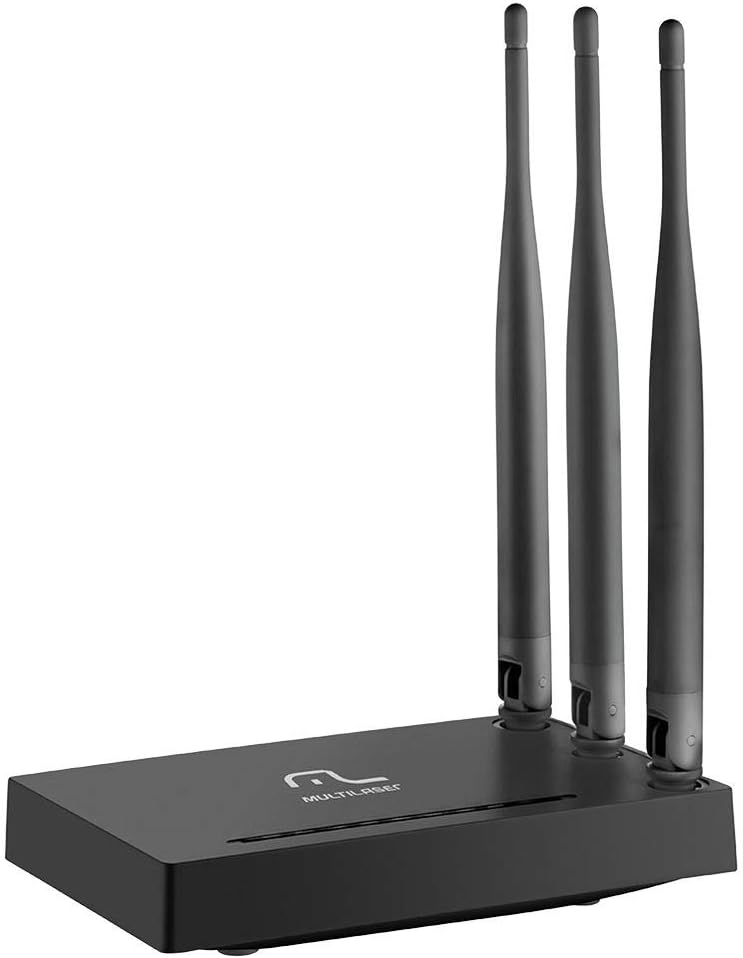
Слика: Фронт view of the Multilaser RE085 router with its three external antennas in an upright position, showcasinг његов компактни дизајн.
Садржај пакета
Пре него што наставите са инсталацијом, проверите да ли ваше паковање садржи следеће ставке:
- Multilaser RE085 Dual Band Wireless Router
- Повер Адаптер
- Етхернет Цабле
- Quick Installation Guide (this document serves as a comprehensive guide)
Подешавање и инсталација
Follow these steps to set up your Multilaser RE085 router:
1. Физичка веза
- Позиционирање: Поставите рутер на централну локацију у вашем дому или канцеларији, даље од препрека и уређаја који могу изазвати сметње (нпр. бежични телефони, микроталасне пећнице).
- Повежите антене: Ensure the three external antennas are securely attached and oriented for optimal signal coverage.
- Повежите се са напајањем: Plug the power adapter into the router's power port and then into a wall outlet. The power indicator LED on the router should light up.
- Повезивање са модемом: Connect one end of the provided Ethernet cable to the WAN port (often colored differently, e.g., blue) on the Multilaser RE085 router. Connect the other end to the LAN port on your modem or existing internet source.
- Повежите уређаје (опционо): For wired connections, connect one end of an Ethernet cable to any of the four LAN ports (usually yellow) on the router and the other end to your computer or other network device.

Слика: Позади view of the Multilaser RE085 router, highlighting the WAN port (typically blue) and four yellow LAN ports for wired connections.
2. Почетна конфигурација (Web Интерфејс)
- Повежите се са рутером: Connect your computer to the router either via an Ethernet cable (to a LAN port) or wirelessly using the default Wi-Fi network name (SSID) printed on the router's label.
- Приступ Web Прегледач: Отвори а web browser (e.g., Chrome, Firefox, Edge) and type the default IP address of the router into the address bar. This is typically
192.168.0.1or192.168.1.1. Refer to the label on your router for the exact address. - Пријава: Унесите подразумевано корисничко име и лозинку. Уобичајене подразумеване вредности су
adminfor both username and password. If these do not work, check the router's label or the quick installation guide. - Покрените чаробњака за подешавање: Upon successful login, you will likely be prompted to run a Quick Setup Wizard. Follow the on-screen instructions to configure your internet connection type (e.g., PPPoE, Dynamic IP, Static IP). Your Internet Service Provider (ISP) can provide this information if you are unsure.
- Конфигуришите бежична подешавања:
- ССИД (име мреже): Change the default Wi-Fi network names for both 2.4GHz and 5GHz bands to something unique and easily identifiable.
- Password (Security Key): Set a strong, secure password for each Wi-Fi network. Use a combination of uppercase and lowercase letters, numbers, and symbols.
- Тип безбедности: WPA2-PSK (AES) is recommended for optimal security.
- Сачувај подешавања: After configuring, save your settings. The router may restart to apply the changes.
Упутство за употребу
Once your Multilaser RE085 router is set up, you can connect your devices and manage your network.
Повезивање уређаја
- Бежични уређаји: On your smartphone, tablet, laptop, or smart TV, search for available Wi-Fi networks. Select the SSID you configured (e.g., "MyHomeNetwork_2.4GHz" or "MyHomeNetwork_5GHz") and enter the password.
- Жични уређаји: Connect devices like desktop computers, gaming consoles, or smart TVs directly to the router's LAN ports using Ethernet cables for a stable and fast connection.
Dual Band Functionality
The RE085 supports both 2.4GHz and 5GHz wireless bands:
- Опсег 2.4 ГХз: Offers wider coverage and better penetration through walls, suitable for general internet use, browsing, and devices further away from the router.
- Опсег 5 ГХз: Provides faster speeds and lower latency, ideal for bandwidth-intensive activities like online gaming, 4K video streaming, and devices closer to the router.
You can connect different devices to the band that best suits their needs and location.
Мрежа за госте
The router allows you to create up to 6 additional guest networks. This feature provides internet access to guests while isolating them from your main network, enhancing security. Access the router's web interface to configure guest networks.
Функција репетитора
The Multilaser RE085 can also function as a wireless repeater, extending the range of an existing Wi-Fi network. Refer to the advanced settings in the router's web interface for repeater mode configuration.
Одржавање
Редовно одржавање помаже у обезбеђивању дуготрајности и оптималних перформанси вашег рутера.
- Редовно поновно покретање: Periodically restart your router (unplug from power for 10 seconds, then plug back in) to clear its memory and refresh network connections. This can resolve minor performance issues.
- Ажурирања фирмвера: Check the Multilaser official website for firmware updates. Keeping your router's firmware up-to-date can improve performance, add new features, and enhance security. Follow the instructions provided by Multilaser carefully when performing updates.
- Физичко чишћење: Keep the router free from dust. Use a soft, dry cloth to gently clean the exterior. Ensure ventilation holes are not blocked.
- Управљање лозинкама: Change your Wi-Fi and router login passwords periodically for enhanced security.
Решавање проблема
If you encounter issues with your Multilaser RE085 router, try the following troubleshooting steps:
Нема интернет везе
- Проверите каблове: Ensure all Ethernet cables (WAN, LAN) are securely connected to both the router and your modem/devices.
- Проверите модем: Проверите да ли ваш модем исправно ради и да ли има активну интернет везу. Покушајте да поново покренете модем.
- Светла статуса рутера: Check the LED indicators on the front of the router. The internet/WAN light should be solid or blinking, indicating an active connection.
- Поново покрените рутер: Power cycle the router (unplug, wait 10 seconds, plug back in).
- Подешавања интернет провајдера: Confirm your internet connection type and settings (PPPoE, Dynamic IP, Static IP) in the router's web interface match those provided by your ISP.
Weak or Unstable Wi-Fi Signal
- Постављање рутера: Померите рутер на централнију локацију, даље од зидова, великих металних предмета и других електронских уређаја који могу изазвати сметње.
- Оријентација антене: Adjust the antennas for better signal direction.
- Избор опсега: For devices closer to the router, try connecting to the 5GHz band for faster speeds. For devices further away, the 2.4GHz band might offer better range.
- сметње: Identify and minimize sources of interference (e.g., microwaves, cordless phones, Bluetooth devices).
- Избор канала: У рутеру web interface, try changing the Wi-Fi channel for both 2.4GHz and 5GHz bands to a less congested one.
Forgotten Wi-Fi Password or Router Login Password
- Check Router Label: The default Wi-Fi password and router login credentials are often printed on a label on the bottom or back of the router.
- Вратите на фабричка подешавања: If you cannot access the router's web interface or have forgotten your Wi-Fi password and cannot retrieve it, you may need to perform a factory reset. Locate the small reset button (often recessed) on the router. With the router powered on, use a paperclip or pin to press and hold the reset button for about 10-15 seconds until the lights flash. The router will restart with its factory default settings, including default Wi-Fi names and passwords. You will then need to reconfigure it from scratch.
Спецификације
Key technical specifications for the Multilaser RE085 Dual Band Wireless Router:
| Феатуре | Спецификација |
|---|---|
| Бранд | Мултиласер |
| Број модела | РЕ085 |
| Стандард бежичне комуникације | 802.11ац |
| Класа фреквенцијског опсега | Двопојасни (2.4 GHz и 5 GHz) |
| Брзина преноса података | До 750 мегабита у секунди |
| Број портова | 4 (LAN) |
| Технологија повезивања | Ви-Фи |
| Компатибилни уређаји | Gaming Consoles, Tablets, Smart Televisions |
| Препоручена употреба | Хоме |
Гаранција и подршка
For warranty information, technical support, or further assistance, please refer to the official Multilaser webсајт или директно контактирајте њихову корисничку службу. Сачувајте рачун као доказ о куповини за потребе гаранције.
Multilaser Official Webсајт: www.multilaser.com.br