
1. Увод
The Zooz Z-Wave Plus Power Switch ZEN15 is a smart plug designed to provide Z-Wave control and energy monitoring for heavy-duty 110V appliances. This device allows integration of appliances such as AC units, sump pumps, and humidifiers into your Z-Wave smart home system, offering remote control and detailed energy usage reports. It also functions as a Z-Wave signal repeater to strengthen your network.

Слика 1: The Zooz Z-Wave Plus Power Switch ZEN15. This image shows the compact, white circular main unit with a flexible cord extending to a standard three-prong plug on one end and a three-prong outlet on the other.
2. Важне информације о безбедности
- Овај уређај је намењен за само за унутрашњу употребу.
- Не излажите киши или води.
- Ensure the connected appliance's power requirements do not exceed the switch's maximum load capacity (15 Amps, 1800 Watts at 110V AC).
- Не покушавајте да раставите или модификујете уређај.
- Чувати даље од деце.
- Always unplug the device from the power outlet before cleaning or when not in use for extended periods.
3. Садржај пакета
The package for the Zooz Z-Wave Plus Power Switch ZEN15 typically includes:
- 1 x Zooz Z-Wave Plus Power Switch ZEN15
- 1 x Упутство за употребу (овај документ)

Слика 2: Packaging for the Zooz ZEN15 Power Switch. The image displays the product box, which is black with green accents, showing the power switch coiled inside.
4. Производ је готовview
The ZEN15 Power Switch features a robust design for reliable operation. Key components include:
- Главна јединица: Houses the Z-Wave chip and control electronics.
- Кабл за напајање: Extra-thick flexible cord for durability.
- Угаони утикач: A 45-degree angled plug design allows two smart switches to fit into a single duplex receptacle.
- Controlled Outlet: The receptacle where your appliance plugs in.
- ЛЕД индикатор: Пружа повратне информације о статусу.

Слика 3: Експлодирао view of the Zooz ZEN15 Power Switch. This image highlights internal components such as the 800 Series Z-Wave chip, strong relay, solid enclosure, and extra-thick flexible cord, emphasizing its robust hardware.
5. Подешавање и инсталација
5.1 Контролна листа пре инсталације
- A Z-Wave certified hub is required for smart control (sold separately).
- Ensure the installation location is indoors and within the operating temperature range of 14°F to 104°F (-10°C to 40°C).
- Verify the appliance to be controlled is 110V AC and does not exceed 15 Ampс или 1800 вати.
5.2 Физичка инсталација
- Plug the Zooz ZEN15 Power Switch into a standard 110V AC wall receptacle.
- Plug your appliance into the controlled outlet of the ZEN15 Power Switch.

Слика 4: The 45-degree angled plug of the Zooz ZEN15. This design allows two ZEN15 switches to be plugged into a standard duplex wall outlet simultaneously without obstructing each other.
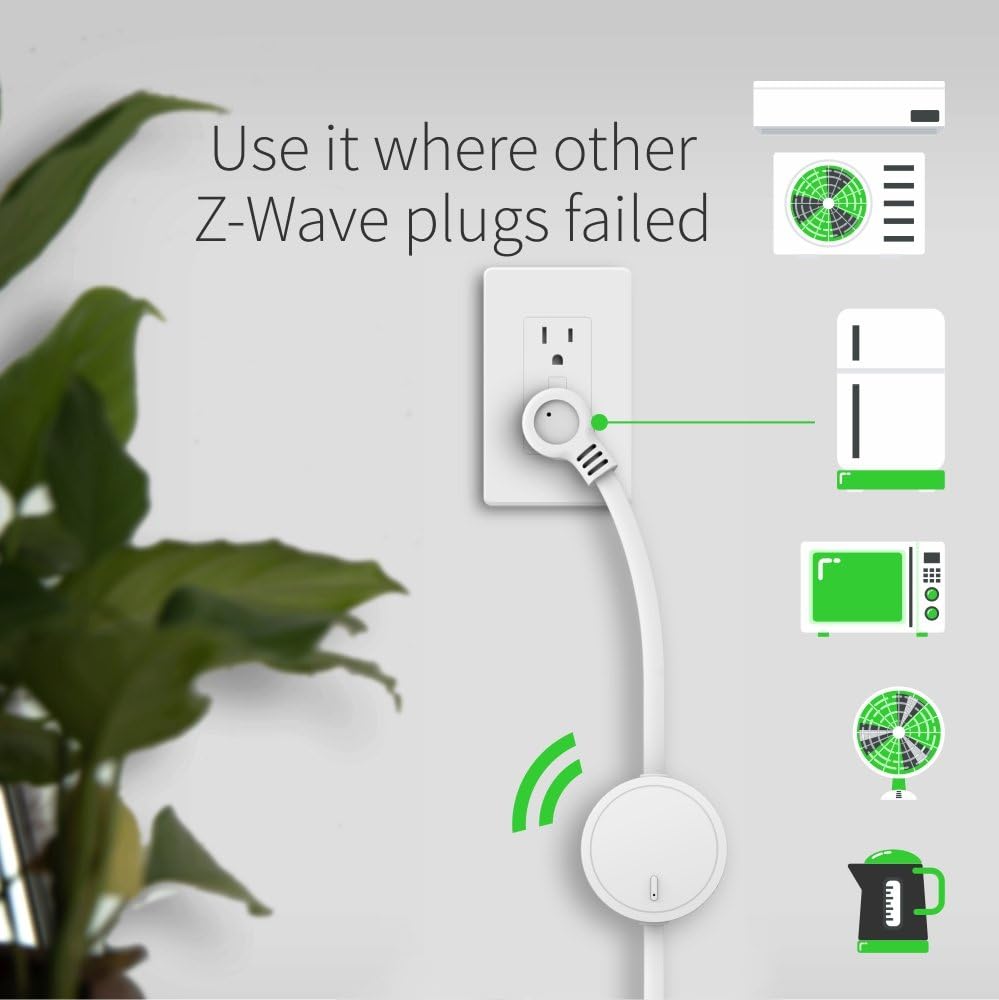
Слика 5: The Zooz ZEN15 Power Switch in use, demonstrating its ability to control various heavy-duty appliances such as an AC unit, refrigerator, microwave, fan, and kettle, plugged into a wall outlet.
5.3 Укључивање Z-Wave-а (упаривање)
Follow these steps to add the ZEN15 Power Switch to your Z-Wave network:
- Initiate the inclusion (pairing) mode on your Z-Wave hub. Refer to your hub's instruction manual for specific steps.
- Press the Z-Wave button on the ZEN15 Power Switch три пута брзо. The LED indicator will flash to confirm inclusion mode.
- Your hub should detect and add the device. The LED on the ZEN15 will turn solid when successfully paired.
- If inclusion fails, try excluding the device first (see 5.4) and then repeat the inclusion process.
5.4 Z-Wave Exclusion (Removal)
To remove the ZEN15 Power Switch from your Z-Wave network:
- Initiate the exclusion (removal) mode on your Z-Wave hub. Refer to your hub's instruction manual for specific steps.
- Press the Z-Wave button on the ZEN15 Power Switch три пута брзо. The LED indicator will flash to confirm exclusion mode.
- Your hub should confirm the device has been removed. The LED on the ZEN15 will turn off.
6. Упутство за употребу
6.1 Основна контрола укључивања/искључивања
- Ручна контрола: Press the Z-Wave button once to manually turn the connected appliance ON or OFF.
- Контрола З-таласа: Use your Z-Wave hub's interface or associated voice assistant (if configured) to remotely turn the appliance ON or OFF.
6.2 Праћење енергије
The ZEN15 Power Switch can report real-time energy usage data (Watts, kWh, Amps, Volts) to your Z-Wave hub. This feature requires a Z-Wave hub that supports energy monitoring. Consult your hub's documentation for how to access and interpret this data.
Напомена: This device is not a power outage monitor. It reports current energy usage, not power loss events.

Слика 6: Key Z-Wave features of the ZEN15 Power Switch. This graphic illustrates the device's capabilities including Z-Wave Plus Repeater functionality, a Z-Wave Range Test Tool, Secure Signal Encryption, and Energy Use Monitoring.
7. Напредне функције
- Z-Wave Plus and 800 Series Chip: Utilizes the latest Z-Wave technology for improved range, speed, and security.
- Z-Wave Long Range (LR) Ready: Compatible with Z-Wave Long Range networks for extended communication distances.
- S2 Authenticated Security: Provides enhanced security for your Z-Wave network.
- Signal Repeater: Boosts your Z-Wave network by repeating signals from other devices.
- Range Test Tool: A built-in tool to help assess Z-Wave signal strength (consult your hub's documentation for activation).
- Повер Оуtagе Опоравак: The switch can be configured to restore its last on/off state after a power failure.
- Компатибилност: Works with certified Z-Wave hubs for basic on/off control. Advanced settings and energy monitoring are typically available with open systems like Z-Box Hub (recommended), SmartThings (custom driver may be required), Hubitat, Home Assistant, and HomeSeer.
8. Одржавање
- Очистите уређај меком, сувом крпом. Не користите јаке хемикалије или абразивна средства за чишћење.
- Уверите се да је уређај искључен пре чишћења.
- Regularly check for any signs of damage to the cord or housing. If damaged, discontinue use and contact support.
КСНУМКС. Решавање проблема
9.1 Device Not Pairing with Z-Wave Hub
- Check Hub Mode: Ensure your Z-Wave hub is in inclusion (pairing) mode.
- Троструки притисак: Confirm you are pressing the Z-Wave button on the ZEN15 three times quickly.
- Exclusion First: Try performing an exclusion (removal) process first, even if the device was never paired. This can reset the device.
- Удаљеност: Move the ZEN15 closer to your Z-Wave hub during the pairing process.
9.2 Appliance Not Responding
- Проверите снагу: Ensure the ZEN15 is properly plugged into a live outlet and the appliance is securely plugged into the ZEN15.
- Ручни тест: Try pressing the Z-Wave button on the ZEN15 to manually toggle the appliance. If it works manually, the issue might be with your Z-Wave network or hub.
- Appliance Power: Verify the appliance itself is functional by plugging it directly into a wall outlet.
- Капацитет оптерећења: Ensure the appliance's power draw does not exceed the ZEN15's maximum load (15A, 1800W).
9.3 Energy Monitoring Not Displaying Data
- Компатибилност чворишта: Confirm your Z-Wave hub supports energy monitoring features.
- Custom Drivers: For some hubs (e.g., SmartThings), a custom device handler or driver may be required to access advanced features like energy monitoring. Refer to the Zooz Support Portal for details.
- Конфигурација уређаја: Check your hub's interface for any specific settings or parameters related to energy reporting for the ZEN15.
10. Спецификације
| Број модела: | ЗЕН15 |
| Снага: | КСНУМКСВ АЦ КСНУМКСХз |
| Максимално оптерећење: | 15 Ampс, 1800 вати |
| З-таласна фреквенција: | 908.42 МХз (САД) |
| Радна температура: | 14°Ф до 104°Ф (-10°Ц до 40°Ц) |
| Димензије: | Approximately 20 x 2.6 x 1.1 inches (cable length included) |
| Тежина: | 10.8 унци |
| Сертификати: | ЕТЛ сертификован |
11. Гаранција и подршка
For warranty information and technical support, please visit the official Zooz website or contact their customer service directly. The Zooz Support Portal often provides detailed guides, custom device drivers, and troubleshooting resources for their products.
Произвођач: ЗООЗ