
1. Увод
Хвала вам на куповиниasing the Riptunes Portable CD Player with AM/FM Radio, Model CDB204. This device is designed for portable audio playback, offering versatile options including CD playback, AM/FM radio reception, and auxiliary input for external audio sources. Please read this manual thoroughly before operating the unit to ensure proper use and to maximize your listening experience.

Image 1.1: Riptunes Portable CD Player (Model CDB204) with an external device connected.
2. Безбедносне информације
- Не излажите уређај киши или влази како бисте спречили пожар или струјни удар.
- Не отварајте кабинет. Сервисирање препустите само квалификованом особљу.
- Избегавајте постављање уређаја у близини извора топлоте као што су радијатори, грејни уређаји, шпорети или други уређаји који производе топлоту.
- Користите само додатке/прибор које је навео произвођач.
- Искључите ову јединицу из струје током олуја са грмљавином или када се не користи дужи временски период.
- Dispose of batteries properly, following local regulations. Do not expose batteries to excessive heat.
3. Садржај пакета
Молимо вас да проверите да ли су следеће ставке укључене у ваш пакет:
- Riptunes Portable CD Player (Model CDB204)
- АЦ адаптер
- Упутство за употребу
4. Производ је готовview
Familiarize yourself with the controls and features of your Riptunes Portable CD Player.
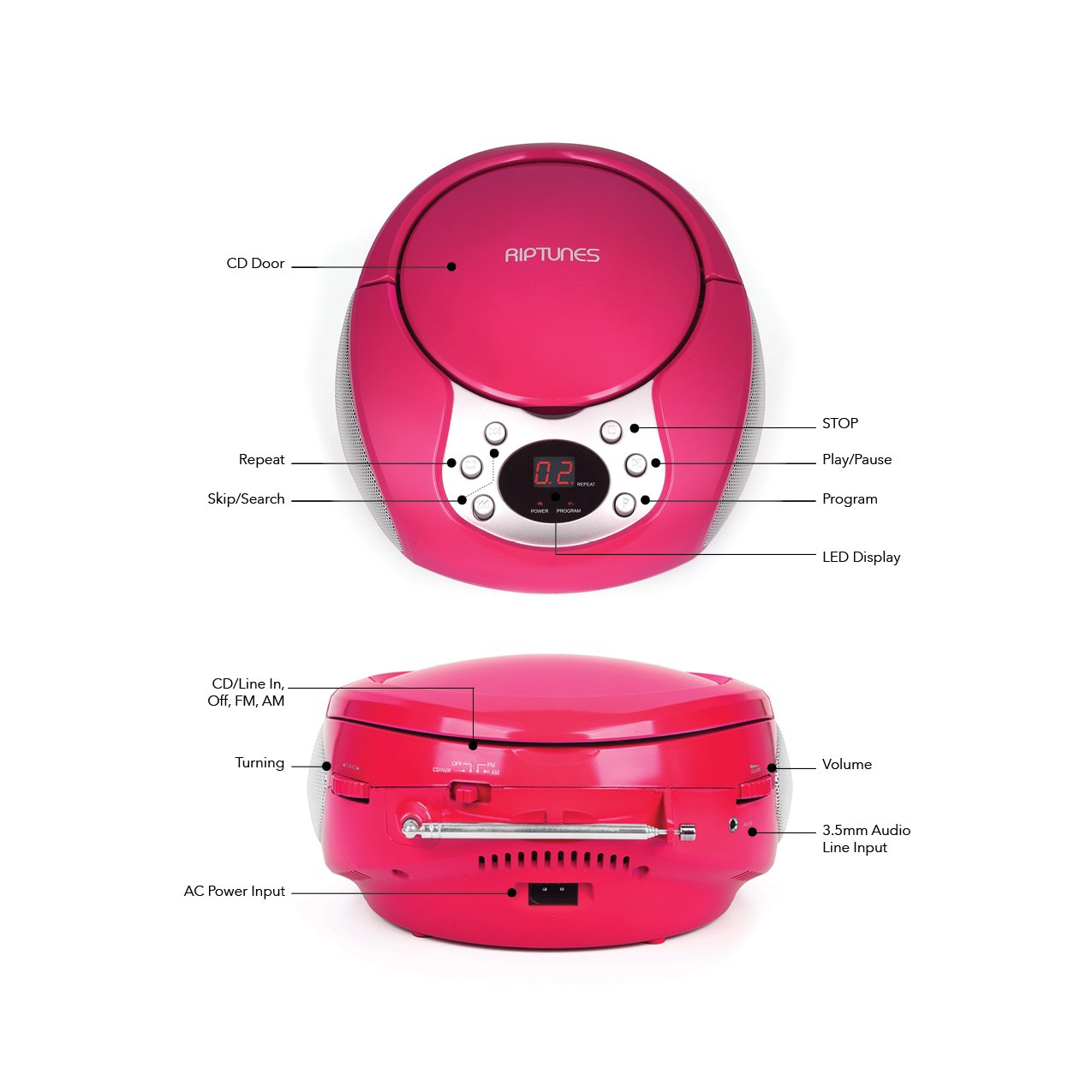
Image 4.1: Front and Side Panel Controls and Ports.
Контроле на предњој плочи:
- CD Door: Open to insert or remove a CD.
- ЛЕД дисплеј: Приказује број нумере, радио фреквенцију или режим.
- POWER/PROGRAM Button: Press to turn the unit on/off. In CD mode, press to program tracks.
- PLAY/PAUSE (►/−−) Button: Press to start or pause CD playback.
- Дугме СТОП (■): Press to stop CD playback.
- SKIP/SEARCH (◀◀ / ►►) Buttons: Press to skip tracks on a CD. Hold to search within a track. In radio mode, press to tune.
- Dugme REPEAT: Press to repeat the current track or all tracks on a CD.
Side Panel Controls/Ports:
- FUNCTION Switch (CD/Line In-Off, FM, AM): Selects the operating mode (CD/Aux, FM Radio, AM Radio) and turns the unit off.
- VOLUME Dial: Подешава ниво аудио излаза.
- TUNING Dial: Подешава радио фреквенцију у AM/FM режиму.
- АУКС ИН прикључак: Connects external audio devices using a 3.5mm audio cable.
- AC POWER INPUT Jack: Connects the supplied AC power adapter.
- ФМ антена: Extend for optimal FM radio reception.
5. Подешавање
5.1 Напајање јединице
The Riptunes Portable CD Player can be powered by either the included AC adapter or by batteries.
Рад наизменичног напајања:
- Ensure the FUNCTION switch is in the 'OFF' position.
- Insert the small end of the AC adapter into the AC POWER INPUT jack on the side of the unit.
- Plug the other end of the AC adapter into a standard AC wall outlet (120V ~ 60Hz).
Рад батерије:
За преносиву употребу, уређају су потребне 6 батерија величине „C“ (нису укључене).
- Ensure the FUNCTION switch is in the 'OFF' position.
- Пронађите одељак за батерију на дну уређаја.
- Open the battery compartment cover by sliding it off.
- Insert 6 'C' size batteries, observing the correct polarity (+/-) as indicated inside the compartment.
- Вратите поклопац одељка за батерије безбедно.

Image 5.1: Battery Compartment on the underside of the unit.
5.2 Подешавање антене
For optimal FM radio reception, fully extend the telescopic FM antenna located on the side of the unit. For AM reception, the unit has a built-in antenna, so no external adjustment is needed, but you may need to reposition the unit for better signal.

Image 5.2: Unit with FM antenna extended.
6. Упутство за употребу
6.1 Репродукција ЦД-а
- Slide the FUNCTION switch to the 'CD/Line In-Off' position.
- Press the 'OPEN' button on the CD door to open it.
- Place a CD into the compartment with the label side facing up.
- Close the CD door firmly. The LED display will show '00' or the total number of tracks.
- Press the PLAY/PAUSE (►/−−) button to start playback. The track number will appear on the display.
- Adjust the VOLUME dial to your desired listening level.
- To pause playback, press the PLAY/PAUSE (►/−−) button. Press again to resume.
- To stop playback, press the STOP (■) button.
- To skip to the next track, press the SKIP/SEARCH (►►) button.
- To go back to the beginning of the current track, press the SKIP/SEARCH (◀◀) button once. Press twice to go to the previous track.
- To search rapidly forward or backward within a track, hold down the respective SKIP/SEARCH button.
- Функција понављања: Press the REPEAT button once to repeat the current track. Press again to repeat all tracks. Press a third time to cancel repeat mode.
- Функција програма: While the CD is stopped, press the PROGRAM button. The display will flash. Use the SKIP/SEARCH buttons to select your desired track, then press PROGRAM again to confirm. Repeat for up to 20 tracks. Press PLAY/PAUSE to start programmed playback.
6.2 Рад AM/FM радија
- Slide the FUNCTION switch to either 'FM' or 'AM' position.
- For FM reception, extend the telescopic antenna fully.
- Rotate the TUNING dial on the side of the unit to select your desired radio station. The frequency will be displayed on the LED screen.
- Adjust the VOLUME dial to your desired listening level.
- For optimal AM reception, you may need to rotate the entire unit to find the best signal.
6.3 Помоћни улаз (AUX IN)
- Slide the FUNCTION switch to the 'CD/Line In-Off' position.
- Connect one end of a 3.5mm audio cable (not included) to the AUX IN jack on the side of the unit.
- Connect the other end of the audio cable to the headphone jack or line-out jack of your external audio device (e.g., smartphone, MP3 player).
- Turn on your external audio device and start playback.
- Adjust the VOLUME dial on the Riptunes unit and the volume on your external device to achieve the desired sound level.
7. Одржавање
- Чишћење: Обришите уређај меком, сувом крпом. Не користите абразивна средства за чишћење или раствараче.
- ЦД Царе: Држите ЦД-ове за ивице. Држите их чистим и без огреботина. Користите меку крпу која не оставља влакна да бисте обрисали ЦД-ове од средине ка споља.
- Складиштење: Када се уређај не користи дуже време, извадите батерије и чувајте га на хладном и сувом месту, даље од директне сунчеве светлости и екстремних температура.
КСНУМКС. Решавање проблема
| Проблем | Могући узрок | Решење |
|---|---|---|
| Нема струје | AC adapter not connected; Batteries depleted or incorrectly inserted; FUNCTION switch in 'OFF' position. | Ensure AC adapter is securely plugged in; Replace batteries or check polarity; Slide FUNCTION switch to 'CD/Line In-Off', 'FM', or 'AM'. |
| CD се не репродукује | CD inserted incorrectly; CD is dirty or scratched; CD door not closed; FUNCTION switch not in 'CD/Line In-Off' mode. | Insert CD with label side up; Clean or replace CD; Close CD door firmly; Set FUNCTION switch to 'CD/Line In-Off'. |
| Лош радио пријем | FM antenna not extended; Unit position. | Fully extend FM antenna; Reposition the unit for better signal. |
| Нема звука са AUX IN-а | Audio cable not connected properly; External device volume too low; FUNCTION switch not in 'CD/Line In-Off' mode. | Check audio cable connections; Increase volume on external device; Set FUNCTION switch to 'CD/Line In-Off'. |
9. Спецификације
- Модел: ЦДБКСНУМКС
- Извор напајања: AC 120V ~ 60Hz or 6 x 'C' size batteries (DC 9V)
- ЦД компатибилност: ЦД, ЦД-Р/РВ
- Радио фреквенције: ФМ, АМ
- Повезивање: 3.5 мм АУКС ИН
- Димензије (приближно): 12.48 к 11.46 к 7.09 инча (31.7 к 29.1 к 18 цм)
- Тежина (приближно): 2.68 фунте (1.22 кг)
10. Гаранција и подршка
Riptunes products are designed for reliability and performance. For warranty information, technical support, or customer service inquiries, please refer to the contact information provided with your purchase documentation or visit the official Riptunes webсајт. Молимо вас да сачувате доказ о куповини за потребе гаранције.