
Увод
Thank you for choosing the Lepro LED Desk Lamp. Ово лamp is designed to provide versatile and comfortable lighting for various tasks, featuring adjustable brightness, multiple color temperatures, a flexible design, and convenient additional functions.

The Lepro LED Desk Lamp provides versatile illumination for your workspace.
- Подесиво осветљење: Choose from 3 color temperatures (3000K Warm White, 4700K Natural White, 6000K Cool White) and stepless dimming from 5% to 100% brightness.
- Флексибилан дизајн: Тхе лamp features a multi-angle adjustable arm and head, allowing for precise light positioning. The base rotates 90 degrees, and the lamp head adjusts 180 degrees.
- Интегрисани УСБ порт: A 5V/1A USB output port is located on the back of the base for convenient charging of your electronic devices.
- Паметне функције: Includes a memory function to recall your last lighting setting and a 30-second timer for automatic shut-off.
- Издржљива конструкција: Made with a brushed aluminum alloy stand and shade, ensuring excellent heat dissipation and longevity, with ABS plastic articulations for flexibility.
Упутства за подешавање
- Садржај распакивања: Пажљиво уклоните лamp, power adapter, and cleaning cloth from the packaging.
- Поставите Лamp: Ставите лamp on a stable, flat surface such as a desk or table.
- Прикључите напајање: Insert the power adapter's DC plug into the power input port on the back of the lamp base. Then, plug the power adapter into a standard electrical outlet.
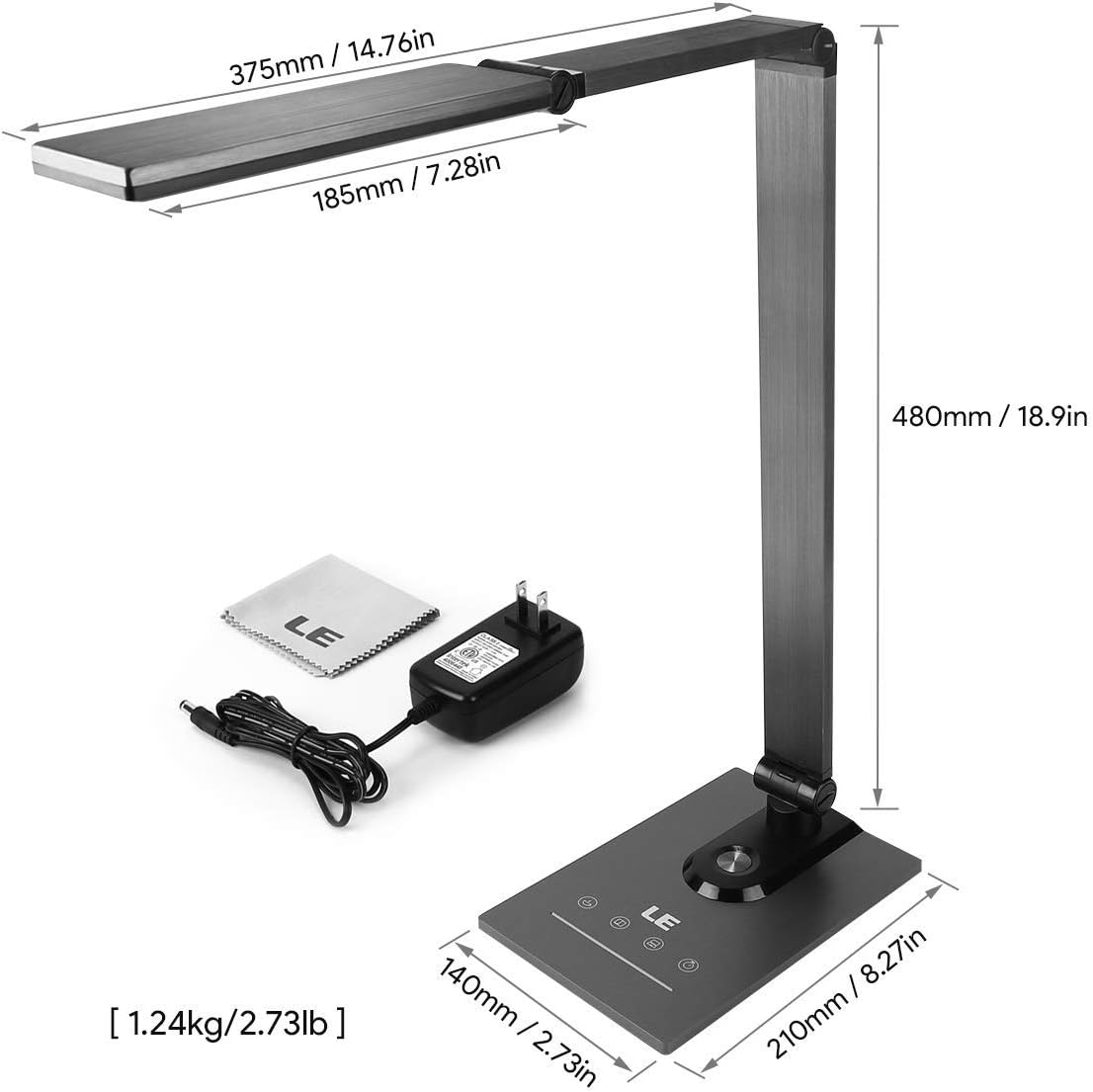
Ensure all components, including the power adapter and cleaning cloth, are present.
Упутство за употребу
1. Укључивање/искључивање
Gently touch the power symbol (O) on the lamp база за окретање лamp укључено или искључено.
2. Подешавање осветљености
Slide your finger along the touch panel (indicated by a horizontal line with sun icons) on the lamp base to adjust the brightness level from 5% to 100%. The lamp offers stepless dimming for precise control.
3. Промена температуре боје
Touch the mode symbol (icons resembling a coffee cup, book, and computer) on the lamp base to cycle through the three available color temperature modes:
- 3000K (топло бела): Ideal for relaxation or a cozy atmosphere.
- 4700K (природно бела): Suitable for general reading and daily tasks.
- 6000K (хладно бела): Best for focused work and concentration.

Easily switch between three color temperatures and adjust brightness with the touch controls.
4. УСБ порт за пуњење
Connect your smartphone, tablet, or other USB-powered devices to the 5V/1A USB output port located on the rear of the lamp база за практично пуњење.

Charge your devices efficiently using the integrated 5V/1A USB port.
5. Функција меморије
Тхе лamp automatically remembers your last used brightness and color temperature settings. When you turn the lamp on again, it will resume with these previous settings.
6. 30-Second Timer
Touch the clock symbol (ЦЛОЦК) on the lamp base to activate the 30-second timer. The lamp will dim to a low light level and automatically turn off after 30 seconds, providing a convenient delay for leaving a room or falling asleep.

Utilize the timer and memory functions for enhanced convenience.
7. Adjusting Lamp Положај
Тхе лamp's design allows for extensive adjustment to direct light precisely where needed:
- Ротација базе: Тхе лamp base can be rotated up to 90 degrees horizontally.
- Подешавање руке: The main arm of the lamp can be adjusted to various angles.
- Подешавање главе: Тхе лamp head can be tilted and rotated up to 180 degrees vertically.

Подесите лamp's arm and head to achieve optimal lighting angles.

The flexible design allows for precise light direction, suitable for various scenarios.
Одржавање
- Чишћење: Use the provided cleaning cloth or a soft, dry cloth to wipe the lamp. Do not use abrasive cleaners, solvents, or harsh chemicals, as these may damage the finish or electronic components.
- Складиштење: Ако чувате лamp for an extended period, ensure it is clean and dry. Store it in a cool, dry place away from direct sunlight and extreme temperatures.
- ЛЕД: The LED light source is integrated and not user-replaceable. Do not attempt to disassemble the lamp глава.
Решавање проблема
| Проблем | Могући узрок | Решење |
|---|---|---|
| Lamp се не укључује. | Нема напајања или лабава веза. | Уверите се да је адаптер за напајање добро прикључен у оба лamp и исправну електричну утичницу. |
| Light flickers or brightness is inconsistent. | Unstable power supply or dirty touch panel. | Check the power source. Clean the touch control panel with a dry cloth. |
| USB charging port is not working. | Device incompatibility or faulty cable. | Ensure your device is compatible with 5V/1A USB charging. Try a different USB cable. |
| Lamp does not hold its adjusted position. | Joints may be loose or over-extended. | Gently readjust the lamp to a stable position. Avoid forcing joints beyond their intended range of motion. |
Спецификације
| Феатуре | Детаљ |
|---|---|
| Број модела | 3100030-ЕУ |
| Димензије (Д к Ш к В) | 14P x 21l x 48H cm (5.5 x 8.3 x 18.9 inches) |
| Тежина | 1450 грама (3.2 фунте) |
| ЛЕД Повер | 9 Ваттс |
| УСБ излаз | 5V/1A (10 Watts) |
| Улазни волtage | 240 Волтс |
| Температуре боје | 3000К, 4700К, 6000К |
| Подешавање осветљености | Stepless Dimming (5%-100%) |
| Контролни метод | Контрола додиром |
| Материјали | Brushed Metal (Base, Shade), ABS Plastic (Articulations) |
| Укључене компоненте | Деск Лamp, Power Adapter, Cleaning Cloth |
Гаранција и подршка
This product comes with a 1-year availability of spare parts, indicating a commitment to product support.
For any questions, technical assistance, or warranty claims, please contact the retailer where you purchased the product or visit the official Lepro webсајт за информације о корисничкој подршци.
Молимо вас да сачувате доказ о куповини ради гаранције.