
Увод
This manual provides essential information for the proper setup, operation, and maintenance of your Seville Classics Airlift Height Adjustable Sit Stand Converter Workstation. Please read these instructions thoroughly before use to ensure safe and efficient operation.
The Airlift Sit Stand Converter is designed to transform any desk into an active workstation, allowing seamless transitions between sitting and standing positions. It features a gas-spring mechanism for smooth height adjustment, a spacious work surface for multiple monitors, and a dedicated keyboard tray.
Безбедносне информације
WARNING: Always ensure the desk is properly anchored to your work surface. Do not exceed the weight limit of 33 lbs. Use caution when adjusting the height and tilt to prevent injury. Keep hands and fingers away from moving parts. Always follow the instructions provided with the product.
- Ensure the workstation is placed on a stable, level surface.
- Do not place objects that exceed the maximum weight capacity of 33 lbs on the workstation.
- Keep children and pets away from the workstation during adjustment.
- Inspect the workstation regularly for any signs of damage or wear. Discontinue use if damage is found.
- Avoid sudden movements or leaning heavily on the workstation when it is in an elevated position.
Садржај пакета
Пре почетка монтаже проверите да ли су све компоненте присутне:
- AIRLIFT™ Desk (1)
- Имбус кључ (1)
- Заграде (2)
- Keyboard Tray (1)
- Zip-ties (2)
Подешавање и монтажа
The Seville Classics Airlift Sit Stand Converter Workstation comes largely pre-assembled. Only minimal setup is required.
- Распакујте радну станицу: Carefully remove all components from the packaging. Place the main desk unit on your existing desk surface.
- Attach the Keyboard Tray: Align the keyboard tray with the designated slots on the main desk unit. Secure it using the provided brackets and Allen wrench. Ensure it clicks firmly into place.
- Организујте каблове: Use the included zip-ties and wire clips to manage and secure your cables, maintaining a tidy workspace.
Your workstation is now ready for use.

Слика: Фронт view of the assembled workstation, ready for use.
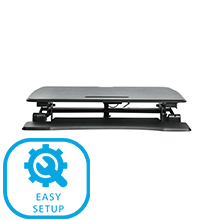
Image: Visual representation of the easy setup process, highlighting minimal assembly.
Упутство за употребу
The Airlift Sit Stand Converter features a pneumatic gas-spring system for smooth and effortless height adjustment.
Подешавање висине:
- Да се подигне: Gently squeeze the levers located on each side of the workstation. While holding the levers, lift the work surface to your desired standing height. Release the levers to lock the workstation in place.
- Спустити: Gently squeeze the levers on each side. While holding the levers, apply slight downward pressure to the work surface to lower it to your desired sitting height. Release the levers to lock the workstation in place.
The workstation can be adjusted to any height between 6.2 inches (minimum) and 19.7 inches (maximum) from your desk surface.

Image: A user adjusting the workstation to a standing position.

Image: Close-up of the height adjustment levers.
Video: Official product video demonstrating the smooth gas-spring height adjustment of the Airlift Sit Stand Desk Converter. This video shows the ease of transitioning between sitting and standing positions.
Карактеристике
- Instant Sit-Stand Adjustment: Effortless pneumatic vertical adjustment from 6.2 inches to 19.7 inches high.
- Wide Dual-Monitor Riser: Large desk top (35.4" x 23.5") with a beveled front edge, suitable for single monitors, dual monitors, laptop + monitor setups, and ultra-wide monitors.
- Detachable Keyboard Tray: Full-width keyboard tray (35.4" x 12.5") with an ergonomic curve for user comfort.
- Интегрисани држач уређаја: Built-in stand on the top tier for holding smartphones, tablet computers, and notepads.
- Робусна конструкција: High-quality steel base and frame ensure stability and durability.
- Капацитет тежине: Supports up to 33 lbs evenly distributed on the workstation top.
- Управљање кабловима: Includes zip-ties and wire clips for organized cable routing.
- ANSI/BIFMA X5.5 Compliant: Engineered for ergonomic comfort and safety to meet industry standards.

Слика: Одозго надоле view изложбаasing the spacious work surface accommodating a laptop, monitor, and other accessories.
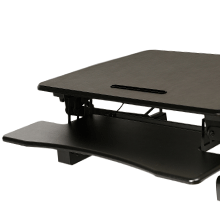
Image: Diagram illustrating the monitor riser, keyboard tray, and tablet holder features.
Спецификације
| Атрибут | Детаљ |
|---|---|
| Број модела | ОФФ65807 |
| Workstation Top Dimensions | 35.43" W x 23.23" D x 0.59" thick |
| Димензије лежишта за тастатуру | 35.43" W x 12.60" D x 0.59" thick |
| Overall Dimensions (Min Height) | 35.43 cm Š x 35.8 cm D x 6.2 cm V |
| Укупне димензије (максимална висина) | 35.43 cm Š x 35.8 cm D x 19.7 cm V |
| Басе Дименсионс | 32.75 cm Š x 21.9 cm D |
| Тежина Капацитет | 33 лбс (равномерно распоређено) |
| Тежина артикла | 52.3 лбс |
| Врста материјала | Engineered Wood, Metal, Plastic, Steel |
| Боја | Црно |
| Механизам за подизање | Pneumatic Gas-Spring |
| Обавезна монтажа | No (Minimal attachment of keyboard tray) |

Image: Detailed dimensions of the workstation, including height range and surface areas.
Одржавање
To ensure the longevity and optimal performance of your workstation, follow these simple maintenance guidelines:
- Чишћење: Wipe the surfaces with a dry cloth. For stubborn marks, a slightly damp Може се користити крпа, након чега се одмах осуши. Избегавајте абразивна средства за чишћење или јаке хемикалије.
- инспекција: Периодично проверавајте све завртње и спојеве да бисте били сигурни да су чврсто затегнути. По потреби поново затегните.
- Померање: When moving the workstation, ensure it is in its lowest position and lift it carefully. Avoid dragging it across surfaces to prevent damage to the base or your desk.
Решавање проблема
If you encounter any issues with your workstation, refer to the following common problems and solutions:
- Workstation is difficult to raise or lower:
Ensure that the weight on the workstation does not exceed the 33 lbs capacity. Distribute weight evenly across the surface. Check that the levers are fully engaged when attempting to adjust the height. - Workstation feels unstable:
Verify that the workstation is placed on a flat, stable desk surface. Check all connections, especially the keyboard tray, to ensure they are securely fastened. - Keyboard tray is loose:
Ensure the brackets securing the keyboard tray are properly installed and tightened with the Allen wrench.
Ако проблеми и даље постоје након покушаја ових решења, обратите се корисничкој подршци.
Гаранција и подршка
Limited 3-Year Manufacturer's Coverage: Seville Classics AIRLIFT height adjustable converter desks are backed by a 3-year limited coverage unless otherwise specified. This warranty protects against original defects in material or workmanship under normal home or office use for the duration of the coverage period.
For warranty claims or technical support, please refer to the contact information provided with your purchase or visit the official Seville Classics webсајту.