
Propel Zipp Nano 2.0
Propel Zipp Nano 2.0 Drone User Manual
Model: Zipp Nano 2.0
Марка: Пропел
1. Увод
This manual provides essential information for the safe and effective operation of your Propel Zipp Nano 2.0 Drone. Please read this manual thoroughly before operating the drone to ensure proper usage and to prevent damage or injury.
The Propel Zipp Nano 2.0 is a high-performance 2.4 GHz indoor/outdoor drone designed for stable flight and exciting aerial maneuvers. It features a built-in 6-axis gyroscopic chip for stability, multiple speed settings, and the ability to perform 360-degree stunt rolls.
2. Мере предострожности
Always prioritize safety when operating the drone. Failure to follow these guidelines may result in injury or damage to the drone or property.
- Не користите дрон у близини људи, животиња или препрека.
- Keep hands, hair, and loose clothing away from rotating propellers.
- Уверите се да је дрон потпуно напуњен пре сваког лета.
- Не летите при јаком ветру или неповољним временским условима.
- Supervise children during operation. This product contains small parts and is not suitable for children under 3 years due to choking hazard.
- Do not attempt to modify or repair the drone yourself. Contact customer support for assistance.

Image: Back of the product packaging, highlighting features and a warning about small parts.
3. Садржај пакета
Проверите да ли су све ставке присутне у вашем пакету:
- Propel Zipp Nano 2.0 Drone (Red)
- 2.4 GHz Digital Remote Control
- УСБ кабл за пуњење
- Spare Replacement Parts (Propellers)

Image: The Propel Zipp Nano 2.0 Drone and its remote control visible within the clear retail packaging.
4. Подешавање
4.1 Пуњење батерије дрона
The drone is powered by an internal rechargeable battery. Use the provided USB charging cable to charge the drone.
- Connect the small end of the USB charging cable to the drone's charging port.
- Повежите већи крај УСБ кабла за пуњење са УСБ извором напајања (нпр. УСБ портом рачунара, УСБ адаптером за зид).
- Индикаторска лампица пуњења на USB каблу ће светлети током пуњења и искључити се када се кабл потпуно напуни.
- Пуњење обично траје отприлике 30-45 минута. Немојте препунити.
4.2 Инсталирање батерија у даљински управљач
The remote control requires 2 "AAA" batteries (not included).
- Пронађите одељак за батерије на полеђини даљинског управљача.
- Отворите поклопац одељка за батерије.
- Уметните 2 батерије типа „ААА“, водећи рачуна о исправном поларитету (+/-).
- Добро затворите поклопац одељка за батерије.

Image: The remote control for the Propel Zipp Nano 2.0 Drone, showing its various buttons and joysticks.
4.3 Упаривање дрона и даљинског управљача
To establish a connection between the drone and the remote control:
- Поставите дрон на равну, равну површину.
- Turn on the drone by sliding the power switch. The drone's LED lights will flash.
- Укључите даљински управљач.
- Push the left joystick (throttle) all the way up, then pull it all the way down.
- The drone's LED lights will turn solid, indicating successful pairing.
5. Управљање дроном
5.1 Контроле лета
Упознајте се са распоредом и функцијама даљинског управљача:
- Леви џојстик (гас/скретање):
- Push up to increase altitude (throttle).
- Push down to decrease altitude.
- Push left/right to rotate the drone (yaw).
- Десни џојстик (нагиб/рот):
- Push up/down to move forward/backward (pitch).
- Push left/right to move left/right (roll).
- Дугме за брзину: Cycles through 3 different speed settings (slow, medium, high).
- Stunt Button: Press to initiate 360-degree stunt rolls (see 5.4).
- T-Mode Button: Activates T-Mode for beginner pilots, providing more stable and controlled flight.
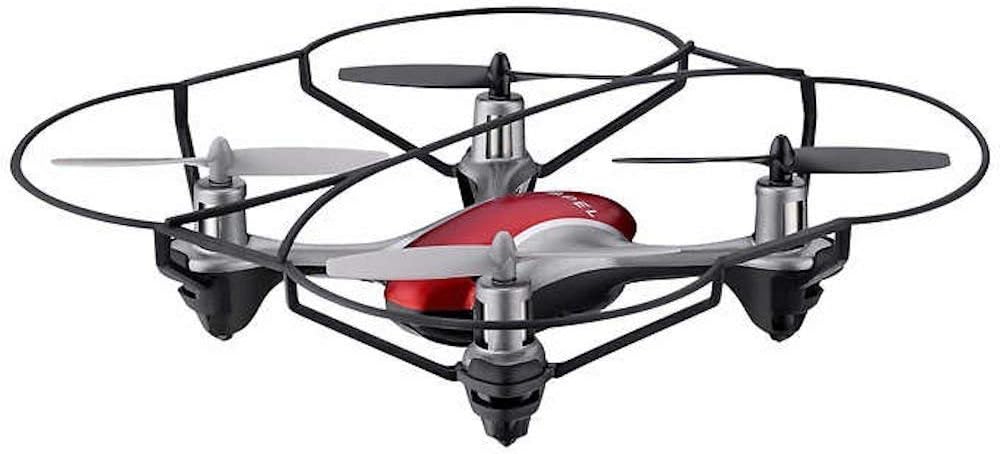
Image: The Propel Zipp Nano 2.0 Drone, showcasing its compact design and propeller guards.
5.2 Полетање и слетање
- полетање: After pairing, slowly push the left joystick (throttle) up to lift off.
- Слетање: Slowly pull the left joystick (throttle) down until the drone lands gently.
5.3 Одржавање висине
The Zipp Nano 2.0 features an air pressure sensor that helps lock altitude in mid-air, making it easier to control and hover stably.
5.4 360-Degree Stunt Rolls
To perform a stunt roll:
- Ensure the drone is flying at a sufficient height (at least 6-8 feet).
- Press the dedicated Stunt Button on the remote control.
- Immediately push the right joystick in the desired direction (forward, backward, left, or right) to execute the roll.

Слика: Угаона view of the Propel Zipp Nano 2.0 Drone, highlighting its sleek design and protective frame.
6. Одржавање
- Чишћење: Use a soft, dry cloth to clean the drone and remote control. Do not use harsh chemicals or water.
- Замена пропелера: If propellers become damaged, replace them with the provided spare parts. Carefully remove the damaged propeller and snap the new one into place, ensuring correct orientation.
- Складиштење: When not in use, store the drone and remote control in a cool, dry place away from direct sunlight.
КСНУМКС. Решавање проблема
| Проблем | Могући узрок | Решење |
|---|---|---|
| Дрон не реагује на даљински управљач. | Not paired, low drone battery, low remote control batteries. | Re-pair the drone and remote. Charge drone battery. Replace remote control batteries. |
| Дрон лети неправилно или се дрифтује. | Not calibrated on a level surface, damaged propeller, strong wind. | Ensure drone is placed on a flat surface for pairing. Check for damaged propellers and replace if necessary. Fly in calm conditions. |
| Drone does not lift off. | Low drone battery, propellers not spinning correctly. | Charge drone battery fully. Check for obstructions around propellers. |
8. Спецификације
| Феатуре | Детаљ |
|---|---|
| Бранд | Пропел |
| Назив модела | Propel 2.4 ghz (Zipp Nano 2.0) |
| Технологија повезивања | Радио фреквенција (2.4 GHz) |
| Оперативни домет | До 200 стопа |
| Гиросцопе | Built-in 6-axis gyroscopic chip |
| Подешавања брзине | 3 (Slow, Medium, High) |
| Посебне карактеристике | 360-degree stunt rolls, Altitude Hold, T-Mode for beginners |
| Тип(ови) материјала | Plastic, Carbon Fibre |
| Димензије производа | 13.97 к 3.81 к 13.97 цм |
| Тежина артикла | 453.59 g (1 Pound) |
| Боја | Црвени |
| Ниво вештине | Бегиннер |
9. Гаранција и подршка
Propel offers unlimited replacement parts for one year from the date of purchase. For warranty claims, technical support, or to order replacement parts, please refer to the contact information provided on the product packaging or the official Propel webсајту.
Сачувајте рачун као доказ о куповини за потребе гаранције.
Ask a question about this manual
Ask about setup, troubleshooting, compatibility, parts, safety, or missing instructions. Manuals+ will review the question and use this page’s manual context to help answer it.