
1. Увод
This manual provides essential information for the safe and efficient operation of the Keyence BL-601 Fixed Mount Barcode Scanner. Please read this manual thoroughly before using the product and keep it for future reference.
The BL-601 is an ultra-compact barcode scanner designed for high-speed and accurate data capture in various industrial applications. Its small footprint allows for integration into space-constrained environments.
2. Мере предострожности
Observe the following safety precautions to prevent injury to personnel and damage to the product.
- Do not attempt to disassemble, repair, or modify the scanner. This may cause electric shock or damage.
- Уверите се да је напајање волtage is within the specified range. Incorrect voltagе може проузроковати штету.
- Avoid exposing the scanner to direct sunlight, high temperatures, excessive humidity, or corrosive gases.
- Do not look directly into the scanning window while the device is operating, as it emits a laser light.
- Mount the device securely to prevent it from falling.
3. Садржај пакета
Проверите да ли су сви предмети присутни и неоштећени приликом распакивања.
- Keyence BL-601 Barcode Scanner Unit
- Connection Cable (specific type may vary)
- Mounting Bracket (optional, may be sold separately)
- Водич за брзи почетак
4. Производ је готовview
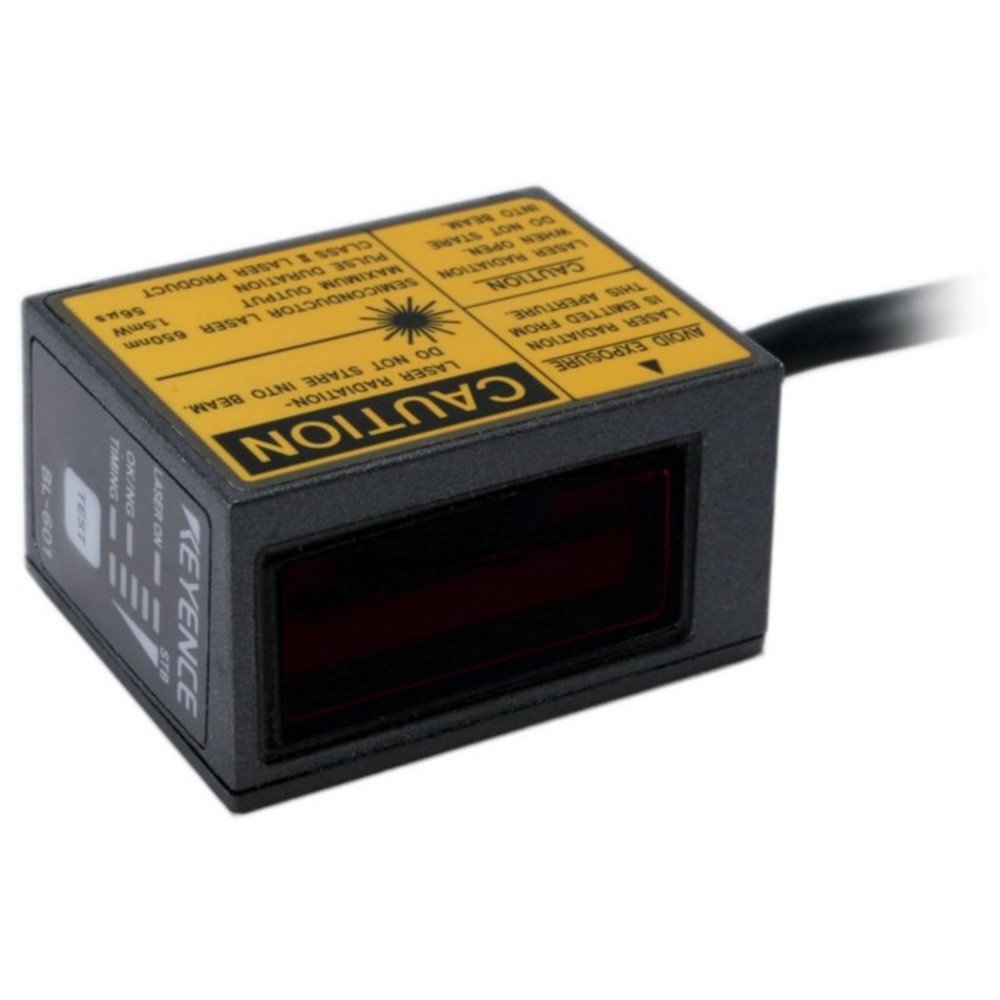
Слика 4.1: Фронт view of the Keyence BL-601 Barcode Scanner. This image shows the compact design and the scanning window.
The BL-601 features a robust housing, a high-performance scanning engine, and various interface options for seamless integration into existing systems. Key components include the scanning window, status indicators, and a connector port.
- Прозор за скенирање: Area where barcodes are read.
- Индикатори статуса: LEDs indicating power, scan status, and error conditions.
- Порт конектора: За напајање и комуникацију података.
5. Подешавање
5.1 Mounting the Scanner
The BL-601 can be mounted using standard M3 screws or an optional mounting bracket. Ensure the scanner is positioned to provide a clear line of sight to the barcodes.
- Select a stable, vibration-free surface for mounting.
- Secure the scanner using appropriate screws, ensuring it is firmly attached.
- Adjust the angle to optimize reading performance.
5.2 Повезивање каблова
Connect the provided cable to the scanner's connector port and to the host device (e.g., PC, PLC).
- Ensure the host device is powered off before connecting.
- Connect the scanner cable to the designated port on the scanner.
- Connect the other end of the cable to the appropriate interface port (e.g., USB, RS-232) on your host system.
- Power on the host device and then the scanner. Observe the status indicators.
6. Упутство за употребу
6.1 Основне операције скенирања
Once powered on and connected, the BL-601 is ready to scan. The scanner operates automatically or can be triggered externally depending on its configuration.
- Ensure the barcode is within the scanner's field of view and focal range.
- The scanner will emit a laser beam to read the barcode.
- A successful read is typically indicated by a green LED and/or an audible beep (if configured).
- The decoded data is then transmitted to the host system via the connected interface.
6.2 Конфигурација
The BL-601 can be configured using dedicated software provided by Keyence or via configuration barcodes. Refer to the detailed programming manual for advanced settings such as symbology enabling/disabling, data formatting, and trigger modes.
7. Одржавање
7.1 Чишћење скенера
Regular cleaning ensures optimal performance and longevity of the scanner.
- Прозор за скенирање: Gently wipe the scanning window with a soft, lint-free cloth dampened with a mild, non-abrasive cleaner or isopropyl alcohol. Do not use harsh chemicals or abrasive materials.
- Становање: Wipe the exterior housing with a soft, dry cloth.
- Ensure no liquid enters the scanner's interior.
7.2 Складиштење
Store the scanner in a clean, dry environment within the specified temperature and humidity ranges when not in use for extended periods.
КСНУМКС. Решавање проблема
| Проблем | Могући узрок | Решење |
|---|---|---|
| Скенер се не укључује | No power supply; loose cable connection | Check power source; ensure cable is securely connected. |
| Cannot read barcodes | Barcode damaged; incorrect focal distance; dirty scanning window; symbology disabled | Check barcode quality; adjust scanner position; clean scanning window; enable required symbology in settings. |
| Data not transmitting to host | Incorrect interface settings; faulty cable; host software issue | Verify communication settings; try a different cable; check host application. |
9. Спецификације
| Феатуре | Детаљ |
|---|---|
| Модел | БЛ-КСНУМКС |
| Произвођач | КЕИЕНЦЕ |
| Димензије (Ш к Д к В) | 31 к 40 к 21 мм (приближно) |
| Метод скенирања | Fixed Mount Laser Scanner |
| Интерфејс | RS-232C, USB (depending on model/cable) |
| Повер Суппли | 5 VDC to 24 VDC (typical) |
| Радна температура | 0 до 50°Ц (32 до 122°Ф) |
| Температура складиштења | -20 до 70°Ц (-4 до 158°Ф) |
| Влажност | 35 до 85% РХ (без кондензације) |
10. Гаранција и подршка
For information regarding product warranty, technical support, or service, please contact your local Keyence representative or visit the official Keyence webсајт. Држите рачун о куповини и серијски број производа при руци када контактирате подршку.
Keyence Official Webсајт: ввв.кеиенце.цом