
Yamaha Audio NPS303 B
Упутство за употребу мрежног аудио плејера Yamaha NPS303 B
Model: NPS303 B
Увод
This manual provides detailed instructions for the setup, operation, and maintenance of your Yamaha NPS303 B Network Audio Player. The NPS303 B is a sophisticated digital music system designed to stream music from various sources, including PCs, smartphones, and streaming services, with Yamaha's renowned Hi-Fi audio quality. It features MusicCast compatibility, built-in Wi-Fi, Bluetooth, AirPlay, and a front-panel USB terminal for versatile audio playback.
Шта је у кутији
- Yamaha NPS303 B Network Audio Player
- Даљински управљач
- ААА батерије (x2) за даљински управљач
- Кабл за напајање
- РЦА аудио кабл
- Упутство за употребу (овај документ)
Производ је завршенview
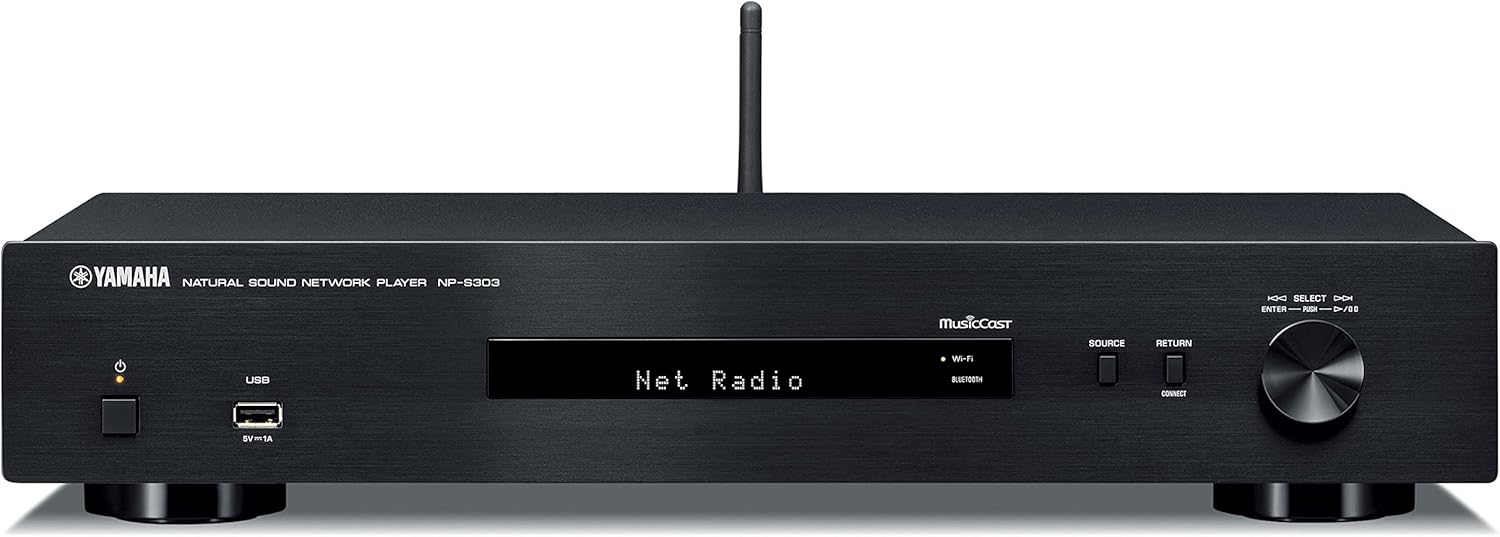
Слика 1: Предња плоча. Shows the power button, USB port, display, source selection buttons, and rotary encoder.

Слика 2: Задња плоча. Displays analog audio outputs (RCA), digital audio outputs (coaxial and optical), network port, and AC power input.

Слика 3: Даљински управљач. Features buttons for power, mute, dimmer, presets, navigation, playback controls, and input selection.
Сетуп
1. Распакивање и постављање
- Пажљиво уклоните све компоненте из паковања.
- Place the NPS303 B on a stable, flat surface, away from direct sunlight, heat sources, and excessive dust or vibration. Ensure adequate ventilation around the unit.
2. Повезивање са Ampлифиер
Connect the NPS303 B to your amplifier using either the analog or digital audio outputs.
- Аналогна веза (RCA): Use the supplied RCA audio cable to connect the ANALOG OUT (L/R) jacks on the NPS303 B to the corresponding analog input jacks on your ampлифиер.
- Digital Connection (Coaxial/Optical): For higher fidelity, connect either the COAXIAL or OPTICAL digital output on the NPS303 B to a compatible digital input on your amplifier or external DAC.
3. Мрежна веза
The NPS303 B supports both wired and wireless network connections.
- Жична (Етернет): Connect an Ethernet cable from the NETWORK port on the rear panel of the NPS303 B to your router or network hub.
- Бежично (Wi-Fi): The unit has built-in Wi-Fi. For initial setup, it is recommended to use the MusicCast Controller app on your smartphone or tablet.
4. Прикључак за напајање
Connect the supplied power cord to the AC IN terminal on the rear panel of the NPS303 B, then plug the other end into a wall outlet.
5. Remote Control Batteries
Insert the two supplied AAA batteries into the remote control, ensuring correct polarity.
Упутство за употребу
1. Укључивање/искључивање
Притисните тастер ПОВЕР дугме на предњој плочи или на даљинском управљачу да бисте укључили или искључили уређај.
2. Initial Network Setup (Wi-Fi)
For wireless network setup, download the "MusicCast Controller" app from your device's app store (iOS or Android). Follow the on-screen instructions within the app to connect your NPS303 B to your Wi-Fi network.
3. Репродукција музике
- Услуге стримовања: Access popular music streaming services (e.g., Spotify) through the MusicCast Controller app.
- УСБ репродукција: Connect a USB storage device to the front-panel USB terminal. Use the remote control or MusicCast app to navigate and play audio files. The NPS303 B supports FLAC and MP3 files from external USB drives.
- Блуетоотх: Pair your smartphone or other Bluetooth-enabled device with the NPS303 B to stream audio wirelessly. Select "Bluetooth" as the source.
- АирПлаи: For Apple devices, use AirPlay to stream audio directly to the NPS303 B.
- Мрежни аудио: Stream music from your PC or NAS (Network Attached Storage) server connected to the same network.
4. Коришћење даљинског управљача
Даљински управљач омогућава приступ разним функцијама:
- Избор извора: Buttons like NET, USB, BLUETOOTH allow direct selection of input sources.
- Навигација: Use the arrow keys and ENTER button to navigate menus on the unit's display.
- Контроле репродукције: Play, Pause, Stop, Skip Forward/Backward buttons control audio playback.
- Диммер: Adjusts the brightness of the front panel display.
Одржавање
- Чишћење: Обришите уређај меком, сувом крпом. Не користите абразивна средства за чишћење, воскове или раствараче.
- вентилација: Уверите се да отвори за вентилацију нису блокирани.
- Кабл за напајање: Редовно проверавајте кабл за напајање да ли има оштећења.
- Ажурирања фирмвера: Yamaha may release firmware updates to improve performance or add features. Check the Yamaha website or the MusicCast app for available updates.
Решавање проблема
| Проблем | Могући узрок | Решење |
|---|---|---|
| Нема струје | Кабл за напајање није безбедно повезан. | Уверите се да је кабл за напајање чврсто прикључен у уређај и зидну утичницу. |
| Нема звука | Изабран је погрешан унос amplifier; cables not connected properly; volume too low. | Изаберите исправан унос на вашем amplifier. Check all audio cable connections. Increase volume on both the NPS303 B and ampлифиер. |
| Повезивање на Ви-Фи није могуће | Incorrect Wi-Fi password; unit too far from router; network interference. | Verify Wi-Fi password. Move unit closer to router. Try restarting router. Use the MusicCast app for guided setup. |
| Даљински управљач не ради | Батерије су празне или су неправилно уметнуте; препрека између даљинског управљача и уређаја. | Replace batteries, ensuring correct polarity. Remove any obstacles. Ensure you are within range and pointing the remote at the unit's sensor. |
| Проблеми са репродукцијом са USB-а | Неподржано file format; USB device not recognized. | Осигурати files are in supported formats (FLAC, MP3). Try a different USB device or reformat the current one (FAT32 recommended). |
Спецификације
| Модел | NPS303 B |
| Бранд | Иамаха Аудио |
| Димензије (Ш к В к Д) | КСНУМКС к КСНУМКС к КСНУМКС цм (КСНУМКС к КСНУМКС к КСНУМКС инча) |
| Тежина | 2.72 кг (6 лбс) |
| Повезивање | Ви-Фи, Блутут, УСБ, Етернет |
| Режим аудио излаза | Stereo, Surround (5.1 channel configuration) |
| Компатибилни уређаји | паметни телефон, Amplifier, External DAC |
| Посебне карактеристике | Wireless, Built-In Bluetooth, MusicCast compatibility |
| Извор напајања | Цордед Елецтриц |
| Укључена додатна опрема | Remote control, Batteries (AAA x2), Power cord, RCA audio cable |
Гаранција и подршка
Информације о гаранцији
За детаљне информације о гаранцији, погледајте гарантни лист који је приложен уз ваш производ или посетите званичну веб страницу Yamaha Audio. webсајт. Услови гаранције могу се разликовати у зависности од региона.
Корисничка подршка
If you encounter any issues or have questions not covered in this manual, please contact Yamaha customer support. You can find contact information on the official Yamaha Audio webсајту или преко вашег локалног продавца.
Онлине ресурси:
Ask a question about this manual
Ask about setup, troubleshooting, compatibility, parts, safety, or missing instructions. Manuals+ will review the question and use this page’s manual context to help answer it.