
InFocus IN112XV
Упутство за употребу пројектора за презентације InFocus IN112XV
Model: IN112XV | Brand: InFocus
1. Увод
This manual provides essential information for the safe and efficient operation of your InFocus IN112XV Presentation Projector. The IN112XV is designed for business presentations and educational use, offering a long lamp life, high brightness, and clear image quality.
- Проширено Лamp живот: Enjoy over 15,000 hours of viewинг.
- Висока осветљеност: 3800 lumens for clear images in various lighting conditions.
- Однос контраста: 26000:1 for distinct whites and blacks.
- Флексибилно Viewинг: Projects images from 28 inches to 300 inches diagonally.
- Повезивање: Features HDMI input and SVGA (800 x 600) resolution.
2. Садржај пакета
Проверите да ли су све ставке наведене у наставку укључене у ваш пакет:
- InFocus IN112XV Projector
- Повер Цорд
- Ремоте Цонтрол
- ВГА кабел
- Документација (овај приручник и други водичи)
3. Производ је готовview
Familiarize yourself with the components and controls of your InFocus IN112XV projector.
3.1 Фронт View
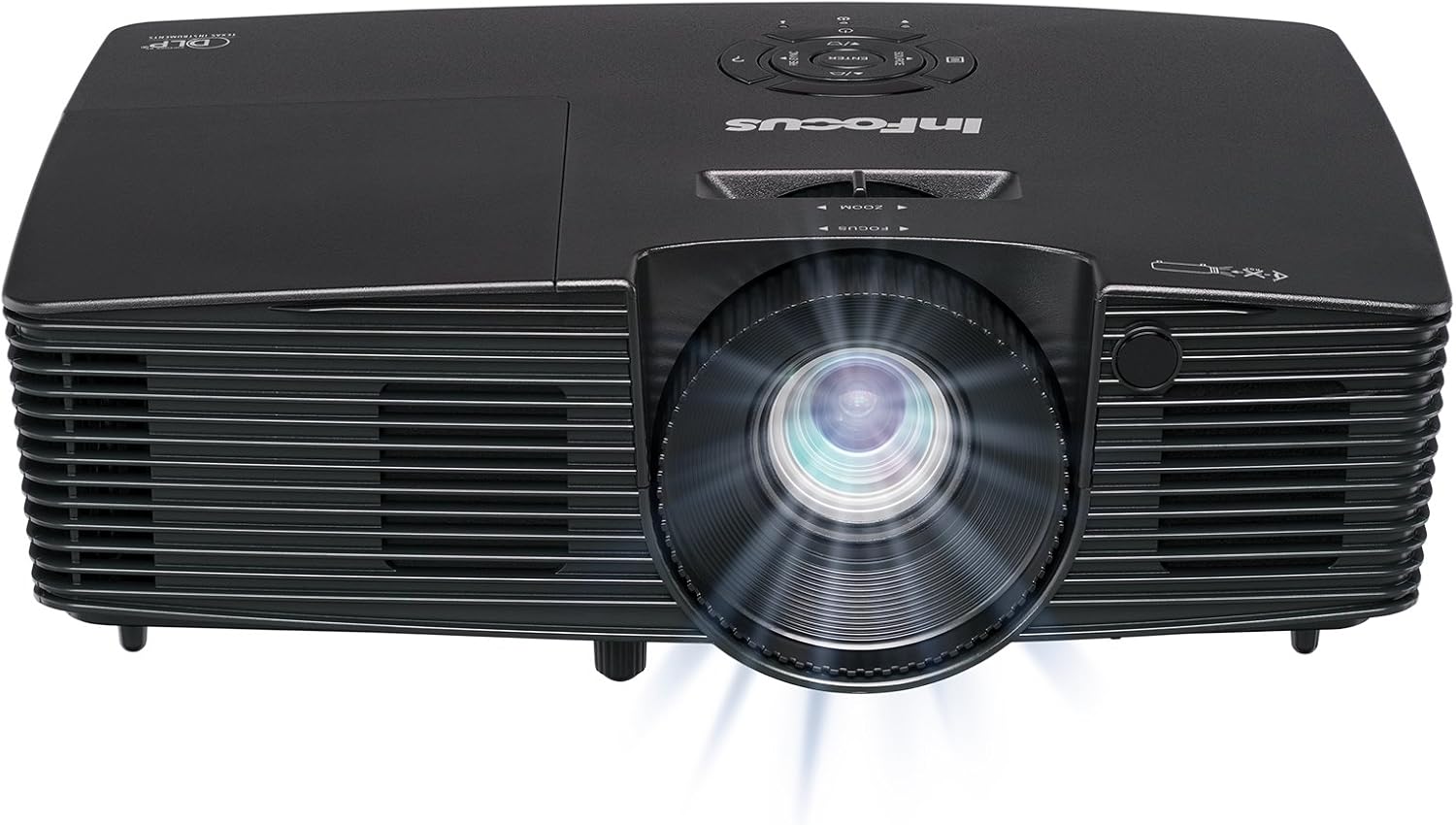
Слика 3.1: Фронт view of the InFocus IN112XV projector. This image highlights the main projection lens and the front ventilation grilles.
3.2 Врх View и Цонтрол Панел

Слика 3.2: Врх view of the InFocus IN112XV projector. The control panel is visible on the right, featuring buttons for power, source selection, menu navigation, keystone adjustment, and volume. The focus and zoom adjustment rings are located around the lens.
The control panel on the top of the projector allows for basic operation without the remote. Key buttons include:
- Снага: Укључује или искључује пројектор.
- Извор: Кружи кроз доступне изворе улаза.
- Мени: Приступа менију на екрану (OSD).
- Унесите: Confirms selections in the OSD menu.
- Стрелице: Крећите се кроз опције менија и прилагодите подешавања.
- Re-Sync: Synchronizes the image.
3.3 Реар View и портови за повезивање

Слика 3.3: Позади view of the InFocus IN112XV projector. This image displays the available connection ports, including Video In, S-Video In, Computer In (VGA), HDMI, and the power input.
The rear panel provides various ports for connecting external devices:
- Видео у: For composite video sources.
- S-Video In: For S-Video sources.
- Computer In (VGA): For connecting to computers via VGA cable.
- ДВИ: За дигиталне видео и аудио изворе.
- Услуга: For service and maintenance purposes.
- Улазна снага: Connects the power cord to an electrical outlet.
3.4 Даљински управљач

Слика 3.4: Remote control for the InFocus IN112XV projector. The remote provides full control over the projector's functions, including power, source selection, menu navigation, keystone correction, and volume.
The remote control offers convenient access to all projector functions. Ensure batteries are correctly installed.
4. Подешавање
4.1 Постављање
Position the projector on a stable, flat surface or mount it securely. Ensure there is adequate space around the projector for ventilation.
4.2 Прикључак за напајање
- Прикључите кабл за напајање на улазни порт за напајање пројектора.
- Укључите други крај кабла за напајање у уземљену електричну утичницу.
4.3 Повезивање улазних извора
The projector supports various input sources. Choose the appropriate cable for your device:
- ДВИ: Connect an HDMI cable from your source device (e.g., laptop, media player) to the projector's HDMI port.
- VGA (рачунарски улаз): Connect a VGA cable from your computer to the projector's Computer In port. This is a plug-and-play connection.
- Video In / S-Video In: Use composite video or S-Video cables for older video sources.
- Мобилни уређаји: To connect an iPad or smartphone, a LightCast Key (продаје се засебно) је обавезан.
5. Упутство за употребу
5.1 Укључивање/искључивање
- За укључивање: Притисните тастер Повер button on the projector's control panel or the remote control. The power indicator light will change.
- За искључивање: Притисните тастер Повер button again. A confirmation message may appear. Press again to confirm shutdown. Allow the projector to cool down before unplugging.
5.2 Selecting an Input Source
After connecting your source device, select the correct input:
- Притисните тастер Извор button on the projector's control panel or the remote control to cycle through available inputs (HDMI, VGA, Video, S-Video).
- Alternatively, use the dedicated input buttons (HDMI, VGA, Video) on the remote control.
5.3 Adjusting Focus and Zoom
For a clear and appropriately sized image, adjust the lens rings:

Слика 5.1: Manual Focus Adjustment. This image illustrates the effect of adjusting the focus ring, transforming a blurry projection into a clear and sharp image.
- Фокус: Ротирајте Фоцус ring on the projector lens until the image appears sharp and clear.
- Зумирање: Ротирајте Зоом ring on the projector lens to adjust the size of the projected image.
5.4 Корекција Кеистоне
If the projected image appears trapezoidal (wider at the top or bottom), use keystone correction to square it:
- Притисните тастер Кеистоне+ or Keystone- buttons on the remote control to adjust the image geometry.
5.5 Навигација кроз мени
Access the On-Screen Display (OSD) menu for advanced settings:
- Притисните тастер Мени button on the remote or control panel.
- Use the arrow keys to navigate through menu options.
- Притисните Ентер да бисте изабрали опцију или потврдили подешавање.
- Притисните Мени again to exit the OSD.
6. Одржавање
6.1 Лamp Живот
Пројектор лamp has an estimated life of over 15,000 hours. When the lamp reaches the end of its life, the projector may display a warning message or the image brightness may significantly decrease. Refer to the full service manual for lamp replacement procedures if necessary.
6.2 Чишћење
- Пројектор Цasing: Use a soft, dry cloth to wipe the exterior of the projector. Do not use abrasive cleaners or solvents.
- Објектив: Gently clean the lens with a lens cleaning cloth and specialized lens cleaning solution. Avoid touching the lens surface with your fingers.
- Вентилациони отвори: Periodically check and clean the ventilation openings to ensure proper airflow and prevent overheating. Use a soft brush or compressed air to remove dust.
КСНУМКС. Решавање проблема
Овај одељак се бави уобичајеним проблемима на које можете наићи са пројектором.
| Проблем | Могући узрок | Решење |
|---|---|---|
| Нема приказане слике |
|
|
| Слика је мутна |
|
|
| Слика је трапезоидног облика |
|
|
| Projector runs hot or smells of burning plastic |
|
|
| Нема звука |
|
|
Важна напомена: This projector is not recommended for high-definition movie viewing. While it can accept a 1080p input signal, it projects at its native SVGA (800 x 600) resolution.
8. Спецификације
| Феатуре | Детаљ |
|---|---|
| Број модела | IN112XV |
| Дисплаи Тецхнологи | ДЛП |
| Нативе Ресолутион | СВГА (800 к 600) |
| Осветљеност | 3800 лумена |
| Однос контраста | 26000:1 |
| Lamp Живот | До 15,000 сати |
| Повезивање | HDMI, VGA (Computer In), Video In, S-Video In |
| Посебна карактеристика | 3Д-Реади |
| Препоручена употреба | Business, Education |
| Димензије производа | 8.8 к 12.4 к 4 инча |
| Тежина артикла | 5.5 фунти |
9. Гаранција и подршка
9.1 Информације о гаранцији
The InFocus IN112XV projector is backed by a 2 година гаранцијеОва гаранција покрива недостатке у материјалу и изради при нормалној употреби. Молимо вас да сачувате доказ о куповини за потребе подношења захтева за гаранцију.
9.2 Корисничка подршка
For technical assistance, troubleshooting beyond this manual, or warranty service, please contact InFocus customer support. Contact information can typically be found on the official InFocus webсајту или у документацији која је приложена уз ваш производ.
Ask a question about this manual
Ask about setup, troubleshooting, compatibility, parts, safety, or missing instructions. Manuals+ will review the question and use this page’s manual context to help answer it.